773 comments found.

Hi thanks for this theme plz what is the step for install this theme for xampp localhost plz help me thanks
Hello,
You can install it as usual web application. Here’s a tutorial – https://www.youtube.com/watch?v=p48Lk8ljd-4
I found an error in the template SHOWTHREAD (condition $show[‘largereplybutton’]):
version 4.2.0: <vb:else />[span class=”closed-thread”]+[/span] {vb:rawphrase closed_thread}</vb:if>
version 4.2.2: <vb:else />{vb:rawphrase closed_thread}</vb:if>
Regards!
Hello,
Thank you for the report! We’ll fix it in the nearest update.
Hi, I am thinking of purchasing this theme, is it compatible with Chinese?
Hello,
Sure, it works with Chinese!
Hello, I would like to say that your template is one of the best I’ve seen. It took me a long time to decide which to use. There were 3 choices, and it took me awhile. What I love about yours is the different color templates to chose from, and the clear indications on what to click. What would be nice is on your live preview, you have those squares that allows you to click on for a different color. Any way for us to be able to use that?
Also, the logo.psd file seems to be really small. If I were to add my own logo onto the site with the same size as what you have it now, will it make it bigger automatically? How would you recommend on making a logo?
Thank you for making this amazing logo.
Hello,
Thank you for the purchase and for your kind words! We are glad you like our work!
What would be nice is on your live preview, you have those squares that allows you to click on for a different color. Any way for us to be able to use that?It’s only a raw html-code for demonstration purposes. But if you want, I can send you the code and instructions on installation. If so, just contact us via our profile page.
If I were to add my own logo onto the site with the same size as what you have it now, will it make it bigger automatically? How would you recommend on making a logo?Yes, you should just replace the default logo with your image of any size and it will automatically appear with the right size.
Oh, that is wonderful! So, I can use any size of an image and it will adjust itself automatically to the right location?
Yes!
Thanks so much. I sent you a message. 
How do you change the logo? I don’t see it in the instructions. Also, did you receive my email?
Hello,
I replied you! Please check your inbox
I got your reply message. I sent you another reply. Seems like I’m having some issues. 
I having issues with the side bar color change code. The format of how I installed the color templates are different from what you have set up. I tried to fix it but it’s not coming out right. Any ideas?
Please send us a screenshot of the issue to our email!
Sent, you an email.
nevermind, got it fixed.
OK! Sorry for the delay. And feel free to contact us if you still have any questions – just send us an email.
Hello, Very thanks! Sorry, I make two queries please:
I add a tab in Navigation Manager but does not darken when entering the page. How should I do? Is possible to change the default icon for other I like?
The second is: I have problems with vBadvanced. The navbar is not displayed. In vba options I can disable the navbar, but I remove all the header. http://i.imgur.com/eLtdiKh.jpg
Thanks for your time and sorry for my english.
Hello,
I add a tab in Navigation Manager but does not darken when entering the page. How should I do? Is possible to change the default icon for other I like?Just edit the menu item using this guide – http://www.vbulletin.org/forum/showpost.php?p=2333206&postcount=4
The second is: I have problems with vBadvanced. The navbar is not displayed.You just need to add a single submenu item and the issue will be fixed.
Thanks, but I do not how it’s done. Sorry.
TAB: Should I create a plugin? What would be the content?
I have installed this: mysite.com/index.php (vbadvanced 4.2.1) mysite.com/foros/index.php (vbulletin 4.2.2)
vBadvanced: I did not understand. Should I add a submenu in the navbar?
Hello,
Could you please contact us via our profile page?
Thanks, I sent you an email
What is the width in the fixed version? How do I change it? Is it wrong if I change to 1000px for example?
The problem is to change the side bar to 300px and the forum is way too small. In fluid is way too big.
Thanks!
Hello,
The width of the fixed version is 950px. And you can change it as you want. You just need to edit one StyleVariable -
ACP – Styles & Templates – Style Manager – YOUR_THEME – Style Variable Editor – Global – doc_width
I have made the big Navbar buttons (forum, articles etc) a little smaller, and I am trying to figure out how I can align=center the text inside the buttons. I have tried to use “text-align: center;” in every possible css setting, but the “Articles, forum, Whats new” is still aligned to the left in the buttons. Can you tell me what to change?
Hello,
Thank you for the purchase!
Please contact us via our profile page, we’ll help you.
Ok, you mean by sending you an email? I have tried this a few days ago, but no answer.
Hello,
Please check your inbox, I replied your email.
I have hosting with Just Host. I have two other domain names attached with this hosting.
Now i want to use this theme for my next domain. I haven’t yet bought the new one but creates a folder to attached the new domain.
/home5/yourpart/public_html/forumentertainmentisonline
Inside this folder, i have created a new folder: images and inside images folder i copied metro folder.
Now, next step in the documentation is: Log in to your forum administrator control panel and go the Styles & Templates > Download / Upload Styles section.
Where to go to find forum administrator control panel and Styles & Templates > Download / Upload Styles section
Please advice. Sorry i am very new to vBulletin.
Hello,
Inside this folder, i have created a new folder: images and inside images folder i copied metro folder.If you already installed vBulletin you should have that folder. And then when you enter your forum as an administrator you’ll see ‘Admin’ link down the page to enter AdminCP.
As i am new to this. Please suggest.
I have bought your theme. I am happy to buy your software for $160. I have hosting and domain.
Please advice, are these things enough to bring my forum site up and running? What i mean is, do i still need a developer to help me bring this up?
Hello,
As a matter of fact vBulletin is not our software, we only create themes for the CMS.
Please advice, are these things enough to bring my forum site up and running?Sure, that’s enough. But sure, if you can’t set the forum yourself you need a developer for that. Though if you’ve already set up your domain and hosting you can install your forum yourself using this tutorial for example – http://www.youtube.com/watch?v=CvFi_eaWZyc
Sorry, Youtube is blocked in Pakistan. Please suggest a difference source.
Here’s a text tutorial – http://www.siteground.com/tutorials/vbulletin/vbulletin-installation.htm
So does this mean, DATABASE stuff will also be handle automatically by the software?
Sure! You just need to install it and software will take care of the rest itself.
Bravo. Thanks.
I’m having a problem with uploading images in topics see screenshot: how can I fix this?
It’s not working in chrome, IE, firefox
Hello,
Please make sure you’re using “Metro” version corresponding to vBulletin version (4.2.2 = 4.2.2).
Yes I am using that version …
Hello,
Could you please contact us via our profile page and send a link to your forum? I need to have a look at the code.
Can we install this theme on word press setup?
Hello,
No, vBulletin is a separate software. You should install the theme via vBulletin AdminCP. Please check the theme documentation, it’s described there how to install the theme.
Thanks.
Really liking everything so far, most issues have been resolved. One big one left that I cant figure out.
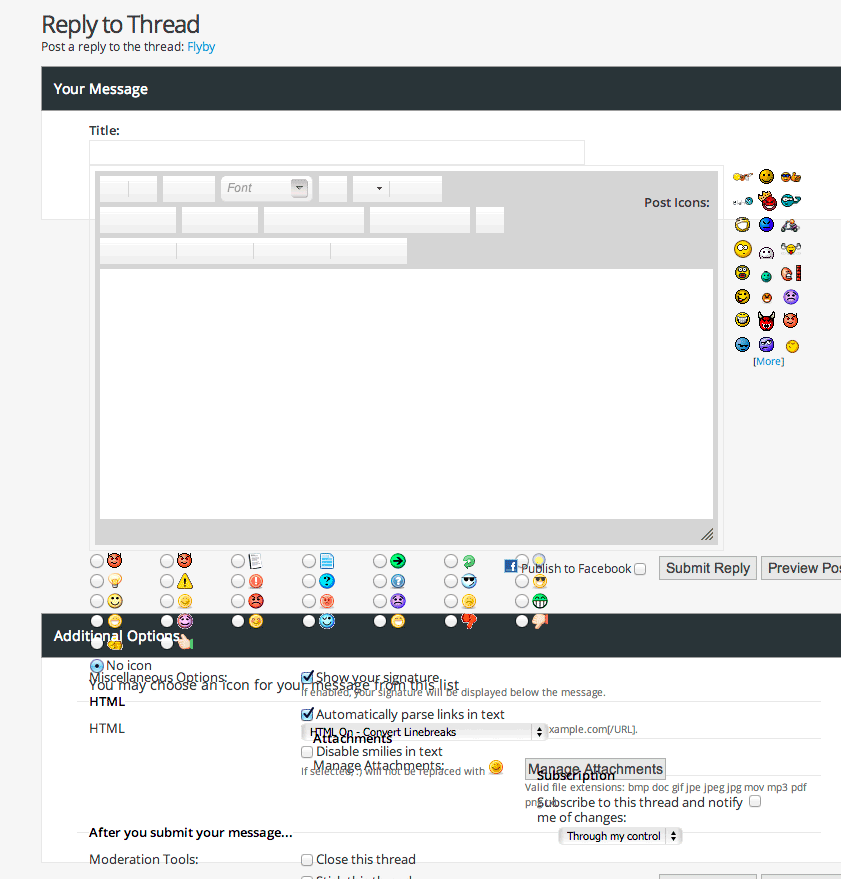
I’ve been modifying the theme a lot … but left the parent theme along. No template changes, all css. So I checked your stock version, same thing. The newpost page is perfect, all buttons, smilies, etc. all align correctly. But when you go to “go advanced” from the post reply, the entire screen is jumbled ( screen shot here: ftp://dirtrider.net//public_html/A1_BOBVO/advancedreply.png )
Thoughts?
Hello,
I can’t see the screenshot – authorization required. Could you post it somewhere else?
What browser and what OS are you using?
Odd… it’s all strightened out now… I discovered html turned on for all the forums this morning and turned it off … could that have done that? BTW, that was all major & latest browsers on mac & pc, as well as an android and apple tablet. It was hosed pretty good
Hello,
BTW, that was all major & latest browsers on mac & pc, as well as an android and apple tablet.I think there was something wrong either with the templates or the forum software. I double checked the theme in major browsers and it was OK. But if the issue appears again, please let me know, I’d like to test it online.
It has that layout problem when an image or video is in the post …. it’s like the size of the attached media blows the layout.
Inside the edited post or inside a post above?
click edit on a post…. then click go advanced, if there is an image (or whatever) in the container that holds the post you are about to edit….
make sense?
Just checked it using both remote images and locally stored one but it’s OK. Did you change any default bbcodes or add any custom ones?
Picked this up a few weeks ago, very happy with the theme and the user support, which was excellent !
One question – how would it behave with PhotoPost?
thx!
I forgot – Or DragonByte’s gallery
Hello,
The theme works with all plugins and modules. But sometimes you’ll need a little styling to match the theme.
Nice theme… I applied it this weekend and found most things I needed to modify for my site, short of this one.
Where is the css to change the text/font size, etc, of the threaddetail, ie, the “stated by: XXXX ” info under the post title on forum display?
thanks!
Hello,
Thank you for the purchase and for the kind words!
Where is the css to change the text/font size, etc, of the threaddetail, ie, the “stated by: XXXX ” info under the post title on forum display?It’s a global Style Variable ‘
small_fontSize’. And it can be changed via Style Variable Editor. But as I say it’s global. So if you change it, a lot of blocks using this small size will increase its size. So if you only need to increase this block font size, you should edit it directly via css template. You can find it inside forumbits.css template, this rule –
.forumbit_post .forumlastpost .lastpostdate {
    font-size: {vb:stylevar small_fontSize};
}
You should just set ‘font-size’ to what you need, replacing {vb:stylevar small_fontSize} to ‘13px’ for example.
Thanks for the info. It’s just THAT instance of the font specs that I’m looking to change at the moment, can’t do it globally.
Hi,
under the word “vBulletin Metro Theme by Studio PixelGoose”
I’ve added the copyright, but i can’t remember how to do it
what is the name of the template to edit?
Thanks again
It should be ‘footer’.
hello just purchased this theme i love it, any chance you wull have a dark look, black background and white/grey writing
Hello,
No, we don’t have such plans. But you can do it yourself – mainly you’ll have to change some css-rules.
Installed a product by VB Advanced (Links), and can not figure out why the theme is not correct in the upper navbar (too tall), and does not stay highlighted (like other tabs)?
http://www.christianmom.com/links/Any advice on how to fix? also, when I look at std. VB4 default theme, it works correct….
Thanks for your advice…
Hello,
Thank you for the purchase!
Did you add the tab via the default navigation manager of via a third-party plugin?
default navigation manager in adminCP
Hello,
I checked your forum. The item is not highlighted with the default style too. Here’s a quick tutorial on setting new menu items – http://www.vbulletin.com/forum/forum/vbulletin-4/vbulletin-4-questions-problems-and-troubleshooting/413049-navigation-parent-not-highlighted-when-child-is-clicked
As for the height. You should add a submenu link to that menu item and the header will look alright!
Ok, I’m close now…
http://www.christianmom.com/links/index.phpSomething is not aligning correctly with the Nav manager. Using the VB Advanced add to the End of the navbar…
Any other suggestions to try? Works fine in VB default style, something must be in this style??? any advice to try?
Hello,
Something is not aligning correctly with the Nav manager.Please contact us via our profile page. I’ll send you instruction how to fix it.
Thanks, just sent you a message through your profile.
Hello! I just bought your theme, its awesome but I have a few questions. My website-forum-logo its bigger than 100px of height.
How Can I change this height (and the color) in order to put correctly my logo? If you need more info of the website, just tell me it.
Screenshot of what I want to change (the “blue metro” box): http://gyazo.com/f1cc586b9740b995bf5f7c5dbd9e4973.png
Hello,
Thank you for the purchase!
Just replace the default logo image images/metro/YOUR_COLOR/misc/vbulletin4_logo.png with your image. That’s all!
No, that’s not the problem. I know how to replace the logo, but my logo is bigger than the blue space. I want to know how to to make the blue part highest. I dont know if you know what i mean. Because if I put my logo (that is higher than 120px) protrudes up.
And also, if you can tell me where I can change the phrase of “login to your account” to another in spanish… (Screenshoot: http://gyazo.com/0fa612a842ddcf0ac8cc425a20960077.png) I looked on the vBulletin ACP but i did not find it.
Could you please contact us via our profile page? I’ll send you an instruction on both questions.
Yes! I will do it right now!
Did you receive the mail?
Hello,
Yes, I got it. I’ll answer you today!
Ok! I also see this today: http://gyazo.com/91dcce27004f7604b7bc4c1db873eb30.png
I did not change anything, it has to be like this?
Hello,
I answered your questions! Please check your inbox
Yes! I saw it. Im going to send you another mail because I have a problem… buts it easy to correct it I think. Thanks for everything. I will recomend this theme
Check your inbox i sent you anoher mail.
And another. I find the problem for one question but I found another . I will send you right now.
Hello,
I answered you. Please check your inbox.
Hello, I check it and I answered you. I didnt find why i can not see correctly the buttom…
Dear PixelGoose,
Thanks for the great theme!
I am kinna noobie and I do not know how to add new icon to the png file nav-icons.psd and assing it. Can I just replace the + icon?
Thanks!
Hello,
Thanks for the kind words and for the purchase!
Can I just replace the + icon?Sure, if you only need one icon, you can replace that ‘plus’ icon!
Hello,
We need help.. for some reason [quote] BB code isn’t working on our forums.. the quoted message does not differentiate from the original message they look very ugly. I have seen other forums with the same theme and it seems to be working fine for them therefore I am sure that the problem is only limited to us.
An example can be seen HERE
We will appreciate if you can let us know what we have done wrong.
Thanks,
Hello,
Something ruins the code. There should be ‘class’ string there.
Did you install any plugins that could interfere with the code?
Thanks for your reply.. Yes, I have installed a couple of them:
—GlowHost – Spam-O-Matic —MonkeyStop Keyword and URL Moderation
I am not sure but I also have Panjo enabled in the list, something that I did not install.
These plugins are especially to stop spammers, do you think any of these are the problem.
Thanks once again
Try to disable all the plugins temporarily and check the theme. If it doesn’t help, we’ll try something else.
Hello,
I have tried disabling all plugins but it did not help. what do you suggest next..?
Sorry for the delayed reply.
Thanks,
Check the bbcode_quote template. And look for those classes – do they look ok inside the template?
Hi there is there a huge difference with vbulletin vs phpbb? Which would you recommend for a beginner?
Hello,
Thank you for you interest to our work! I would recommend vBulletin – it has much more features and options from box. The same options are available for phpbb3 too, but quite often you only get them by installing third-party mods. In addition while installing those mods you need to edit the phpbb3 files directly (99% of vBulletin mods are installed automatically).
Wow thanks for the info. I notice phpbb is a free source however the vBulletin is 249.00. By any chance does this theme include the vbulletin? Or is my info wrong? greatly appreciate it.
Yes, that’s right it’s only a theme. If you need a vBulletin license you should buy it on vbulletin.com. And frankly speaking it’s rather expensive.





)