992 comments found.

Lightbox is not working when woocommerce is active. How do I fix it. If I disable woocommerce lightbox it still doesn’t work Please help
Mega menu doesn’t work either if woocommerce is active
Hi., You mean the lightbox is not working on the gallery items or in some other sections ? because we have used lightbox in gallery items only. Please let us know so that we can help you better.
Hi., What is the issue you have with mega menu when woocommerce is active. Please help us have a better understanding on it by getting back with any screenshot like references..
I have the latest version of wordpress and woocommerce installed. There seems to be what I believe is a javascript conflict. The lightbox I am talking about is from the gallery items. Also the mega menus will not work. So if woocommerce the plugin is active lightbox from the gallery doesn’t work nor does the mega menu. If woocommerce is deactivate the gallery lightbox and mega menu work. I’m not sure but the new version of woocommerce is most likely causing the problems because woocommerce lightbox won’t work with the magnifier plugin active… It’s a mess but at the moment I’m only concerned with woocommere playing nice with the theme
Hi. So now the woo commerce does not works with the theme correctly? If yes means please mail us your site credentials (WP & FTP access logins) immediately via the right bottom form located @ http://themeforest.net/user/designthemes along with some screenshot like references. So that gets a better idea of the issue on our end. Then we’ll help you get rid of it ASAP !!
I will send you the information. I am going to switch servers if I still have the same problem I’ll be sure to contact you
Thanks!..
Yes please let us know if you have any issues.
Note: If you like our theme and support, please feel free to give us your best rating (5/5 stars) !!.. thanks in advance….
Hello I just wanted to let you know once I switched servers everything worked out great no problems. The issue was definitely coming from our side not yours we fixed it and it’s coming along nicely thanks.
We are extremely glad to hear this news.
Let us know if you find any difficulties.
Note: If you like our theme and support, please feel free to give us your best rating (5/5 stars) !!.. thanks in advance
Hello
I love your theme but I am very new to wordpress and I had trouble installing the theme. Every time I try to upload the kidszone zip file my site goes blank and displays:
“Are you sure you want to do this? Please try again.”
What am I doing wrong? Please help the newbie here, thanks!!
Thanks for the Purchase!!
Please follow the below given steps,
1) Please try to download the “zip file” from the themeforest page and “unzip” the files.
2) If your wordpress uploader does not work. Please connect your server via FTP.
3) Move to folder “wp-content/themes/”
4) Upload the kidszone theme files ( the files inside the folder kidszone)
5) Activate it via “Dashboard -> Appearance -> Themes”.
If you still have difficulties!!
Please mail your WordPress and FTP Login Credentials via the right bottom form @ http://themeforest.net/user/designthemes . So that we can install the theme for you.
hi i installed the theme on my site and i haveing strange problems with gallery
also i see it in your site here
http://wedesignthemes.com/themes/kidszone/gallery/gallery-four-column-with-left-sidebar/there is strange line after pic div
i have it here also with another problem http://razztech.net/themes/zone/gallery/gallery-two-column-with-left-sidebar/Sorry! We cannot see any lines after the picture as you have mentioned above. Are you referring to the issue in the filters of that page? Please check the attached screenshot.
http://snag.gy/kYLEC.jpgIf yes, then please mail your (WordPress and FTP Login) Credentials via the right bottom form @ http://themeforest.net/user/designthemes . We will check the issue and offer you a solution to get rid of it ASAP!
i created blog in home page using
[dt_blog_posts show_feature_image=’false’ excerpt_length=’20’ show_meta=’true’ limit=’2’ posts_column=’one-half-column’/]
its working but how can i limits the total number of posts to 2 so that page numbering will disappear and one thing more show_feature_image=’false’ has no effect see the image https://www.dropbox.com/s/r9gka0m4uaeycza/blog.png
Hi., 1) The limit acts as number of items to be displayed in one page. If you need to remove the pagination, please let us know, so that we can remove the pagination from that shortcode.
2) Let us know your ftp and admin for fixing the featured image issue.
Please mail us your site credentials (WP & FTP access logins) immediately via the right bottom form located @ http://themeforest.net/user/designthemes So that, we can check and have a clear look on our end. Then we’ll help you get rid of it ASAP !!
yes i need to remove pagination but just from home page not overall
thanks for quick reply
Please mail us your site credentials (WP & FTP access logins) immediately via the right bottom form located @ http://themeforest.net/user/designthemes So that we can remove the pagination from home page.. Then we’ll help you get rid of it ASAP !!
Thanks for the update  Let us know, if you find any issues in future..
Note: If you like our theme and support, please feel free to give us your best rating (5/5 stars) !!
i send it to you kindly chk it
one question more how can i make the services to clickable to link it to other webpage
Thanks for the update Let us know, if you find any issues in future..
Note: If you like our theme and support, please feel free to give us your best rating (5/5 stars) !!
Please mail us your site credentials (WP & FTP access logins) immediately via the right bottom form located @ http://themeforest.net/user/designthemes So that, we can check and have a clear look on our end. Then we’ll help you get rid of it ASAP !!
i already send it to you
Sorry, we didn’t get any mail as you mentioned above.
Kindly check and resend your site Credentials ( WP-admin and FTP Details) via the right bottom form @ http://themeforest.net/user/designthemes . So that, we can check and have a clear look at your end.
I just purchased the theme, why is the dummy data not like the demo?? Where is the woocommerce demo content? Slider content? etc??
Hi.,
Our dummy data does not have the datas of woocommerce products. You need to add your own products.
Please use the attached json file in Dashboard -> LayerSlider for getting the slider as our demo. Please note that you need to update the images with your own images or buy license for the images used in the slider.
https://www.dropbox.com/s/7ja06jm6bn2rjtn/kidszone_layer-slider.jsonNote: If you like our theme and support, please feel free to give us your best rating (5/5 stars) !!
Thank you. But how do I set up the home page like your demo? In other words, from the dummy data, Im using home page 2, and I placed the shortcode for the layer slider, but I want it to go full width like your demo, while the content beneath it must be boxed?
Hi! Hope that the following instruction & screenshot will help you get a clear view.
For having the layerslider in the home page 2, you dont need to place the shortcode. You can select the slider from Slider Options below the editor panel. Please check the attached screenshot for reference. http://snag.gy/LS2Cj.jpg
Thank you so much! Can’t believe I missed that! Last 2 questions. 1. How do I associate a icon to the top level menu items and 2. how do i insert on the home page featured products that scroll (like the gallery scrolls on your home page demo) thank you!
Any response yet? Sorry it is quite urgent
1) For adding icons to the main menus, Kindly check the attached sample screenshot below.You can use any font awesome icons there.
Refer the screenshot below:
https://www.dropbox.com/s/mc6nouligqq4zcp/font-awesome.pngRefer the following link for the collection font awesome icons.
http://fortawesome.github.io/Font-Awesome/icons/2) Sorry for now, we don’t have the option of scrolling for featured products. We will consider this option in our future updates.
Note: If you like our theme and support, please feel free to give us your best rating (5/5 stars) !!
ok thanks. Then what is the shortcode to insert either featured products or latest products into the home page?
Hi.,
Kindly! Check the shortcodes below:
Latest Products: Products/dt_hr_title
Featured Products: Products/dt_hr_title
Note: If you like our theme and happy with our support, please feel free to give us your best rating (5/5 stars) which would be much appreciated and helpful for us to proceed support you all forever… thanks in advance
Hi DesignThemes,
Can I import my fonts in the website? I have installed to my pc my desired fonts. Is there any way to use them for the texts of the site?
Many many thanks!
Hi..
Please this youtube video for generating new fonts and using that in your site,
http://www.youtube.com/watch?v=MD5CSzcKiN8Hello I would like to have your slide demo package?
Thx
And One more thing how do resize Logo size?
Hi.. Go through the following instruction you get a clear view.
Please use the below json file in Dashboard -> LayerSlider WP -> Import. Please replace the images in the slider with your own images or else you need to buy license for those images.
https://www.dropbox.com/s/nuqux3na7aug6gf/kidszone_layer-slider.jsonNote: If you like our theme and happy with our support, please feel free to give us your best rating (5/5 stars) which would be much appreciated and helpful for us to proceed support you all forever.. thanks in advance…
Hi..
Go through the following instructions you get a clear view:-
1) You can resize the logo from Dashboard -> Appearance -> Header.
2) Upload a new image, crop and resize it. And that image will be saved in media.
3) You can get the path of the new image from Dashboard -> Media -> Edit.
4) Use that path in Dashboard -> Kidszone -> General -> Logo -> Paste the path in the textbox and save it.
Note: If you like our theme and happy with our support, please feel free to give us your best rating (5/5 stars) which would be much appreciated and helpful for us to proceed support you all forever..
thanks in advance
thx
Thanks for the update Let us know, if you find any issues in future..
Note: If you really like our theme and support, please feel free to give us your best rating.
We’re expecting 5/5 stars, which will be much appreciated and helpful for us to proceed support you all.
In your demo website there is no navigation through the shop demonstrated. Can be done by the WC Product Categories widget, or I added the Yith Ajax filter navigation. Last one works just fine. But I’m not to happy about the working of the WC widget for categories.
My customer wants a 2 level menu on the left sidebar. I would like combine MegaMenu and Custom Menu widget to create a vertical 2 level menu where each menu item is a categorie with behind it a shortcode to show a specific products category of sub-category.
Is this possible? And if so, do you have an example?
Thanks.
website: http://soitsme.eu/shop You can have a look at the tests
Adding some more information: the goal is to have collapsing category navigation. When clicking a category with sublevels, these collapse open/close when clicking the category main level.
Thanks.
Hi.. It would be a custom work for us. Please let us know if you are interested, with a detailed description of your requirement. So that we can give you a price quote and time taken.. Thanks..
Well, it’s simple. A Product Category plugin like there already is, but where I can select which categories to show. Thanks.
Hi.. You need to customize the product categories plugin, such that to show the desired categories.
There is not much to configure in the WC Product category plugin. How can use Mega Menu (vertical menu) with custom menu widget. Where can I find the documentation for Mega Menu?
Hi.. You need to customize the product categories plugin, such that to show the desired categories.
I know … but I’m not going to digg into the code myself. There are alternatives for that. Any update on the Mega Menu documentation?
Hi., We have used mega menus in our main menus section only and we do not have any special documentation for this. If you need we can send you a video for setting up the mega menu as our demo. Please let us know so that we can send the video.
Would be nice, certainly for adding the picture like in the demo
Hi.,
The images in our demo are licensed images. Let us know if you need the purchase links of those images. Please purchase those images and use it in your site.
Hope that the following instruction will help you get a clear view.
Once you install woocommerce plugin, there will be a option at the top of the dashboard asking to “Install Woocommerce Pages”. Clicking that button, the cart page will be automatically created. Please let us know if you have any other queries.
Note: If you like our theme and happy with our support, please feel free to give us your best rating (5/5 stars) which would be much appreciated and helpful for us to proceed support you all forever thanks in advance
Thanks alot it worked but have got another issue which is this kindly assist please am new to wordpress; Catchable fatal error: Object of class WP_Error could not be converted to string in /home/content/p3nexnas05_data01/65/2103865/html/wp-content/themes/kidszone2/framework/register_public.php on line 67
Please mail your WordPress and FTP Login Credentials through the right bottom form @ http://themeforest.net/user/designthemes . We will check the issue and offer you a solution to get rid of it ASAP!
i want same content , database , dummy data , settings , sliders , menus. etc.
how can i install as i said ?
Hi..,
Yes..! you can import the demo data from Dashboard -> Kidszone -> General -> Import Dummy Data. The demo data does not contains the layerslider xml file. Please use the layerslider json file, for importing the slider as our demo, once you are done with adding the demo content. Also the images that you see in the demo will be replaced by the placeholder images in the dummy data. You can update the images of your own.
https://www.dropbox.com/s/nuqux3na7aug6gf/kidszone_layer-slider.jsonNote: If you like our theme and support, please feel free to give us your best rating (5/5 stars) !! thanks in advance…
thank you
Thanks for the Appreciation
Note: If you like our theme and support, please feel free to give us your best rating (5/5 stars) !!.
Hi I purchased this theme because I very much like it. But I am facing some issues with it. 1) Text on add to cart button is not visible until you hover your mouse on it. Even the pricing font size is very small. 2) Items are getting displayed vertically, instead of the grid style. Please check this link http://kidsler.com/?product_cat=gifts
Your help very much appreciated.
Hi..Thank you for purchasing our theme..
Please mail us your site credentials (WP & FTP access logins) immediately via the right bottom form located @ http://themeforest.net/user/designthemes
So that, we can check and have a clear look on our end. Then we’ll help you get rid of it ASAP !!
I have sent you the login details. Hope you got it.
Please can you look into this. The issue is still present. Apart from the category products, even the related products are getting displayed vertically and the text on add to cart button is not visible until you hover your mouse over it.
Hi.. We received your details. Our support team is processing your request. We will update you as soon as possible.
Hi..
Please mail us your site credentials (WP & FTP access logins) immediately via the right bottom form located @ http://themeforest.net/user/designthemes
So that, we can check and have a clear look on our end. Then we’ll help you get rid of it ASAP !!
Hi..We have updated your issue. Kindly, check it out now!.Thank you..
Hi, Thank you, that issue has been resolved but now the size of the top menu area has increased and the menu items are getting displayed twice. Please check this link http://kidsler.com/?product_cat=kids-hair-accessories
Thanks a ton, all is working fine now. 5 stars for you guys! Brilliant work!
I can’t find the option to give you my buyer rating. Can you direct me to it so that I can contribute my 5 stars for your amazing work.
Thanks for your kind information anyways!. The issue has been resolved. Please check it now.
Thanks a lot for such great loving appreciations !!.
Please visit this page to get a clear idea of rating a theme – http://themeforest.net/forums/thread/how-to-rate-a-file-template-download-it-now-/58963 . Hoping for a 5 star rating from your end thanks in advance..
Hello! Thanks for your wonderful work in this theme for wordpress.
I don’t know a lot about the area, and I have a question that may sound kind of silly.
When I bought your theme I thought that my visitors would be able to change the skin as it is shown in your demo.
Is that possible?
Thanks in advance for your help
Hi..
You have an option in the dashboard to enable/disable style picker. If enabled it will show the style picker at the front end. Please check the attached screenshot. http://snag.gy/bLbr8.jpg
We hope you will purchase our theme…. thanks in advance
Hello there,
First of all, congratulations on building one of the more impressive themes on ThemeForest! Great job!
I’m in need of your help. You see, I’m trying to create that row of Upcoming Events you have on your Home Page III example, but I can’t find the shortcode or widget or what have you to make it show up on my home page.
What do I need to do to make the upcoming events show?
Thank you
P.S. Expect a high rating from me soon
Hi..thank you for your appreciation..
Kindly go through the following instruction you get a clear view:-
Please use the below shortcode for the title and upcoming events. Let us know if you have any questions.
Events[/dt_hr_title][dt_events_list limit=’3’ excerpt_length=’15’/]
Note: If you happy with our support, please feel free to give us your best rating (5/5 stars) which would be much appreciated and helpful for us to proceed support you all forever thanks in advance…
Gave you 5 stars! You earned it.
By the way, is there a way to post a Calendar on page that is not the “events template”, for example, the Home Page?
Thank you
Hi..
You mean to add Calendar to the footer columns of the home page? If yes then you can add the calendar from the calendar widget. Drag the calendar widget to one of the footer columns and the calendar will be displayed. Or If you are referring to something else, please let us know, so that we can help you better.
Thanks for the response,
I’d like to know how one can display The Events Calendar (in month view) in the content body of the Home page itself.
See illustration: https://www.diigo.com/item/p/qrsreazcbddebadczbdqsreocHi
We cannot not have that calendar to be displayed in that format. You can display the monthly view only in a separate page.
hi i have installed wp and your design to my host.
but when i install all required plugins site can not access to database.
wich plugin is block database connection do you know ?
thanks
Hi.. We are not sure about which plugin is blocking the database connection.
Please mail us your site credentials (WP & FTP access logins) immediately via the right bottom form located @ http://themeforest.net/user/designthemes So that we can check the issue at our end and provide you the solution. Then we’ll help you get rid of it ASAP !! thanks…
Hello, I’d like to know how can I change the device in “€” for the pricing tables? Thank you.
Best Regards
Hi! Hope that the following screenshot will help you get a clear view.
You can change it from wp-content/plugins/designthemes-core-features/shortcodes/shortcodes.php. Line no: 695.
Please check the attached screenshot for reference.
http://snag.gy/UA4w2.jpgthanks…
OK thank you so much it’s done!!!
I got one last question, I don’t find where I can modify the woocommerce pagination’s to translate the “of” in french?
Thank you so much for your answer!
Best regards 
Hi!
Hope that the following instruction & screenshot will help you get a clear view.
Installing the wpml plugin will automatically translate the text to your need. Or else please open the file
kidszone\wp-content\themes\kidszone\framework/utils.php.
Go to line number: 714 , and you can translate from there.
Please check the attached screenshot: http://snag.gy/sjfDb.jpg
Hello again! I’m using Shape Three for a Gallery page but you’ll see in this link that the appearance is diferent from what I see in your site… https://drive.google.com/file/d/0B3UVbKUEh1vwcG9RaS00aUphNVk/edit?pli=1 How can I change this? Thank you!
Hi..
Please upload images for each of the gallery items, so that the default image will be removed and the image that you uploaded will be shown at that place. Just upload the image from back-end and refresh the gallery page in front end.
Note: If you are really happy with our Theme and Support, please rate it! 5 stars are very much appreciated.. thanks in advance…
Thank you!
Thank you for your reply.
Note: If you like our theme and support, please feel free to give us your best rating (5/5 stars) !!
Can I recomend something? Every time I want to save changes in Buddha Pannel I’m nearly click on “Reset All”. I think it would be good if this button has and alert icon or something or maybe to be replaced on the left. Thank you!
Thanks a lot for all your loving interests and the kind valuable notices anyways !!
Currently, we are just getting a numerous requests on features to be added and improved in our theme. So, we’re in the process of analyzing and discussing the possibility of updating those things .
Thank you! I’ll rate you 5/5
Thanks a lot for such great loving appreciations !!
Hello, I am liking this theme a lot! Is there any way I could add the social media link icons to the top right corner above the navigation? Here is a link to the home page work-in-progress:
http://www.generations-care.net/wp/Thanks,
- Karen
Hi,
Go through the following instruction you get a clear view:-
Please use the below code in the header.php file. Place it where ever you need it in the header, you need to do some style sheet alterations for that to fit it in the header.
<?php echo do_shortcode(‘[dt_social]’); ?>
Note: If you are really happy with our Theme and Support, please rate it! 5 stars are very much appreciated.. thanks in advance…
Hi!
I want to create a page like this one http://wedesignthemes.com/themes/kidszone/features/ but I don’t know how to do it. I see that I need to create a new page as a Features Template for each tab content but I don’t know how to edit/create the Tabs. Thank you!
Hi!
Hope that the following screenshot will help you get a clear view:-
http://snag.gy/uGRHL.jpg http://snag.gy/9jxxS.jpg http://snag.gy/J0j4j.jpgthank you….
Great! Thank you!
Thanks for the Appreciation!
Note: If you like our theme and happy with our support, please feel free to give us your best rating (5/5 stars) which would be much appreciated and helpful for us to proceed support you all forever thanks in advance…
I would like to create my own skin. I searched through comments and the doplr link for each of the posts no longer exists. Can you explain how I do this by editing the css. I think I almost have it but I definitely wanted to see the screenshot your provided.
Thank you for a great theme!
You can create or change your own custom skin (Blue) into this KidsZone theme easily as following:-
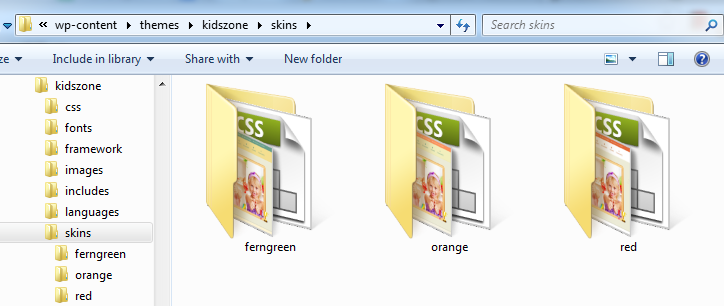
(i). Get into the skins folder from your theme directory, where we’ve added 3 folders with their skin names.
Look at the screenshot we’ve attached here for your reference, http://snag.gy/bMXM5.jpg
(ii). Just copy and paste any of them, and then rename it with the new skin name you’re about to be added.
(iii). Then you’ll be needed to edit the “style.css” of new custom skin you’ve replicated. (Just like the images, color, background and border color hex codes with your new custom skin color as needed).
(iv). Now you can find you new custom skin folder (created) on your Buddha Panel skin settings. So you can choose your custom skin and save changes thereby as here, http://snag.gy/bMXM5.jpg
Note: If you like our theme and happy with our support, please feel free to give us your best rating (5/5 stars) which would be much appreciated and helpful for us to proceed support you all forever thanks in advance