992 comments found.

Hello,
I have been looking through past comments about changing the h2 title shortcode font from Pacifico to something else.
I added the following into my KidsZone child style sheet:
secondary h3.widgettitle, .hr-title, #respond h3, .woocommerce .checkout h3, .woocommerce-checkout h2, .woocommerce-checkout .col2-set.addresses h3, .woocommerce-account .woocommerce h2, .woocommerce-account .woocommerce form h3, .woocommerce .col2-set.addresses h3 {
font-family: ‘Pacifico’,cursive; }
I wanted to use Crafty Girls font and so changed Pacifico to Crafty Girls within the font-family statement. I didn’t change the term cursive.
However, this did not change the headings at all. Crafty Girls is one of the Google Web Fonts which is listed in the dropdowns when going into the Buddha console. I wouldn’t think I would need to upload this font.
Can you please let me know how to get around this problem so I can change the font to something else.
Many Thanks, Diana.
Hi., You can just update the font family of the h2 tag from Buddha Panel -> Appearance -> Typography -> H2 Font Family, Size and Color. No need to add it to the child theme css
Hello again,
Thanks for your response. With your answer that only changes the font in the standalone h2 tags, it doesn’t change the font in the shortcode
“[dt_hr_title tag=’h2’]text[/dt_hr_title]”
How can the font be changed for the h2 title shortcode?
Regards, Diana.
Hello! I have installed WPML for the translations in this site http://www.costabravapa.com.mialias.net/ I have installed one of the plugins of WPML (the String translation one) and then I have tried to activate the plugin and it gives me this error “Fatal error: Cannot redeclare class Envato_WP_Toolkit in /usr/home/costabravapa.com/web/wp-content/plugins/envato-wordpress-toolkit-master/index-04june2014.php on line 10 ”. No I can’t do anything because I can not acces the wordpress admin because of this error. Can you please help me? Thanks!
Hi.,
We have fixed the issue. Kindly, check it out now!
Note: If you like our theme and support, please feel free to give us your best rating (5/5 stars) !!
Thanks a lot!
Thanks for the update  Let us know, if you find any issues in future..
Note: If you like our theme and support, please feel free to give us your best rating (5/5 stars) !!
Let us know, if you find any issues in future..
Note: If you like our theme and support, please feel free to give us your best rating (5/5 stars) !!
Hi, Just a quick presale question is it possible to add images to the icons along the top (Instead of fontawesome) and also on the sub headings with > to be another image?
Thanks
Hi., Thanks for the interest in our theme. As of now we have the option of adding font awesome icons only and for the sub menus this tag ”<”. But we will consider those options in our future updates.
kindly tell me how to remove the dropdown arrow in Firefox chk link
https://www.dropbox.com/s/q9ot54m1lhfrbpq/upload.jpgHi.,
In Firefox selection box arrow issue, kindly follow the link to download & replace into, kidszone \ css \ buddypress.css
Download: https://www.dropbox.com/s/zf592f0l5nv34ia/buddypress.css
Note:- The answer we got from here, http://stackoverflow.com/questions/17083499/remove-default-select-box-arrow-in-firefoxnot working
try to resize Firefox browser to mobile view and open demo website and check the menu dropdown
Hi.,
We tried the solution mentioned in the following link and it worked fine for us. We have not updated it in the demo.
http://stackoverflow.com/questions/17083499/remove-default-select-box-arrow-in-firefoxPlease try again with the solution, else let us know the correct ftp and domain name, so that we can fix the issue.
Hi,
What widget/shortcode was used to create the ‘recent reviews’ sidebar widget in the blog demo pages of your theme?
[dt_review_carousel]

[dt_review name='Jame Gandolfini' role='Hollywood Actor' image='http://wedesignthemes.com/themes/kidszone/wp-content/uploads/2014/01/review3.jpg']Richard McClintock, Phasellus viverra porttitor nisi, nec mollis est mattis. Quisque fermentum.[/dt_review]

[dt_review name='Jennifer Lopez' role='American Actor' image='http://wedesignthemes.com/themes/kidszone/wp-content/uploads/2014/01/review2.jpg']Jennifer Lopez, tellus nulla, consequat a dictum at, tincidunt ac sem. Curabitur sed enim fringilla.[/dt_review]

[dt_review name='Paul Walker' role='Stunt Master' image='http://wedesignthemes.com/themes/kidszone/wp-content/uploads/2014/01/review1.jpg']Richard McClintock, ipsum primis in faucibus orci luctus et ultrices posuere cubilia Curae.[/dt_review]

[/dt_review_carousel]
Note: If you like our theme and support, please feel free to give us your best rating (5/5 stars) !!
Cheers
Hi, this is a great theme but I have an issues if you can help to solve. Sub-menu’s are not working properly sometimes, it disappears before click.
Please mail us your site credentials (WP & FTP access logins) immediately via the right bottom form located @ http://themeforest.net/user/designthemes So that, we can check and have a clear look on our end. Then we’ll help you get rid of it ASAP !!
The same in the responsive: http://cl.ly/image/0b3j1T1W3s2r
And…how resolve that? I need support! Thanks! Bárbara
Hi.,
Please update the kidszone theme to the latest verion, in which we have fixed the issue that you have mentioned.
Follow the below steps to update the theme:-
1) Download the theme from themeforest page. 2) If you have made any custom changes in the code, please take a backup of it. 3) Overwrite the updated theme files to the older theme files. Update the custom change that you had already. 4) go to wp-content/plugins/ through ftp 5) Remove the folder designthemes-core-features/ from wp-content/plugins/ 6) Then Login to Dashboard -> Appearance -> Install Plugins. Install the Designthemes Core Features plugin. Thats it. Now you are updated to the latest version.
Hello!
I’m trying to load the widgets area but get an error:
Uncaught TypeError: undefined is not a function stickars.ca/wp-content/themes/kidszone/framework/js/admin/mytheme.admin.js?ver=3.9.1:513 [hs-ext] (0.8.2|0xbaaf) ready. Object [hs-ext] (0.8.2|0xbaaf) clean up [hs-ext] (0.8.2|0xbaaf) set up
Some widgets load, but there are no sidebars and the page stops loading. Is something with the theme not playing well with additional plugins as I have some of my favourite WooCommerce plugins installed as well.
Any insight would be appreciated.
-KSD
Ah Never-mind, I figured it out. Had two mail-chimp plugins and it conflicted with the existing mail-chimp widget from the theme.
Hi., Glad that you have found the issue. Let us know if you have any queries. Note: If you like our theme and support, please feel free to give us your best rating (5/5 stars) !!
hey
1. will the theme work with visual composer plugin? 2. where can i find the other hompage demos?
where is the short code for dt_theme_service icon? i dont belive that there is no page builder…
how can i make a dt_theme_service icon into a link?
i have change all font colors to black but it is not changing on the theme. http://vtrack.co.il/themes/rachel/
how can i change the h2 shortcode to center?
Hi…!
1) Sorry we have not tested our theme with any external plugins, other than the ones listed in themesforest page.
2) Please check the attached text files for kidszone home versions of 2,3,4,5,6.
Also, please make sure to place it in the “Text” editor mode on your page.
https://www.dropbox.com/s/qwzxv4occmepgpf/kidszonehomepagetextfiles.zipPlease check the following shortcode for service icons:-
icon='icon-skillset' type='custom' title='Target Skillsets']/dt_theme_service
icon='icon-activity' type='custom' title='Extra Activities']/dt_theme_service
icon='icon-track' type='custom' title='Complete Tracking']/dt_theme_service
icon='icon-bus' type='custom' title='Individual Bus']/dt_theme_serviceHi., Just add link property to shortcode [dt_theme_service]
EX:
If you are not sure about it, Please mail us your site credentials (WP & FTP access logins) immediately via the right bottom form located @ http://themeforest.net/user/designthemes So that, we can can fix it for you. Then we’ll help you get rid of it ASAP !!
Hi.,
If you are referring to the title h2 tags then you need to edit it directly in the css file. Open the file wp-content/themes/kidszone/style.css. Go to line no: 49. You can see this code,
h2.hr-title { font-size: 24px; }
Change it to
h2.hr-title { font-size: 24px; text-align: center; }
Hi I need to Set Theme Same as Preview
Hi…
Once the theme and required plugins are installed, you can import the demo data from Dashboard -> Kidszone -> General -> Import Dummy Data (Right Top Corner).
Thanks…
I Already do it but it’s not like same as Preview can we talk Privately for this help?
We do not have any private chat for it.
Let us know your ftp and admin, so that we can check the issue.
Please mail us your site credentials (WP & FTP access logins) immediately via the right bottom form located @ http://themeforest.net/user/designthemes
Hi, i have a question. Can i make link at service section? How to do that? Sorry i’m new user of wordpress
I do not appear to have access to the Buddha Panel you mention and cannot change the header or title of the site. Can you help please?
Hello Again,
Thanks for all of your help so far, we would like to keep your dt contact form but we can’t find any options to edit the recipient email address or fields, is this possible? We do not want to use contact form 7..
Cheers
Hi.,
The contact form is used for the users of your site to contact the site admin. If anyone uses the contact form, an email will be sent to the website admin with the details provided in the contact form. The email mentioned in Dashboard ->Settings -> General -> Email Address will be used for this. Let us know if you have any questions.
Note : If you really want to thank our support, please feel free to give us your best rating (5/5 stars) !!
Hi there,
Random, probably stupid question. For some reason, the dropdown elements of my menus have ceased to work. They’re set up the exact way they’ve always been set up and now they’re not dropping down at all. I even went as far as to import the dummy data (again) and edit a menu provided to make sure I wasn’t just being an idiot (pretty sure I wasn’t, this isn’t my first time at the rodeo with Wordpress) but they’re still refusing to drop down. Any thoughts as to why this might be? I’m using a static page as a landing page with the Layer Slider activated. The url is http://www.danceunlimitedpac.com/staging/
Thanks!
Please mail us your site credentials (WP & FTP access logins) immediately via the right bottom form located @ http://themeforest.net/user/designthemes So that, we can check and have a clear look on our end. Then we’ll help you get rid of it ASAP !!
Pre-purchase questions! 1. Do you plan to keep updating this for the latest Wordpress versions? 2. Do any of the images on the slider come with it?
Thanks
Thanks for the interest with our theme
1) Yes we do update our theme for all the wordpress versions.
2) Yes our theme comes with layerslider and revolution slider. You don’t need to purchase those sliders.
Thanks. The second question was about the images. Are they included?
Hi., The dummy data does not includes the slider and the images. But if you need it, we can provide you the import file of the layerslider. You can change the images once you import the slider.
Hi,
How can we change the header colours rather than using the default theme skins?
Thanks
You can edit the colors of the menu from Dashboard -> Kidszone -> Appearance -> Menu. Other than this for modifying the header you need to edit the style.css file directly.
Also, how do we remove the footer menu? We have removed the ‘footer menu’ from the menu’s but a menu is still displaying..
Cheers
Hi! Please follow the steps listed below:-
Please make sure that you removed all the menus from Dashboard -> Appearance -> Menus -> Footer Menu (dropdown) -> Select and then finally clicked the “Save Menu” button. Let us know if you still see the footer menu.
Note: If you like our theme and support, please feel free to give us your best rating (5/5 stars) !!
Hi,
We have followed your steps and are still seeing the menu in the footer..
Is it possible to change the service icons?
Lastly, can we display an email address in the top bar with the phone number?
Cheers
Hi! Please follow the steps listed below.,
Please make sure that you removed all the menus from Dashboard -> Appearance -> Menus -> Footer Menu (dropdown) -> Select and then finally clicked the “Save Menu” button. Let us know if you still see the footer menu.
Note: If you like our theme and support, please feel free to give us your best rating (5/5 stars) !!
Hi.,
We have removed the footer menu. Kindly, check it out now!
Hi!
Please follow the steps listed below:-
Please refer the following shortcode which our service icons uses
icon='icon-skillset' type='custom' title='Target Skillsets']/dt_theme_service
icon='icon-activity' type='custom' title='Extra Activities']/dt_theme_service
icon='icon-track' type='custom' title='Complete Tracking']/dt_theme_service
icon='icon-bus' type='custom' title='Individual Bus']/dt_theme_service
For the replacing the icons you need to work on the css file.
1) Open the file wp-content/themes/kidszone/css/shortcode.css
2) Go to line no: 104 and you can see the background image of icon-skillset. If you need to change the image. Just change the name there and upload the corresponding image in that path.
3) Similarly you can find the other icon images in the next few lines.
Hi.,
You need to directly place it in the php file wp-content/themes/kidszone/header.php
Note: If you like our theme and happy with our support, please feel free to give us your best rating (5/5 stars) which would be much appreciated and helpful for us to proceed support you all forever…. thanks in advance
hi i have a very rare issue:
i have added some images as you have on the demo, at the homepage, in section “Our gallery”, after serveral trys i could change the “twitter” “facebook” etc. links to my own font awesome links, as you have in the section i mentioned, but. Whenever i do any change in the page that contains it, they disapear. the
- line that make it show have gone EVERY TIME i made a change.
Can you help me please?
Hi.,
Please make sure you have used the following shortcode:-
[dt_sc_team name=”Lily Mandae” image=”http://wedesignthemes.com/themes/kidszone/wp-content/uploads/2014/01/team1.jpg” role=”Teacher” skype=”#” facebook=”#” linkedin=”#”/]
Also open the file wp-content/plugins/designthemes-core-features/shortcodes/shortcodes.php, line no: 937 and make sure the code marked in the screenshot is present in your file. If both are good and still you are not getting the social icons, then please let us know the ftp and admin, so that we can trace the issue.
Hello, I wish to purchase this theme but was wondering if more self customised pages can be added to this theme other than the template pages provided. An early reply shall help me. Thank you!
Yes you can always add any customized pages other than the one given in the template.
Please let us know if you have any queries.
We hope you will purchase….
Hello, I dont understand what is going on? I put all dummy data in but my page does not look anything like demo! it’s just a bunch of links and code! I downloaded the code for homepage and insert it but the problem stays! How can can make the front page look exactly like in the demo. I also dont see any short code builder and dont really get how to build the page. Please help! Thank you
I also don’t have any slider plugins included
Hi., Please mail us your site credentials (WP & FTP access logins) immediately via the right bottom form located @ http://themeforest.net/user/designthemes So that, we can build the home page as our demo. Then we’ll help you get rid of it ASAP !!
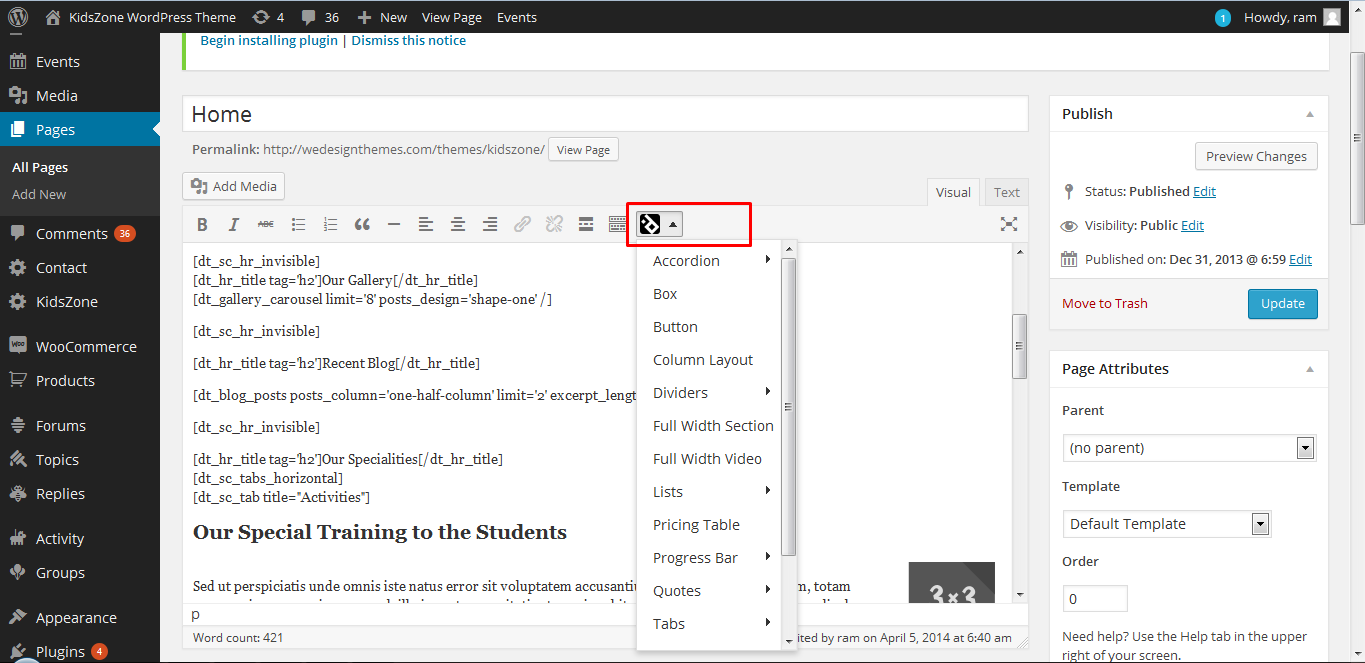
You can see the shortcode builder from the editor section of posts and pages. Please check the attached screenshot ( http://snag.gy/aLMgL.jpg ).
Hi…!!
Please follow the steps listed below:-
The slider plugins are already included in the theme. Please go to Dashboard -> Install Plugins. And from there you can install the Layerslider and revolution slider plugins.
Note: If you like our theme and support, please feel free to give us your best rating (5/5 stars) !!
Where are the Slider Demos?
Hi.,
Please use the below dropbox json file to import the layer slider as our demo. Once imported, please replace the images in the slider with your own images.
https://www.dropbox.com/s/7ja06jm6bn2rjtn/kidszone_layer-slider.jsonThanks.