

836 comments found.

Hi please make this theme for phpbb 3.1. Current version 3.1RC3 i now very stable and imho is possible use for small project. thanks!
Hello,
Yes, we are working on it already!
Hi, may I use it with JoomLa?
Hello,
You can use phpbb 3 with joomla via a bridge mod. In this case the theme will work with Joomla.
hello,
i bought the style, its cool. But when i translated it to arabic, some problems happened. Can you help?
does it support arabic?
Hello,
Thank you for the purchase!
Do you have issues with RTL-language?
yes, there is a problem happened after i added arabic language.. some problems with the alignment and width of the forum..
actually in english its fantastic..
The theme is not fully supports RTL-languages. But we plan to add the support in the nearest future.
its only one.. i sent u a msg to see
Please check your inbox!
sorry now its open
Hi. I’ve added a new tag and created a new icon for it. I uloaded the icon to styles/metro/imageset with the name “tab-icon-articles”. I did exactly the same format as the others: 120×120 and .png
Then I went to styles/metro/template/tabs.html and add a new line like you say in your tutorial, with “articles-link” in it.
After refresh my template and images from my ACP I can see the tab, but the image I uploaded is missing.
Would you help me, please?
You can watch it on audioforo.com/phpbb3_1
Thanks in advance
Hello,
I looked at your code. You seem to forget to add the ids names. It looks like that – http://i.imgur.com/5Xxuu3K.png
You need something like this so it could work -
li id="articles-link"
Hi!
Great theme – love it!
Please can you advised if the theme is compatible with phpBB 3.1?
Thank you.
Hello,
It’s not compatible yet but we’re going to create a 3.1 version update too!
Thank you 
Hi from Spain.
I’m using the Metro template for phpbb forums. When an user receives a new private message there is no popup and alert email although it’s slected in the user’s control panel.
I also want to add some social links and icons in the footer but don’t know how. Could you help me, please?
Regards
http://audioforo.com/phpbb3_1/Hello,
I’m using the Metro template for phpbb forums. When an user receives a new private message there is no popup and alert email although it’s slected in the user’s control panel.Does it happen for only one user of for everybody?
I also want to add some social links and icons in the footer but don’t know how. Could you help me, please?You just need to read the documentation. It’s fully described there.
I didn’t buy the template, but it came with my hosting and the domain that I had purchased. It was resold to me by another user for a cheaper price. 
I’ve been experiencing a strange issue, the edit and the report button are aligned together. Their actually touching each other. How would I restore the proper spacing!?
https://i.imgur.com/UCtWffL.pngAlso, how would I be able to change the button to another image other than a caution sign!?
Hello,
Sorry, we only support verified users. You need to ask the license holder to contact us on the question.
I’m verified. Now, can you please help!?
To be a verified user you need to contact us via the account the theme was bought with. Or send us the license number (do it via our profile page, don’t post it here).
Hi quick question, im looking to purchase this but I will need to translate it to Portuguese. Will a phpbb language pack make it in Portuguese or will I still have to manually change everything to Portuguese. Thanks!
Hello,
Thank you for your interest to our work!
The Portuguese language pack will work with the theme. The only thing – we don’t have buttons translated into Portuguese at the moment, so you’ll need to use the English ones (buttons like edit, pm etc).
Will I be able to edit them myself? I have never used phpbb before. Can I just replace the img?
Hello,
You’ll be able to edit theme if you are familiar with Photoshop. If not you can contact us and we’ll think how to help you.
Thanks Farrow, I know, but I really want to test the themes, especially when my setup isnt standard
@JanHoos You should never use illegal download versions. You might want to check your files for exploits, or even worse where the shell script might be hidden.
Hi!
I want to start off by saying that I fully intent to buy this theme, if the following issue turns out fixed or fixeable.
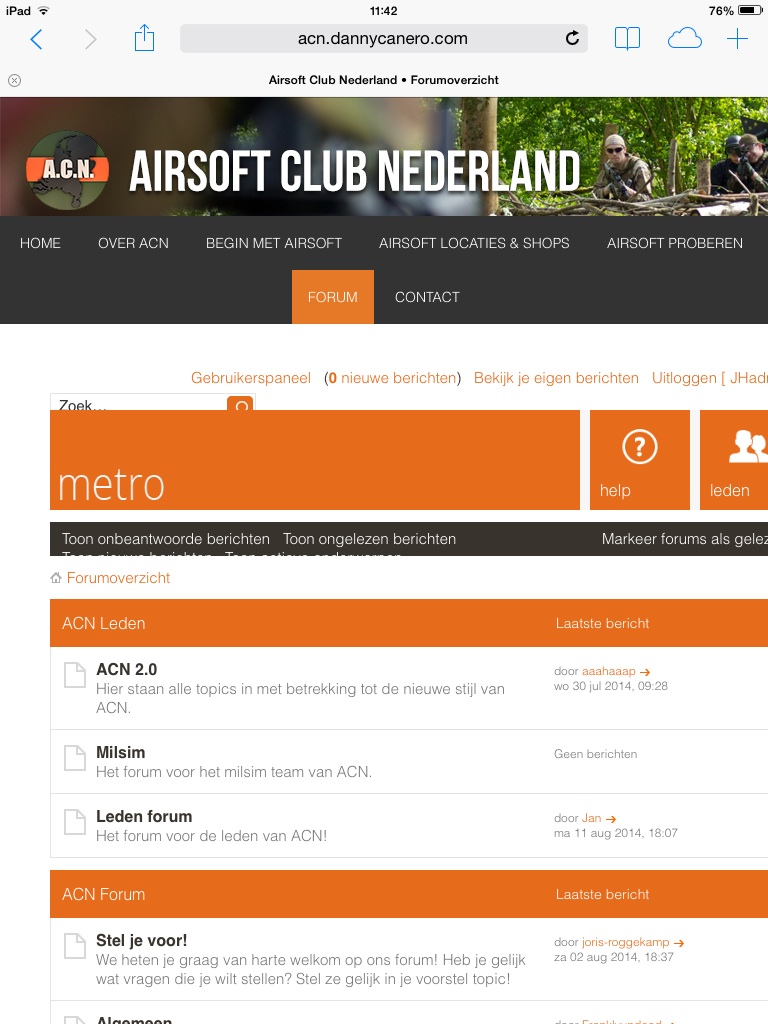
I’ve managed to find an illegal download version of this theme to test for possible issues (dated december 2013), since my forum is embedded on a wordpress website. I was afraid that the theme wouldnt work so well on that, since its a theme within a wordpress theme.
There are issues that have turned up. As you can see, its not scaling down properly. Buttons are positioned outside the screen and text is hiding behind elements.
http://www.airsoftclubnederland.nl/wp-content/uploads/2014/08/image.jpg
Is this something that you already fixed (since this was an older version)? If not, is it fixeable by you when I buy your theme? Or is this a result of the forum theme not mixing well with the wordpress theme?
In that case I might have to look for another theme I can imagine.
Hello,
Thank you for your interest to our work!
The theme is fully responsive and should work OK on low width screens. I’ve just tested it and it seems to be ok – http://i.imgur.com/cNBnXak.png
Anyway as far as I see it’s just a browser issue – for some reason it don’t show the theme properly. And I think it can be solved.
Ok awesome! Great that you tested it as well. Im on an ipad mini so it could be a bug than. Thanks, ill probably make the purchase on sunday, when I get back home
Ok! And feel free to contact us if you have any issues.
I have a Fixed Navbar that works on the Desktop Version but not the Mobile or Tablet one. I would like to know what I did wrong in the code, and what to fix so that the fixed navbar also displays on mobile.
CSS
.fixednav{
                font-size:16px;
                width:99.99%;
                background-color:#999999;
                position:fixed;
                top:0;
                left:0;
         z-index: 5;
        }
        .fixednav a:link, .fixednav a:visited, .fixednav a:active{
                display:block;
                padding:5px 15px 5px 15px;
                float:left;
                color:#ebebeb;
                text-decoration:none;
        }

         .fixednav a:hover{
            color:#fff;
    }

    ul#menu, ul#menu ul.sub-menu {
    padding:0;
    margin: 0;
}
ul#menu li, ul#menu ul.sub-menu li {
    list-style-type: none;
    display: inline-block;
}
/*Link Appearance*/
ul#menu li a, ul#menu li ul.sub-menu li a {
    text-decoration: none;
    color: #fff;
    background: #666;
    padding: 5px;
    display:inline-block;
}
/*Make the parent of sub-menu relative*/
ul#menu li {
    position: relative;
}
/*sub menu*/
ul#menu li ul.sub-menu {
    display:none;
    position: absolute;
    top: 30px;
    left: 0;
    width: 100px;
}
ul#menu li:hover ul.sub-menu {
    display:block;
}
HTML
<div class="fixednav">
        <a href="kwandrivia.net">Home</a>
        <a href="http://kwandrivia.net/viewforum.php?f=33">the Order</a>

        <ul id="menu">
    <li>
        <a href="#">Menu 1</a>
    </li>
    <li><a href="#">Menu 2</a>

        <ul class="sub-menu">
            <li>
                <a href="#">Sub Menu 1</a>
            </li>
            <li>
                <a href="#">Sub Menu 2</a>
            </li>
            <li>
                <a href="#">Sub Menu 3</a>
            </li>
            <li>
                <a href="#">Sub Menu 4</a>
            </li>
        </ul>
    </li>
    <li><a href="#">Menu 3</a>

    </li>
    <li><a href="#">Menu 4</a>

        <ul class="sub-menu">
            <li>
                <a href="#">Sub Menu 1</a>
            </li>
            <li>
                <a href="#">Sub Menu 2</a>
            </li>
            <li>
                <a href="#">Sub Menu 3</a>
            </li>
            <li>
                <a href="#">Sub Menu 4</a>
            </li>
        </ul>
    </li>
    <li>
        <a href="#">Menu 5</a>
    </li>
</ul>

        <div style="clear:both" />
        </div>
Sorry about the length of the code, seems I can not edit it. Don;t know if I asked before, but how do you make the forum wider, right now it doesn’t fill the whole display on a 1080p monitor.
[Bump]
Hello,
The point is that the mobile/tablet part of css-code should be added to responsive.css template of your theme. There are some media queries depending on your screen resolution, so you need to add your code inside them.
but how do you make the forum wider, right now it doesn’t fill the whole display on a 1080p monitor.You need to increase
#wrap width inside the common.css template of your theme. But don’t forget to increase the width of #page-body-inner block to have appropriate width of the main forum list if you’re using the sidebar.
I guess it’s safe to assume that I won’t be able to put a static nav bar on my forum…
Hello,
I think it’s possible. You just need to find a developer for that if you can’t implement it yourself.
if someone expert on this template please letme know im willing to hiring you. contact me on skype live:”myidname” my idname okay??
Hiring pros on this template
GREAT THEME!
Adsense / Ads after first post
I want to add adsense / ads between the first and the secont post. I guess i have to add a piece of code to viewtopic_body.php
What code do i need?
Hello,
Look here, this may help you – https://www.phpbb.com/community/viewtopic.php?f=71&t=1165925
Hello, I would like to place on the issues created by users with avatar creator theme, I tried but I can not do it correctly, I could help ?, I leave a picture to see what I want to do. Greetings.
http://i62.tinypic.com/2i6gkl.jpgHello,
Do you need to add poster avatar, as far as I understand?
I would put it to the user to identify at a glance, what reform forum enough to do well for my graph and necessary, many forums have them and I would like to implement is it very difficult to place that code? if you want to see my forum is www.planetaarrecife.com.ar
Thank you for your help.
Hello,
I think you may use a mod like this – https://www.phpbb.com/customise/db/mod/avatar_of_poster_on_index_and_viewforum/
Awesome theme! I’m on the verge of buying it for my forum. I’m going to embed it on a wordpress website that uses a wordpress metro theme for Genesis so this theme and the wordpress theme, match very well!
One thing I noticed in the preview page here, the checkboxes are missing when I forgot my password or username after a failed login. Does that have to do with the themeforest embed? Or is that a bug in the theme?
Hello,
Thank you for you interest to our work, we are glad you like it!
One thing I noticed in the preview page here, the checkboxes are missing when I forgot my password or username after a failed login. Does that have to do with the themeforest embed? Or is that a bug in the theme?It seems to be a Chrome issue and sure it could be fixed. After buying contact us via our profile page – we’ll send you a quick fix!
Ok great! Thanks for the swift response. I’m on safari but I’m sure the fix can be applied on there as well
Thanks for this making this great looking theme.
I have the same issue as another poster about profiles on the left. When logged in, the profile stays on the right and is out of place. I double checked everything and the changes were all correct. I sent you an email about the issue but was not sure you got it.
Hello,
Since you have a different position of the element after login, I think you just see some other theme. Make sure in your UserCP that you load the same theme as you edited.
Thanks for the reply. I’m loading the Metro style and made sure to clear and purge the cache. As a test, I did the profile on the left changes to the default Prosilver style and it looks correct logged in or logged off.
If you could, can you try to duplicate the issue on your end? If another buyer was having the same issue I can only assume it’s the theme. If you can’t figure it out then I’ll move on to another style.
Hello,
I did the changes a few times for our customers and everything worked OK for both registered users or guests. You just need to follow this tutorial carefully – https://www.phpbb.com/kb/article/prosilver-profiles-on-left/
Hello,
i have one question: Is it possible to show the threadtitle over the last posters Name on Index.php? I hope you know what i mean
Greetings
Hello,
Sure, it’s possible. Just follow this tutorial – https://www.phpbb.com/kb/article/adding-last-posts-subject-to-index/
Thank you! now another question : Is it possible to show the last recent replies/post on the index?
Hello,
Do you need a separate block with the latest replies? You can try this mod, I think – https://www.phpbb.com/customise/db/mod/nv_recent_topics/
users can’t change theme styles after selecting metro theme? I’ve made sure my ACP is set to “Override user style:” “no”
Seems like the “change styles” is not available?? Any chance you can help?
Using the latest version or Metro and PHPBB
Appreciate the help! Nice theme!
http://i60.tinypic.com/21evmmb.jpg[/IMG]Hello,
Did you modify the templates in any way or add any ‘style chooser’ mods?
Bonjour,
je suis très intéressé par votre thème, cependant une question : est -il compatible avec wordpress ? puis je l’intégrer dans mon site wordpress ?
—
Hello there,
I am very interested in your topic, however a question: is it compatible with wordpress? then I integrate into my wordpress site?
thank you for ur answer.
Hello,
Thank you for your interest to our work!
is it compatible with wordpress? then I integrate into my wordpress site?It’s a theme for phpBB3 forum software. It’s a separate community cms, but yes it can be integrated with WordPress via an addon. And feel free to contact us if you still have any questions!







![http://i60.tinypic.com/21evmmb.jpg[/IMG]](http://i60.tinypic.com/21evmmb.jpg[/IMG])