266 comments found.

I recently installed your theme, where can I change the layout settings. For example Magazine layout 1 or Blog layout 1 ? Where are these layouts located at?
Hi. I wrote clearly in documentation and video. You just need access Appearance / Widgets then add your custom sidebar, and pick that sidebar when you create a static page. You can also change layout settings in Appearance / Theme Options / Sidebars.
Hi Tiennguyenvan, thank you for your quick reply, I watched the video to install and have watched again. I do not have any options in my appearance/widgets in the appearance/theme/options/sidebar for any of the layouts magazine style or blog style. In the video under MENUS the layouts are there to drag and drop and also in the widgets but when I installed I have none of those options. Please advice
Hi. Did you download the latest version of the theme? Hope you can install Teamviewer ( http://www.teamviewer.com/en/download/windows.aspx ) and send its ID+Pass to http://themeforest.net/user/tiennguyenvan#contact
I will remote your desktop to help directly.
I installed Teamviewer and messaged you
Hi Tien, Where can you access the user ratings and add or delete ratings. We have user ratings from the demo that we wanted to delete but do not know how.
Thanks,
Kenny
Also where does a user go to vote on the ratings?
Hi, we deleted all demo users and the ratings still show. So what we need to know is how to access user ratings and how to inform users how to rate? Thanks.
Hi Kenny.
You can not access user rating to modify it and make it beautiful as you like. User rating must be fair.
User just need to click on user rating bar under author rating box. If a user rated, he / she can not rate again. This action not need logged in member, it uses cookie to check.
We don’t understand what’s relationship between delete demo users and rating.
Ok. Well is there any way to make it so the person has to be a registered user to rate? I was just checking out the user rating system on a demo post to see how it worked. I thought the rating system was related to the comments on it. Thanks for the quick reply.
At this time, the theme not support that features, only use cookie to check.
Ok, no problem. That is fine. I appreciate it. It is still the best theme online! Thanks!
Hi Tien,
How can I disable small sidebar from just one page, when I select the disable small sidebar from the drop box in the page editor it still displays.
I don’t want to disable it from all pages just one.
many thanks,
Are you using any cache plugin? You can clean cache. And please use latest version of the theme. Thanks.
Hi Tien, I have tried that but it seems the settings in appearance/theme settings/ sidebars is over-riding the page settings
Hi. The settings of page will have higher priority then Theme Options. So I don’t think that is the cause.
Can you install Teamviewer ( http://www.teamviewer.com/en/download/windows.aspx ) and send its ID+Pass to me to http://themeforest.net/user/tiennguyenvan#contact
I will remote your desktop to help
Hi Tien, I just realized it does work but it doesn’t work with the pages from buddypress. Any ideas how I can disable the small sidebar for just buddypress. thanks
The theme not support built-in functions for buddypress (I never advertise that), it only supports BbPress and WooCommerce.
So sorry about that and hope you understand that this is a magazine theme, not social network or multi-purpose theme.
that’s OK not to worry. Definitely one of the best wordpress themes I have come across. Thanks Tien.
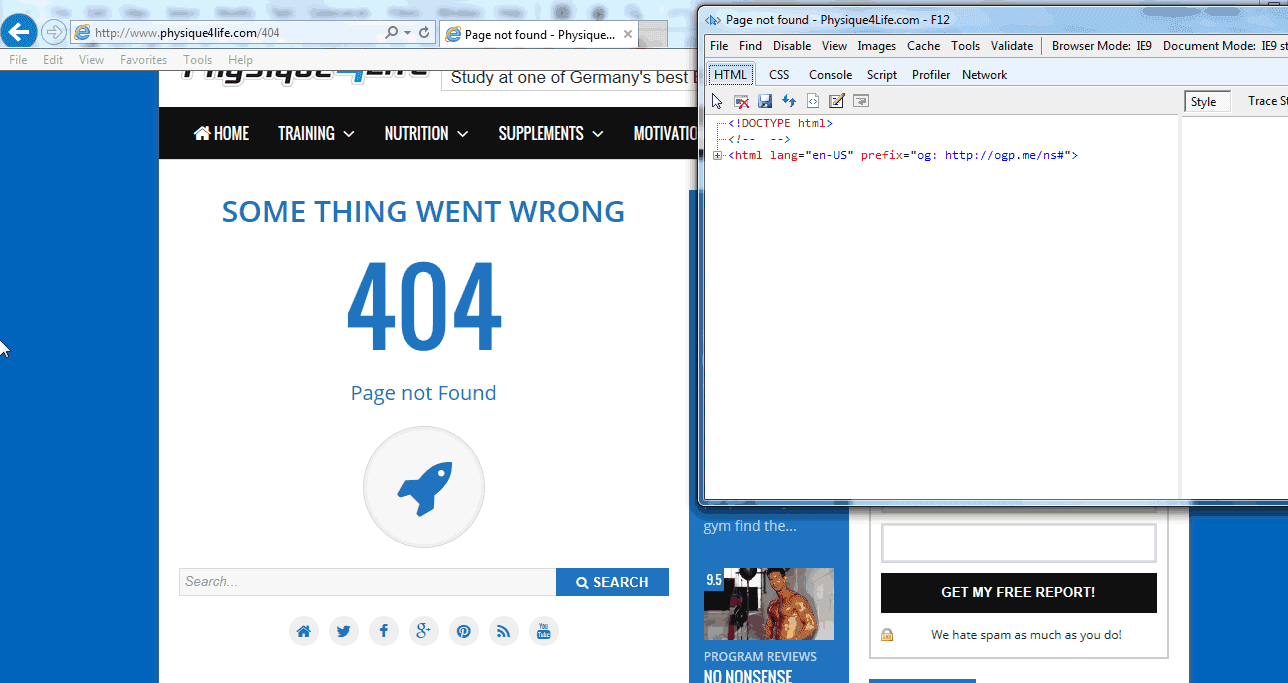
Sorry Tien, I just noticed another thing. The 404 page isn’t working when I input a wrong url. I get a small piece of broken code. Any idea why this would be doing this. Even when I type in website.com/404.php I get the same thing.
Can you share your 404 URL? I will take a look. I guess may be some of your plugin hooked and modified 404 content.
Hi Tien, my 404 is http://www.physique4life.com/404 many thanks
I see your 404 page is working well now. Can you tell me what’s problem with it? What’s piece of broken code in this page? Thanks.
Sorry forgot to mention it works in firefox and google chrome but not internet explorer.
Here is your 404 page in IE9+ http://1.bp.blogspot.com/-xhLLjs8a6EA/U__0YKib6OI/AAAAAAAAIp0/iKP3OFYzOmk/s1600/delipress-404-ie9%2B.png
Our theme supports from IE9+, not IE7 or 8, that’s what I checked in theme features on the right column of item detail page.
Hi Tien, that’s fine thanks for your help. Sorry for so many questions but I just have one last question. Is there a way to make the category pages show articles the same way as the One Horizon Widget does? Thanks again
Hi. Currently, Delipress not support pick Category (archive page) tempate, so we must use the default template from it.
I will consider adding that feature in next version. Thank you very much.
OK, thanks anyway. You done a great job with the theme. One of the best I have come across. Many thanks
This comment will keep going update to show up my customer sites which are using Delipress theme.
Also help them increase their traffic rank a bit.
Hi Tien,
We tested out your theme on a subdomain of our site, and now we copied the theme folder over to the directory of our actual site. None of the changes that we made with arranging widgets has transferred over in the copy. Where are all the customizations made through Wordpress stored, and how can we access them and move them over to our live site?
Thanks, El Estoque
Nevermind, we got it to work. Thanks anyways!
Another question: We would like to change the height settings for thumbnails; where can we reset the height for thumbnails?
Dear. Mean you want to regenerate thumbnail to fix with out thumbnail size or other thing?
If yes, you can try regenerate thumbnail plugin.
I want to set the size for the thumbnails so that every picture resizes to that thumbnail. I would like it to be the size of item-thumbnail, not item-natural-thumbnail. Where can I do this?
Also, how can I get multiple author names to show up?
Hi. The theme not support set size for item-thumbnail, all thumbnail images will be auto cropped to fix with its container size (in this case is “item-thumbnail” a tag).
In case you want to change the container size manually, you can find “item-thumbnail” selector in css/articles-box.css file. Some of them have height property only mean they have auto width.
About the multi author names, the theme has no that feature at this time.
Thanks! Also, how do we remove the stock images from the thumbnails? We don’t want any thumbnails on the stories without feature images.
Dear. For keeping the layout work well without the thumbnail, we used the random image as placeholder for that case. not hide them.
But you can access Appearance / Customize / Content Settings and upload your own placeholder thumbnail.
Got it. Thank you!
Hi Tien,
Most of the widgets that we put on the custom sidebars are not updating as we add posts, but the widgets on the home page are… Do you know why this is happening/how to fix it?
El Estoque
Can you show me two URLs (one is home and one is page with custom sidebar) ? I will take a look.
Hi, I cannot find where I change the author picture in the author box. Where do I go to change the photo with an updated photo of the author?
Thanks,
Kenny
Dear.
As default, Wordpress not support change author avatar inside dashboard. You must go to gravatar.com and register for you one or you can install a plugin to help that ( here https://wordpress.org/plugins/user-avatar/screenshots/ or you can find another better one)
This feature is not related with the theme depend on Wordpress Theme standards. So just try the solutions that I suggested and the feature will be not integrated to theme in future.
Ok. That makes sense. So if we edit the avatar then that will change the picture?
Yes of course.
The theme works follow the Wordpress standard so the avatar using in the theme is getting from Wordpress API which will load image from Gravatar. Or if you installed a plugin that help changing avatar from dashboard, Wordpress API will return that image.
Simple, the theme is only the receiver who will get and show the thing that Wordpress give to it. That’s why, I said the theme not related in this case.
Just try to solutions and tell me the result. If have any trouble, I am always beside you to help.
Ok. I used “WP User Avatar” which is downloadable through WordPress directly just in case if anyone asks about it in the future. It is compatible with WordPress 3.9.2 and works great. Thanks for letting me know as this was a quick and easy fix. This is the best them on WordPress by the way. I love it and already voted it 5 stars.Thanks!
Hi there,
We are keen to purchase this theme but we have a couple of questions.
1. We want to setup each blog post as an Infinite scroll so that once users get to the end of the blog post it loads up another blog post from the same category or another category. Is that possible with this and what will be the costings to set it up.
2. The in-built reviews, is that using Schema.org so they show up in Google?
Hi.
1. The theme not support this feature of course. You must hire a person from studio.envato.com , I am not available for freelancer now.
2. Yes, you can check with one of my review page in my demo site. We invested much time to this feature.
Ok. Thanks
I have problem with import your data sample:
Import WordPress Failed to import shop_order_status cancelled Failed to import shop_order_status completed Failed to import product_type external Failed to import shop_order_status failed Failed to import product_type grouped Failed to import shop_order_status on-hold Failed to import shop_order_status pending Failed to import shop_order_status processing Failed to import shop_order_status refunded Failed to import product_type simple Failed to import product_type variable Failed to import product_cat Clothing Failed to import product_cat Hoodies Failed to import product_cat Music Failed to import product_cat Posters Failed to import product_cat Singles Failed to import product_cat T-shirts Failed to import product_cat Albums Failed to import “General Information”: Invalid post type forum Failed to import “Support”: Invalid post type forum Failed to import “FAQ”: Invalid post type forum Failed to import “Just A Topic”: Invalid post type forum Failed to import “Other Topics”: Invalid post type forum Failed to import “Child Forum”: Invalid post type forum Failed to import “Woo Logo”: Invalid post type product Failed to import “Premium Quality”: Invalid post type product Failed to import “Ship Your Idea”: Invalid post type product Failed to import “Ninja Silhouette”: Invalid post type product Failed to import “Woo Ninja”: Invalid post type product Failed to import “Happy Ninja”: Invalid post type product Failed to import “Ship Your Idea”: Invalid post type product Failed to import “Woo Ninja”: Invalid post type product Failed to import “Patient Ninja”: Invalid post type product Failed to import “Happy Ninja”: Invalid post type product Failed to import “Ninja Silhouette”: Invalid post type product Failed to import “Woo Logo”: Invalid post type product Failed to import “Ship Your Idea”: Invalid post type product Failed to import “Flying Ninja”: Invalid post type product Failed to import “Premium Quality”: Invalid post type product Failed to import “Woo Ninja”: Invalid post type product Failed to import “Woo Logo”: Invalid post type product Failed to import “Woo Album #1”: Invalid post type product Failed to import “Woo Album #2”: Invalid post type product Failed to import “Woo Album #3”: Invalid post type product Failed to import “Woo Single #1”: Invalid post type product Failed to import “Woo Album #4”: Invalid post type product Failed to import “Just a Topic”: Invalid post type topic Failed to import “This Is New Topic”: Invalid post type topic Failed to import “Common Topic”: Invalid post type topic Failed to import “New Support Topic”: Invalid post type topic Failed to import “Just Another Support”: Invalid post type topic Failed to import “Any New Support?”: Invalid post type topic Failed to import “Variation #23 of Ship Your Idea”: Invalid post type product_variation Failed to import “Variation #24 of Ship Your Idea”: Invalid post type product_variation Failed to import “Variation #41 of Ship Your Idea”: Invalid post type product_variation Failed to import “Variation #42 of Ship Your Idea”: Invalid post type product_variation Failed to import “Woo Single #2”: Invalid post type product Failed to import “”: Invalid post type reply Failed to import “Order – July 18, 2014 @ 09:00 AM”: Invalid post type shop_order All done. Have fun!
Dear Anderson. Can you add an account as your site admin and send login info to me to http://themeforest.net/user/tiennguyenvan#contact
I will login and take a look.
Hi Tien!
How can I upload new widgets to the theme?
Thanks, El Estoque
Hi El,
Just access Appearance / Widgets and drag & drop the widget you want to the sidebar you want.
Can I import widgets that aren’t part of the theme default/wordpress default? Also, is it possible to make the search bar extend to the left of the icon, rather than dropping below?
We love how the site looks with the new theme, just want to make some slight tweaks to the appearance, so any help is much appreciated! Thank you so much for your assistance.
Yes you can import other widget to theme by install the widget plugins.
The search bar is current not dropping below, can you show me the URL that had the error?
I sent you an email with the link. Please let me know if you don’t see it and I’ll resend it.
I replied you and that’s not an error, that’s original design.
Hi Tien,
I’m waiting for the blogger version.
Hi Tien,
there is a widget name “Article Box – Two Columns” , i would like to use in “Main Sidebar” section a 3 columns article box , which we don’t have within the theme, how can I do that ? is there any external plugin that can you suggest ? r u going to add a widget with 3 columns in the future ?
Thanks, Barnet
Hi Barnet. I think I will not add the 3 cols widget into theme because width of sidebar is small now. You can try to find a plugin from wordpress.org
Hi,
I have a few questions:
1. Is there any way that I can make the similar articles display only in the posts sidebar instead of below the post? Where would I modify the code to do this? I don’t want the similar articles to always show up in the sidebar, just for the posts pages.
2. How can I change the color for individual components that do not have the “select background color” option in the widget and that I don’t want to use the main color from color settings in the customization tab?
3. I would like to resize the slider, since it’s too wide for my liking. What file/part of file do I need to access to make this change?
4. How can I remove the background color behind the title text in the widgets?
Thanks in advance.
Hi.
1. You can not do that with the theme, just try to find a plugin for that and add to sidebar.
2. This is very personal customization, so you can hire a developer from studio.envato.com or you must show the element you want to change color and I will show you the code.
3. Find in /css/article-box.css at line 301, I set it 300px in height (content). Width of slider must be fixed with width of the column which is containing it.
4. You can add below CSS into advance CSS (Appearance / Theme Options / Custom Code / Advance CSS)
.widget-title {
    background: none;
}
.widget-title a {
    color: black!important;
}
.widget-title .arrow {
    display: none;
}
.widget-title .widget-title-content {
    color: black;
    padding: 0;
}
Black is only example for color of text inside title, so you can change to any color you want.
Thank you for your quick response! I will do that.
Also, one more question: Is there any way to create different header wide sidebars for each page? Or can I make it so that there is only a header wide sidebar for the home page?
Dear. Can not do that. The header sidebar is fixed for whole site.
Quick question – when I use the team members shortcode not all team members will show up on the page. How can I fix this? Thanks!
Dear. At this time, the shortcode only supports show all members who had published posts. not show members who have no post or members who was set as “No Role” by admin of site (even they have posts or not).
So just with until next update when I add a parameters to allow you show author with specific role or limited number of authors to show.
Okay, no problem. Thank you so much for clearing that up!
Hi Tian!
I love your theme firstly and I currently have a psychology revision website which I wish to change the theme to yours. Its for AQA Psychology (a UK exam board students use) The website is below:
My website is running the basic Wordpress theme by default however has proven popular and I am worried about losing ranking if I change it to yours? The linking and page structure for my website is simple and is also running woo-commerce on it -I have also done a lot of onsite SEO for it as well as off-site SEO.
I’m worried if I change my website theme to yours it can affect ranking if the theme is not coded correctly – any suggestions or thoughts on how to make the transfer smooth and lower risk of losing my ranking?
Also Yoast (maker of a popular SEO pluging) commented on some theme creators not coding it correctly which can be a risk especially with something like a re=canonical links?
Read here: https://yoast.com/wordpress-themes-hurt-seo/
Any suggestions or thoughts to make the transfer smooth and what you think?
Saj
Dear. The theme will not affect your ranking, just use it with Yoast SEO and everything must be well.
Hi Tien,
the widgets can be used only in home page, but in the demo version I see that except of home page, you also use those widgets under “Blog” category. I would like to add also a “Blog” section to my site, but when I open a new page , I don’t have those widget options to use. How can I duplicate the home page and use it under another category ?
Thanks
actually, not just duplicate the home page, i mean creating another page which can use all the widgets that I can use in home page.
ok , i found it by myself , thanks anyways 
You’r welcome Barnet. Wish all kind things to your business.
Hi, just bought your theme, but in the backend of my page I don´t have any of the widgets. What do I have to do?. Thanks
Dear. Can you send me login info for your site to my profile contact: http://themeforest.net/user/tiennguyenvan#contact
I will login to take a look.
Hi, just sent you my info, can I use this theme in another webpage?
Dear. You must follow standard license: http://themeforest.net/licenses/standard
Your site seem using very old WP version and not update to the latest version. Now everything is properly.
Thank you very much, I´m using it right now.
I print-screened at www.mesutkoc.com/columnist.jpg that columnist is an author or a editör etc. A demo for columnists can be seen .habermatik.net/v3/ at the right side bar. kö?e yazarlari-author columnist…. etc.
a news /magazine theme must have a widget like this….
Dear. I don’t think a theme on themeforest “MUST” have this built-in inside it. I can consider this as your personal favorite, and when have many similar requests, I will add it in to my theme. When waiting, you can try to find a plugin for that. Thank you very much.
hi, I hope to have “columnist widget” for this theme at the sidebar. thanks.
Can you tell more about “columnist” as your mean? It’s nice if you have a link to demo for your idea. Thank you.
Dear. You can try a plugin for this, the theme not support it at this time. Thank you.
Hello,
First of all, I would like to say that I really love your theme! Unfortunately, I have a problem with the megalink menu. I can’t add alll the pages I want to the megalink menu. When I’m trying to add more pages to the megalink menu, the theme doesn’t add them after saving. I have tried it for several times, but it doesn’t work.
http://www.business-booster247.com/dev2/ Currently you will see 3 different main categories added. However, I want to add 6 categories more.Could you please help me with this problem?
Hi. You can install Teamviewer (as I wrote in documentation) and send its ID+Pass to my profile http://themeforest.net/user/tiennguyenvan#contact
I will remote you desktop and help you.
I just purchased this and wanted to say thank you for not only a beautiful theme but for the wonderful video that walks through setting it up.
Your theme and instruction video are both amazing. Thank you so much!
I highly recommend anyone to buy this. It is great.
If we need any help we will message you. Thanks again.
Thank you. If you like the theme, hope you can rate it 5 stars.
How to rate: http://themeforest.net/forums/thread/how-to-rate-a-file-template-download-it-now-/58963
Appreciate all helps, wish best thing for your business.
Rating right now. I had some questions but found them in the documentation. Thanks so much!