1115 comments found.

Hi,
How can I change the “RELATED PRODUCTS” in the product page so that it could only display related products from the current page’s category.
Hi,
It is not possible. The “related products” contains only hand picked products for each product individually.
Hi, great theme! where would i go to change the font & color of the metadata below the title of my blog post? (e.g. author name)
Never mind 
Hi,
I’m glad to hear you have managed to solve it already. If you have any further questions regarding this theme, please let us know by opening a support request on our support forum at http://support-rt.com
Thank you for purchasing my themes.
Best Regards
Hello, I have purchases this theme and it is great! But is there any reason why the map won’t show on contact us page?
It has two locations by the way.
Thanks
Hello,
Can you please provide us your website url by opening a support request on our support forum at http://support-rt.com so we can check it.
Thank you for purchasing my themes.
Best Regards
Hello There!
I have a question, how can i add the little pphoto slider that show on your demo? which of the three types of slider i need to put? its really important for me to know it
thanks in advance
Hello,
There are three slider scripts comes with the theme and all of them can be smaller when placed in a smaller column rather than 1:1 column.
By the way, you can always import the demo website templates by downloading them from this link http://support-rt.com/forums/topic/tutorial-demo-website-templates-sample-contents/If you have any further questions regarding this theme, please let us know by opening a support request on our support forum at http://support-rt.com
Thank you for purchasing my themes.
Best Regards
This is not a theme at all, it is a complete framework of CMS that you can build your site from scratch.
Thank you, great work!
I’m glad you like it. Thanks for purchasing my themes! Best Regards
Hi if I buy this theme can we make changes customized changes on css or make customized changes with php on pages (like I want add other menu jquery or codes on footer with php)
Hello,
You can customize many layouts by using the template builder http://rttheme18.demo-rt.com/customizing-with-template-builder/ and theme options http://rttheme18.demo-rt.com/admin-panel/ Also RT-Theme 18 supports child themes http://support-rt.com/forums/topic/tutorial-how-to-create-a-child-theme-2/ and you can customize many core functions and css files as you wish with a child theme.
Please feel free to ask if you have any further questions. Thank you for interesting in my themes.
Best Regards
Hi there
I just realised that by adding the link it does in fact make the image into a link. I didn’t notice because it takes Firefox a little while to show alterations to the theme – is this a problem anyone else has experienced?
Thanks
Hi,
If your page is big it might take a few seconds to affect the changes. If you have any further questions regarding this theme, please let us know by opening a support request on our support forum at http://support-rt.com
Thank you for purchasing my themes.
Best Regards
Hi there
I’m just wondering in the content image with box is it possible to link the image with a page. I understand that you can add a Read More link underneath but because the image has some nice hover effects it would lead users to think that this could be a link itself. Thanks
Hi,
1. For Home page Example #7 with product showcase, can I display the product category with image instead of the side tabs. For example, the New Arrival Products at the top section, instead of products, I want to show product categories i.e. Watches, Bag. If I click on Watches, it will bring me to Product Category 1 page with all watches item.
2. Can we hide the product price from the product page?
Thanks.
Hi,
1) You can use the “content box with image” module. It is a manual solution but it is flexible. 2) Sure, it is optional for the product showcase
Please feel free to ask if you have any further questions. Thank you for interesting in my themes.
Best Regards
Good. Do you provide the full demo data in your package?
Yes, You can import the xml file that comes with the theme to start quickly building up your website and also you can import all the sample templates that seen on the demo website by downloading from http://support-rt.com/forums/topic/tutorial-demo-website-templates-sample-contents/
Thank you. Bought
Hi:
Under the Product Catalog, is there a way to integrate Brands to work in conjunction with Categories? E.G. Jeans > Levis, Gap, and then Tops > Gap and the like?
Hi,
You can always use more than one category and sub-category for an item. So, you can create the brand names as categories and assign the item. Then you can add those categories into a sidebar by using widgets.
Please feel free to ask if you have any further questions. Thank you for interesting in my themes.
Best Regards
Hi, my main menu navigation is wrapping after 7 tabs even though I’ve adjusted the padding between each navigation tab. Is there a way to fix this? There’s plenty of space for the two extra navigation tabs to stay on one line. Thanks!
Hi, you can follow this tutorial http://support-rt.com/forums/topic/tutorial-decreasing-the-padding-between-main-navigation-items/
If you have any further questions regarding this theme, please let us know by opening a support request on our support forum at http://support-rt.com
hi. i have a lot of product categories and i want to a side menu for all of those categories. i need a toggle (or collapse i dont know exact name) menu for custom product categories. how can i make this happen? thank you.
can i make this like a accordion menu? thanks
Hi,
Currently you can use the widget with “Only show children of the current category” option to make your list shorter. WordPress doesn’t provide a good markup for the list so i couldn’t add the option you mentioned but still searching a way to add in the future.
If you have any further questions regarding this theme, please let us know by opening a support request on our support forum at http://support-rt.com
Thank you for purchasing my themes.
Best Regards
Hello. I used your theme for http://thestillpointspa.com/ now I need to port it over and duplicate for their intranet subdomain, same url I FTP’d it in but none of the style ported over. Normally there’s an export box on most themeforest themes with a bunch of gibberish, I’m not locating it, do you not have one? I not how do you port over the style settings? Thanks!
Hello,
You can use this plugin to move your production website to live website https://wordpress.org/plugins/duplicator/
If you have any further questions regarding this theme, please let us know by opening a support request on our support forum at http://support-rt.com
Thank you for purchasing my themes.
Best Regards
Hi. I want to have the exact same website as the demo. how can i do this? i downloaded: Demo Website Templates ( Zip file UPDATED : 31 May 2014 ) and imported all the files to the template builder one by one. but still i cant get like the demo. can you please intruct me what to do to have the demo website? thanks!
Hello,
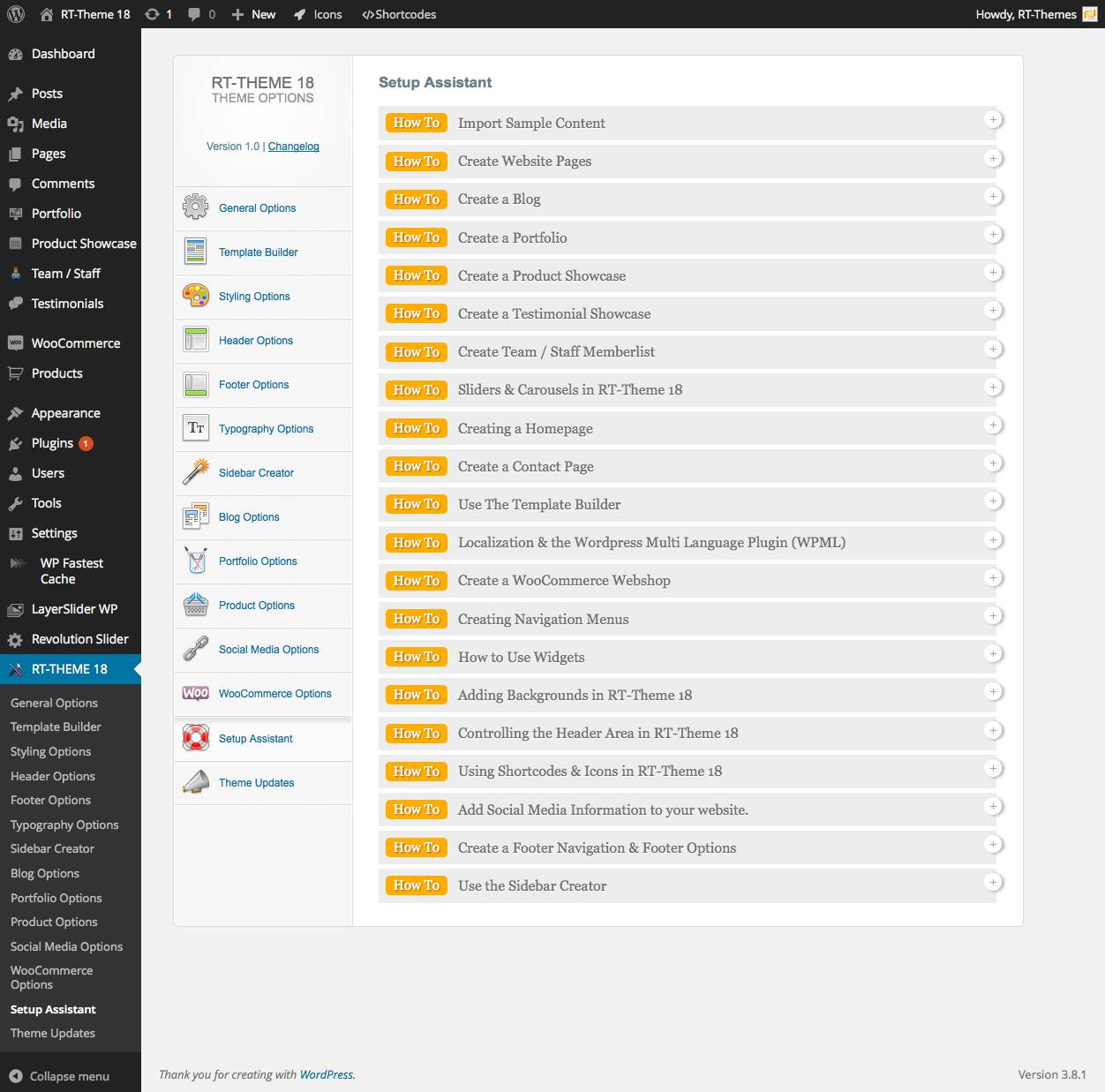
Now you can assign one of the tempaltes with any page you want. Create a page, select a template for it and make it your home page via Settings->Reading You can find detailed instructions on this page http://rttheme18.demo-rt.com/customizing-with-template-builder/ and inside the Setup Assistant http://rttheme18.demo-rt.com/wp-content/uploads/2014/03/Setup_Assistant.jpg
If you have any further questions regarding this theme, please let us know by opening a support request on our support forum at http://support-rt.com
Thank you for purchasing my themes.
Best Regards
thanks for your reply. still i’m not able to have my website look exactly (photos, sliders, everything) like the demo. please instruct me step by step how to do this. thank you.
Hello,
Please note that the photos that seen on the demo website has not been included to the package. The other contents must be added already when you imported the files that i suggested. To use a template as your home page, you need to assign it with your home page ( see part 6 http://rttheme18.demo-rt.com/customizing-with-template-builder/ ) If you have any other question related with the issue please open a new thread on our support forum at http://support-rt.com we’ll be glad to help.
Hi !
I really love the theme you made. I’ve been watching the videos as well and I’m totally in.
But, I need my blog to keep the slider. I want my blog to have the slider while having the latest posts showing up right below it with the sidebar showing the different categories and most popular posts.
Is that possible ?
Thank you,
Kevin
Hello Kevin,
It is totally possible. I put a post carousel to the header content area for this sample template http://rttheme18.demo-rt.com/home-page-with-blog/ and it is possible to replace with any other modules including sliders. It is pretty flexible.
Please feel free to ask if you have any further questions. Thank you for interesting in my themes.
Best Regards,
Thank you for your answer ! The theme is bought, can’t wait to see it in action !
Thanks for your purchase. Please let us know when you need our assist.
Hello there! Congratulations on this excellent work.
I want to know how I can change the color of the font throughout the site. I can not find the option.
Thank you very much.
Hello,
The entire theme split to parts and all of them can be re-colored individually via RT-Theme -> Styling Options. Select a part then select a custom color set for it.
If you have any further questions regarding this theme, please let us know by opening a support request on our support forum at http://support-rt.com
Thank you for purchasing my themes.
Best Regards
Hey.. The video player for the portfolio items doesnt work in FF. I’ve tried on two different computers. It works in Chrome and Safari.. Have you had any issues with this?
Hello,
It works at my end http://rttheme18.demo-rt.com/our-portfolio-2/ http://rttheme18.demo-rt.com/portfolio/curabitur-laoreet-mattis-30/ Make sure you have provided a webm version of the movie for FF.
If you have any further questions regarding this issue or another one, please let us know by opening a support request on our support forum at http://support-rt.com
Thank you for purchasing my themes.
Best Regards
Ok cool, thanks! I tried to convert the mp4 video to webm, and now it works
I Have 17 articles in blog category “Manufacture Technique”, but only show 10 of them on ” http://www.plastics-mold.com/category/manufacture-technique ” , and there is no page navigation on the bottom of this page . How to fix?
Hello,
I couldn’t reproduce this issue on my install. It might be a plugin conflict. Please try to disable your plugin that could be related with posts and pagination. If it doesn’t solves the issue please let us know by opening a support request on our support forum at http://support-rt.com
Thank you for purchasing my themes.
Best Regards
I need to put videos in the description of products like I do? How do I change the search? texts appear in English…
Hello,
You can use portfolio custom post or blog post to create a post with video. You can find detailed instructions inside the RT-Theme 18 Options -> Setup Assistant
If you have any further questions regarding this theme, please let us know by opening a support request on our support forum at http://support-rt.com
Thank you for purchasing my themes.
Best Regards
I have a question regarding the revolution slider that is incorporated in the theme. When I use it on my webpage I see that there is a lot of inline CSS (on every page) and I think this will hurt my SEO. Is this something that you did on purpose or can this be fixed?
Hello,
It wont hurt your SEO. For example, Google has a service called “page speed” https://developers.google.com/speed/pagespeed/service and when you activate it for your website, it moves many things into inline including images (according the optimization level) In a few years ago, webdevs were avoiding to use inline css to keep the html document size smaller to help web crawlers. But it is just an old rumor currently. RT-Theme 18 does not generates any inline css codes but the rev slider plugin may. If you ask me, you don’t need to worry about at all. Hope it make sense
If you have any further questions regarding this theme, please let us know by opening a support request on our support forum at http://support-rt.com
Thank you for purchasing my themes.
Best Regards