391 comments found.
Hi,
I’ve been using this theme (joyfully) for about 6 months. I’m very experienced and only have a few plugins installed. I noticed tonight that the portfolio live demo link is adding my domain a bunch of spaces then the link to the website – then more spaces then a closing span.
the code it is producing:
<a id=”modal-url” href=”<span> <a href="http://www.littlebokeelia.com/">http://www.littlebokeelia.com/</a> </span>” target=”_blank” class=”btn btn-view-all”>Live Demo
I’ve tried updating everything, turning off the portfolio, turning it on, disabling plugins, reactivating. It was working before and I’m not sure when this stopped linking correctly.
Any clue what could be happening here?
http://robynd.com/Thank you for any help you can give.
Robyn
This seems to either be Chrome related or my Chrome related. Troubleshooting. Will let you know if I find out it’s a version of Chrome related.
What problem you are facing for that? You site portfolio live demo link is working fine.
It’s my computer’s install of Chrome for some reason. Haven’t figured it out yet.
Again, great theme! The only thing I don’t like is how the revolution slider is showing on my iPhone 5S. I tried to adjust it:
https://imagizer.imageshack.us/v2/374x341q90/909/YiOzuM.png
I don’t want it to show up on mobile devices. But now the whole website looks different on my phone:
https://imagizer.imageshack.us/v2/456x811q90/661/wCIt6Y.jpg
And I still don’t have my favicon! 
Hi,
I’ve just purchase the theme from Themeforest and I can install the two propertary plugins which have not been included with the theme.
Should the essential grid and the slider revolution been included in the theme file I have downloaded from theme forest?
Could you please hemp me: francisco@tomboa.net
No you do not need to buy this plugins. Because we use extended license for our client so that you can use it without purchasing. The plugins are included with the theme

hi, I had the same problem as skagens above… (with admin appearing before my blog posts)
I went to single.php, and deleted line # 95. However this did not fix my problem..
a) what was line 95 so i can add it back in? b) what is the fix?
Cheers,
Please download the latest updated version 3.0. The issue is fixed there.
Hello,
I would like to know if it possible to edit the social media section. In fact I would like to replace the facebook section by Odesk. Instead of displaying the facebook logo I would like an Odesk logo.Is there any possibility ?
Looking forward to your reply
Regards Nelly
Thank you for your request. We will add some more social link for the resumex theme very soon. Hope that you will get it in the next update.
I’m trying to check how your theme looks on mobile devices and when accessing it through me iPhone I’m automatically redirected to bucketadmin.themebucket.net. Is this theme responsive? Why is this happening?
Hi, may be its happen for top iframe bar. can you please check our direct link here http://resumex.themebucket.net/
thx
Why the PORTFOLIO not display?
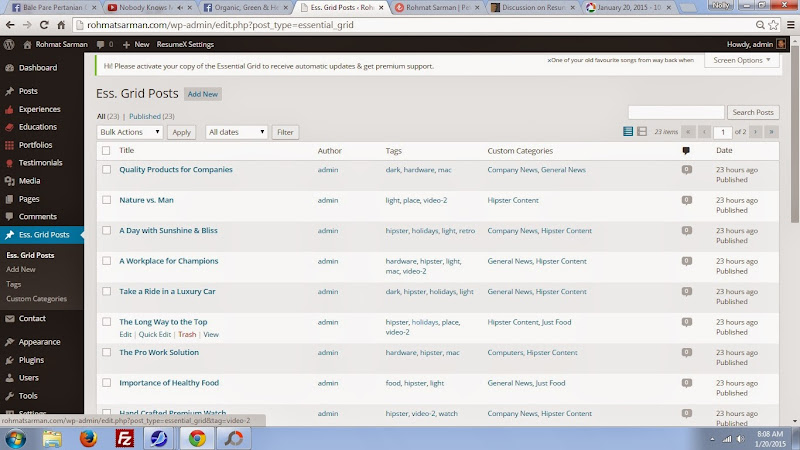
https://lh6.googleusercontent.com/-n-g8SicOuuw/VL2qVruqFGI/AAAAAAAADFA/clAIoPYoYIg/s800/komplen%25202.jpg https://lh3.googleusercontent.com/-XkcWr9qReKQ/VL2qViOvgjI/AAAAAAAADE8/fIOkuHtPGRc/s800/komplen.jpg https://lh6.googleusercontent.com/-3IlZd2wTzms/VL2qtx_lkHI/AAAAAAAADFM/ZpcncK1pz9M/s800/hghg.jpg
I think you post your photo properly but didn’t setup the grid yet. https://www.dropbox.com/s/ip421jl8vp2ag24/Screenshot%202015-01-20%2015.10.11.png?dl=0
Go to essential grid setting and setup your grid first. then put the “Portfolio Essensial-grid Shortcode” there.
I want t change the transparent reddish-orange block between experiences and education to a transparent blue one that matches. How can I do this? Also, I want to remove the My Resume in the nav bar completely. How can I do that? You wouldn’t happen to have the Photoshop PSD files for the large header images by chance? I like the one with the guys face, but would obviously like to remove his face and put something else there. Thanks a ton!
Here the link to my draft so you can see what I am talking about. Also, I noticed that in the skills section, the center column seems to be bold while the outside columns are not. How can I unbold the center column? http://www.anthonywalz.net/resume
Please go to Resumex Setting > Experience > And turn of the “Display Counters”. Your Reddish block will be hidden.
and if you want to remove default logo my resume then just go to your style.css file line # 170 and add a css line “display:none” like as screen shot https://www.dropbox.com/s/e4887v3qe5fc5kn/Screenshot%202015-01-19%2016.17.44.png?dl=0
Got it! Thanks!
welcome
I want to change the Home nav to all caps in the nav bar. How can I do that? I see other have asked the same question and you’ve requested their login information. Is it possible for me to fix?
Yes, you can do it easily by adding one line css in your style.css file here is screenshot https://www.dropbox.com/s/evmit6kzc1w92sr/Screenshot%202015-01-17%2010.44.24.png?dl=0
just add following css into line # 136
.navigation ul.nav > li > a {
      text-transform: uppercase;
}
thx
Awesome! That worked. Thank you for the quick response!
please reply my question…
Sorry RSarman, had some issues in our end and we apologise for the delay in communication. Can you please re-send your issue to us at themebucket@gmail.com for an instant reply. I will be waiting for your email.
Why you guys are not replying ?
Sorry David, had some issues in our end and we apologise for the delay in communication. Can you please re-send your issue to us at themebucket@gmail.com for an instant reply. I will be waiting for your email.
Hi,
I am emailing you guys from last week but don’t getting any response. First there was a issue in theme related to experience links and now i am unable to add portfolio and I have deleted all dummy comments but still they are showing in footer section. Please reply on ASAP basis.
Thank You
My website is pending and you guys are not responding from last few weeks. Such a pathetic support.
Sorry David, had some issues in our end and we apologise for the delay in communication. Can you please re-send your issue to us at themebucket@gmail.com for an instant reply. I will be waiting for your email.
Okay, maybe this is a really weird question but what is the safest / best way to update the theme? I haven’t updated it since I bought it ages ago.. I did download the new version.. so what will be the next step? Thank you in advance, it’s a great theme and I get a lot of positive comments!
Sorry for the late answer. Somehow we missed the ticket. Really sorry for that. If you input some data in your previous theme keep a backup data. just go to export and export data from there.
Then update the new version. Hope that the data will not change. if you face any data missing then you can import data from your backup. thanks
Hi.
I’ve bought this theme and have a couple of issues I would like to fix. Hope you can help me with this.
Here it goes:
1) All of my blog posts have the word «admin» written on the top of every singel post. I don’t know why this has happened, and would like to remove it.
2) Is there a way to edit the default blog sidebar without using new widgets?
Here is the site: http://pernilleskagen.no
I’m looking forward to your response! Thanks 
/Pernille
Hi,
1. we’re sorry its type mistake. you just go to single.php, line # 95 and remove it.
2. You can, in that case you need to change sidebar code from line #166-228 in blog-home.php and line #202-264 in single.php
thx
Will the theme support Wordpress V4.1?
Yes it’ll be support Wordpress V4.1
thx
I bought this template, and are making a web of my cv. but here there is a problem, if you first open the web is everything running smoothly, but when the refresh web there are some parts that become not appear, this problem if it only happens in crome, I use crome version 39.0.2171.95 m. if I open it in firefox everything smoothly, how do I fix it? my web is: www.rohmatsarman.com
https://lh5.googleusercontent.com/--mghFSbVmjA/VKFjXfxOpnI/AAAAAAAAC4k/twEeWHCpgUA/s800/cats%25202.jpg https://lh3.googleusercontent.com/--VRoX-cjUNQ/VKFjXj-f3EI/AAAAAAAAC4s/ulsviYM88iI/s800/cats.jpg https://lh5.googleusercontent.com/-hC4yCZNBQNc/VKFjXT1emPI/AAAAAAAAC4o/cZ0cAwExCoc/s800/hhh.jpgtnahks.
Responsed through mail
I have this theme at the top of my collections for my potential cv site. I have some experience with wordpress but the style and setup of the demo has always perplexed me. With the purchase of your theme, how easy is it to import the demo content, aND how much tweaking do I need to do to make it mirror your demo?
This is very easy. You can see some of our video demo. https://www.youtube.com/channel/UC6RfW89Hj7pOVvi8zFFG21Q/videos
Hello . I have sent the FTP access. I managed to install the theme and upload the import data and followed what the video said. But when I clicked on view the site nothing is appearing in the site . I am getting the error message “loading assets” and the front page is blank. I want my website to be exactly Iike the demo site. I’ve sent you 3 emails now with no reply. Could you please help me to fix this issue . Thank you.
solved.
Hello ,
I have just purchased the themes. But I am not able to install it. Could you help me plz ?
Thank you
Nelly
Send you FTP Access to our mail address themebucket@gmail.com
Hello . I have send the FTP acces. I manged to install the theme and upload the import data. But when I clicked view the site nothing is appearing in the site . I am getting the error message “loading assets” . Could you please fix this issue . Thank you.
solved
I have launched an complain few days back and already sent you my wordpress login details. There was a issue in your theme which you said that it will take some time. But now it’s more than a week please tell me how much time will it take.
I didn’t get any mail from your ID “davidrichard” Please resend your mail with the problem details to themebucket@gmail.com
NB: Must mention your Envato ID, Site url, user id and password