971 comments found.

I have two languages set up, English and Dutch. When im on the dutch site and I add a product to the cart than it won’t show the dutch cart. When i want to view my cart or checkout, it simply goes to the english checkout.
Im running the latest WP and latest plugins and latest theme.
Hi modkid
Are you using WPML for the dual languages?
We have a 6 part Youtube tutorial on setting it up with Adrenalin here: https://www.youtube.com/watch?v=4qurB6u6EH8
If you are and you think everything should be set up correctly take a look at your site in an incognito window of Chrome to ensure nothing is cached.
Best
Simon
It is working, forgot to add the dutch pages, sigh. But what isn’t working is the translation for the cart view in the menu, and the text select options underneath a product isnt translated to dutch either.
But more importantly: When i go to checkout, the shipping and handling option remains unchanged even when I insert all the necessary information regarding shipping.
I made a copy from a working website, so everything should be in working order, even for shipping etc.
Hi modkid
WooCommerce has a Dutch language pack to translate native strings such as the cart view.
WPML has options to translate variations.
The best thing really would be to watch the 6-part tutorial, we recorded them so they’d serve as a perfect guide for a multi-lingual WooCommerce site.
All 6 are on the channel: https://www.youtube.com/channel/UClvNafnizyoA1u-Ul1B0nCQ
Regards
Simon
Hi simon, thank you for your reply.
But what about the shipping options not showing? I can’t checkout. It used to work previously as this was a complete copy from a working website with shipping enabled.
Hi modkid
There’s nothing in the theme that would have changed shipping options. When making a copy of a working website I’d recommend using something such as the Duplicator plugin – https://wordpress.org/plugins/duplicator/The reason is some settings within WordPress contain serialized data and these aren’t carried over in a simple SQL dump.
Regards
Simon
First of all, congrats for the amazing theme.
I’d like to know: Where can i setting the “CALCULATE SHIPPING” with the airplane icon?. I did an instalation but the calculate shipping show on Shipping and Handling Free Shipping (table of Cart Totals).
On demo site, the icon of Calculate Shipping display after COUPON area.
Ex: http://bit.ly/1MJJVqy (first, you need to add a product)
What i need to do?
Simon,
I'm doing some test but i really like to know WHY my theme is very different of your. I did the instalation OK but i have many errors some like: button +/- in a product detail, Calculate shipping...I did the instalation on my PC too, but the same error show.What i need to setting?
Best!
Simon ,
I’m sure that some files are missing in your adrenalin.zip . I did numerous tests and do not have the same visual as yours. The items are the ones that I mentioned above and you accessing the site I spent see the mistakes.
Best! 
Hello cajuze
There’s no files missing  WooCommerce 2.3 came out last week and our demo site is still running 2.2.
There were 2 main changes introduced with the release:
1) Shipping calculation as you spotted was moved into the cart area – this is a WooCommerce change and will be the way it is from now on.
2) The + and – buttons were moved into a separate plugin.
You can download the plugin from here:
http://develop.woothemes.com/woocommerce/2015/02/v2-3-handsome-hippo/Best
Simon
My page won’t update….when I click UPDATE after making changes, the page sort of ‘jumps’ , then the blue button turns to ‘loading’ and nothing happens. If I wait for a message that says ‘auto save has a version newer etc…’ ,and then choose to restore that, I see the changes.
Its very, very strange. This is the page http://www.awesomeadventures.com/about-us/awesome-adventures/
This can occasionally happen in WordPress with very long content pages and the ‘locked’ admin bar which sticks to the top of the screen.
Try scrolling back up to the top of the page and clicking the ‘update’ on the right hand side instead.
Regards
Simon
I actually it out it’s something very strange….I had a Mail Chimp newsletter signup form on the page, as long as I enter an email address in that field, then save, it works….if I don’t enter and email,it doesn’t work. Weird, huh?
it sounds like a conflict with the plugin to be honest.
Colm
Hi Colm,
Since the last update i’m experiencing some loading problem with the admin-ajax/wp-admin. Before i had a blazing fast site with your theme!
It takes sometimes up to 14 seconds to load, is this a familiar problem with the Adrenalin theme?
Thanks in advance.
Hello Motoko
This occurred when you updated to the latest version of WooCommerce (v2.3)?
We haven’t noticed any issues of this nature following the update.
Can you send a link to your site and a login to support@commercegurus.com and we’ll check it out.
Best
Simon
Hi Simon,
Yes, it did. I’ve managed to reduce te load time of the admin-ajax to 1/1,5 second by disabling the W3 plugin cache. But sit still takes the most of my loading time.
But i’ll send an email. Thanks.
Hi
We’ll take a look and respond by email – it’s easier to keep a conversation thread in one place.
Regards
Simon
I’d like to know if this theme on product page works with other plugins. For example: I have a plugin for shipping and after the button “ADD TO CARD” add an information about the shipping. Other plugin is a Woocommerce Installments.
it works?
Hello
We can’t guarantee compatibility with every single plugin out there. From my experience the best ones are from woothemes themselves – http://www.woothemes.com/plugins/
Best
Simon
Hi, I enter the purchase code of layer slider but it says: You’ve reached the muximum number of authorized instalations for this purchase code…. What should i do? Would you plz reply to this question to this email address: sheida@etarahan.com
Hello
That purchase code is only for users who buy their own individual licence of Layer Slider. Updates to that plugin are bundled as part of theme updates – you don’t need to worry about it.
Best
Simon
Hi..
We just tried adding the adrenalin-child theme included in your package to our themes folder. And we see that the menu has disappeared altogether. Do we need to redo menus and stuff in the child theme.
And what does the folder “customvc” used for in the child theme? is it important for functioning of the child theme? If so, how?
Thank you and awaiting your response
Hi there!
Yes, a child theme is treated as a separate theme by WordPress so menus, widgets, Theme Options etc do need to be set up again. There are big benefits however in that the parent theme can be updated in the future without over writing child theme updates.
The ‘customvc’ folder is necessary for Visual Composer to work with a Child Theme.
Best
Simon
Hello -
when i do the demo_data install, the woocommerce plugin after activating forces HTTPS across my whole WP site, therefore making it un accessible (home page loads but without CSS or JQUERY). All the other plugins are installed and activated without problem. Anyone else experience this?
-dan
tried dowloading woocommerce from WP itself, same thing…...... must be my server
Hi there
I’ve never seen that happen before – I think you’d be best getting in touch with your host.
Best
Simon
Hi, I want to change the add to cart button but the color selected in the Theme Options—> WooCommerce Product Listings at the bottom of this page (Select the color for your Add to Cart button.) is not taking effect? How can I get this to work, the main theme color (Purple) is currenlty the color of the Add to Cart button? Can you supply some custom css code instead?
Yes, it takes on the primary color. Try something like this in Theme Options > Custom Code
.woocommerce .container div.product form.cart .button {
background: red !important;
}
Regards
Simon
Hello There,
In Theme options > Product Listing I have set the number of products per row to 3. Doing this automatically changes the number of “Complete the collection” section in product detail page to 3 as well.
Whereas, I want the the number of complete the collection products to 4 with a square size of 261px x 261px each.
can you please show me the way how to do this?
Thank you
Kumar
Hi Kumar
1) There’s no way at present to change the number of products displayed for Complete the collection as it uses the same loop.
2) You can’t really define a different thumbnail size for just those – they will change everywhere.
If you want them all to change you can update the ‘Catalog Size’ setting in Settings > WooCommerce > Product Tab
Then run ‘Regenerate Thumbnails’ to redo existing images.
Regards
Simon
Hi there, is it possible to have different product layouts per category? i.e. Category A would be a ‘grid’ layout whilst Category B is a ‘list’ layout.
Also is it possible to show a different image on the ‘Quicklook’ feature to the normal product thumbnail?
Lastly, the regenerating thumbnail layouts doesn’t seem to work… Nothing happens at all.
Hi there
1) This isn’t possible – grid or list view will apply for all listings – there’s no setting for a ‘per category’ basis I’m afraid.
2) Again, this isn’t possible. It’s using the same loop to display the primary featured image of each item.
3) You can change the product image dimensions within WooCommerce > Settings – Product Tab. You’ll see image sizes for the large, catalog and thumbnail.
You can adjust the sizes there (to make them a square for example). As it’s a responsive grid, they will still stretch horizontally to fill it.
Once the dimensions are changed, the ‘Regenerate Thumbnails’ plugin will redo existing images to the new sizes.
Best
Simon
Hi Colm,
I am trying to find a way to: (1) put a custom button next to “Add to Cart” on product details page. For eg; “Make an Appointment” button (2) show recently viewed items in product details page in Bottom area
Look forward to your response.
Thank You Kumar
Hi Kumar,
Re: 1.) You would need to reach out to WooCommerce directly to see if there is a plugin available to do that. I think there might be.
Re: 2.) this isn’t really possible at present – there’s a recently viewed items widget for WooCommerce but you would need to hire someone to build this into the product details page.
Colm
Hi,
First of all… Amazing Theme.. And Love the customization Options !! We have just started using your theme for our e-commerce portal. We have a few doubts as below: 1. The Layer Slider Plugin does not seem to get activated with the license code provided with the theme. How to activate it? 2. The Primary Menu Bar color changes with the wrapper color. How can I have a seperate color for the Primary Menu Bar itself? 3. Can I add an additional Menu above the header for options like Sign In / Log Out / Profile etc.? If yes, how can i do it? 4. Can I remove the Page Name Bar that appears on every page just blow the Menu bar? I dont need that on certain pages ! 5. Is there anyway that a link path (eg: Shop->Agriculture->Vegetables->Spinach) be incorporated just below menu bar on the single product page just like in many other sites?
We hope that your support will be as good as your theme is and expect a reply very soon.
Thank you !! Nitin
Hi there Nitin,
Thanks for getting in touch!
Re 1.) You don’t need to enter a purchase code for LayerSlider – we purchase an extended license for our theme customers. We will issue plugin updates shortly after they are released by the plugin developer.
Re: 2.) you’ll need some custom css for that – add the following in Theme Options -> Custom code
.cg-primary-menu {
    background-color: #eee !important;
}
change #eee to be whatever color you want.
Re: 3.) No – this is not a menu area – just add the links manually in the text widget (this is covered in the docs)
Re: 4.) Yes – when you edit a page you should see a “Show page title” option at the top of the page (this will only appear if you imported the demo data)
Re: 5..) Yes – you mean like here? http://adrenalin.captivate.io/product/calm-seas-raglan-sweat/ You just need to install WordPress SEO https://wordpress.org/plugins/wordpress-seo/then go to SEO -> Internal links and enable breadcrumbs
Hope this helps!
Colm
Thank you for your quick response. We are working on the above solutions provided by you.
Meanwhile you may note that there are bullet points appearing on list items of a plugin which does not appear in other themes. Please let us know how we can remove those list bullets from css. The class name is most likely “list-unstyled” or “list-inline”.
We have already tried doing “list-style: none;”
Can you please guide us?
Try adding this to Theme Options > Custom Code
.content-area ul li:before {
display: none;
}
Best,
Simon
Hello, Is it possible to add Google Early Access fonts? Google Early Access Thank you
@font-face seems to work fine, but is there a more elegant way of doing this?
Hmm don’t think so. But when Google approves the font it’ll appear as a choice in the typography dropdown in the Theme Options.
Regards
Simon
I liked this theme. Is there provision of this (as in www. westwaymachinery. com in right sidebar of the slider) type of product filter option available in your theme? or if it can be customized easily? As i need 4 levels of filtration for woocommerce products: 1. Product-wise 2. Type-wise 3. Manufacture wise 4. Condition wise. As we need to create a large inventory website. So we need smart filter as i explained.
Hi there
These are more questions about WooCommerce as a platform really.
There are literally hundreds of plugins to can add to extend functionality to a theme including many many filter extensions. I’d look at something like this perhaps and see if it does what you need.
http://codecanyon.net/item/woocommerce-product-filter/8514038Its author would have more info.
Regards
Simon
Thanks Simon. This plugin is doing same thing what the theme already have and most of woocommerce themes have. I need kind of nested filtering which narrows down the search criteria. Like first select the product.. the it will display all available types.. then select type.. then it will show all available manufacturer for that kind of products.. then condition available in those displayed items. If you know any specific plugin for nested filtering, it would be highly appreciated.
I’d go through the WooCommerce filtering plugins on CodeCanyon and email a couple of the authors with an exact description of what you need.
If you find one that fits the bill it’d be great if you could shoot me a message.
Best
Simon
Hi, there appears to be an issue with the YITH WooCommerce Wishlist version 2.0.2 plugin. Items can’t be removed from the wishlist and clicking on add to cart in the wishlist goes to the 404. Is this a template issue or the Wishlist plugin ?
Hi there,
Please shoot me an email to support@commercegurus.com with your site detals – this could be related to the big WC2.3 update released last week.
Best,
Colm
Than you Colm, i sent you some details. I notice you released another update, is this in response to the wishlist problem? Is there a change-log of the specific files? Thank you.
Hi there,
No sorry we’re quick but not that quick
I’ll have a changelog and filelist shortly.
In a nutshell this release has some other minor WC2.3 fixes – nothing major.
Best,
Colm
Hi, no problem I will look out for the change log/file list,do they not get included in the download updates by default ? might be a good thing to include them by default?
Hi there,
Sorry for the delay – here’s the file diff between 1.3.2.1 and 1.3.3
css/commercegurus.css
functions.php
style.css
woocommerce/checkout/form-checkout.php
woocommerce/single-product/share.php
and the changelog
Adrenalin V1.3.3 Changelog - 17th Feb 2015
- fix for checkout text notes not appearing since WC2.3 update
- minor improvements to Visual Composer icons
- pinterest image fix
Many Thanks I have a quick question.. will a changelog and list of files be available in future updates by default, or should i always ask here ?
We post the changelog shortly after the theme update is approved (like yesterday). If you want a file diff shoot me an email to support@commercegurus.com.
We don’t release that as standard procedure as we encourage people to update using auto updating tools to avoid manual errors – but I’ve no problem giving it to people who know what they’re doing
Great Much appreciated. Incidentally i see Woocommerce did it again and 2.3.4 is release! I ran the update on my development site copy and it seems to be o.k. Certainly no files red flagged in the Woocommerce status checker.
Hi there,
Thanks for getting in touch.
On the quickview the SKU displayed is just the general SKU – not variation specific – this is a limitation of the quickview.
My guess is your general SKU for that item is blank. Try entering that and checking again.
If you still have an issue send me an email to support@commercegurus.com with your WP site url and admin user/pass.
Colm
Yeah i see work just for general SKU, ok no problem, so i can put SKU parent on general SKU.
Thanks for your support
Noticed your pinterest does not work on products. Not on the your theme or my dev site. Great work though!
Hi there Eddie,
Yip – update coming soon for this (later today).
Best,
Colm
hello, i installed your theme but there is alot of 500 internal server errors when logging into wp-admin after using your ‘demo-data’ install. The website itself without a wp-admin cookie works fine and the demo data is there.
my WP install is in a secondary folder relative to root:
www.mysite.com/folder/wp is installed here
and i see this error in console when trying to get into admin:
POST http://www.mysite.com/folder/wp-admin/admin-ajax.php 500 (Internal Server Error)
Hi there,
This is not something we’ve had reported from any other Adrenalin customer. My initial recommendation would be to get in touch with your hosting company as it sounds like something is up with your WordPress install.
If you’re getting 500 errors it is most likely permission issues or you’re reaching memory limits on your hosting account. Either way your host should be able to advise as this is almost certainly not an issue caused by the theme.
Best,
Colm
Hi there
That isn’t an issue we’ve ever seen before.
If you could send a link and login and screenshots if possible to support@commercegurus.com we’ll take a look.
Thanks
Simon
Hello,
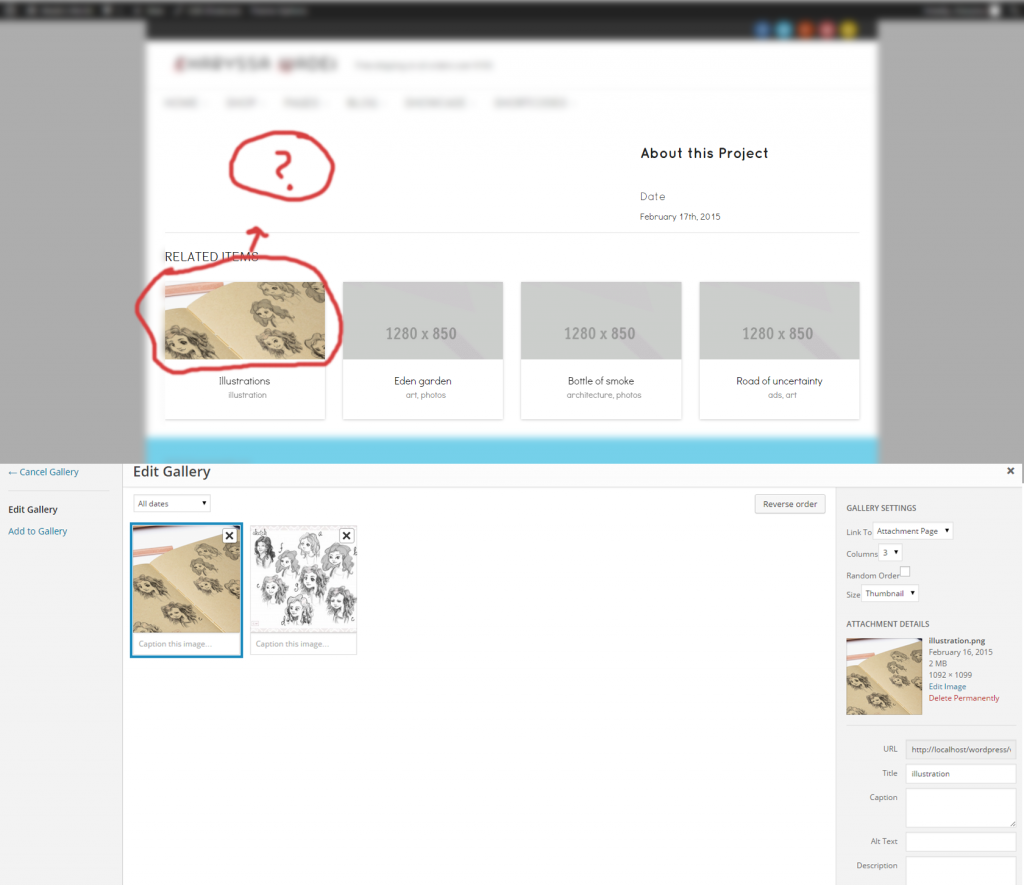
How can I show an still image instead of a video in the showcase portfolio?
thanks,
Issa
Hi there
There’s a Showcase Image gallery option just above the video input. If you just want to display a single image use the featured image.
Can see here: http://awesomescreenshot.com/0ef4f7cg1d
Best
Simon
Hello,
I tried the showcase image gallery and it still won’t show anything. This is what it looks like
http://i1082.photobucket.com/albums/j365/TinuvielEva/featured-image-1.pngThanks,
Issa
Hi Issa
Have you added it also as a featured image? It needs that to display the thumbnail. You can see it in my screenshot – http://awesomescreenshot.com/0ef4f7cg1d
Simon
yes i have added it as a featured image, that is the first thing I do. Its still not showing up for me. It populates in the portfolio with the picture, but the gallery still doesn’t work. Is there anything else I’m missing?
thanks,
Issa
Hi
Can you send a direct link to that page and a WordPress login to support@commercegurus.com and I’ll take a look.
Simon