45 comments found.

Hello, I installed the theme. But in editor, short codes button did not appeared. Could you help me? Thanks,
Hi,
That icon was created for the old editor. You can activate the old editor by using this plugin – https://wordpress.org/plugins/classic-editor/
But that icon (shortcode generator) is just “typing” shortcode for you. On the other side you already have all shortcodes in demo content – so, you can copy/past them.
If you have more questions, please use our support forum – https://cocobasic.ticksy.com/
Thank you.
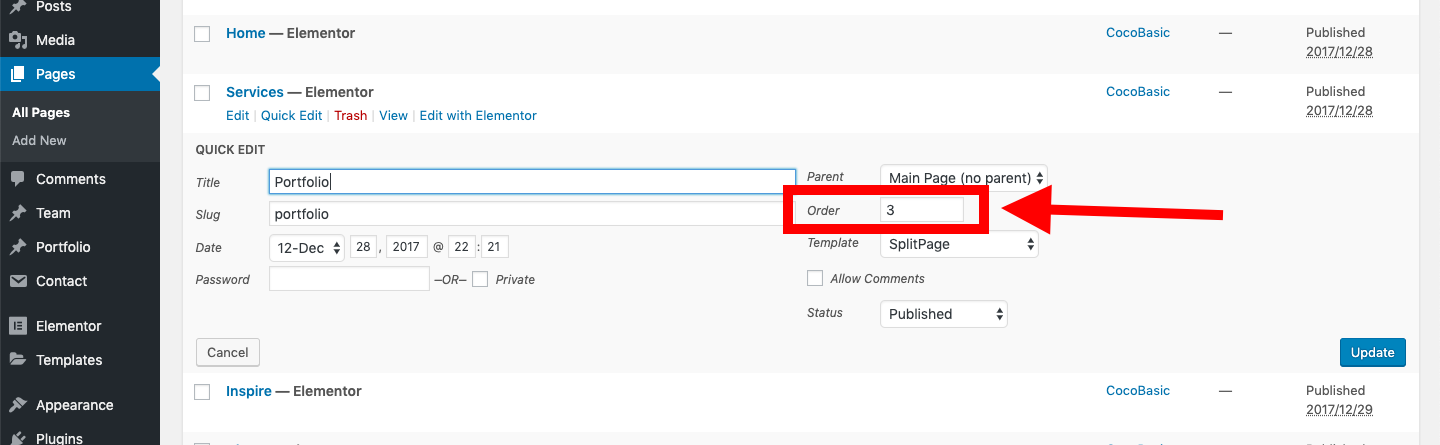
How do I change the order of the pages in the onepage?
You need to change “Order” value for the page. Check this – https://ticksy_attachments.s3.amazonaws.com/pageOrder_130.png
sorry, Thanks.
hello, on the homepage by clicking on a portfolio item I have the text “undefined” how can i solve?
on the homepage by clicking on a portfolio item I have the text “undefined” how can i solve?
Hi,
There is some problem with WP 5.9.1. The quick and easy solution (at the moment) is to downgrade WP to ver 5.9.
Plugin which can do that – https://wordpress.org/plugins/wp-downgrade/
I am looking for a solution (checking again my code) but also it can be that there is a bug in WP it self and there I can not do anything (we must wait until WP core developers fix that).
Hope all will be fixed soon.
Thanks for the reply. I have another problem. I used the same theme footer and the image is cropped at the bottom. how can i solve?
unfortunately the core updates automatically. I have tried various plugins. Do you have an alternative solution?
There will be official update in next 24-48h.
I have already updated my live demos and it looks like all is working fine. So, the update will be live soon on Envato.
Thank you.
Hi,
There is a new version on Theme Forest. Update your theme.
If you have more questions, please open a support ticket – https://cocobasic.ticksy.com/
Thank you.
I upgraded to version 1.5 but the problem persists. https://www.friariello.com/
- Check if you have updated the plugin also to 1.5
- Empty Cache plugin and/or empty DNS server if you have (it looks like you are using the same hosting us me – SiteGround and when I empty/reset my DNS I need to wait up to 24h to get the latest version on my website).
It is because of cached page – it will take some time after you reset the cache.
unfortunately this is not the case. I have update to 1.5- The update does not work.
It works perfect.
https://ibb.co/1fTYnqM- Empty your browser cache OR use incognito mode OR use some other browser
BUT if you are using DNS it can be that you need to wait a little bit more (check on Google how DNS server works – they are all around the word and it needs time to update all of them).
Hi there, nice theme! If one purchases the theme, would you be able to supply the layouts in PSD format?
Sorry, and which editor is the theme using?
Hi,
Theme is created on “old school” way – using shortcodes. So, there is no visual (drag and drop) builder.
Sorry, we don’t have a PSD file of a full theme – only PSD of gradient images which we are using left/right for the section titles, this one – https://demo.cocobasic.com/caliris-wp/wp-content/uploads/2017/11/left_obj_05.png
If you are interested and want to test the theme, I can give you admin access. Contact me via email from my Profile page – https://themeforest.net/user/cocobasic
Best
Hi, there is a section that displays correctly on IE but will not display correctly on chrome. is there an update? this happened about 3 months or so ago
Hi,
IE is not-supported/out of date browser and I will not test any more my items with IE. On other side – all my items must work properly on the latest version of Chrome.
This is what I see on my live demo (using MacOS and latest Chrome) – https://imgur.com/vW6b79F
All looks ok for me. Can you point me which part is not working correctly?
section 3. I have to zoom in and out on different computers for all images to display. here’s the website https://baltimoresgifted.com/
Hi,
There is “mixed content” on your website and maybe that is the reason (I am not 100% sure). Your domain is on https and the images are loaded using http (not secure connection).
Also, some time ago the WP has included lazyload option for images by default and maybe there is some “conflict” (but on our live demo all works fine). I am suggesting you to install this plugin and to enable only the “Lazy Load” option for images – https://wordpress.org/plugins/wp-smushit/
If you still have troubles there or have any other question, please use our support forum.
Hello,
How do I place the “Search” option in the “Menu”? plz
Sorry for the double post… 
Hi,
Sorry, we don’t have this option by default, so I can offer you this only as custom modification (if you are interested, contact me via email form).
But also it looks like there are a lot of free plugins which can do this and a lot of tutorials – you can try some of them.
Hi! We have bought Caliris theme here but the support has ended while I have one more question) May be somebody can help me. The issue is with logo icon (in your case it’s Caliris) in the left upper corner.
We change it to our business logo in png and use a very good quality but as a result always get a very low quality logo on a website (all other elements are very bright and clear but logo is terrible…) What can we do with that? We have tried to change different sizes but it doesn’t help
Hi,
There was some version of Google Chrome which had a problem with this and I have added some fix for that but maybe (obvious) now that is the problem.
In Dashboard > Appearance > Editor > style.css find this code:
.header-logo
{
    line-height: 0;
    font-size: 0;
    float: left;
    position: absolute;
    transform: translateY(-50%);
    top: 50%;
    image-rendering: pixelated;
}
and remove last line:
image-rendering: pixelated;
I will remove this in next update also.
Also, I am recommending to try with a Retina Ready Logo – if you have questions about Retina Ready logo, contact me on email and I will explain you how to make it (it should be twice bigger and you need some extra CSS code).
greetings, the preview of a page and how the page displays when baltimoresgifted.com is published don’t match. All of the short code is the same from demo content. I’ve viewed it on two different browsers and the same issue. The preview displays everything correctly but the published site does not. how can I send a screen shot?
Hi,
Please open a support ticket on our forum – https://cocobasic.ticksy.com/
You can start a private ticket there and provide me your login info (admin username and pass) so I can check the code/theme.
Thank you.
i tired but my theme isn’t listed and it will not accept the purchase code. thers no Calris WP only HTML. Please advise?
For me it looks ok – https://imgur.com/fucdyXg Strange. Contact me over the email – you can contact me over email form from profile page here – https://themeforest.net/user/cocobasic – (right bottom corner) or directly (you will find the email in documentation file – https://demo.cocobasic.com/documentation/MANUAL-CalirisWP.pdf )
my apologies I found it….ticket submitted
No problem. Check your ticket, you have answer there. Best.
does this theme have a visual page/portfolio builder? Right now its just all text and changes are not updated correctly. I’ve installed the Element Page Builder but it only works for pages, not the portfolio post. please advise.
Hi,
Content in the theme by default is not created using any visual builder, only via shortcodes (maybe we will change this in some of upcoming updates, but can’t promise anything).
You can install Elementor and start creating a content with that page builder. And for Pages should work all fine (as you mentioned). For Portfolio items, you need to enable in Elementor > Settings > Posts Types > Portfolio
But, there is some limitations. In Portfolio section we are using Ajax call to get the content on front page for Portfolio Item. If you have added some default Elementor widget in Portfolio item content which need JavaScript to run – that will not work after Ajax call (for example, default Image Carousel will not work after ajax call on OnePage / front page). That is a limitation in Elementor because there is no documentation for this part.
But, on other side, our custom Slider (which is created using shortcodes) will work after ajax call (like you can see on our demo). So, for Portfolio Item, you can create content (layout, text, images) using the Elementor + add a Elementor Shortcode widget and there add shortcode for slider and that all should work fine on ajax call.
Sorry for a little bit longer post, hope I was clear.
i tried submitting a ticket but Carlis WP wasn’t listed. having a small brian fart…can you please tell me where in the dashboard to edit the footer section that has the email and social links? https://meetyourmakers.us/baltimoresgifted/
Hmm, strange, it should be there – there are already answered questions.
To edit the footer section go to Dashboard > Appearance > Customize
Take a look here – https://www.youtube.com/watch?v=QulXcK450VY&feature=youtu.be&t=130
hi yes i saw that but not what I am looking for. there’s already a footer on my page with an email address. I just want to edit that. where are those settings? not shown in the vid. I’m not adding a new footer, i need to know where to edit the content of the current footer. thanks for the fast response
Just edit code there, in the Customizer.
On the same place where you have added a email address (in Customizer) you will edit it. The code which is added in Customizer for email address looks like this:
<a href="mailto:do-not-send-me@yoursite.com">hello@cocobasic.com
</a>
So, edit “do-not-send-me@yoursite.com” and “hello@cocobasic.com” with your own email address.
For social icons – https://cocobasic.ticksy.com/article/12743/
there is no code to edit. is there a way i can send you an email with a screen shot?
I just checked code on your site and it looks like you have created a footer content through the footer sidebar (widget area). So, if I am not wrong, your footer content is placed in Dashboard > Appearance > Widgets – take a look there.
If you have more questions, if will much better to try again to use our support forum – https://cocobasic.ticksy.com/
awesome that worked..thanks!
Hi how we can make this theme mobile responsive. I got this theme from elements envato.
Hi,
Theme is (should be) already responsive. Check here – https://www.responsinator.com/?url=https://demo.cocobasic.com/caliris-wp/&device=iphone-x&orientation=portrait
Check your code again and if you still need some help, please use our support forum but for that you will need a regular license – there is no support for Elements users (that is the “price” of Elements). Thank you.
https://cocobasic.ticksy.com/Hi. RTL support ?
Sorry, no. I don’t have experience in creating RTL themes.
Hi,
this wordpress theme include any page builder like wp bakery? kindly, please let me know
Hi,
No – the content is created using shotcodrs. It is on our list for update and Elementor page builder will be added (like we have add in Cardea WordPress), but I can not tell you when will be this update.
Okay cool Thanks. if there any slider plugin available?
No, sorry. There is a shortcode for a simple image slider (click on first portfolio item and you will see the simple image slider).
You can also check our Meelo WordPress – it is created using Elementor and Slider Revolution is also included.
Much Better thanks a lot

Hi,
is it possible to actually try Caliris theme somehow before buying?
Thanks Kristýna
Hi,
Yes. Contact me over our profile page (there is a contact form in bottom-right corner) to provide you more info – https://themeforest.net/user/cocobasic
Hi, great theme! Question: I cannot see the coco shortcode button when editing text on a page of portfolio item. I got the plugin installed and working (shortcodes and all work fine), but I cannot see the button to add shortcodes? I hope you can help me out.
Best regards, Wessel
Hi,
Thank you on kind words!
Take a look on this article (it is for our Opta WP theme) but on same way you can return the icon in Caliris WP (maybe the lines 19 and 21 will some other numbers – for example 18-20) but the code is the same. If you have any additional questions feel free to ask anytime.
Hi, thanks for your reply.. What article? I see no link?
Thanks!
- Is this theme stille supported?
- Will there be updates in the future?
Thanks
Hi,
Yes – theme works fine with latest WP.
Yes – theme must always work with latest WP version. So, there will be updates to keep the theme up to date with WP core updates
On other side, as you see, all our themes are simple and minimal and will keep them like that – it is not in our plan to add lots of features in upcoming updates – just to keep the current features up to date.
Hi, I purchased this theme today. What is the best way to add a testimonials/references section?
Hi,
The easiest way is to use 3rd part plugin for that (there are a lot free plugins with this functionality). I can help you to add/edit some CSS code. If you need any additional help about this, contact me on support forum.
Thank you.
Hello CocoBasic, Does this theme support all google fonts?
Hi,
We are including only fonts which we are using in the theme (Google Fonts) and the only way to include additional Google Fonts is to do it manually. Here is a example from Opta WP (on same/similar way you can include in Caliris). I will help you with this just let me know which font you want to use.
https://cocobasic.ticksy.com/article/10919/Also, if you are interested, I can give you admin access to Caliris – to try a whole theme before you buy it.
Just contact me over the mail via our profile page (in bottom-right corner is a contact form) – https://themeforest.net/user/cocobasic
Hi, we are considering this theme for a project. Couple of questions:
Is it possible to change order of the different sections since it doesn’t include visual composer? Is there a way to see in action the image slider since it doesn’t include revolution slider? Is it this one? https://codepen.io/AndreCortellini/pen/kxwmj/
Hi,
Yes, you can easy change order of pages/sections.
We have simple slider which you can see on Portfolio section when you click on first item (Plate – Real Mockup)
If you are interested, I can give you access (admin dashboard access) to try the theme before you buy it – just contact me over the mail and I will provide you all info.
Thank you
I cannot change the tittle of the site nor the description. Could you please help me. Thanks
Hi,
You will find the answer on our support forum. Thank you.
Hi, i do not find it
I have answered you on our support forum. You have start there the same question – you have there also an answer.