422 comments found.

Hi, in Wordpress admin, inside “Knowledge Base” i can only see dd New Article, Article Categories, Article Tags.
Can’t fins the sections for customizing order and other stuff I saw in the documentation.
I installed exactly following yor guide (all plugins, regular and child themes). Did it twice, still can’t get this sections.
Hi Lubos, We’re using this Custom Post Type UI plugin: https://en-gb.wordpress.org/plugins/custom-post-type-ui/ However when we view these custom post types it uses the full width content layout – do you know how would we change this to the layout with the sidebar? Thanks!
Hi,
you will have to check the documentation of the plugin on how to edit its template. You can use the page-templates/sidebar-left.php or page-templates/sidebar-right.php template files as a base, but how to name the final file and where to place it (definitely somewhere in the child theme though) is something you will have to learn from that plugin itself.
Lubos
BTW, the standard file name would be archive-cpt_name.php (placed in your child theme root), but again, I have no idea how that specific plugin works, so better check its documentation or contact its author.
Hi Lubos,
We’re using this Custom Post Type UI plugin: https://en-gb.wordpress.org/plugins/custom-post-type-ui/
However when we view these custom post types it uses the full width content layout – do you know how would we change this to the layout with the sidebar?
Thanks!
Hi,
I am sorry, but you will have to contact me via an account with which you have purchased the theme to get support.
Lubos
in this new version, where can edit suggestion search?
Hi,
under Appearance / Customize / Header.
Lubos
hi i have WordPress 5.2.2 and this plugins with his versions: https://drive.google.com/file/d/1Jd4qHvnj6hVWvwtcC8msiyCk8yMERpnH/view?usp=drivesdk And in this moment i cant order categories and articles, pls help
solved, wp-admin/options-general.php?page=hicpo-settings, tnks
Hello, a few presales questions please. We’re aware that this is a wordpress KB but we’d like your statement to be sure.
1) We have an issue with our current KB as it does not support non-latin characters on the page title. Does your theme support non-latin UTF-8 characters both in the content and in the page titles?
2) Will we be able to have both public and private Forum categories and pages, public and private KB categories and articles?
3) Does the Search function work with non-latin UTF-8 characters too? I tested it on your demo and it works perfectly for English characters. Need to make sure it works with non-latin UTF-8 (not Aascii) characters.
Thank you
Hi,
1.) never heard about an issue with that
2.) forum functionality is handled by bbPress plugin, so please check out their documentation or support forum if you have any questions about its functionality. As for KB articles, private posts is a standard WP functionality so that is possible, however I’ve never heard about private categories. maybe there is a plugin for that, but I can’t guarantee it. I guess you should expect that some custom coding may be required to achieve that.
3.) again, never heard about any issues with that and I have plenty of non-english based customers. Also, the search algorithm is handled by the WP itself, theme provides only the front-end styling. I guess you can try it with some default WP theme if you are not sure about that.
Lubos
Hi,
that is a Sitemap block which uses a standard WP menu which you can edit under Appearance / Menus. Please read this tutorial on how to create a demo front page where it is explained in detail.
Lubos
How can deactivate EN DE ES menu, i think that is language preference but i need only spanish but without menu
done, is with customize menu
Hi,
under Appearance / Customize / Languages.
Please read through the whole documentation. This for example was mentioned right at the start in the Quick Overview chapter.
Lubos
Hi, How can I get a Knowlegde base overview like on the demo page? (see here: https://snag.gy/GK70Al.jpg). I want article columns align: left and also give each of them a small icon. Also it would be nice if every category would always show how many items it contains; i.e. “6 Articles”. Thanks
Hi,
that page is automatically generated under yoursite.com/knowedge-base (if you haven’t changed its permalink). You also need to go to Appearance / Customizer / Knowledge Base and change Archive Layout to Category View.
Lubos
thanks, apparently the screenshot did land on a 404, here is a new one: https://snag.gy/Bw7OsQ.jpg I found the URL you’re talking about but is has a slightly different layout than the one you’ve made on your demo site. Can I change the layout somewhere? Here is a screenshot of what it looks like on my site: https://snag.gy/foVeAJ.jpg
Please read my reply again.
pre sales question: 1. Is the theme SEO friendly (do pages / comments / posts get easily indexed?). In line of this: is it easy to modify on-page SEO (header tags, titles, etc). Or is the theme article layout not very customizeable? 2. I want to build my own content pages using Visual Composer. I already read that compatibility is not guaranteed. But I don’t like Gutenberg so I will use VC. Are there known issues when using VC in this theme? 3. Is the top header also customizeable? (where now the search bar is). 4. Is the homepage easily customizeable? (can I add text blocks, some images, etc?)
Hi,
1.) I haven’t heard any complains from customers when it comes to SEO, also you should use a 3rd party plugin like Yoast SEO for some advanced SEO config. Not sure what you mean by “article layout”, but the KB article detail page works in the same way as standard WP post.
2.) the main issue is that you won’t find custom theme elements in the VC, so you will have to use shortcodes. Also, I do not support VC, so if you come across any incompatibility issues, I can’t guarantee I will be able to fix them.
3.) it depends what you mean by customizable. You can change BG image, logo, site tagline and description, menu, language switcher and and toggle the search area. All the basic stuff. If you need to completely change it then you will have to do it via code.
4.) the demo home page was created using the Gutenberg editor so it is customizable. I guess you can use VC instead, but as I’ve said earlier, you won’t find those elements you see on the demo as VC elements.
Lubos
Hi Lubos- I see you updated the theme. I ditched the alternative that I had gone with and am back with Lore. Keep up the great work and thank you. Kindest Regards-
Hi,
glad to hear!
Lubos
Hi, how do i add an article to a category? look in this picture, for the exemple, i don’t know how to add a new article on the title “editar conteudo”.
http://uploaddeimagens.com.br/imagens/okkk-png-4fb4dc28-1aec-4096-b4a6-fd9f3845bca2Hi,
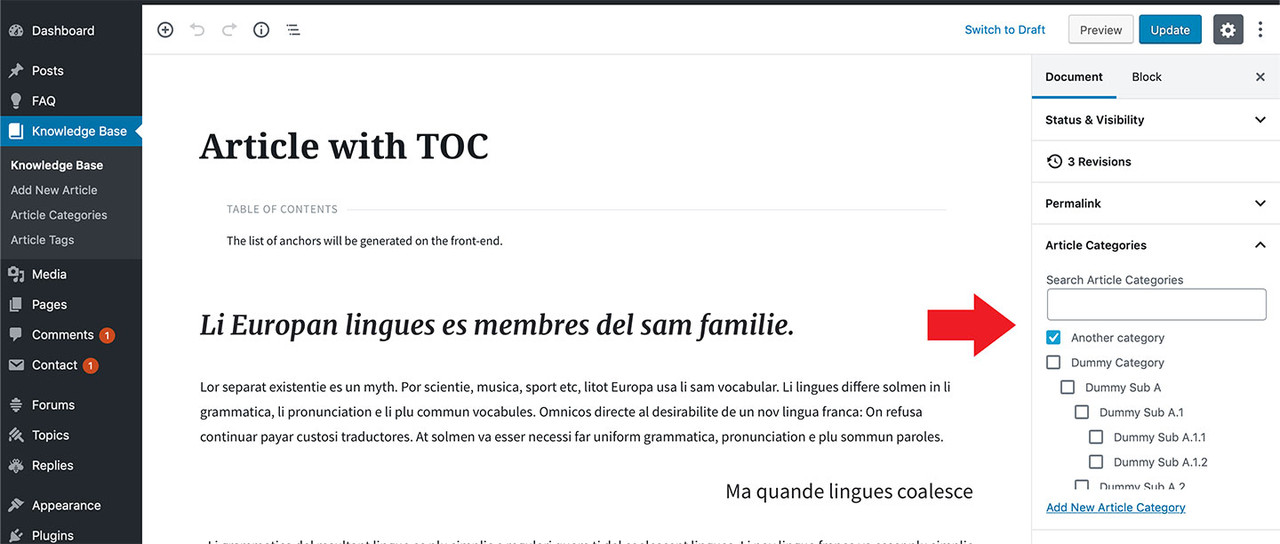
simply edit the article post and assign a category in the right panel. See the screenshot. It works exactly the same as with the regular WP posts.
Lubos
So, thats the problem with mine, doesn’t show anything to chose, look:
http://uploaddeimagens.com.br/imagens/de-png-7f98b3f2-f8a6-4caa-b43c-9906ed6dab65Are you using the latest version of the WordPress (5.2.1)? Try to disable all plugins except LSVR ones to see if that makes any change.
Forget about what i just said, after a while he show me those options. My only doubt now is how i can make this inicial page pretty, i have options to change the layout or insert an image, for the example…?
http://uploaddeimagens.com.br/imagens/32-png-3b34c30e-5256-4f62-b31d-2026bcb5bec3Another thing, when i choose “todos os artigos”, the acutally page that he brings me is for the Blog page, do you know what can be that? http://uploaddeimagens.com.br/imagens/artigos-png
Not sure I understand your question. Simply edit the page in the admin using the block editor. Have you read through the documentation? There is a tutorial on how to create the demo home page from the scratch. You should definitely read it.
Also, I do not understand your second question. That screen is for setting up your front page and blog page. So if you set your “todos os artigos” page as blog page, it will be used to display blog posts.
I already finished the documentation, about those thing that i asked you, already solved them. Can i scape of the translate plugin and do it manualy? For the example i’d like to change the “previous” and “next” in the end of the page for “anterior” and “proximo” and also “by admin”.
http://uploaddeimagens.com.br/imagens/333-png-626058e0-d4fe-440a-a979-71764c015348If you do it manually via the code, you will lost those changes if you update the theme in the future. Translating it via .po file is the proper way to do it.
I follow your steps and Its working, thanks!
For remove the comments i just need to remove the plugin of comments?
http://uploaddeimagens.com.br/imagens/comentario-png-f3e2d0b7-a3e6-4d57-a591-d42f198160a3You can disable them under Settings / Discussion. This is a basic WP functionality. If you are new to WordPress, please read through some beginner tutorials. Support covers only theme-specific stuff.
Sorry for so many questions, i wordked with wordpress before but just with page builders and i didn’t learn differenciate elements that belong to a theme than elements that belongs to wordpress
No problem.
On the Lore Sitemap Block, how can I add an icon to the top of the menu name>
Hi,
try this custom CSS:
.lsvr-lore-sitemap__title { padding-left: 20px; }
.lsvr-lore-sitemap__title::before { font-family: 'lore-icons'; content: '\f006'; }
Just replace ”\f006” code with icon code from this list (it has to be prefixed by ”\”).
Lubos
That helped a ton!, but I am also lost on how to set the icon like you have it set on the demo. Where you have the categories sitemap buttons with the icon on each category. under the category settings I add the icon name but it does not appear, what am I missing to enable these?
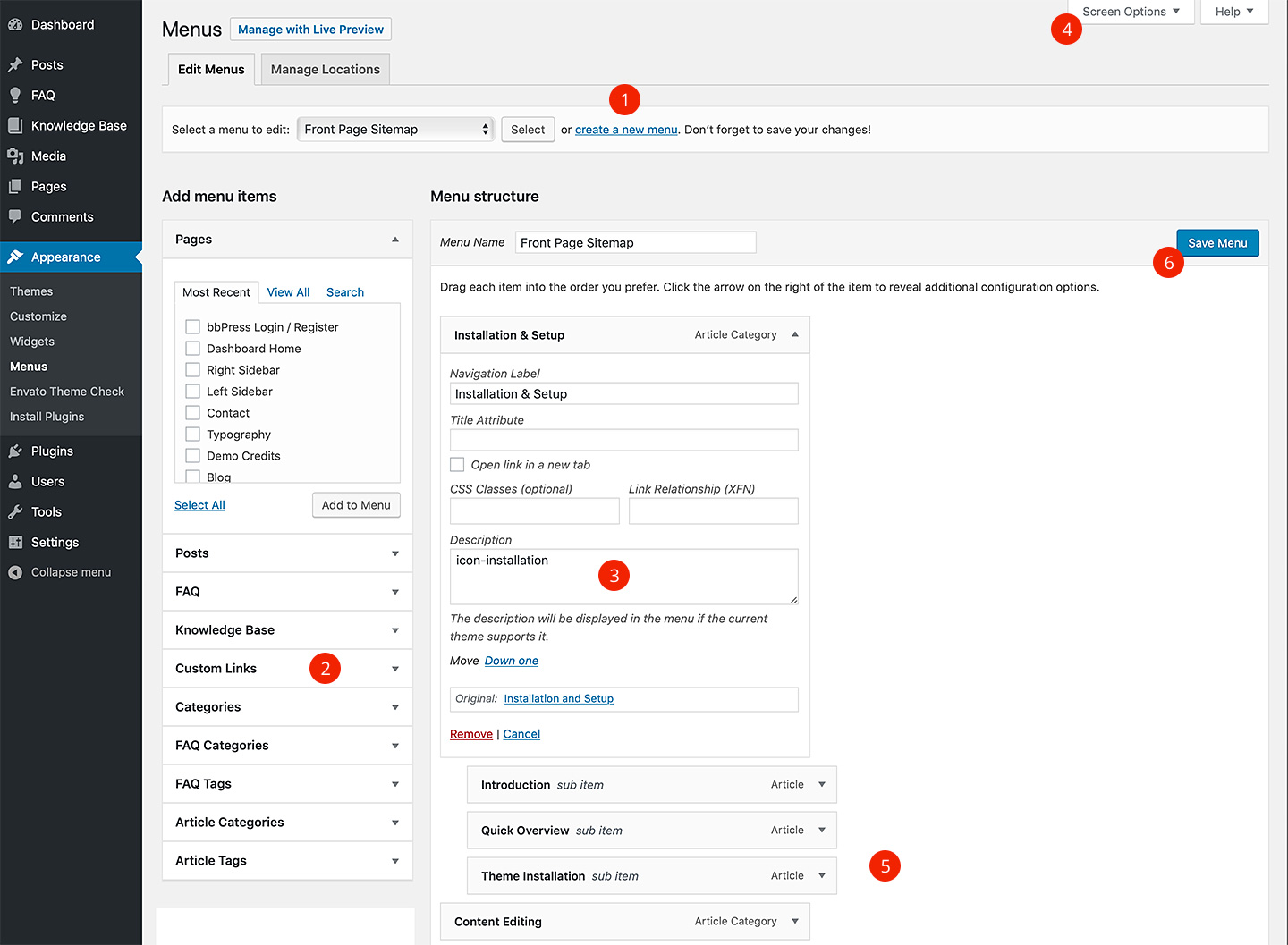
The Sitemap element works a bit differently. To add an icon, edit your sitemap under Appearance / Menus and add an icon name into the Description field of the top level menu items. If you don’t see the Description field, click on Screen Options in upper right corner and enable it. I will add this into the documentation.
I’ve just updated the documentation, check out this screenshot (point 3).
Can you explain me wich is the ways of editing your theme? Is it dificult? I also would like know if i can use some page builders like WPBkaery, Elementor, etc.
Hi,
you can use WPBakery and Elementor (however there is currently known incompatibility issue with Elementor which will be fixed in the next update), but most of the custom theme’s elements won’t be available in those editors. The Gutenberg editor is the recommended and the only officially supported editor for this theme. I do not provide support for any other editors, so you are on your own when using them (but I am willing to fix any glaring incompatibility issues if possible).
I can’t tell whether it is difficult to use, because that is obviously very subjective.
Lubos
Hi, it’s me again, can you please help me with taht..? I don’t know how to edit the content on the right side (site-1), as you can sse on the file “site-2”, i can’t see the gutenberg editor.
Sidebars are edited under Appearance / Widgets.
I can edit the pages with WPBakery or any other website builder?
Is there any video editing the theme? I’d like to know how easy or dificult it is to edit.
Hi,
you can edit the pages using the built-in block editor (Gutenberg). If you have your own WPBakery license, then it should work too, however most of the theme custom elements are not available outside the Gutenberg editor.
There is no video about the theme but take a look under Item Details tab for some admin screenshots. Generally, the theme works the same as any other modern WordPress theme. You have the Customizer to edit theme options, Gutenberg for editing pages and posts and stuff like FAQ and Knowledge Base articles is handled via custom post types, so basically the same workflow as standard posts.
Lubos
Hello, Sorry but i don’t find anymore the url with incons named like “loreico loreico-heart”... I’ve just find this, but it doesn’t work… http://docs.lsvr.sk/lore.wp/content/icons/index.html Thanks for helping me
Hi,
what version of the theme are you using?
Lubos
LoreVersion : 1.1.0
In that case, check out this link.
Thanks !
Hi, I have purchased downloaded the knowledge base theme on 29th May. I have decided to install the demo content to see how the content has been organised. I have followed instructions given here: https://preview.lsvr.sk/lore/knowledge-base/demo-setup/
Although I had no issues installing demo content, whenever I preview any demo pages a blank page appears. I have double checked the static page customizations etc aswell. Just to check I have installed one of wordpresses default themes and that worked immediately. If you have any feedback back regarding this It would be appreciated. Thank you
Hi,
do you mean blank as just a white screen, or a page without content? If you mean a white screen, then make sure you are running PHP 5.6 or higher. Next, you can enable the WP debug mode which will display the error message instead of just the white screen.
If you mean a blank page, then share your URL please.
Lubos
Hi, Thanks for your prompt reply. I mean a white screen. I have just checked the php version, which 5.5.38. This is because our production application currently requires that version of PHP.
I am sorry but PHP 5.6 is the supported minimum. I can issue you a refund, however it is very likely that any modern theme will require at least PHP 5.6 (even if not now, then most likely in the future if author keeps updating it), but it is up to you. If you want to proceed with a refund, just send me a PM.
Thanks, I understand. We may try this out on another server with PHP 7. I’ll get it in contact with you if I have any issues with that. Thanks again for your feedback.
Sure, just keep in mind please that I offer refunds only within 30 days from purchase.
Hi,
something like that is not possible. It is a nice idea though, maybe in the future, but definitely not anytime soon.
Lubos
HI! Where I can find the link to update to 2.0? And what is the procedure to update from my version? Thanks!
Hi,
either use the Envato Market or just install it manually as you did for the very first time. You can just follow the documentation. However, if you are updating from 1.x read this first. 1.x is NOT compatible with 2.x version, so you will have to basically set everything from the scratch (only standard posts and pages will be preserved). You can try this plugin to convert your 1.x KB articles to 2.x ones.
Lubos
Hi, No shortcode generator in v2?
Hi,
no, shortcode generator is very outdated concept. The Lore now supports the Gutenberg block editor which is way more easier to use.
Lubos


.)