68 comments found.

I bought this by mistake thinking it’s a WP theme. The seller was very understanding and issued a refund! Buy with confidence.
I purchased this theme a while back and I notice today when I delete a page off the server the page does not actually go away, it looks like it loads the page without the CSS even though the HTML page is no longer on there. Is there some so. Does this theme need a 404 page or something? not sure how the content still loads when the page is not even on the server. Thanks
Here is a example link: http://www.burnerlaw.com/seminars/8_2_2018.html
Hi,
This is not a template feature. It must be hosting related. Maybe there is some kind of a caching system?
I’m trying to embed page transition jquery on it but none seems to work. I am particularly interested in animsition jquery or if you have some thing else, please recommend. When I run this on plain simple html, it works but trying to run it on Marble html, it won’t. Not sure, what’s going on. Appreciate your help. Thanks,
Our support only includes fixing bugs and answering questions related to problems with the included features in our items. Debugging or providing guides on how to make custom modifications to items is unfortunately not part of our support. Thank you for understanding.
Hi guys, i have two questions: How many images can i put in the showcase portfolio? (i hope that infinite). Can i associate every image to a specify post in the blog section? (Something like a e-commerce web site, but without a shopping cart). I will be waiting for a response, thanks!!
Thank you for your interest in Marble. There is no limit to the number of images that can be inserted in the showcase portfolio. But please keep in mind that the more images you have the more time it will take for the page to load. We couldn’t understand your second question though. Could you please provide more details and maybe screenshots? Thanks.
Thank you. This is my first template purchase. I prefer to design my own, but I am still learning. I really liked all the different elements you included in this page.
Thank you 
Hi, I need to add two different google maps on contact page using map … like in the contact example page of the theme. could you give me support, please? there’s also a way to insert a responsive table inside a single page like the pricing table style … cause if I try to add a column it will crash while moving mouse over … thanks in advance
Hi,
You don’t seem to have purchased this item. There is no purchased badge on your comment. Is it possible that you’re referring to the Wordpress version of Marble? If so, Wordpress version of Marble is released by tommusrhodus. You can contact him through Marble Wordpress discussions page: http://themeforest.net/item/marble-flat-responsive-creative-wordpress-theme/5896650/comments or his support forum: http://tommusrhodus.ticksy.com/ If you are referring to the HTML version, could you please contact us with the account you purchased the item? Thanks.
Anyone else having trouble with links in the revolution slider not working on iphone or ipad? They work on desktop.
appears to be a safari only issue.
Hi,
Could be an issue with the latest iOS. We contacted themepunch (the developers of Revolution Slider) and we will get back to you as soon as we hear from them.
Hellooo, I was wondering, how do i change the favicon? Many thanks
Hi,
You need to replace the existing favicon.png in style/images folder. The image must be 16×16
Hello. I have to ask you one more question.:) Hopefully last one.
On webmaster tools my index page (without extension) and my sitemat has error 403. Can you please tell me how to fix it? Those pages work fine if I type them on google. But for example if i want to put www.simi-design.com on my facebook page it gives me error 403.
All other pages cant find the resources of style/type/fontello it says this “Get optimal indexing of your content: make sure Googlebot can access any embedded resource that meaningfully contributes to your site’s visible content, or to its layout.” I have no idea why.
Thank you very much for your answer. >|
Hi,
It may have something to do with the language settings. Please make sure the <head> sections of the pages that have the problem are the same with other pages.
Hello, I would like to ask you about the contact form. I have changed my email in form-handler.php but it is still not working. I am trying online. In slovak language after pressing the submit button it does not react (but i change the name of submit button, to my language so I am not sure if this has something to do with it). And in english version it says Error please try again. Do I also have to fill in the SMTP SERVER, PORT …..?? My site is all done only contact form is missing part. Please help meee. Thank you very much.
Hi,
Your hosting might be requiring SMTP authentication. Could you please try filling SMTP details? Instructions can be found in the help documentation. If it doesn’t work you will need to contact your hosting provider. Because some hosting settings might be the cause of this issue. mail() function may be blocked for example.
Thank you … I will have to contact my hosting provider.
Hello,
Thank you for this web template. I like it more and more.
My web portfolio is nearly ready, but i would like to have it multilingual (2 languages for now).
Could you please tell me how to put a button or maybe two flags for languages somewhere at the top. PLEAASE.
Thank you many times
Hi,
This is how you can add language flag icons in the menu:
HTML:(You can add the code right after Contact menu item)
http://f.cl.ly/items/1o0J2s1Z2C3D1x02291D/%3Cli%20class=lang%3E%3Ca%20href=%3E%3Cimg%20s.txt
CSS:
http://f.cl.ly/items/060h0S0Q0t2H1W1Q1N1P/media%20minwidth%20768px%20%20%09lang%20a%20.txt
This way, the flag icons will only show on the desktop view, and in the responsive menu, the icons will be hidden, only the language names will show.
THANK YOU SO MUCH. I am very happy now.
Hi ya, I have recently purchased this template and I am trying to use a circle logo, well the PNG is square, I have extended the margin height to fit but the menu is not centred vertically, when it collapses (through scrolling) it is centered but when fully open its not. Can you help? This is just regarding the menu itself.
Hi,
Could you please provide your website URL so we can take a closer look?
Sure, its purley testing at the moment to see if the theme will work for what I want, which it more than likely will. Love the template
Link is: http://afcreative.com.au/test/
Hi,
Unfortunately there is no direct option to make it work. If you send us your template files we can edit the header script for you and customize it to fit your needs. Please send us an email via the contact form on our profile page http://themeforest.net/user/elemis#contact and we’ll reply so you can send the files.
Thank you so much for your help, I have emailed you a response. Awesome quick and helpful respone
Hi. This php files don’t work in my template. Please send me this php files: tural-39@mail.ru
SMTPClass.php form-handler.php
If you buy the template, those files will be in the download package.
Hi, I have been trying to change the height of the Navbar but havent been successful . I have remove evrything from the Navbar as I don’t want a menu, Im just using the Navbar to display the logo and a title.
I would like to make the navbar half of it’s current height (25px I guess). I have been going through style.css without success I found the offset line but that’s just offsetting all the rest of the page not changing the height of the Navbar block.
Hope you can help me, thank you very much !
Best
Hi, I got it, they was a navbarMinimumPadding = 5px in script.js I change it to 0px and I can now have a very slim NavBar ! thanks
Hi, how can i map the share buttons? I code the url in href tag but doesn’t work.
Share section is design only. They are not working on the demo either. You will need to add a social sharing plugin yourself. There are some examples here: http://www.sitepoint.com/10-social-sharing-jquery-plugins-missed/
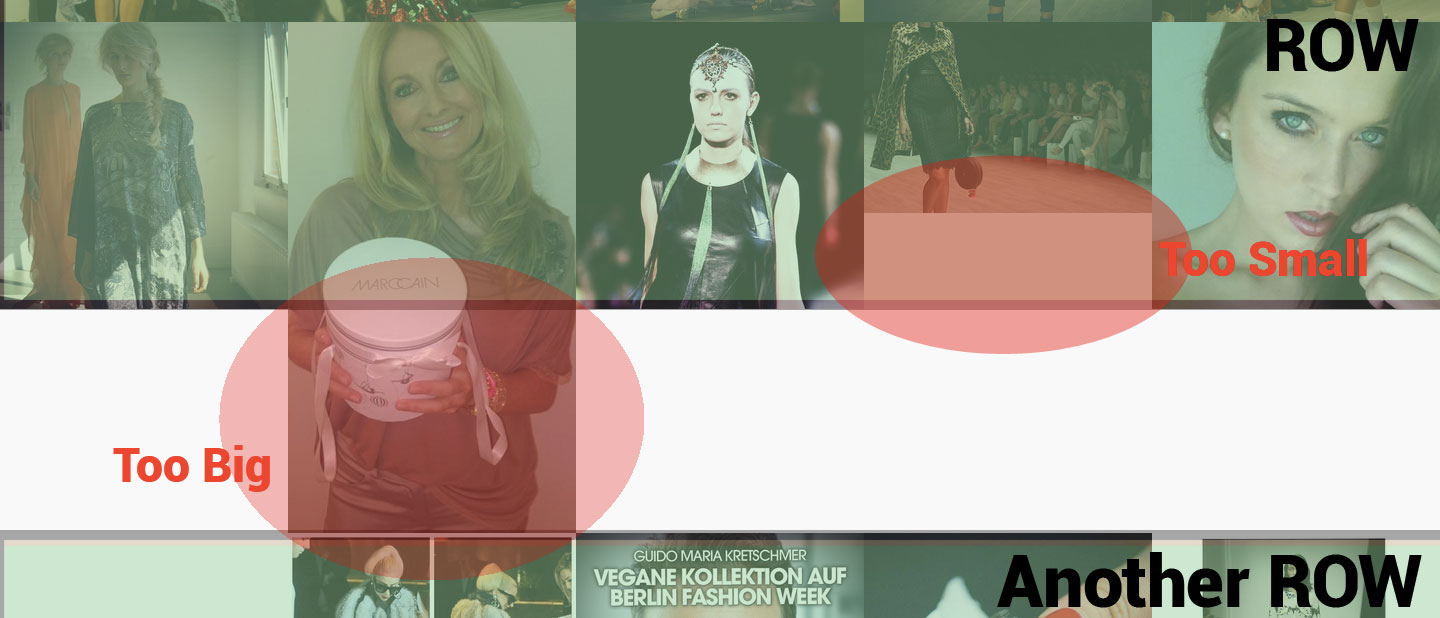
Hi, first of all this is a nice theme. But i still have a little problem. The images displayed in the img tags don’t have the same size. The img tag has a fixed width but the height is set to auto. What i want is that every image (it doesn’t matter if the height is too less or too much) is displayed in the same size without distortion. Maybe center the image and crop the border? Is this possible?
Sorry we couldn’t understand what images you are referring to. Could you please provide your website URL so we can take a closer look? Thanks.
Ok, sorry. Maybe i wasn’t clear enough. I cannot give you an URL because my website isn’t online yet. I try to explain it again.
I’m using the “showcase portfolio” view where every image is square. But your sources in your demo are already square. In my case i have images that aren’t necessarily square. They can be in landscape or portrait orientation. That’s why i have white spaces or the image is so big that the whole row slides down. The question is now how to force the images to be square and to keep their aspect ratio. It doesn’t matter if the image is cropped or enlarged.
Maybe this sample makes it clear…
You can disable the “fitrows” option of Isotope and make the showcase portfolio work as masonry grid (as in http://cl.ly/image/16141r1u3b1M). In order to achieve this you need to remove the following code that is under title “ISOTOPE PORTFOLIO” in style/js/scripts.js:
layoutMode: 'fitRows',
Unfortunately this is not an option because i like the squared grid layout of your theme. Isn’t it possible to force the image to be square and keep the aspect ratio? I can’t use a fixed CSS height with overflow because of the responsive design that changes the image size depending on the screen size. And i can’t change the image size on the server because i only have the URL to the images and not the images as files. Do you have any idea?
Unfortunately it is not possible to force the image to be square and keep the aspect ratio. The only way is to upload the images on your server as square.
Hi. Very nice theme. Is there any way to get the portfolio filtered from the URL? Something like http://www.example.com/portfolio#video so that the link get you to the portfolio with the videos already filtered. Thanks!
Unfortunately this is not possible with the existing portfolio script.
Hello elemis,
I’ve a problem with the contact form… well, it doesn’t work. Is there anything else to do than changing the Email in form-handler.php? After submit the message there is a green box with wild letters shown above the contact form…
Hope you can help me
Kind regards
Hi,
Please make sure you’re working online when testing the contact form because forms work only when online.
Hi elemis,
I know. My website went online today… but it still doesn’t work 
I’m working with Abobe Dreamweaver CS4... could this be a problem?
Can you please provide your website URL so we can take a closer look?
You have received a message from me  Thx for your support!
Just replied your email.
I really like this theme! But I have a problem with it.
When I upload the zip file to my wordpress, I got a massage saying missing stylesheet I checked the folder and I saw the style sheet wasn’t missing but just in the files?
I tried different solutions like upload only the template file or changed all the subfiles to the main file?
What can I do to solve this problem?
Thank you in advance
Hi,
You purchased the HTML version of Marble. It is a pure HTML template, not a Wordpress theme. So it can’t be installed in Wordpress. You can purchase the Wordpress version here: http://themeforest.net/item/marble-flat-responsive-creative-wordpress-theme/5896650
Hi, Im back with a simple question but I couldnt figure out how to do it :
I wanna be able to have some portfolio page with a dark background and some page with a Light background.
The main lading page index.html as a light background then when I click to launch a portfolio page I would like to be able to have dark or white background on that new page.
Ive try to create a style_dark.css (black background) that I was calling in the portfolio page I wanted to be dark and it works if I load directly the portfolio_page.html however when I go on the index.html and click on the thumbs to load that project it’s loading with the parent style so a light background, I believe it’s overwriting the style_dark and replacing by style.css ?
How will you do that ? I really want to be able to have some porfolio page with a black background and some other with a light background.
Thank you in advance.
Best regards
If possible Id like to also be able to call different colors for button so have different style/color/red.css for main page and the style/color/green.css for a portfolio page . thanks !
Portfolio posts are AJAX, so they use the main page css. You will need to edit the “detailview” css for changing the backgrounds. And for the buttons you will need to change the main page colors to change the portfolio post buttons. Then you can add custom colors for main page buttons individually.