616 comments found.

I am not getting the option to update the theme through the updates page on the Wordpress Dashboard. When I try to upload the latest theme directly I get an error. Also, the theme seems to be broken on Wordpress 5.5.
Hi.,
Kindly refer this link for how to update the theme
http://support.wedesignthemes.com/knowledge-base/steps-to-update-the-theme/Regards., DesignThemes Support.
Hey, I installed this theme and there was an error, I decided to not use the theme. I am using another theme for this project, so I would like to have a refund. 7033b76a-e4ae-47ce-9125-cef4812c02cf How do I go about this?
Hi.,
Please be more specific on your query with some screenshots / videos. So that we can get a clear view and help you ASAP.
Regards., DesignThemes Support.
Hello, I have upgraded the wordpress to 5.4 but it seems that the Revolution Slider in the theme is not supported and cannot be activated.
I went to the download page of the Revolution Slider and the page said I can contact the theme builder to obtain a new copy of Revolution Slider 6, is it correct? If yes, please send it max.lui@gmail.com
Thanks
Hi.,
We have replied to your mail
Hey! I just purchased and installed the theme and right away the Error: Framework/register-header.phop/LINE 80 showed up. I removed all of the code there
$preloader = !empty( cs_get_option( ‘enable-preloader’ ) ) ? “enable” : “disable”; $nicescroll = !empty( cs_get_option( ‘enable-nicescroll’ ) ) ? “enable” : “disable”; $stylepicker = !empty( cs_get_option( ‘enable-stylepicker’ ) ) ? “enable” : “disable”; $stickynav = cs_get_option(“enable-stickynav”) ? “enable” : “disable”; $onepagestickynav = cs_get_option(“enable-onepage-stickynav”) ? “enable” : “disable”; $isResponsive = !empty( cs_get_option( ‘enable-responsive’ ) ) ? “enable” : “disable”; $submenu_animation = cs_get_option(“submenu-animations”) ? cs_get_option(“submenu-animations”) : ””;
I don’t planned to use any “register” part. Once i removed this, I was able to get into the WP dashboard, but now the preview of the site does not load. Just the cute little 4 dots spinning… can you help. I just need to get started….
I am testing this site as a demo in a sub folder first. http://squeakymusic.com/halpern/ Please help. Thank you. mikaHi.,
Dont remove any code just restore it and Kindly, mail us your site credentials immediately via the right bottom form located @ http://themeforest.net/user/designthemes So that, we can check your issues in your end.
Regards., DesignThemes Support.
hi i purshased the theme and followed the steps in the configuration file but i am getting an error while installing a template site. Could you please assist?
Hi.,
Thank you for contacting us.
You can import the demo content via the unyson plugin. Kindly refer our knowledgebase link for how to import the demo contents using the unyson plugin http://docs.wedesignthemes.com/dt_articles/import-demo/
Please check your server requirements., Please refer the below link for server requirements http://docs.wedesignthemes.com/dt_articles/requirements-for-theme/
If still facing any of issues Please mail us your site credentials (WP & FTP access logins) immediately via the right bottom form located @ http://themeforest.net/user/buddhathemes So that, We import demo data for you.
We would be happy to help out here support@wedesignthemes.com.
I noticed today that the WP Bakery Page Builder is not working with your theme anymore. I have version 6.2.0 and it only partially works on my pages now. Instead of being aable to access elements to edit them, this is what I am seeing. This is my home page: margin=”30” /]dt_sc_widgets widget_name=”RevSliderWidget” widget_wpname=”widget_revslider” widget_wpid=”rev-slider-widget-1” rev_slider_title=”” rev_slider=”1” rev_slider_pages=”” /dt_sc_margin margin=”50” /[dt_sc_title type=”h2” style_pb=”hr-title” icon=”” link=”” margin=”” font_size=”” font_color=”#8c2b12” align=”aligncenter” class=”dt-sc-hr-invisible-small”]
Welcome to Lore Krill Housing Co-operative
type="h3" style_pb="" icon="" link="" margin="" font_size="" font_color="#4e771b" align="aligncenter" class=""]Co-operative Living in Vancouver, BC
/][dt_sc_one_half first]The co-op opened in 2002. There are 106 apartments at 65 West Cordova (bachelor, one-bedroom, and two-bedroom). There are 97 apartments at 230 East Georgia (from bachelor to 5-bedroom). There are a small number of universally accessible units in the Georgia building.
The co-op is right in Gastown and Chinatown, with many food shopping options close by.
The nearest elementary school is Lord Strathcona, about .5 km from Lore Krill Georgia. The nearest high school is Britannia Secondary which is about 2 km away. There are campuses for the Vancouver Film School, BCIT, SFU, and UBC – all within walking distance.
]dt_sc_embed_video video_url="https://www.youtube.com/watch?v=ok8nckLBEE0&t=9s" type="embedvideo" /dt_sc_margin margin="45" /dt_sc_one_third animation_delay="400" firstThere are many kinds of co-operatives: food co-ops, co-op daycares, credit unions, retail co-ops, worker co-ops, agriculture co-ops and housing co-ops. Any group of people can form a co-operative. The members own the co-operative and the co-operative provides a service they need.
column_animation_type="None" column_animation_delay="400" ][dt_sc_icon_box type="type4" fontawesome_icon="fa-folder-open" stoke_icon="1px" custom_icon="" custom_icon_hover="" icon_text="" title="Application Process" title_icon="" link="#" readmore_title="Lean more ..." readmore_link="https://lorekrillco-op.ca/application-process/" icon_animation="fadeInUp" icon_animation_delay="100" align="left" animation="" animation_delay="" background_color="" class="" border="false" boxshadow="" designtype=""]Thank you for your interest in Lore Krill Housing Co-operative! Living in a housing co-operative means participation and sharing your skills with one another. Learn about the applications process and membership eligibility and how you can become a member of our community oriented housing co-op.
column_animation_type="None" column_animation_delay="400" ][dt_sc_icon_box type="type4" fontawesome_icon="fa-building-o" stoke_icon="1px" custom_icon="" custom_icon_hover="" icon_text="" title="Floor Plans & Rates" title_icon="" link="#" readmore_title="Learn more ..." readmore_link="https://lorekrillco-op.ca/floor-plans-rates/" icon_animation="fadeInLeft" icon_animation_delay="100" align="left" animation="" animation_delay="" background_color="" class="" border="false" boxshadow="" designtype=""]A Housing Charge in a co-op is the equivalent to rent in commercial housing. Co-op Member housing charges pay the mortgage, property taxes, capital expenses and operating costs. Because the co-op is a not-for-profit organization, housing charges tend to be lower than rents in similar commercial units.
space="40" /]dt_sc_fullwidth_section type="color-overlay" backgroundimage="" backgroundrepeat="" backgroundposition="" backgroundattachment="" backgroundsize="" backgroundcolor="#0f0f0f" opacity="" backgroundcolorsecondary="" opacitysecondary="" backgroundimagesecondary="" backgroundrepeatsecondary="" backgroundpositionsecondary="" parallax="" paddingtop="" paddingbottom="" padding="" textcolor="" topbordercolor="" bottombordercolor="" gradientvalue="" gradientvaluesecondary="" gradientdegree="" radialgradientposition="" applywhitecolor="" align="" disablecontainer="" responsivecolumn="" responsivealigncenter="" class="" firstare currently not accepting applications right now. Our waitlist is full./dt_sc_title dt_sc_one_third type =" type2"Download Application Form/dt_sc_button [dt_sc_hr_invisible_very_small /]Is your theme now breaking WP Bakery Page Builder?
Hi.,
The “WP Bakery Page Builder” works only newly created pages. Our dummy data built using our inbuilt page builder.
Regards., DesignThemes Support.
I have purchased this theme over 4 years now and i’d just like to say that it is still a very robust and wonderful feature rich theme that the authors work very hard on in keeping up-to-date. That being said, I have updated my theme and only now noticed that I have a glitch on my portfolios, I see another user once had the same problem but iunfortuntely the solution wasn’t posted under his post. after i upload images to a portfolio, and select update/publish, the images disappear and all my recent albums are now blank, (grey slots where images should be) has anyone else experienced a similar issue and willing to share the resolve? thanks
Hi.,
Kindly, mail us your site credentials immediately via the right bottom form located @ http://themeforest.net/user/designthemes So that, we can check your issues in your end.Regards., DesignThemes Support.
sure thing
Hi.,
We replied to your mail ID. Please have a look.
Regards., DesignThemes Support.
Hello Greetings, I have purchased thgis theme for Attorny Demo contents but when I installed theme and start to upload demo contents of Attorny, its not available, So please provide me updated theme ASAP.
Hi.,
Thank you for contacting us.
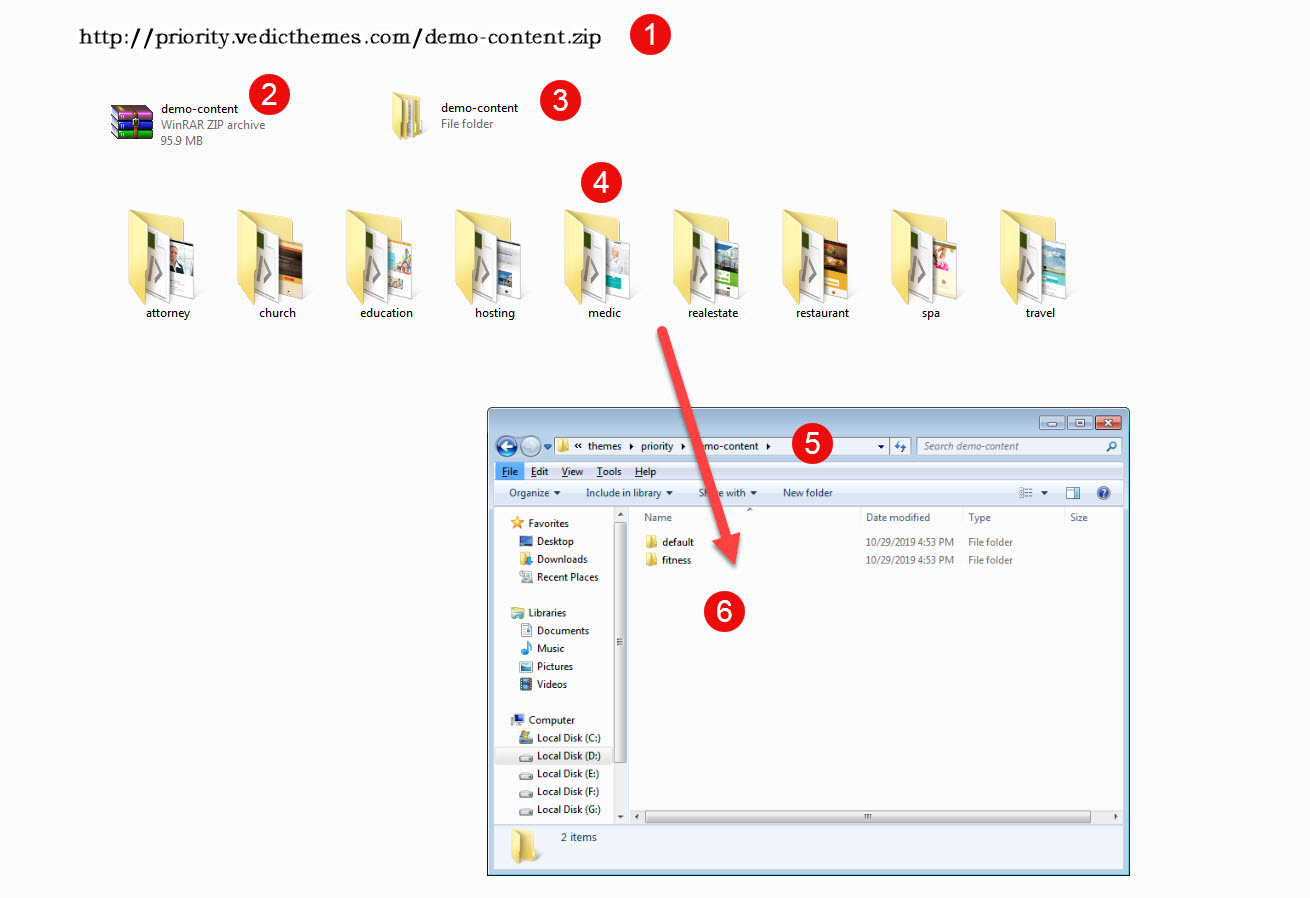
Because of large demo size, only Priority default demo comes with theme package. To avail all demos (Attorney, Church, Education, Hosting, Medic, Realestate, Restaurant, Spa, Travel) download zip file., from given below link.
Priority Demo’s – http://priority.vedicthemes.com/demo-content.zip
http://buddhathemes.docs.wedesignthemes.com/wp-content/uploads/sites/2/2020/03/dt_unyson_import2.jpgYou can import the demo content via the unyson plugin. Kindly refer our knowledgebase link for how to import the demo contents using the unyson plugin http://docs.wedesignthemes.com/dt_articles/import-demo/
Please check your server requirements., Please refer the below link for server requirements http://docs.wedesignthemes.com/dt_articles/requirements-for-theme/
I bought this theme a while ago and my developer has come back to ask for we only have 1 theme content. Kindly provide all theme demo content. Thanks
Hi.,
Thank you for contacting us.
Because of large demo size, only Priority default demo comes with theme package. To avail all demos (Attorney, Church, Education, Hosting, Medic, Realestate, Restaurant, Spa, Travel) download zip file., from given below link.
Priority Demo’s – http://priority.vedicthemes.com/demo-content.zip
http://buddhathemes.docs.wedesignthemes.com/wp-content/uploads/sites/2/2020/03/dt_unyson_import2.jpgYou can import the demo content via the unyson plugin. Kindly refer our knowledgebase link for how to import the demo contents using the unyson plugin http://docs.wedesignthemes.com/dt_articles/import-demo/
Please check your server requirements., Please refer the below link for server requirements http://docs.wedesignthemes.com/dt_articles/requirements-for-theme/
Hi,
could you please send me the slider content for attorney demo? I need slider revolution not layer silder, essentially this: https://priority.vedicthemes.com/attorney/ Please reply on info@proxevent.itHi.,
We have replied your mail. Please check.
hi The image does not load. It gives http error. I sent an image of all the errors. I’m about to go crazy. I have been trying to fix the site for 1 month. errors : 1. https://prnt.sc/s7b02b 2. https://prnt.sc/s7b1jy 3. https://prnt.sc/s7b1y0 4.https://prnt.sc/s7b2cx
Hi.,
Your site is not loading. Check it – https://prnt.sc/s7cnfn
Also, You can send your login details to support@wedesignthemes.com
Regards., DesignThemes Support.
Hi.,
1)Image uploads fine. Check it – https://prnt.sc/s7t0h0
2) Installed and activated “Classic Editor” and now your editor works fine.Check it out. https://prnt.sc/s7t9n2
3) Kindly, mail us your site credentials immediately via the right bottom form located @ http://themeforest.net/user/designthemes So that, we can check your Theme option not saving issue.
Regards., DesignThemes Support.
Hi.,
Please mail us your site credentials (WP &FTP access logins) immediately via the right bottom form located @ http://themeforest.net/user/buddhathemes So that, we can check and have a clear look form our end. Then we’ll help you to get rid of it ASAP !!
Regards., BuddhaThemes Support.
When I say identify the featured image, it gives an error. error message: “Connection lost …” image does not load
1- https://prnt.sc/s5pcaj 2- https://prnt.sc/s5pcks 3- https://prnt.sc/s5pcul 4- https://prnt.sc/s5pd40
hi The picture is uploaded when I remove all of the plug-ins. but with the “BuddhaThemes Appointment Addon” plugin installed, it gives an image upload error.
Hi.,
Please check your server requirements – http://support.wedesignthemes.com/knowledge-base/server-requirements/ If it’s low, Contact your hosting team to do regarding this and check this issue.
Let us know if still issues occur.
Regards., DesignThemes Support.
hi., I made the server requirements before. The problem has not improved. It still continues.
hi I installed numerous sites and removed them back. I have not tried more than one method. Please the problem is caused by the plugin. You should fix the problem. I can’t edit the site for 1 month.
Hi.,
It seems you have changed your login details. So Kindly, mail us your site credentials immediately via the right bottom form located @ http://themeforest.net/user/designthemes So that, we can check your issues in your end.
Regards., DesignThemes Support.
Hi I installed the theme. Priorty page builder does not appear on me. Can you help me ?
Hi.,
Thank you for contacting us.
You need to enable the page builder from Dashboard > Priority > General > Advance > Page builder. Please have a look. https://prnt.sc/r8wwtf
https://prnt.sc/r8wwk0Please don’t forget to place your worthy ratings  Your 5 stars has a crucial part in our overall rating!!! Please visit below video link for how to rate our theme:
Refer : http://recordit.co/YqdTBuEJRm
Waiting to see your 5 stars rating. Thanks in advance
Regards., DesignThemes Support.
thanks !
Hi, the latest update theme, 4.2, overwrote the previous theme options though I backed up them before the update. But in the latest theme back up theme options section i do not see a way to restore them. Clicking on “Import” button bring me to nothing, below i see only current theme options without customisation. In the meanwhile i put site in maintenance mode because header shows up Priority logo instead of the client one. I know support is expired, but tomorrow i will renew. Thanks
Previous theme version was 2.8.
When I clicked “Backup” button in the earlier theme, i get a little saved confirmation message above button with date and time and nothing more. Where are stored theme options in the database?
Hi.,
Priority 4.2 is updated version. In this version we replaced “Buddha panel” to “Code Star” and we used “Visual Composer” for build the pages.
But it seems you have used old version “2.8 version”. In this version, We included our inbuilt “Page Builder” So if you want to move newer version, you need to rebuild your site again.
Newer version has many features and also easy to customize the page content.
Regards., DesignThemes Support.
Some questions: I installed addon for Visual composer, but it does not display in the plugins section. Do i have to install and activate Visual Composer? What about Bakery page bulder? Do I have to eliminate it once activated Visual Composer? If i activate Visual Composer I lost all the design personalisation made with Backery page buider or i can have both page builder? What’s the right process to follow to keep most of the design?
If I understood, with latest update all the pages and posts builded with Bakery page builder must be rebuild with Visual composer, right?
Now, Contaci page (http://pantareimilano.it/contatti/) never load, is because it was builded with Bakery page builder?
About the header, i see the original thumbnail image in the customization theme section, but it does not display. instead, i see Priority logo. How can change it? Maybe because it require a smaller image than before?
Please help me to fix problems, it’s urgent. it would have been nice to be notified about all the issues that would have caused the update, especially the rebuillding of entire site.
I am not seeing Visual composer as page Builder and only an option to activate WPBakery Page Builder, which it looks like I would have to pay for. I wll email you web site credentials to take a look (web site is in maintenance mode). Thanks
Hi.,
Both are same – “WPBakery Page Builder” and “Visual composer”. You no need to any extra addons. Go to Dashboard / Appearance / Install plugins / Here you can find the list of our theme recommended / Required plugins. Install and activate those plugins.
https://prnt.sc/rv6rqj – This is our inbuilt theme page builder. You can’t use both “our inbuilt theme page builder” and “WPBakery Page Builder” in same page.Regards., DesignThemes Support.
Hi, installed all required plugins except woocommerce because we don’t need them. There is not page builder option to enable it, no Visual Composer in the left sidebar (second screenshot): About WPBakery Page Builder, it looks like I would have to pay for (number 1 on first sceenshot).Thanks.
https://prnt.sc/rvc21s https://prnt.sc/rvc3ctLast issue after theme update: contact page never finish loading, loading icon spin forever. Here is the page: http://pantareimilano.it/contatti/
Hi.,
Kindly, mail us your site credentials immediately via the right bottom form located @ http://themeforest.net/user/designthemes So that, we can check your issues in your end.
Regards., DesignThemes Support.
Yes, in the meanwhile i fixed contact page problem, I rebuilded page. Old Google map shorcode caused the issue.
I sent site credentials. Thanks
Hi.,
We have replied to your mail ID. Please have a look.
Regards., DesignThemes Support.
Hi, just sent ftp credentials
Hi.,
1) If you are using any cache, Please remove that cache and check it out.
2) You no need to buy any plugins, Kindly refer to the below KB link and video to know how to get the updated plugins.
http://support.wedesignthemes.com/updated-plugins/ http://support.wedesignthemes.com/knowledge-base/how-to-get-updated-theme-premium-plugins/Regards., DesignThemes Support.
Hi, About 1): i removed cache on the Plesk panel and in the browser but Priority logo still being displayed in header. For point 2): Do I have to create a new account to get premium plugins on designthemes site? And Do I have to register theme with purchase code in the account? Thanks
Hi.,
1) Kindly, mail us your site credentials immediately via the right bottom form located @ http://themeforest.net/user/designthemes So that, we can check your issues in your end.
2) Yes, OR please send your site login details. We will update all your third party plugins.
Regards., DesignThemes Support.
Hi, I just saw your email, but image logo header before theme update was this: http://pantareimilano.it/wp-content/uploads/2019/11/COPERTINA-NEW-2019.png, and not shrunken as now. Look at this: https://prnt.sc/s0piq5.
Hi,
This is simply your browser cache actually causing this issue, please clear your browser cache.
Hi, it does not a browser cache issue. I tried many times with cache cleared and with different browsers. What does happen is that for only the first second correct header image is being displayed (as in your screeshot) but soon after it shrink as in this screenshot: https://prnt.sc/s0piq5. Try to reload homepage and you can verify it (a short video to show you the effect: http://www.maryhellen.it/image-header-shrink.mp4). What about premium plugins update? Thanks
Hi, header image shrink after less than 1 second. It is not a browser cache issue: I cleaerd browser cache and tried with different browsers. See in this short video header image shrinking http://www.maryhellen.it/image-header-shrink.mp4 . It does occurs the first time and everytime page reloads. What about premium plugins update? Thanks
I fixed header image shrinking. I changed a css property value in the responsive css file. Now last thing is premium plugins update. Thanks
Hi.,
Thank you for contacting us.
kindly refer the below links for updating the plugins
http://docs.wedesignthemes.com/dt_articles/how-to-get-updated-theme-premium-plugins/Download updated plugins:
http://docs.wedesignthemes.com/dt_articles/updated-theme-premium-plugins/Please follow the instructions in the below knowledge base link for how to update the plugins.
For Ex : Layer slider
http://support.wedesignthemes.com/knowledge-base/how-to-update-layer-slider-plugins/Video : https://www.youtube.com/watch?v=2vyZrLu7gb8
Thank you, we look forward to helping you!
Three days ago you wrote to me: “[...] please send your site login details. We will update all your third party plugins.” A promise is a promise. Thanks
Hi.,
We have updated all your third party plugins. Please check it out.
Please don’t forget to place your worthy ratings Your 5 stars has a crucial part in our overall rating!!! Please visit below video link for how to rate our theme:
Refer : http://recordit.co/YqdTBuEJRm
Waiting to see your 5 stars rating. Thanks in advance
Regards., DesignThemes Support.
Hi.,
Thank you for contacting us.
The plugin is already activated and please ignore the message that is showing in your dashboard. Please refer the Knowledge Base link : http://wedesignthemes.com/support/knowledge-base/how-to-update-the-premium-plugins
http://buddhathemes.docs.wedesignthemes.com/dt_articles/design-themes-support/Since I have purchased the theme (Priority), I am not able to use it. I am not able to download the demo content yet. Can you PLEASE assist me with this? Please tell me what information you need and I will share it with you.
Hi.,
Kindly refer the below links for a demo install
1) Make sure your server matches the theme PHP value requirements http://docs.wedesignthemes.com/dt_articles/requirements-for-theme/ 2) How to install the theme http://docs.wedesignthemes.com/dt_articles/how-to-install-theme-via-wordpress-dashboard/ 3) How to import demo data using Unyson plugin http://docs.wedesignthemes.com/dt_articles/import-demo/ For more details kindly refer the below theme documentation http://buddhathemes.docs.wedesignthemes.com/priority-multipurpose-theme/Note: If it is not successful Kindly share us your site credentials (WordPress admin login (Domain Name, Admin username, and Admin password) & FTP access login details ( FTP Host, FTP Username, FTP Password)) immediately via the right bottom form located @ https://themeforest.net/user/designthemes?#contact So that, we can check and import the dummy data onto your site.
Hi,
I’ve bought again the theme to have the update but I have some trouble with the editor / Page builder even when I desactivate the Gutenberg Editor. When I want to edit some bloc (for example “Add any content here”), no text appear in the editor. I updated the previous content with Update page contents for latest page builder set on. Can you have a look to my preprod BO?
Thanks. Regards. Romain
N.B: 50e84526-cf04-4b85-8b2b-6bd98ae38039 – 25 Mar 2020
Hi.,
Kindly, mail us your wordpress admin and FTP details via the right bottom form
located @ http://themeforest.net/user/designthemes so that, we can check your
issues in your end.
We have used the above theme to create a website which we have had for the last few years and we are trying to udpate the PHP to 7.3 but, this theme will only work on 5.6.
When we update to 7.3 it becomes distorted and we lose the site. So, we have to re-instate via, back up.
This is a big issue for us and we would like to get this sorted asap. Please advise.
Hi.,
Please be more specific on your query with some screenshots / videos. So that we can get a clear view and help you ASAP.
Regards., DesignThemes Support.
Hi, I am trying to change the php to 7.3 however, when I apply this the website gives me an error. Please can you advise.
Hi.,
Please be more specific on your query with some screenshots / videos. So that we can get a clear view and help you ASAP.
Regards., DesignThemes Support.
I get an error 500
Hi.,
Refer our knowledge base link for fixing the 500 ERROR - http://support.wedesignthemes.com/knowledge-base/500-internal-server-error-4/
Regards., DesignThemes Support.
Hi, I have used betheme to create a website.
I have created a contact form on a slider but, it will not mobile optimise when used on tablet or smartphone. The website is this :- https://ainscoughscrapcars.co.uk/
Is there a way of achieving this please as currently it will not work. Your help greatly appreciated.
Hi.,
https://ainscoughscrapcars.co.uk/ – It seems you have activated some other theme. So please activate our theme and let us know your issues with some screenshots. We will help you.Regards., DesignThemes Support.
Is latest theme version compatible with Wordpress 5.3.2?
Hi pantareimilano.,
Yes, it is compatible.
Regards., DesignThemes Support.