183 comments found.

Hello can we have option for theater seats map ? if you go to link and book one of choice you will appear the seats map https://www.viva.gr/tickets/mainnavigation/%CE%B5%CE%B9%CF%83%CE%B9%CF%84%CE%B7%CF%81%CE%B9%CE%B1-%CE%B8%CE%B5%CE%B1%CF%84%CF%81%CE%BF%CF%85/plays/%CE%B1%CE%BD%CE%B1%CE%B6%CE%B7%CF%84%CF%89%CE%BD%CF%84%CE%B1%CF%83-%CF%84%CE%BF%CE%BD-%CE%B1%CF%84%CF%84%CE%B9%CE%BA29cbe0ad-b03e-4531-9716-031ac/
Hi, it’s not possible in the current version. We will consider it and bring it to the next version if possible.
Thanks!
hi there pre-sale question. Is it possibile that people who create event add their paypal so they could get money for event they created. I would like to use it as a platform where i would only charge percentage. So what are options about that?
Hi,
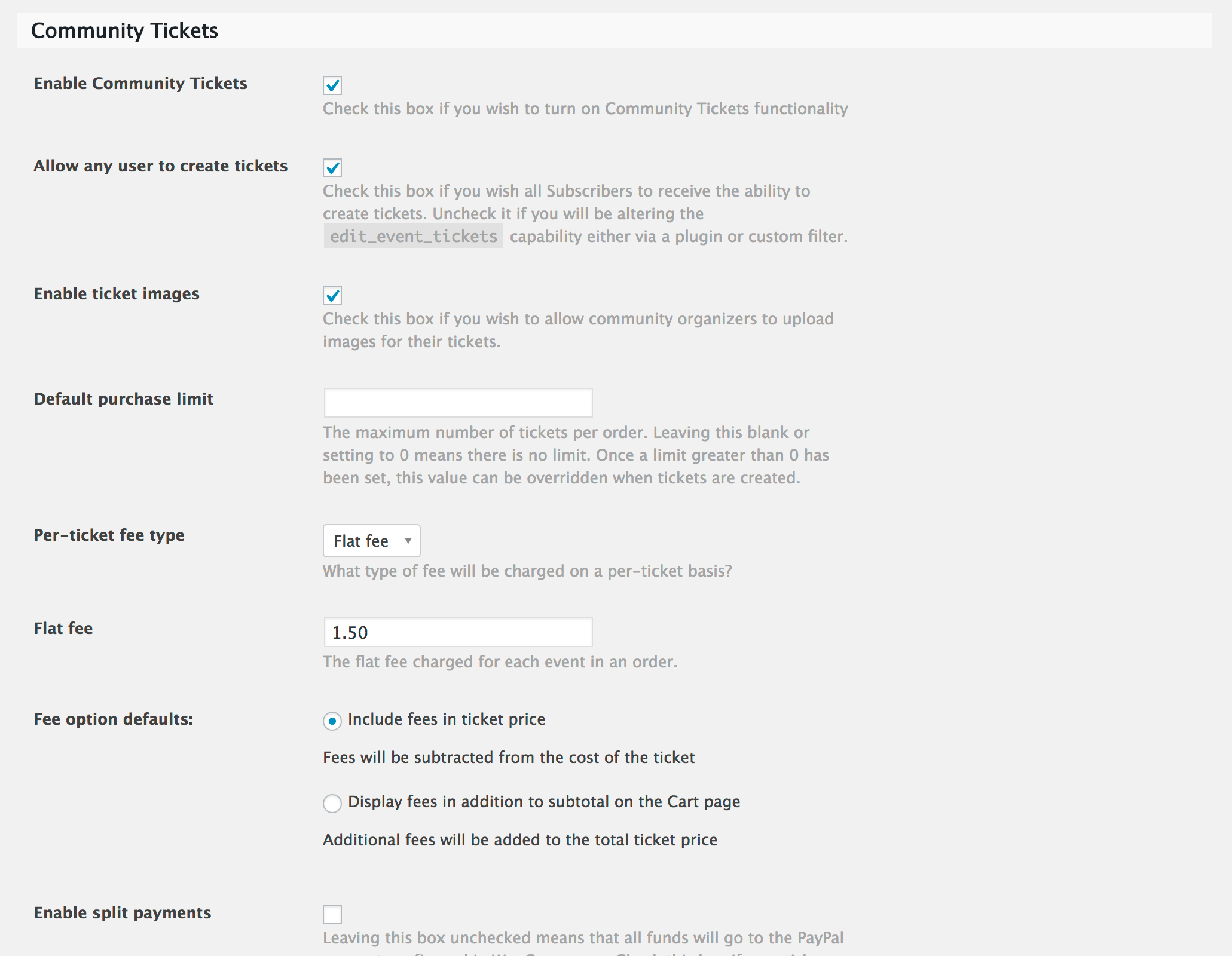
Thanks for interesting in our theme. Yes it’s possible, this theme support Community Tickets. Please refer here: https://theeventscalendar.com/product/community-tickets/ See the screenshots: https://theeventscalendar.com/content/uploads/2015/11/Community_Tickets_Settings.png
Hi, I installed the theme but it says that “Event Tickets does not support ticket sales via third party ecommerce plugins. If you want to sell tickets with WooCommerce, please purchase a license for Event Tickets Plus.” And also I don’t have visual composer for make the installation. How can I do?
Hi,
Please create a topic on our support forums: http://dawnthemes.com/support/ Our support team will check in the detail and help you.
Have a great day!
En este diseño solo se puede crear eventos con distintas categorias de entradas, si se compra el complemento ticket plus
The theme will help you to Sell conference ticket online by using Event Tickets Plus or you can also sell your event ticket using WooCommerce.
Los codigos QR, se pueden personalizar ? enlazar a una URL o a los datos del comprador?
se puede agregar en los eventos el mapa de las entradas para vender ticket con asientos numerados. Algo parecido a esto https://www.puntoticket.com/evento/Pablo-Alboran-Movistar-Arena
Yes, QR, Map, Number of Tickets… supported.
Hi, the mailchimp subscribe form giving error when user already subscribed. What can i do to replace this message to: You are already subscribed. Thanks!
Hi,
Please create a topic on our support forums: http://dawnthemes.com/support Our support team will check in detail and help you.
Hi, we did create a post in dawnthemes and no reply has been given for more than 3 days now. Please, could you tell me how to: “The mailchimp subscribe form gives an error when the user is already subscribed. What can i do to replace the error message to: You are already subscribed. Thanks!”
Hi,
We have just replied to your topic. Thanks for your patience!
B.Regards!
Hi There, amazing theme and thank you. Can I ask, is there a way to stop the text being dropped down with a hyphen if the word is too long to fit on the line?
Thanks again Ian
Hi Again, I have found a small bug, when you press the + sign to add a ticket in Event Ticket Plus, you can’t bring it back to zero again if you press the minus sign.
http://dawnthemes.com/ticketbox/event/linkin-park-live-at-the-small-of-asia-arena/Thanks Ian
Hi, yes it’s small bug. We will fix this asap. And please create a topic on our support forums: http://dawnthemes.com/support Our support team will check in detail and help you.
Have a nice weekend,
B.Regards!
Hi, can I create multilanguage site with this template? Is it support languages plugins?
Yes, it’s possible and you can check the list features here: https://themeforest.net/item/ticketbox-event-tickets-wordpress-theme/19697328#item-description__features
B.Regards!
This template comes with Woo Commerce. Can it support Square payments?
Yes, you have to install the plugin Square for WooCommerce on your site.
Is there any way to download the complete list of bought tickets for each event in CSV, Excel or another format… With all the buyer options and data? (Maybe if I can choose the fields to download )
Hi, Our theme using the Event Tickets Plus plugin to sell your ticket online. Event Tickets Plus works with your favorite Ecommerce Engine, please kindly refer here: Event Tickets Plus
Hello, I have a problem with your theme, at the end of some pages under the footer appear one empty grey space and I can’t find the solution for fix it. Can you help me to solve it? Should I open a ticket? In this case can you send me the link?
Thank you Best regards
Hi,
Please create a topic on our support forums: http://dawnthemes.com/support/ Our support team will check your issue and help you.
Have a great day!
Hello, I created a topic on your support forum, how long can take before the support will answer to me? I saw topic published after mine already supported. Thank you!
Hi, We have just replied to all topics… I guess you have used another username on our support forum. Could you please give us your topic URLs.
Have a great day!
Hello, I just marketed a resolved ticket as a not resolved in your support because I’m still having issue with white space under the footer in FULL HD resolution 100%! Thank you
He, I have just replied your topic. Have a nice day!
Hi, DawnThemes.If I buy the theme, and I want to first try it and configure it in my localhost, before uploading it to my host. I Could? I really do not know how the theme license works. I mean, I can only use it in one place at a time? (Should I uninstall it from my localhost first, in order to install it on my host?) Thank you!
Hi,
Thanks for interesting to buy our theme. Yes, you can only use the license for a page directly, in localhost you do not have to delete it. You can use your localhost for development, test or restore your live site. If you have any assistance please create a topic on our support forum: http://dawnthemes.com/support
Have a great day!
the case when hit the target! Cool dude!
@@
Hello
I have presales question.
can i send qr code for event after buy?
Thanks
Hi,
Thanks for interesting in our theme. Yes, you can. Please refer here: Using QR codes with Event Tickets Plus.
Have a great day!
For CUSTOMER GREAT SUPPORT
You are welcome!
Hello, I’d like to create a website with restricted content in which there would be 2 kinds of users that can be registered: - The first user can only book the ticket for events and pay it - the second users will be able to book/pay the ticket for events and create a new event.
For these second kind of users, there is an option to have for each of them some dashboard or something where they can manage events that they created? If yes where I can see it in the demo? Is there any option to see the back-office with all of the features of the theme?
Thank you a lot
Best Regards
Sara
Hi,
Yes, It’s possible with the features you want. We’re using The Events Calendar Plugin for this theme. You should refer HERE before buy our theme. And here is the plugin that allows users can be able to create their event: https://theeventscalendar.com/product/wordpress-community-events/
And here I show you the backend of the Community Events Settings: https://cl.ly/1H31422g181m and the community events where users can manage their events: https://cl.ly/401E2A3r2E1r
Have a great day!
Best regards!
Thank you for your answer!
After submitting events where users can manage them? I saw only the list of events submitted… I’d like to allow users to download csv file for each event they created with information of subscribers! Thank you
please how can i create a SUBMIT AN EVENT PAGE i couldnt find it after installing the demo
Hi,
Please create a topic on our support forums. http://dawnthemes.com/support/ Our support team will respond to you as fast we can.
Have a great day!
Two questions:
1. Does it support recurring events? For example I have an event that will repeat each week and I don’t want to copy-paste it every time.
2. Is this page (along with the purchase part) http://dawnthemes.com/ticketbox/events/month/ doable without the need of any premium plugins? I really don’t want to end up buying other plugins besides the theme.
Hi,
Regarding your questions:
1. Yes, it’s supported. Please see the screenshot I show you in the setting Time & Date for the event. https://cl.ly/46031G3c1V0L2. No, this view is not required any premium plugins to display. The views Month, List, Day is available in The Events Calendar Free version. You can refer here: https://theeventscalendar.com/product/wordpress-events-calendar-pro/
Have a great day!
Hi,
A pre-buy question.
I have seen comments for integration with tickera.com. Will this be done?
Thank you
We’re working on this and it will be released as soon as possible.
Have a great day!
Thank you DawnThemes for the prompt reply. What is the estimated time frame for the integration with tickera?
As that will dictate on when to purchase your theme. Thank you!
Hi. I purchased original them but i have problem to import DEMO onwordpress! Let I say what I do step by step to import demo data, please tell me is it true ? because im not professional in wordpress at all.
1- Setup and active the them
2- when you active the them , there is no “IMPORT DEMO” Sub-menu in Appearance MENU bu default . so I need to install and active all plugins to access to the “Import Demo” sub-menu.
3- So I Install and active all plugins. so I will have “Import DEMO” sub-menu in the appearance menu. OK?
PROBLEM: the problem starts when I click on “Import Demo” sub-menu , after clicking , I see 4 Tips :
Import Demo Data Important Notes: We recommend to run Demo Import on a clean WordPress installation. To reset your installation we recommend WordPress Database Reset plugin. The Demo Import will not import the images we have used in our live demo, due to copyright/license reasons. Do not run the Demo Import multiple times one after another, it will result in double content.
?_ Main question is , how can I import Demo without setup any plugin?
because I don`t have access to that sub-menu when I do RESET my word press !!
Im so confused ! can somebody explain that ?
Hi,
After Reset your site, please install and active the plugins that our theme required and recommended. It’s required to import the demo content. And if you have any assistance please create a topic on our support forums. Our support team will respond to you as fast we can.
Have a great day!
Good Evening, i like your theme and I have a pre-purchase question. It is possible to collect points for every purchase made and after reaching a certain threshold you are eligible to a discount for a next purchase?
Hi,
Thanks for interesting in our theme and it’s not possible in the current version. Please kindly contact us and explain with more details so we can consider it to bring it to the next version of our theme if possible.
Have a great day!