38442 comments found.

Similar to co50 posted above, my view cart page does not have a checkout / go to check out button…......
Hey, are you on the current WooCommerce/Salient? If so please open a ticket in regards with your admin credentials so I can take a look https://themenectar.ticksy.com
I hadn’t seen the most recent version, so have updated to that and my checkout button has re-appeared! Whew!
Glad to hear 
Thanks for the most recent update; very, very cool as always
I’ve discovered a bit of a quirky little bug, which should be very easy to replicate in testing at your end, and hopefully uncover a solution.
Contact Form 7, while fantastic in support in the theme, has a bit of a fussy calendar function which requires an edit to the functions.php file in the theme (http://contactform7.com/faq/does-contact-form-7-support-html5-input-types/) for the calendar to fallback to a non-HTML5 supported calendar for FF and IE browsers that don’t support the calendar in use yet.
However, while this fix works on the non-boxed layout, allowing FF & IE to display the calendar, as soon as you switch to Salient’s boxed layout, the calendar no longer displays for FF & IE.
I’ve replicated this on the latest versions of WP / CF7 / Salient.
I’m wanting to use this calendar function on a boxed layout, so if you’re able to work out what might be happening here, that would be very much appreciated.
Thanks!
I’ve noted to test in regards
Hey again, it’s a simple issue on the end of CF7 – the z-index was only at 11 and so the calendar was very simply showing up behind the content container box in the boxed layout view. Easy
Hey – glad to hear!
Hi I’m looking to buy but I wanted to know is there any chance you can have portfolio entries made similar to the “blog creative” example: http://themenectar.com/demo/salient-blog/
I’d like to use that model but with portfolio entries instead of blog entries. Is this possible?
Hey, making a portfolio element display in a blog style would take some custom development as of now
I have also managed to “lose” my logo in the Salient / header options. What I mean is I messed around with the logo height and padding and it was cropped. Then I messed around with those attributes a bit more and now it won’t show up at all. I even deleted and reuploaded the logo a few times to see if I could solve the issue.
Thoughts?
I’ve got the logo displaying again. Not sure how, but it’s back. Now I just need to figure out why the key line below the header is so close to the logo. It’s spaced correctly when I use full navigation. But when I use only the fly-out navigation, the spacing is off (the heyline is too close to the logo). I’m sure there’s a setting somewhere that I’m overlooking.
Hey,
Could you kindly share your URL in regards so I can take a look?
Cheers
Thanks – do you have any ticket open with your admin credentials so I can take a further look? https://themenectar.ticksy.com
Is there a way to control the size of an image icon? I created an icon that is 15×27. When it’s inserted into the “Image with Icon” element, it scales up and obviously becomes very pixelated.
Thanks!
Hey,
that specific element stets a width for the IMG, if you wanted to make it less use this custom css in the Salient options panel:
body .iwithtext .iwt-icon img {
  width: 15px!important;
}
Cheers
How are you controlling the different text styles for “01. Research”, “02. Design”, etc? I don’t see controls for the fonts and color in the visual editor. When I look at the code in text, I also don’t see calls to different fonts.
http://themenectar.com/demo/salient-agency/about-us/This is Embarrassing. I found the controls for the attributes of the text. That aspect of the CMS is standard.
Thanks for a great theme and fantastic, ongoing support.
Hey – glad you found it
Have an issue where there is no checkout button on the View Cart page. I looked at the page source and it seems it just isn’t loaded at all.
1) http://thesandwichspotcafe.com/product/macaroni-salad/ Add product to Cart.
2) Click View Cart….there’s only an Update cart button. No checkout. The checkout page works if you link directly but no link/button where one expects it. (I know it appears in nav but need it to appear in normal view cart box too). Thanks for your help!
Hey,
are you on the current version of the theme/woocommerce?
Yes, Theme 6.1.2, WC 2.4.6
Could you please open a ticket in regards with your admin credentials so I can take a look at what’s going on themenectar.ticksy.com/
just let me know your ticket ID here so I can take a look
Ticket 517874
Thank you!
Hey TN,
there seems to be a bug on tablets(iPad) in landscape-view. After scrolling down and up again, the header lays over the content. I noticed this behaviour on some Pages, all Blog Posts and all Portfolio items. Would be great, if you can take a look:
http://www.superliquid.de/2010/videos/wendsche-kaermetze-2015videoblog-082015/ http://www.superliquid.de/2010/kontakt-2/ http://www.superliquid.de/2010/2015/heisser-sommer-startete-mit-heissem-wochenende/Thanks in advance, Thomas
Hey could you kindly open a ticket in regards with your admin credentials and let me know the ID here so I can take a look?
Hey, sure. The ticket ID is 517781. Thanks!
Thank you!
Perfect, works! Thanks a lot!?
You’re welcome
Hello!
There is a neat plugin for Woocommerce that allows you to show your cart if there are items in it:
https://wordpress.org/plugins/woocommerce-cart-tab/I tried installing it, and it seems to work, except that it only shows for a split second before it disappears.
I’ve used it successfully on other themes. Any suggestions on what I could try?
Hey, could you kindly share your URL so I can check this behavior out?
Hi,
I am having an issue right now. Probably the last one. Infact last two.
1- I used the Dark version of the menu for starting. But the only thing i need is to use the Green color for text on hover which i am unable to do so. Everythng on scrolls seems perfect.
2- On one page demo, when you scroll down to the section that contains social icons. I am unable to link them to my respective pages. I am not sure how i can do that as currently its showing the popup to login right now.
Regards, Abdul Mannan
Hey, please see my response to your earlier comment in regards
Thanks
1- Here is the URL : www.alexandrafriedman.com/new/home-extended-2 2- Is there any option top simply open the social link in new page rather then sharing.
Thanks
Thanks
1- Here is the URL : www.alexandrafriedman.com/new/home-extended-2 2- Is there any option top simply open the social link in new page rather then sharing.
Thanks
Add this into the custom css box located in your Salient Options panel:
body #header-outer.transparent header#top nav > ul > li > a:hover, body  #header-outer.transparent header#top nav .sf-menu > li.sfHover > a, body  #header-outer.transparent header#top nav .sf-menu > li.current_page_ancestor > a, body  #header-outer.transparent header#top nav .sf-menu > li.current-menu-item > a {
 color: #27CCC0!important;
}
2. Not by when using that element – you’d have to manually insert icons with the icon shortcode and then link those by wrapping them in anchor tags
Hi,
I am having an issue right now. Probably the last one. Infact last two.
1- I used the Dark version of the menu for starting. But the only thing i need is to use the Green color for text on hover which i am unable to do so. Everythng on scrolls seems perfect.
2- On one page demo, when you scroll down to the section that contains social icons. I am unable to link them to my respective pages. I am not sure how i can do that as currently its showing the popup to login right now.
Regards, Abdul Mannan
Hey,
1. Could you kindly share your page URL in regards
2. The social icon element inside of visual composer share the current page URL to each social network which is why it’s prompting a log in
Cheers
Any suggestions would be greatly appreciated. I was wondering if it was possible to used the Portfolio Fullwidth Style Three option http://themenectar.com/demo/salient-ascend/portfolio-fullwidth-style-three/; (or at least of the look and feel of it) and have them use the functionality of Default Portfolio Style http://themenectar.com/demo/salient-ascend/portfolio-fullwidth-default/?
I want 3 – 4 portfolio items that are full width that have the “Larger View” and “More Details” on hover options. My portfolio is all video, so i’d like the “Larger View” to trigger a Light box of the video.
Hey,
Have you tried to active the lightbox only option available in your portfolio element? This should allow what you’re trying to do
Cheers
Thank you!
You’re welcome
Found a bug with Contact page Template. The automatic map at the top abuts the page header and even using CSS it’s challenging to insert vertical spacing between the two. Using the Default template and manually inserting the Google Map is a workaround, but just wanted you to know.
Hey,
Thanks for letting me to know – i’ve noted to sort this
Cheers
Hi, for some unknown reason when I open dronearezzo.com on mobiles device the menù button and some social icons have turned in to square empty box logo … any idea where this problem come from?
I have signed and activate evanto toolkit plugin …
Thank you
Mark
Hey,
Could you kindly let me know what mobile device and browser you’re using so I can try to replicate?
Cheers
icon menu not visible on devices, I have asking help at your Support forum, to be honest we have try all solution possible and I feel my costumers are going to be really mad since my dead line is coming soon. I’m very disappointing since I was believe your theme was great as the support but is not … To many issue troubles with this template and your support forum it terribly slow and not efficient considering you have sold so many copy’s this template I was expecting more and more professional assistance … Reading on this dashboard we can clearly see that this ISSUE of the MENU ICON on DEVICES is kind of popular and there are not one topic that come out with a solution so at this pint the problem is totally in your hands … Be clear once for all to all of us and tell you are not able to fix this issue and refund all of us! Thank you
Please share your ticket ID so I can read up on the conversation that you’ve been having / get more information on the issue
Hi there, My home slider caption has high value of line spacing. I have changed the typography settings of “Nectar/Home Slider Captions” to “Line Height” and also tried changing the value, but it does not affect the line height. Can you please help. Website: motioncue.com Thank you.
Hey,
It’s being set by your h2 font selection in the typography options tab – if you want to override this with css use this:
body #featured article .post-title h2 {
  line-height: 49px!important;
}
Cheers
I uploaded the Agency dummy data and copy & pasted the demo-theme-options into Salient, but I can’t figure out why my header doesn’t perform like the demo, staying transparent on scroll. It starts out transparent, on scroll it pops in some white above the logo and widget icon. Also, the demo shows the logo and the side-widget-area icon changing colors from white to black, depending on the background color, how I do enable my logo and side-widget-area icon to do the same thing?
Ok….I figured out my header issue. I had the wrong header layout selected in order for it to work like the demo!
Thanks, Bobby
Hey – glad you sorted it
If you still have any questions just let me know
Cheers
Hello, I’ve a problem with the Nectar Slider. I have a Nectar Slider with one video slide in my home. At first (when you arrive to the website) it works perfectly, but then if you go to one page and then come back, the video doesn’t works.
Could you tell me what can it be? I let you the website, you can check it: http://georgeprivatti.com/wordpress/
Thank you very much!
Hey,
Change your page transition method to “standard” from the ajax option you have selected
Cheers
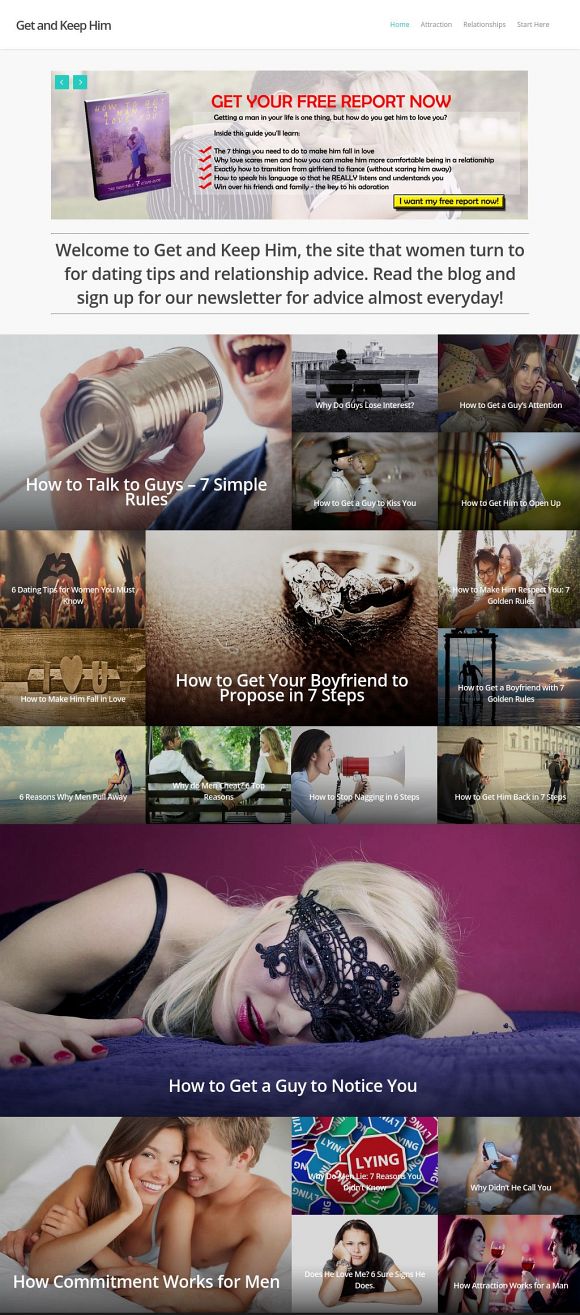
Hi, I am currently using the creative blog theme, but I noticed something weird. When I wanted to compress the image sizes for featured images (for faster load speeds), the layout changes even when they remain the same dimensions. I’ve attached a screenshot: http://www.screencast.com/t/8ftSv9kP
Is there anyway to avoid the changes?
Hey,
Please share the actual URL in regards so I can take a look why that’s happening
Cheers
Hi, but it wouldn’t show on the actual site unless I show you a before and after, right?
Hey – I can see from your screenshot that the images are getting distorted, which I should still be able to see on the front end without a comparison
Hi, I’ve updated all the featured images to the compressed images, and as you see they are all distorted: http://www.getandkeephim.net Here is a screenshot of the original featured images: http://cfb.blob.core.windows.net/conceptfeedback/concepts/580/325494a2-8025-42b9-8703-c90dd4f44d58.jpg
Hey again – i’m seeing some of your images are not uploaded meeting the minimum requirements for width/height
http://www.getandkeephim.net/wp-content/uploads/dating-tips-for-women.jpg – uploaded at 800×313 http://www.getandkeephim.net/wp-content/uploads/How-to-Make-Him-Fall-in.jpg – uploaded at 500×228Please ensure that items set in the default size are at least 500×500 for width and height and items set to wide&tall are at least 1000×1000
Hi, the original images did not meet the minimum requirements but they were not distorted. Nevertheless, I’ve uploaded all images to be at least 500×500 and that did not solve the distortion.
I found out particularly the featured image for this post was the reason the “small blocks” of the grid became square: http://www.getandkeephim.net/why-do-guys-lose-interest/ Compressing it even when the dimensions are the same caused the grid sizes to change. Changing it back to the original image size solves the grid size issue but not the distortion for all other images.
This is very weird because I didn’t know file size (not dimensions) causes distortion.
Hey – try running this plugin https://wordpress.org/plugins/regenerate-thumbnails/ as that specific featured image is currently not cut to 500×500 (even though it’s upload large enough to be)
Oh, I think we had a miscommunication. You were helping me get the actual look of the theme, which are squares. The regeneration made that happen.
I prefer how it looked like originally: http://cfb.blob.core.windows.net/conceptfeedback/concepts/580/325494a2-8025-42b9-8703-c90dd4f44d58.jpg I really just wanted this look with compressed sizes. 
Nevertheless, thanks for your effort and support.
Hey – you’d need to change these items in your funcitons.php and then run that plugin again
add_image_size( 'wide', 1000, 500, true );
    add_image_size( 'regular', 500, 500, true );
    add_image_size( 'tall', 500, 1000, true );
    add_image_size( 'wide_tall', 1000, 1000, true );
Does Salient not have vertical tabs? I can’t find them anywhere on the demos. If not, this is a must have for a future update!
Hey – i’ve noted your +1 for the idea
Hi ThemeNectar,
I’m having trouble with (re)sizing the ‘Centered Heading’ element.
Can you tell me which font I should adjust in the Salient Options, or what kind of .css lines I’d need to ad to make it larger than the original font size?
Just to be sure, I’m talking about the centered heading, with a line underneath it.
Cheers!
Hey,
You could either set the h2 font size in the typography options tab or use this css:
body 222.row .col.section-title h2 {
   font-size: 30px!important;
}
Cheers