3572 comments found.

Hi there,
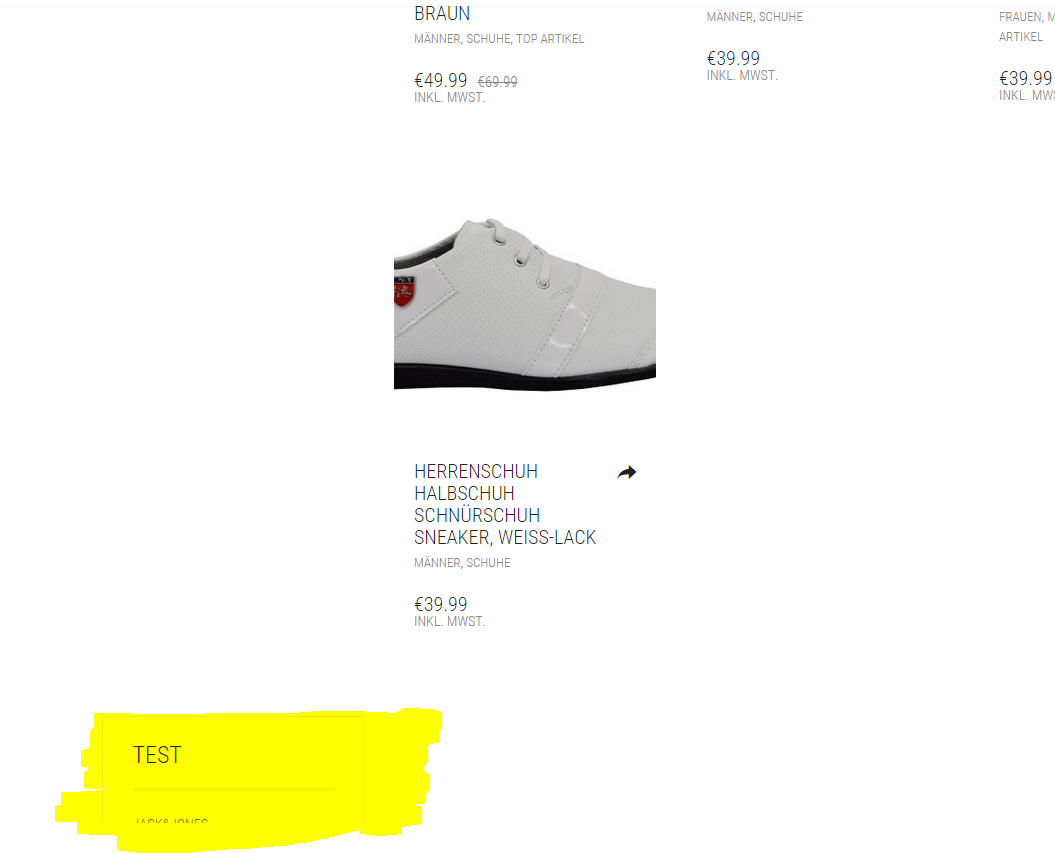
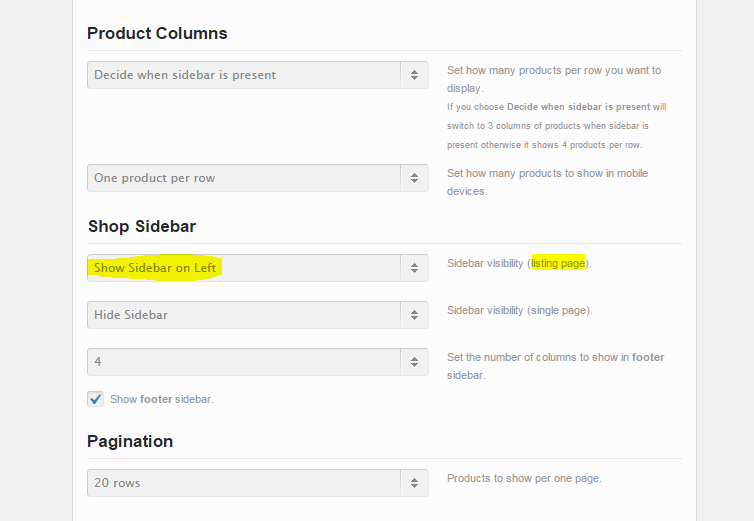
I have activated the sidebar for the product listing page (category site), but it is displayed below all products, instead left of them. http://fs2.directupload.net/images/150910/qvng9r34.pngUsed settings: http://fs2.directupload.net/images/150910/jhbamitm.png
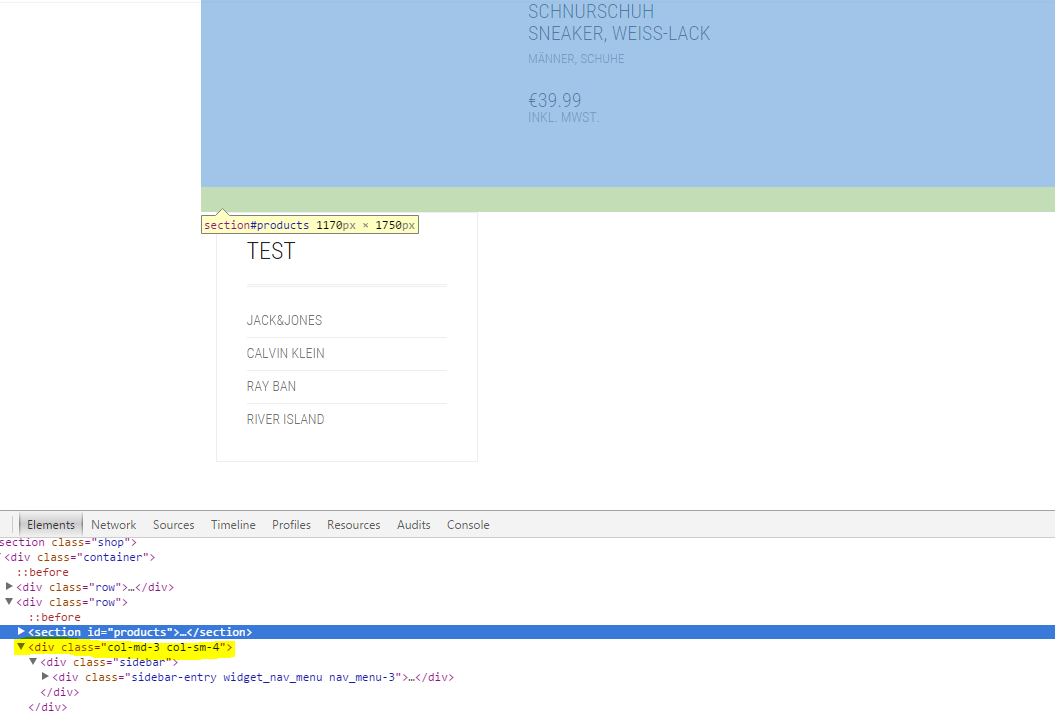
It looks like the sidebar-div should be inside the section: http://fs1.directupload.net/images/150910/hib792hg.pngupdate: This was caused by an external plugin. I deactivated all plugins and the layout is fine again.
Hi sevenlogistics,
Glad to hear that the problem is solved now 
Kind Regards,
—Ylli
Hello, I have imported Demo Content of the Fashion theme, but the pages have been created in duplicates is there a way to reset and try again
Hi there,
Unfortunately there isn’t any quick reset that would do this fast, I know it’s boring to do this all the time, it happened to me many times when trying to install the demo content.
Kind Regards,
Art
Hi,
Some words are not translated in Italian (cart totals, you’ve got 2 items in the cart, etc.), how can I solve it?
Thank you
Hi Alessio_Innocenti,
Are you using the latest version of Aurum 2.5?
Kind Regards,
—Ylli
yes
Hi Alessio
Can you e-mail us your login credentials, we’ll see if we can do anything about it.
To send us email use this link and please write us your request again, because we receive a lot of emails on daily basis and we unfortunately can’t remember all customers requests.
P.S: Please note that we usually do not respond to emails that request support, because here is our primary support forum. We use contact form just for sending sensitive information. Also emails response time can be up to 7 business days.
Kind Regards,
Art
We can follow when click on little heart but after we can’t unfollow when click on little red heart. Can you add this feature ?
Hi kezako,
Can you please tell us for what heart are you talking? For the Wishlist on the single product page?
Kind Regards,
—Ylli
for the wishlist on category page
Hi kezako,
We will see if we can do something about this feature on the next updates
Kind Regards,
—Ylli
Is it possible to add options to buy book or ebook? I have a bookstore. Thank you.
Hi purgeru,
This is an option that WooCommerce allows i think, here you can find more information Digital/Downloadable Product Handling
Kind Regards,
—Ylli
Images embedded into my blog posts (ex, the plant at the bottom-right of this post opens directly to the image instead of in the lightbox. How can I fix this?
Hmmm,
As I see this feature doesn’t seem to work, I have added it in the fix list for upcoming updates and we will surely add it.
Kind Regards,
Art
Thanks!
Hello, please can you advise on the custom css required to remove all of the forced upper case headings and meun items in the theme? I can’t seem to get a rule that will effect all of them.
Thanks
Hi tim-mkmd,
We can help you do that easily but first can you please write us your site URL here on comments first? We need to investigate your site and then get back to you with possible solution
Kind Regards,
—Ylli
Hi Ylli – the site is www.imaginationpost.co.uk – It’s behind a holding page at the moment though. Let me know an email address and I can create a user account to view?
Hi Tim,
I managed to turn them into normal state, can you see now if everything is alright
Kind Regards,
Art
Hello, I also have the problem on chrome with social icons which appear an empty square… It’s working on ios and safari but not in google chrome. You can have a look here : www.yeba-essentials.com Best regards
Hi there,
As I see you have put the fonts in a wrong way, remove the text again and see how you should paste the fonts there.
Kind Regards,
Art
hi,
i just bought the theme and i wonder if there exist photoshop files of it? that would be very helpful to rework it …
thanks, chris
Hi Chris,
We’re sorry but we didn’t made any PSD of Aurum theme, when Art (our Designer) coded Aurum, he skipped the PSD part and made the theme straight on the coding.
Kind Regards,
—Ylli
Hi there, my client purchased the theme and I now have a particular question regarding the post grid: I want to change the side for displaying thumbnails, so first item has post thumb on right, second item has the post thumb on left. Do you know a good solution to do that? I tried to find an answer on the visual composer site… Thanks
Hi resqonline,
Can you please post with the account you bought the theme, this way we can verify that you’re a real customer as we do not offer support to users who doesn’t have “Purchased” badge.
Kind Regards,
—Ylli
Hi! I’ve made a new new main menu and I want to display my products in the secondary which needs to appear under the main menu. But this doesn’t happen. Any idea? (www.evewild.com/) If I put all the menu options in one menu, it gets too large and it pushes the search and basket icon away. Perhaps another solution is to make the menu text smaller. How can I do this? I also noticed that my product name overlays the + icon. How can I make the text smaller? Thanks!
Already fixed a lot. But i’m still curious how to change the font size.
Hi lemiucide,
Glad to hear that you solved the problem
Can you please add the code below to Custom CSS
.shop .shop-item .item-info h3 {
    margin-right: 15px !important;
}
P.S: You are using an old version of our theme (2.2) and the latest version for the moment is (2.5), please update theme first.
The easiest way to update our themes is if you use Envato Toolkit. On this link How to update Themes and Plugins
you can learn this easy step-by-step procedure
Then don’t forget to go to Appearance > Install Plugins to update all your premium plugins to the latest version that we support.
Kind Regards,
—Ylli
Hi Thanks, I updated the theme and plugin. I edited the header size. Unfortunately the sizing code of the products dont seem to work.
Ok I changed margin-right with font-size and now it does respond haha. Now I’m only stuck with the product title and infomation itself. ^^ they are also very big
Hi lemiucide,
I think that you are talking about the Single Item title, to change it’s size use this CSS code:
.shop-item-single .item-info.summary h1 {
    font-size: 30px !important;
}
Kind Regards,
—Ylli
Hello, I have bought the Aurum theme and imported the jewelry demo content. I have two issues that I do not understand:
1. In your demo page the shopping basket is missing, how can I check what I bought? I like the centered logo and menu but where is the shopping basket?
2. After importing the demo version on my website I noticed that in the footer there is a misalignment of the columns: “SWITZERLAND” is correctly aligned while “EUROPE” and “AMERICAS” are displayed in lower position.
How can I solve these two problems?
Thank you.
Alessio Innocenti
Hi Alessio,
1. In the Jewelry demo you see that the cart is missing to, in the centered header we have disabled it to have a minimal look and instead of it you can just add the cart in the menu as a text.
2. Can you send us your site URL, I’ll see what we can do about it.
Kind Regards,
Art
See www.monbijou.info
thank you
Hi there,
As for the second question:
Can you please add the code below to Custom CSS
.sidebar.widget_text.text-5, .sidebar.widget_text.text-3, .sidebar.widget_text.text-4 {
    padding-top: 33px !important;
}
Kind Regards,
—Ylli
Done, but it still doesn’t work …
Hi there,
Are you speaking about this part of the footer?
With that code that i send you they now are aligned.
Kind Regards,
—Ylli
yes, you see that PUNTO VENDITA is not aligned with CONTATTI and SOCIAL
Hi there,
Try adding this instead of the code Ylli sent you:
.sidebar.widget_text.text-5, .sidebar.widget_text.text-3, .sidebar.widget_text.text-4 {
padding-top: 0px !important;
}
Kind Regards,
Art
Ok now it works, thank you
Glad to hear that
Kind Regards,
Art
Hi, I’ve just updated the Aurum theme, [again], and have got the problem back that I had before [again] – the two products I’m showing in my homepage carousel are appearing blurry.
Please can you advise how to fix this again? I’ve tried pasting the following into laborator_functions.php, line 687, but no succes.
add_filter('laborator_wc_product_loop_thumb_size', 'custom_shop_thumb_loop');function custom_shop_thumb_loop(){return "large";}Any help please! It’s a bit annoyiny that the them can’t handle the two product carousel.
Thanks
Tim
Hi Tim,
I added the code at the end of the file and it’s working now
Kind Regards,
Art
Thanks, very much appreciated.
Hey!
1) So in the Shop page, I need to know how if there is a way to edit or select which category thumbnails pop up at the top of the page.
2) I need to know if there is a way to prganize the Product category section of the side bar
basically I have Main categories (rings, pendants, bracelets) which are to be filed into separate collection categories containing multiple types of items (Modern Signet Collection, Artist Signature Collection). The last level of categorization is in the Artist Signature Collection which will contain multiple collections associated with various artists containing multiple product types and still under the Artist Signature collection
3) is there some kind of awesome plugin you can recommend that will enable this kind of categorization and in the shop sidebar, maybe have a more sophisticated way of filtering all these products?
Thanks!
Hi there,
1. If you’re talking about the shop categories, you can select their thumbnail by going to categories and then select the thumbnail you want.
2. I couldn’t understand this question, if possible please take some screenshots or a link to your site to be more specific.
3. This is a free plugin that helps you filter your shop items: https://wordpress.org/plugins/woocommerce-products-filter/Kind Regards,
Art
Hi,
Is there anyway to edit the product page? At the moment there is a large image to the left hand side, the content in the middle and then the sidebar on the right. We’d like to shrink down the size of the image on the left to make more room for content. Can you explain the best way to do this?
Many thanks,
Hi there,
Can you please provide a link to your site so we can see the plugin page and we’ll try to find a solution for it.
Kind Regards,
Art
Hello, I am unable to update LayerSlider sliders of my theme. By placing Purchase Code: appears … Status Failed to set up automatic updates. I still can not use the theme, because it always gives any problems updating. Please help me!! Att.
Hi josysousil,
Layer Slider don’t allow us to give customers our license number, so on each premium plugin such as Visual Composer, Revolution Slider and Layer Slider update we release a new update to our theme with the latest version of that plugin included, and customers don’t need to worry about that,
You never need to buy any premium plugins that comes with our theme
Kind Regards,
—Ylli
Hi – i have a pre-sale question. I am referring to AURUM / FASHION Shop demo. There in product detail view, up to five small preview images are shown left to the large product image. Is it possible to have more than 5 small images here?
Thanks! boptilyadrop
Hi boptilyadrop,
If you are talking about this:
If there are more that 5 products on that “sidebar” it will make it scrollable.
Kind Regards,
—Ylli
Hey! I bought Aurum template but I just found an error. In Single Product page, the footer color is different from the others. In my opinion the footer is all over the page and assumes the normal background color.
Home page (white footer): http://gabs.pt/
The pages where the footer color changes to blue: http://gabs.pt/wpcproduct/sofia-studio/ (Not only that product, but all the single product pages. Blue footer as you can see.)
Hope you can help us.
Thank you.
Hi there,
That is happening because you have modified a lot of thing on your theme, but i found a fix that can solve this problem.
Can you please add the code below to Custom CSS
footer.site-footer {
    background-color: #fff !important;
    float: left !important;
    width: 100% !important;
}
Kind Regards,
—Ylli
Hello.
Yes we had to do some css changes due to our cliente’s request. It works perfectly now!
Thank you very much
Regards, Team BYD

Hi,
I would like to ask if I can edit the presentation of the prices on the single product pages? I need it in a table format.
Thanks
Hi beataliew,
I think that you need an external plugin for that
Kind Regards,
—Ylli
Hello!
It seems like a javascript stoped working somehow, but Im not seeing the product zoom functionality or the variable products change when chosen or the add to cart button shown when a variation is selected.
Here’s an example of my problem… I haven’t done very much to my store yet… no plugins or anything… Can you help me please? http://bit.ly/1Ot5YkAHi dabodude
After checking your site I saw there is an error as described in screenshot:
http://drops.laborator.co/1cPVFYou can also try by yourself, see the error:
http://wmnthelabel.com/wp-content/plugins/woocommerce/assets/js/jquery-cookie/jquery.cookie.min.js?ver=1.4.1But if you try to access:
http://wmnthelabel.com/wp-content/plugins/woocommerce/assets/js/jquery-cookie/You will see that file listed. Try to chmod the directory and that file to 777 and see if that works.
If you don’t know how to set file permissions, read this article it may help you.
Arlind