38438 comments found.

Hello,
Unfortunately, I am experiencing the exactly same situation as user “Liyte” above.
I am running multiple separate sites using the Salient theme and this problem is occurring for each one.
“I’m working on my site and I’m finding that any mobile OS is having an incredibly hard time loading my site, and actually doesn’t load at all… I’ve tested the theme on a few of my sites to see and it does’t seem to be working… What’s the fix?”
- Resolution – Disabling Page Transitions seems to have corrected this.
Hey – glad to hear you’ve sorted it 
Hello,
Just recently the social media widget has stopped displaying the “share” count. Please view the social media widget in my footer.
http://jthotshotting.comAlso, the social media count within blog posts (top right corner) has also stopped being displayed.
Ex. http://jthotshotting.com/snap-on-verus-edge-automotive-diagnostic-tool/
Hey, there’s an updated coming out tonight to sort this
Hi I need to apply different logos through pages, and not just have the global one that salient allows me to, how do I do that?
Hey,
This would require custom development to the header.php file as of now with conditionals for each different logo
Cheers
I know that through custom forms it can be done, any guidance on that?
Inside of the logo div within that file you’d need to do something like this:
<?php
if(is_page('About')) {
  echo '<img src="your-about-logo.png" />';
} else if( is_page('Contact') ){
  echo '<img src="your-contact-logo.png" />';
}
?>
Cheers
Hey hey! As always, amazing theme… I’m working on my site and I’m finding that any mobile OS is having an incredibly hard time loading my site, and actually doesn’t load at all… I’ve tested the theme on a few of my sites to see and it does’t seem to be working… What’s the fix?
Hey, thanks!
Could you please share your URL in regards so I can test the setup? Also please let me know what device you’re viewing the site on
Absolutely- My primary website is Temperandforge.com, which is displayed on mobile, but its fragmented and impossible to use. To test to see if this was a common theme I applied it to one of my proxy domains and I’m not getting a loaded website at all. D3VLPR.com/home. This is happening on the iPhone 6s (latest update) and previous iPhone models/ IOSs.
Hey, thanks for the additional info – everything seems to load correctly on my end and also using test devices in browserstack – could you possibly provide a quick screenshot of what you’re seeing and also let me know if you encounter the same with any of the demos?
Alright, I went ahead and cleared my iPhone’s cache and web data and it seems to have worked. Strange thing happening with the caching, but it appears to be all sorted out now. Thanks for the help my friend!
You’re welcome
Hi Phil,
I posted a support request, so if you ever do get a free minute, please check it out!
https://themenectar.ticksy.com/ticket/591551Thank you!
Hey, will do
Hi,
Sent you another message in the ticket, just finalising what you said, so if you can reply ASAP that would be great!
Thanks for the support.
Hi Nectar, another question. My media code for my slider caption is not working. Can you please take a look at my site from a vertical perspective on an ipad and let me know what I need to do. www.smileservicesdc.com
@media only screen and (min-width: 1000px) and (max-width: 1300px) {.swiper-slide .content { background-image: url(“http://smileservicesdc.com/wp-content/uploads/2015/11/smileservicesslidecontentbg.png”); background-repeat: no-repeat; background-size: 110% !important; width: 50% !important; padding-bottom: 60px; padding-top: 40px !important; padding-left: 20px; }}
nevermind. for whatever reason, the code had a long delay
Hey,
could you kindly take the site off maintenance mode so I could take a further look?
Cheers
HI I had managed to work out the kinks minus one. On the vertical view for the ipad, the slider caption and background are not lined up like the other. The css files I put for media are working in all the other mediums and proportions except that one.
Also, I think everything is ok across all platforms but would you be able to see if anything else is off on the different platforms/mediums? thank you so much!
www.smileservicesdc.com
Hey,
add this as well:
@media only screen and (max-width: 1000px) and (min-width: 690px) {
.swiper-slide .content {
    width: 100% !important;
    top: 85px !important;
    padding: 75px 23px 45px 30px !important;
    background-size: 100% !important;
    opacity: 0.85;
}
}
Cheers
Greats theme
Thanks!
Greats theme
Thanks!
Hello,
I just would love to know which option did you use to make “hover with black opacity” on portfolio: http://themenectar.com/demo/salient-promo/ (where you can choose demos).
What I should do to make similar?
Thanks, Milan.
That’s the project style named “title overlaid + zoom effect on hover”
Any chance to get a response to my ticket #588144 from 3 days ago? I do not post here but I think I have to, in the future, because response time here is much shorter than with the tickets.
Hey,
I’ll look into it shortly. It’s to be expected that the queue on the support forum is longer since there’s a much larger volume of tickets than comments – however if you feel your ticket has been overlooked feel free to comment the ticket ID as you’ve done
I am dealing with some problems while scrolling up and down on my website. A lot of parts of the screen are not being refreshed properly when scrolling, for instance, fragments of a page still appears when the focus is yet in another part of the same page. It begins to happen after a while at any page as soon as you start scrolling up and down. I do not know if you understand what I mean but you can see it by yourself here: quaestio.org. Browse the homepage for a while and start scrolling up and know, soon you will see fragments popping and flashing like a screen tearing problem. It happens using Chrome, Firefox and Safari on desktops at least. And it happens using different computers and screens like Windows desktop and laptop and MacBook Pro. I have already disabled the smooth scrolling option but the problem persists. Do you know how to solve it?
Hey, do you see this occurring on the demo as well? So far I haven’t been able to replicate but after taking a look at the URL i’m wondering if it only occurs for you when loading more blog items on that page and the video embeds start to pile up
Thank you for the reply. Well, I’ve never experienced on the demo. The demo seems to be very consistent, so every element is very stable when I launch it. I’ve thought about the problem with videos too, but I don’t think it is, once this problem occurs even in pages with less files or even no file at all. For instance, the homepage is evaluated 91% by Page Speed Insights, but it still has this problem occurring. I am searching for the solution and I thought you might already had experienced this kind of problem.
I’m trying to figure out how to increase the size of the hamburger menu (like it is in agency). I tried changing the i font size as mentioned in a previous comment and that doesn’t seem to do it. What CSS do I need?
Hey, that large size will only take effect if you don’t have a top level menu assigned and also don’t have any other icons showing in the menu like the agency demo – could you kindly share your URL in regards?
Ah I see. I had the search enabled as well. All better now, thank you.
Cheers
Hi Nectar. I just bought the template . Very awesome. BUT for the life of me i can;t figure out where to replace for instance images of the home page. Can you help ? Also I don’t understand why i see images on the demo but my media gallery is empty… Where can I access the demo images Tks!
Hey,
Can you share your URL so I can see which dummy data setup you have imported? Also, most images are on the demo are not included with the theme directly and are replaced with placeholders for you
Cheers
Www.ana-log.org/BTL Tks!
And the thing is I cannot figure out how to replace the dummy images I see on home page as I can’t find them in media gallery… This again.
Hey, at the moment that URL doesn’t seem to have Salient active
It should be good now. http://www.ana-log.org/BTL I still need help with replacing those placeholder images. I don’t know where to go to do that…. Tsk!
Hey – unfortunately I still can’t access your URL, perhaps you could just let me know which dummy data set you imported so I can better assist
Hi! I now reinstalled and keep the name of folder as it was in case that was the problem but I still can;t do anything:( URL is http://www.ana-log.org/wordpress/ I can’t find the name for the dummy set. salient_RT does that make sense? It’s got large blocks on home page and 2 of them with bright colors and large numbers on them. Please help…
There are dummy data sets inside of each named folder after the demos available on theme forest e.g. ascend, modern creative, one page etc.. Do you know which demo you were trying to import? Also are you saying that in your visual composer page builder the images in this area you’re trying to modify simply won’t let you upload images? In case you’re unfamiliar with the page builder here’s a tutorial on it: https://www.youtube.com/watch?v=N4mt0lOJ888
Hello!
I LOVE THIS THEME, seriously it’s just amazing! Never had an issue doing what I want until now- it seems that any lightbox function from a plugin causes the image to load in the window with no lightbox effect. This has happened with Photo Gallery and Justified Image Grid.. If you could take a look and let me know what your thoughts are that’d be great! I’m using Salient 6.1.65 http://www.staceylucephotography.com/Thank you!
Hey!
Check the option to deactivate the “Fade Out On Click” in your page transitions tab in the Salient options panel
Cheers
Hi, it seems to me that the font styles for Page Header Title and Page Header Subtitle don’t apply if you aren’t using either a Page Header Image or a Page Header Background Color. Am I right, and could this be fixed?
Cheers
Hey,
I’ve noted to sort this bug in the upcoming minor bug fix release which will land within a day
Cheers
Hey,
Grrreat, thanks.
BTW, I’m not sure if the same kind of bug exists on Portfolio Item Page, too.
Thanks. Have a good day and this week.
Teemu
Hey,
Grreat, thanks.
BTW, I’m not sure if the bug exists on Portfolio item page, too.
Thanks. Have a good day and this week.
Teemu
Hi Themenectar,
I wanted to start off by saying great work on the theme, your rating definitely isn’t lying!
I was just how come that every time I add a new product to my store, there isn’t an add to cart button the actual product page and the shop page?
http://wheystd.com/Your help would be greatly appreciated.
Thanks so much!
I’m actually seeing add to cart buttons on your product pages could you kindly link me to an area where I can see the issue or just let me know the name of the product?
Cheers
Hey, could you kindly open a ticket in regards so I can take a further look for you? Please make the ticket private and include your admin credentials so I can log in and inspect everything from the back as well https://themenectar.ticksy.com
Hi,
There is a bug in Portfolio 3-column when viewed in tablet. It blow-up when you load/browse the portfolio. How can I fix it? The issue appeared on the 3-column and 4-column. If I choose the fullwidth, the images get cropped.
Hey,
Please share your URL in regards so I can take a look for you
Cheers
Dear Themenectar,
im using Videos from Vimeo. Is there a possibility to embed the Videos with a fix size using the iFrame code, with no resizing? When i add my video from Vimeo in a column, the size aligns to my column-width, and the video looks unsharp…
See the result on www.3dhandwerk.de , scroll down to showreel
thanx for help
Hey,
Add this into the custom css box in the Salient options panel:
body .wpb_video_widget .wpb_wrapper iframe {
  max-width: 600px!important;
}
Cheers
thanx, but by adding the code, all my videos are shown in maximal width of 600px. But i want to show the same size like on vimeo. When i change your code for example to 960px (it is the size on vimeo) the movie is still blurry.
Is there a solution for this?
It sounds like you’re trying to embed the videos in HD, do you have a vimeo pro account? https://vimeo.com/help/faq/sharing-videos/embedding-videos#can-i-make-my-embedded-videos-default-to-hd
Hi ! Is there a way to create a link leading to a filtered portfolio ? E.g., I’d like an icon to redirect toward the portfolio with the filter “webdesign” activated. I supposed it has to do with the data-filter attribute & javascript / PHP, but I ignore how. Thanks ! Vincent.
Hey, you could link directly to a filtered set of items but there wouldn’t be the ability to sort in the normal way after that. (you could use /project-type/your-category-name on your URL)
Ok thanks for the answer, too bad it won’t be useful for me. Cheers.
Sorry to hear that, let me know if you have any other questions going forward
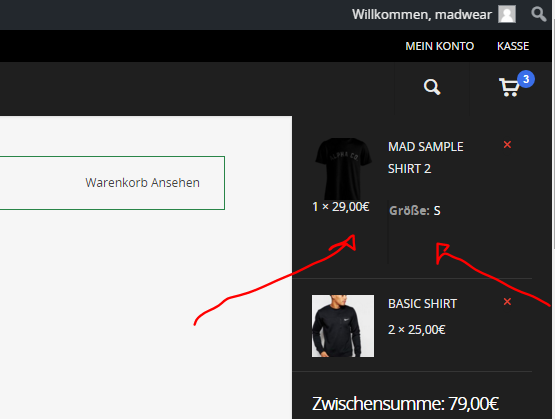
This doesn’t look so nice!
Thanks!
related url: www.alpha.madwear.co
Hey, add this into the custom css box in the Salient options panel:
#header-outer ul.product_list_widget li dl {
    border: none!important;
}
#header-outer .widget_shopping_cart .cart_list a {
  padding-bottom: 0!important;
}
Thanks!
You’re welcome