5480 comments found.

Hi Anna..
Not able to change the color from Purple to any other color.. thanks for giving me the info to do it.. still not able to change it..I sent you my FTP and WP-Admin info via ticket.
Thank you! Winners!
Hi Winners As explained in the ticket, those are images and have to be edited in an editor. Please see my ticket reply and confirm color code in order to help with this. Thank you Anna
Hello,
I can not login with user and 1234. I tried it with different browsers but not working.
Hi bertl11
Please test now. Someone must have reset password. I added back pass 1234
Thank you Anna
Hi, thanks! One more question. Is it possible to create custom fields and is it possible to change the predefined fields? I like your themevvery much and wanttto use it for events. Thanks
Hi bertl11
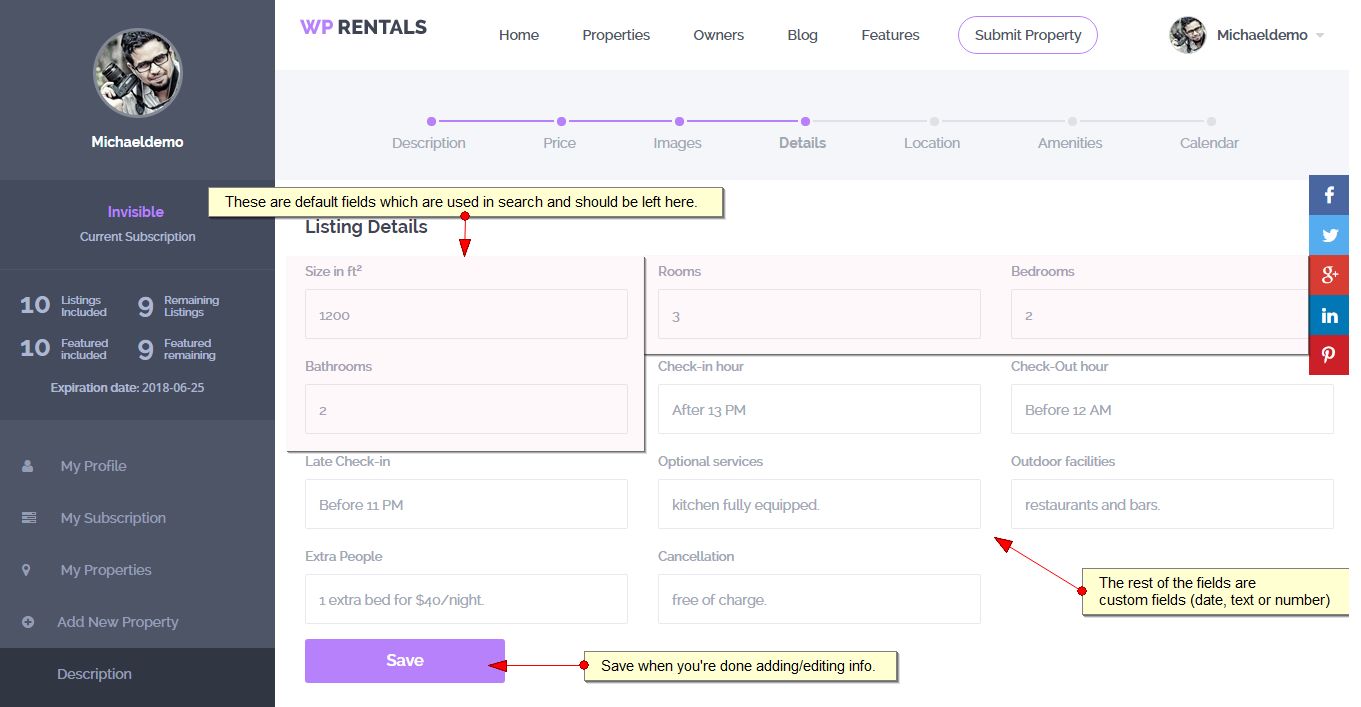
What we have is this. Custom fields are those you see in Listing Details (after Bedrooms). The rest are default fields
http://help.wprentals.org/wp-content/uploads/2015/10/submit8.jpgBut the search uses these default fields too. Modifications in code are required to change search as well. That would require advanced coding skills from your end to make further changes.
The custom fields that can be added, will show after default fields as information. You can add text, number or date type fields.
Thank you Anna
?You don’t understand me. Completely. I work around 3 years in property rentals and it is very important to filter the objects by: 1. District 2. Quantity of bedrooms 3. Price Do you think it is normal from the logical point of view?
So, I go to the page http://balivillas.online/properties-search/
?And try to find all the villas in Umalas. I put the cathegory Umalas at list to the villa Fiona and villa Abigail.
I put the name Umalas to the field “Where do you want to go?”
The system gives me the possible names of the streets suggested by Google. And what?
All the villas stayed in the list!!!
What is the use of the search with filters if it cannot filter the results by area???
What is the use of the website with property where you cannot find an object by area!!! There is no logic and no use in your theme. I am very disappointed that I bought it. Just a waste of money.
Hi leramagenta
We will do our best to help.
I don’t know how address is composed in Indonesia, and all I could do is test following the information you gave me so far. I understand the test we do on our site is not conclusive. So we need to check in your website. Please see below.
In your website, the search returns only Country (not city or area) when you type any address element in search. That’s why search results show all.
It’s possible “Umalas” is neither city or area in google maps database.
As you see here, google maps has several regions:
the (regions) type collection instructs the Places service to return any result matching the following types:
locality
sublocality
postal_code
country
administrative_area1
administrative_area2
the (cities) type collection instructs the Places service to return results that match either locality or administrative_area3.
https://developers.google.com/maps/documentation/javascript/places-autocomplete
Maybe Umalas is a different region than those we selected and we jave to add that too. Please give us FTP in the ticket and we will do tests with this direction to see if it’s the correct solution.
It’s also possible the issue is in the address (it’s not correctly added in admin).
We will check both scenarios on your site directly. Please give us wp-admin and FTP access in the ticket 11195
Thank you Anna
Hi Anna, I’ve been going through this for hours and there are so many things that don’t work as you describe in your help docs that I I need your help addressing the following please:
Images loaded into property page are not loading into a gallery, but remaining in the description.
Featured image does not propagate into a header. In fact, I don’t see any header setting for property pages as in your demo . -both were addressed here, and I followed the directions as illustrated -http://help.wprentals.org/2015/10/28/property-post-settings/
Still outstanding- Unable to adjust all colors- the purple is unaffected.
“Advanced search” widget doesn’t show any of the advanced search features – no ability to search by bed / bath / amenity etc..
Logo image defaults to very small size no matter what size I choose
Can’t find a setting to choose week or monthly rentals.
Doesn’t seem to be an option to disregard price.
Seems to be no access to edit booking form (or any forms. – this is vital as terms differ in different situations and locations).
No financial set up from admin- only from user submitted property? Admin owns / manages all properties.
There’s no description of what ‘property type 1’ or ‘property type 2 means’ Please advise.
Cant find where to edit defaults of neighborhood / area pages. There needs to be a place to write a description about the neighborhood.
Need to change “what do you rent’ as that’s not a logical phrase in American English.
I’ve set the price slider 4 times and it keeps defaulting to $0- $500.
I’ve set the google map zoom and size preferences several times and it remains unaffected.
I’m sure there will be more. Your help is appreciated weeding through the basic to achieve functionality.
best, Kimberly
Hi Kimberly
Since this is a long list, will answer one by one:
Images loaded into property page are not loading into a gallery, but remaining in the description.—> Images should not be inserted into page. Just attach them to a post. You can do that following this steps here – front end (http://help.wprentals.org/2015/10/28/add-new-property/) – see the images part or by editing admin post – see this help – http://help.wprentals.org/2015/10/28/property-post-settings/
Featured image does not propagate into a header. In fact, I don’t see any header setting for property pages as in your demo . -both were addressed here, and I followed the directions as illustrated -http://help.wprentals.org/2015/10/28/property-post-settings/—> There are 2 property page types. You have to select in theme Options – Appearance – property page layout – Type 2 and save. Help http://help.wprentals.org/2015/10/28/appearance/
Still outstanding- Unable to adjust all colors- the purple is unaffected.—> Please open a ticket so I can see why it doesn’t save purple color. Please see my previous reply in details.
“Advanced search” widget doesn’t show any of the advanced search features – no ability to search by bed / bath / amenity etc..—> The shortcode, widget and search in header have the same fields – http://help.wprentals.org/2015/10/28/advanced-search-widget/ Only the half map layout has all the advanced search filters (bedrooms, baths, search). http://wprentals.org/advanced-search/?search_location=&advanced_city=&advanced_area=&advanced_country=&check_in=&guest_no=&submit=Search
Logo image defaults to very small size no matter what size I choose-> There is a max height set in css so that all logos fit our header size
.logo img {
    max-width: 300px;
    max-height: 70px;
}
—> If your logo is larger than this – it will be resized by this css.
—> To make logo larger, you will need to modify entire header. This will need custom css. Please open a ticket for this and send us the url with your logo (original image should be as tall as you wish to show so that we can work with preview and set the css according to your logo)
Can’t find a setting to choose week or monthly rentals.—> We don’t have price per week or month in this theme. Not sure why you would expect this since it’s not advertised anywhere.
—> The custom calendar and all the custom price features can work only with price per night (day).
Doesn’t seem to be an option to disregard price.—> I am afraid we didn’t create this because, being a renting website, we didn’t imagine anyone would rent something and not tell the price. Booking can’t work without at least price per night. I am afraid that price should be listed to work in this theme and the features developed for renting.
Seems to be no access to edit booking form (or any forms. – this is vital as terms differ in different situations and locations).—> I am afraid this is not a feature we offer. Our booking for is coded. Modifications can be done only with code changes. The theme, as shown in demo and as presented in features, is for renting apartments only. If this is not what you need to do with the theme, I am afraid we cannot offer it.
N o financial set up from admin- only from user submitted property? Admin owns / manages all properties.
—> As explained in this forum – there must be at least 1 users/owner assigned to a property. Notifications in private message system go to owner message box. This is for subscribers only (not admins). So you must edit properties in admin and assign owner/user to property. This user should be created in front end.
There’s no description of what ‘property type 1’ or ‘property type 2 means’ Please advise.—> I updated the help. Please see above. It’s just design option. Elements are aligned/designed differently. But they are the same elements. —> We allow users to add not just text, but also shortcodes. Please see this updated help http://help.wprentals.org/2015/10/28/how-to-edit-view-delete-custom-taxonomies/ Look at Add Extra info/text on top of Taxonomy page properties list following these steps:
Need to change “what do you rent’ as that’s not a logical phrase in American English.—> Please see my answer below. If you insist to modify in code (and you’re ok with my comment about having to be careful as a theme update would override this) please let me know and will give you the file name to modify in code. —> I don’t have any issues with this in core. Please note you should add only numbers (no commas). Perhaps that’s the issue? —> To help with this I must know where you change the settings. There could be different scenarios: a. You edit global header but the page has custom header and you need to change that too b. You have some sort of cache c. You try to edit an imported page from demo and sometimes demo imported pages don’t save changes. This is something we can’t modify, but we’re trying to look at alternatives tools to import demo. Meanwhile the solution is to delete the page, create it again, and all future edits will be saved correctly.
I’ve set the google map zoom and size preferences several times and it remains unaffected.To be able to tell which situation applies, I must see the page where settings don’t apply and wp-admin to check settings. So please open a ticket for this separately.
Also, if the features from above that we don’t have are very important to your business, I am afraid that my only suggestion is to ask for a refund, because I am afraid the changes would be too complex to recommend custom development services and the costs would be too high to worth looking for a developer to make that happen.
Thank you Anna
Hi Anna, Thank you for answering most of my questions. I’ll get to work on it again tomorrow and reach out with any more questions. Best, Kimberly
You’re welcome. Will wait for your feedback. Anna
Camelia gives a really bad support help. I mean no help at all. I feel like she does not read the tickets and just sends th? links to the pages related to the topic. I was trying to change a custom header no a page and described it and wrote that I could not. And she sent me a link to a FAQ where it is explained how to set a custom header. Exactly what I already did and it did not work.
-
?Hi leramagenta,
First of all I apologize again for any inconvenience created by the ticket reply.
As posted in the ticket you opened for this, I tried to replicate the same issue on core (editing header) but I can’t.
We noticed that some demo imported pages may not be able to be edited (during import wordpress breaks them). In this situation, please create new pages with the same settings and delete the demo ones.
This is not something we can control I am afraid. We are looking into alternatives to importing demo content but until we find a better solution, we are here to help create the same pages again so this is not an issue with future edits. As I asked in the ticket, please give me wp-admin and will help with this asap.
Thank you for understanding,
Anna
Hi Anna, I have changed the custom colors and the purple remains. Please advise how to change that color. The ‘main color’ has been changed.
Hi Kimberly
I just tested and the colors apply in our sample site. Perhaps you have a caching plugin or there is only a specific color that isn’t yet in our colors options (if that’s the case we’ll make sure it’s added in next theme). To be able to help, I must see your wp-admin. Can you please open a ticket here http://support.wpestate.org/, give me wp-admin and post the ticket ID here. We don’t work over weekend. If I can look tomorrow, will do my best, if not latest monday will assist.
Thank you Anna
Thanks again. The colors I chose have worked throughout the site with exception of replacing the purple. There’s no rush.
Hi Kimberly,
Maybe the purple color code is written wrong. Please give me wp-admin access to check. I test on our testing site and I don’t have any problems. I don’t wish to share the test domain here. If you open a ticket and give me the ID will show you in private my test results. Thank you, Anna
The search by location is not working at all. I input a name of a district on a page properties-search and Google maps find the district. But the results under the filters include all possible districts that are even very far from the one i put in. Camelia does not answer the questions how to fix this bug. Only writes how hard it is to make custom fields. I am very disappointed with this theme. I think that for properties a search by a district is something very basic.
Hi leramagenta
First of all I apologize again if Camelia hasn’t offered the support you expected. I assure you she works very hard to offer clients the best support possible. Sometimes we may misunderstand and offer the wrong answer, but in those cases you can post me your ticket ID and I will take a look.
I assure you that the entire team works very hard to offer you (our client) best theme and support.
I checked ticket 11195 and posted in there already. But will post here as well so in case other clients meet with this situation, they have the directions at hand.
I checked your site. There is something strange related to your properties address. I assume (and please confirm if I am wrong), you didn’t use front end submission and the address form in there with auto-complete. Please tell me how you added your address.
I did a test in our site and it works.
Added Area Canngu to a property.
Then City North Kuta for that area. I checked in Google Maps which city corresponds to this area and these were the city/area posted there.
Then I did a search by Canngu – and results are here correctly
http://i.imgur.com/LQ1dmHX.png http://i.imgur.com/r0WoaFt.png In the same ticket I asked you to provide details about how you added the address and to give me the wp-admin to check how I can help you edit the address to be correct (as google maps addresses). Google Maps search requires your address is written correctly (as google maps has it in the database).Thank you Anna
Hi Anna, I’d like to change the text in all fields of the “make a reservation’ form. Can you please advise where, either front end or specific line of back end / css where I may make those edits? Many Thanks, Kimberly
Hi Kimberly
Best would be to use the .po to make text edits. This will be easier to save in case of theme updates.
The steps are presented here – http://wpestate.org/forums/topic/use-poedit/ (the same steps apply for wprentals theme). If you wish me to help please open a ticket and give me FTP and wp-admin (will need ftp to add the .po to your theme).
Thank you Anna
Thanks Anna, I’m not trying to change the language, I’m trying to change the words – for example change “make a reservation” to “Inquire” and “book now” to “check availability” etc…
Hi Kimberly
Rather than do in code, I recommend to use the poedit. You don’t translate, but you modify the words with poedit and you don’t have to lose the changes in the process.
The help includes all the screenshots. If you believe it’s too complicated, we can help. We’re a little busy the next days, but if you open a ticket here http://support.wpestate.org/, give us FTP and wp-admin, tell us which words and what they translate to, and will give a hand when we have a small window free to do this change for you.
Thank you Anna
Annapx..
Sent you a ticket regarding changing the purple on the theme.. thank you!Winners!
Hi Winners!
I am not in the office during weekends. Please give me the ticket ID here and will look tomorrow (if I can) or on Monday.
Thank you Anna
Ticket User
Adrien Status
Open Priority
High Submitted By
Adrien Assigned User
Department
Support Department Added
20 hours ago Updated
20 hours ago ID
11211
Hi Winners
Ticket 11211 was all I needed. I replied this morning. Please check. Thank you, Anna
Hi Anna..
Not able to change the color from Purple to any other color.. thanks for giving me the info to do it.. still not able to change it..I sent you my FTP and WP-Admin info via ticket.
Thank you! Winners!
Hi Winners As explained in the ticket, those are images and have to be edited in an editor. Please see my ticket reply and confirm color code in order to help with this. Thank you Anna
Regarding adding an extra payment gateway, are you available for custom development?
Hi eskamedia
Thank you for the comment. I am afraid we’re not available for custom development right now. Thank you, Anna
Hi Anna!
in which file is located code to edit http://wprentals.org/properties/huge-sunny-villa-east-side/ “properties” permalink
Thanks!!
Hi wery
Please follow the instructions in this topic – http://wpestate.org/forums/topic/change-permalinks-wp-rentals/
Thank you Anna
Superthanks!!
Regards!
Hi annapx,
i have a simple question, but i can’t figure it out:
How can u add more images to a property? so they will show up at the image carousel from a single property?
Thanks in advance
Hi Snepcatchers
In front end submission you have the IMAGES step in add property (help – http://help.wprentals.org/2015/10/28/add-new-property/)
In admin – you have Add Media (help – http://help.wprentals.org/2015/10/28/property-post-settings/)
Thank you Anna
Hi annapx
do u plan to do the complet booking system not just only the fee o the website. , that accept all the amount of the booking. and if yes when just to plan it in our paln.
Thanks in advance
Hi abjad
Thank you for the comment. Unfortunately I don’t understand the question.
Here is what I understand. Not sure it if answers your question.
Admin can accept 100% payment (except city fee and cleaning fee). We don’t have payment to owner (if that’s what you’re asking). We have in plan to create this, but it’s a complex feature. I couldn’t give a timeline at this moment.
Now we’re working on launching the ical sync feature.
Thank you Anna
Hi annapx,
I really interested in this theme. I really love this. And have one question.
Can the system do showing “B&B host’s address information” after booking?
Hi Mominaina
If there is a confirmed booking, the user who made the booking can see the user contact info, who owns the property booked. The details show on owner profile – like this http://help.wprentals.org/assets/images/contactowner3.jpg
Thank you Anna
Hello! It ‘a great template. Compliments. Can I import the properties that have the template Wp Residence on this?
Hi Ninoman
Thank you for the comment. I didn’t try, but should be ok because the code for properties, custom fields, taxonomies is the same.
If you wish to do a test please email me at annapx0909@gmail.com
Thank you Anna
Hi Anna!, when an owner is uploading a property, at location menu, when i write spanish address not working, i click “place to pin” and not showing right address.
Thanks!
Hi Wery
This is something we have to test with the same address to be able to help. Please open a ticket in our private client support http://support.wpestate.org/ give us the same address as you test and your website url (wp-admin) in case we need to take other settings on our core and test the same.
Thank you, Anna
This theme is beautiful. Does it allow me to let users register and upload listings for free but also allow me to have users register and pay to view those listings?
Hi mtntownmedia
Thank you for the comment. You can set submission to be free. But we don’t have any feature to allow to view properties after paying. Viewing is also free to anyone.
Thank you Anna
hello do you have a demo admin account. realy intrested . also can you use another theme or is this restricted?
Hi mtblive
Thank you for the comment. You can’t use another theme with out theme. Only one theme can be active at one time in wordpress. For an admin account please email me at annapx0909@gmail.com
Thank you Anna
Hi Anna!
I have test your demo a lot of time, and i think i should modify small code to adapt form and search box, when i had bought template could you indicate me which files is located code i have to change?
thanks for your answers!
Hi Wery
Thank you for the comment. If you just need to know the files that are responsible for search, we can tell you what those files are. But the changes themselves would have to be done by you and that will require coding knowledge, or hiring a developer to modify the theme.
Thank you Anna
Of course only location of code. Thanks!
Hello,
We are looking to test the icalendar feed export and import.
If you want to help you can open a ticket at support.wpestate.org and post there the feeds you want to import so we can test it with our new versions.
Also for those who purchased the theme we can offer a beta version of the new version (main update being the icalendar import.export).
Thanks, Anna