995 comments found.

Dear Support,
I’m using your “TrueMag” theme.
I need to add some custom coding to the posts.
So far I was able to do it for the desktop by adding my custom coding within:
“2.2 – Article”
Just after:
Unfortunately I’m not able to find the place where I could do the same also for the mobile layout.
Apparently, that has a very different syntax and I cannot find it.
Could you please shade some light on it?
Thanks, Mihai
I’ve flagged your message because of shared purchase code. It’s private information. Please don’t share it.
Your email bounces when I tried to email it.
wp 4.4 compatible? Is it safe to update my site to wp 4.4?
regards
Hi,
Yes. The theme is compatible with WordPress 4.4.
Regards, Nat
Hi friends!
We have already purchased and started to use your awesome theme! Thanks for this work, your product is insanely great and simple! However, we have some questions.
Demo link: http://elgun.me/psychin/
Problems:
1 – If you entered user password and name wrong, it directs to wp-login.php. Does theme have login page? If there is, how to forward wrong username/pass to that page?
2 – BBpress and Buddypress Login/Register are same? Can I use same bbpress login in everywhere?
3 – Is there any lost password default page? I have created one with using [bbp-lost-pass] but it is ugly. May be you have one.
4 – How to add sublines to the page names on Header Navigation?
5 – How to customize Registration Area? I want to delete some fields and add another fields for registration. For example, how can I add “University Name” and delete “Name” area on registration field?
6 – How to Remove “Home” menu from sub navigation on header? I could not change from Dashboard/Menu.
7 – Which PHP do I have to configure to increase the limit of text on excerpts on homepage?
We recommend to work more on registration/login BBpress/buddyPress sections. It is very important. And you should add simple guidline about BBpress/buddyPress in documentation.
Regards, Elgun
Hi,
1, 3, 5 – The custom login page comes with BuddyPress. I think there are plugins which handle functionality such as forwarding wrong username/password, registration page customizations.
2 – Users are handled by default WordPress core. Thus bbPress users and BuddyPress users can use the same access details.
4 – Fill the Title input field on menu element. By default it’s available, otherwise enable it from within Screen Options bar.
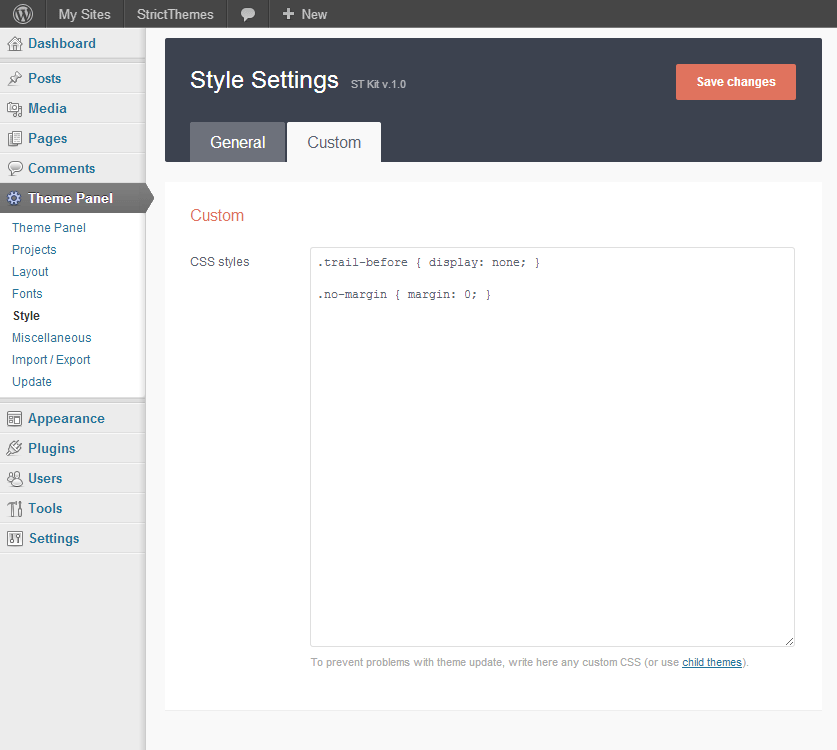
6 – You can drop this line on Theme Panel > Style > Custom CSS:
ul.menu-2 > li:first-child { display: none; }
7 – You need to use excerpt metabox. Enable excerpt metabox – http://dl1.joxi.net/drive/0012/0377/807289/151109/e5f98f665c.jpg and drop some text there – http://dl2.joxi.net/drive/0012/0377/807289/151109/6279217313.jpg
Thank you for suggestions.
Regards, Nat
Thanks! I need some more answers about other isues:
I updated website on – www.psychin.com
4 – This question on my previous comment is still active. I know how to add Title, but I am looking for subtitles. I am adding photo: http://elgun.me/psychin/wp-content/uploads/2015/12/sec-title.png
8 – BIGGEST ISSUE! – I am getting too many 500 HTTP Server Error in everywhere during working on website. I applied solutions, increased PHP memory, contacted with my Hosting Provider, and may be read more than 50-60 pages of Forum discussions, comments, probable solutions – applied them. Still I am facing same issue. Have any customers complained about this issue? May be it is from theme, or some of the plugins that theme uses. How can I solve this issue? When I open this website in 9-10 tabs, at least 4-5 is dead.
9 – How can I restrict tags on home page? I am adding tags, and all of the tags are shown on homepage. It is very ugly.
10 – Problem about Excerpts! I am updating Excerpt from Dashboard, but on homepage, it does not update. I am trying to add News category with ST Posts widget to Secondary Sidebar (FOOD & HEALTH section on Demo content), but it shows a long ugly Excerpt and does not update it.
Thank you again for your great support! Have a nice day!
+ NOTE: For 8th problem, memory limit is 512M.
Hi,
4 – This is Title Attribute, see screenshots – http://c2n.me/3rWfS0R.png http://c2n.me/3rWfZD5.png8 – Most common reasons for Server Error 500
- Invalid syntax in .htaccess file
- Incorrect configuration of server scripts
- Reaching the limit of server resources (weak host, no cache, etc.)
- PHP memory limit
- Incorrect access rules to CGI scripts
9 – You can remove Tags widget from Secondary sidebar from within Appearance > Widgets page.
10 – I’ve checked your website and found custom excerpts on the frontpage. You can make a excerpt shorter and it will look nicely.
Regards, Nat
Thanks, Nat! You are awesome!
8 – Do you think that, BuddyPress, BBpress, ST Kit, WooCommerce working together and forcing CPU, RAM? Or do you think activating all of these plugins should work very well? Have you ever got a complain from customers about this 500 error? I am using the largest package of my hosting company.
9 – Can I clarify my 9th problem again? I know how to delete Tags Widget, I need to limit the tags. I don’t want a long Tag section. I want it to show maximum 10-15 words/tags on widget.
Have a great day! Elgun
Hi Elgun,
8 – All those plugins work fine together on VPS host with average configuration as shown on Live Demo – http://strictthemes.com/truemag/ A server scripts must be configured by the right way.
9 – You can use a custom filter for limiting a number of items in Tags widget e.g. like this – http://coffeecupweb.com/how-to-limit-number-of-tags-in-wordpress-tag-cloud-widget/
Regards, Nat
Hello again. I hope you are well. I have two more questions.
11 – Why my Wordpress shows admin bar to everybody? I don’t know what I did, but when I am logging out from dashboard, admin bar is still there – http://www.psychin.com/wp-content/uploads/2015/12/admin-bar-problem.png
12 – How can I download your Icon package with full sizes?
King Regards, Elgun
13 – IMPORTANT – Is there any way to hide writer’s photo and writer’s name for a SPECIFIC POST. I like this feature but sometimes it not necessary. I want to hide this section from selected posts – http://www.psychin.com/wp-content/uploads/2015/12/writer-name.png
Hi Elgun,
1 – You can disable Admin bar – http://dl3.joxi.net/drive/0012/0377/807289/151224/4f3cada67d.jpg
2 – There is no package to download. Icons come with the theme as font only.
3 – This is part of layout. You can disable/enable author info and post meta for all posts from within Theme Panel > Post tab.
Regards, Nat
Hi Nat,
I’m using a rich snippet plugin: WP Rich Snippets. Google testing tools says everyting is fine, but they are not showing in SERP.
Earlier i used another theme for this website, and rich snippets were shown in SERP. Now i changed to the far better TrueMag theme (:)), but now rich snippets are not showing anymore.
Also voting doesn;t work anymore. Looks like it’s running in a loop.
Can you help me out?
Regards,
Rob
Hi Rob,
I’ve tried to find out about plugin. It’s paid plugin and there is now Live Demo. So I can’t find a difference between this plugin and free analogs. Maybe some kind of special integration is required.
Regards, Nat
Hi Nat,
Thanks for your reply.
Could it help if i send you a link of a sample page of our website?
Regards,
Rob
Hi,
Yes, please let me know URL I will take a look.
Regards, Nat
Hi,
I’ve checked the source of page you’ve provided and found a some kind of meta info. Such meta don’t have relationship with the theme. Please make sure you’ve filled required fields which come from the plugin or try another plugin e.g. Yoast SEO, All In One Schema.org Rich Snippets or similar.
Regards, Nat
Hi,
Installation Failed. Kindly help
Hi,
Take a look instruction – http://strictthemes.com/documentation/getting-started/installation/
You have to upload the theme zip only, not whole package.
Regards, Nat
Hi, I’ve a website: smiletilleternity.com, I tried all the steps to enable comment, but nothing happens, can you please help me out.
Hi,
You have replaced original WordPress comments within Discuss plugin.
Regards, Nat
Hi Agata,
Yes you can use any of these sizes depending on the available width of a sidebar.
Regards, Nat
Great, thank you. And just to be sure, may I add the ad which has 160px width to sidebar which has 300px (the ad will be in the center, and white background around)?
Hi,
Yes you may. I can help you adjust it properly.
Regards, Nat
Hello, All. Hopefully my last CSS-related question.
I tried to add custom CSS within the ST theme panel for the button-st a:href links but it doesn’t seem to be working out. What I’d like to do on this page is simply reverse the colors on the pricing table buttons, e.g. make the inactive white and the hover red (similar to the other links):
http://www.cheersva.org/partners/Would you please tell me how I can go about doing that?
Thanks much.
Regards, Kory
Hello Kory,
Something like this:
.pricing-table-button a:link { color: #FFFFFF; }

.pricing-table-button a:visited { color: #FFFFFF; }

.pricing-table-button a:hover { color: #990000 !important; }
Regards, Nat
Hi, Nat. Thanks much for your reply. I greatly appreciate it. Unfortunately, that didn’t seem to work. I also tried using .button-st instead of .pricing-table-button and that didn’t work either. I also cleared xcache and all the other caches via W3 Total Cache afterwords. Any other suggestions?
Regards, Kory
Hi,
I’ve checked your website and found inactive button is white and the hover red. So the code works fine.
Regards, Nat
Do you have/offer the ability to create different front page designs for this theme versus what comes with it?
Hi,
By default the theme comes with layout as shown on live-preview. There are possibilities to select another blogroll template from within theme panel, change sidebar position and number of sidebars on frontpage. If you need to change a concept of layout then we will be glad to make a customization in accordance with your needs for a some extra.
Regards, Nat
That would be great, is there a direct email I can contact you at?
email us at info@strictthemes.com
Regards, Nat
Hi there. I’m about reach to launch my site and noticed when viewing via Firefox build 42 on Mac OS X, the posts appear to run off the left hand side. I’m not having this problem in Chrome.
It almost appears as if the left column where the meta content resides is forcing the posts to shift. I’m happy to send a screenshot if that’ll help.
Regards, Kory
Looks like it had to do with a banner ad plugin on that side, e.g. I tried to include a 120×240 sized banner ad. When I temporarily turned that banner off, the posts loaded as they should. I’m concerned, however, as I’ve already had to disable the 970px banner in the header and now this one. I’m successfully using four 125×125 banners in the right column.
Regards, Kory
Hi Kory,
I’ve checked your website in Firefox on Mac and haven’t any problem. Let me please screenshot and I’ll take a look.
Regards, Nat
Hi, Nat. My apologies for not getting back to you. I actually went ahead and disabled the banner and am only successfully using the 125×125 banners. That being said, I’m good to go.
Regards, Kory
Hello,
How to remove on sticky posts the transition of the image on hover and the default coloured background that vanishes on hover.
Regards
Hi,
Drop these lines on Theme Panel > Style > Custom CSS.
.posts-featured-wrapper a.post-thumb:before { background: none; }

.posts-featured-wrapper a.post-thumb { background-size: 100%; }
Regards, Nat
Thank you very much Nat,
Any option to show external images as featured image for older posts? I have a lot of posts and I can’t update all of them. How to import tthumbs for featured images? Where is the code placed so I can check. Is there code like this: if ( has_post_thumbnail() ) { the_post_thumbnail(); } else { echo ‘’; } ?> I will edit it….I need for standard posts on index and archives
thank you very much
And one more question
How automatically to centre all old posts?
Thanks in advance
Hi,
1 – Yes, you can edit that in two places – single.php and t4.php You can create a condition for custom featured images from old posts and display that instead of original featured image. Do not forgot to make any kind of customization through a child theme.
I can create a child theme in accordance with your needs for some extra. Drop me a line through the contact form – http://themeforest.net/user/strictthemes
2 – I am not sure what do you mean.
Regards, Nat
Hello Nat,
For the second question instead to add html tag for every post <center> </center> I would like to do that through theme settings (css) if possible
With kind regards
Hello,
You can drop this line on Theme Panel > Style > Custom CSS.
#article { text-align: center; }
Regards, Nat
Hello Nat,
this code is not working
Regards
Hello,
I’ve checked. It works fine – http://dl3.joxi.net/drive/0012/0377/807289/151207/d8ca7aba1e.jpgRegards, Nat
Hi Support, is there a way for the sticky posts not to be included in the order of the list of post in the left side of the frontpage?
Example: Still enable the sticky post in the upper/header part in the frontpage but on the left side only the latest post or article will be displayed.
Thank you.
Hi,
You need to exclude sticky posts from blogroll from within Theme Panel > Blogroll tab. See screenshot – http://dl1.joxi.net/drive/0012/0377/807289/151127/2b16cb9e88.jpg
Regards, Nat
Hi Support Team,
I already checked the Theme Panel > Blogroll > Exclude from Blogroll, but still the sticky posts were posted on top on the other normal post.
Snapshot 2: https://lh3.googleusercontent.com/-UJAbFD7jv2M/VlxSfu2KyLI/AAAAAAAAFXw/6C1yvi861Zc/s576-Ic42/blogroll.png
website: www.josefpanerio.com
Hi,
I’ve checked it works fine on the Live Preview.
Probably it’s about some kind of cache on your server. Take a look a cache settings and reduce the time of storing of cached pages.
Regards, Nat
Hi Sir,
I checked the theme live preview and I see the same in the blogroll.
I checked the cloudflare page caching (4hrs cache settings) and delete the cache from wordpress plugin, but nothing happen.
Snapshot still the same: https://lh3.googleusercontent.com/-UJAbFD7jv2M/VlxSfu2KyLI/AAAAAAAAFXw/6C1yvi861Zc/s576-Ic42/blogroll.pngThe sticky post settings was setup 2 days ago, and I believe if cached it should be ok now.
Can you share the snapshot of what you saw from your end?
Thank you.
Hi,
Let me know access details (to your WP admin) through the contact form – http://themeforest.net/user/strictthemes I will take a look.
Regards, Nat
Hi Nat,
Can you provide an email address where I email the admin details. I cannot post it here, for security purposes.
Regards.
Drop me at info@strictthemes.com
Regards, Nat
Hi,
Done! You had to create the frontpage properly in accordance with the theme documentation. I’ve created frontpage and Sticky posts have been excluded from blogroll.
Buy the way on the theme live preview Sticky posts are excluded from blogroll. 
—
I’ve enabled excerpt metabox http://dl1.joxi.net/drive/0012/0377/807289/151109/e5f98f665c.jpg
It’s better to use excerpt metabox to display excerpt properly on Blogroll http://dl2.joxi.net/drive/0012/0377/807289/151109/6279217313.jpg—
The theme package comes with extended documentation and you have to follow it.
Also you can take a look online manuals:
Regards, Nat
Hi Nat,
Thank you for assistance.
For some reason I do not know what happened here. After you fix the blogroll, I noticed 3 items that did not work or function properly.
List of Items I noticed that did not work properly. 1. The Header Adsense (Ad Sidebar 1) 2. Ads 2 (see attached photo) 3. Once you are in a single post blog article, the search button seems disabled or not functional.
- above features only works on the frontpage and but on single page post (blog post) it did not.
Can you help me understand what happened? And how to fix it.
You can still login as admin using the credentials I sent you.
Fyi. I changed the Page you created from Frontpage to Stock Market Strategy
Hi,
1. There was JS-conflict which comes from the third-party code in Below article text area. I’ve removed this code, the search bar and Adsense display properly on a single post now.
2. I’ve enabled Sticky posts for a single post – http://dl3.joxi.net/drive/0012/0377/807289/151204/2d6228753e.jpg
Regards, Nat
thanks Nat
You are welcome.
Rate our work – http://themeforest.net/downloads It will take 5 seconds.
Regards, Nat
Hi, All. I understand that this may not be in the realm of support but I have a question regarding the CSS colors.
I changed the a: link colors within the child theme css file I have and see that the social media icons are showing up as the same color. Unfortunately, that color is too dark w/ the blue in the theme header. Is there a way to keep the social media icons to the default white while keeping the new a: link colors?
These are the colors that I’m using in the child css file:
a:link {color: #e34c00; text-decoration: none; } a:active {color: #222222; text-decoration: none; } a:visited {color: #e34c00; text-decoration: none; } a:hover {color: #e34c00; text-decoration: none; }
Thanks much.
Regards, Kory
Hi Kory,
Something like this:
.icons-social a { color: #FFF; }
Regards, Nat
Excellent, Nat, thanks! I had to separate the two, e.g. put the a:link syntax within the child style.css file and the .icons-social line within the ST Kit plugin but all’s good now.
I greatly appreciate it.
Regards, Kory
It’s better and easier to drop these lines at Theme Panel > Styles > Custom tab – http://strictthemes.com/wp-content/uploads/2013/08/doc_style_css.png
Regards, Nat
Yes, I had them all there but, for some reason, both the icons and links reverted to the same orange. I was able to get them to work by separating them. Go figure.
Hi,
I’ve inserted your lines at Theme Panel > Styles > Custom tab – http://dl1.joxi.net/drive/0012/0377/807289/151125/fbb91097b8.jpg
And this is result – http://dl2.joxi.net/drive/0012/0377/807289/151125/d90f2861f7.jpg
Regards, Nat
Thanks so much, Nat. I tried in the exact order you shared and that seemed to work. No more using the child style.css file. I’d much prefer to keep everything within ST Kit anyway.
Cheers!
Great. You are welcome.
Hello,
Thanks for the great theme but had an issue with changing theme colors from the orignal colors I changed the theme color to yellow and green in theme PANEL it reflected but Now I tried changing many colors but aren’t reflecting on front End.
Thanks, Samron
Hello Samron,
I’ve tried to change a colours on your website and it works fine. Please see screenshot: http://dl2.joxi.net/drive/0012/0377/807289/151120/16f6d89b5a.jpg
Regards, Nat
Hello,
similarideas.com is my website Link Please check if you can change the color of the website and let know.
Thanks, Samron
Hello,
Even Let me know where can I find the CSS if required to change the theme color.
Thanks, Samron.
Hello Samron,
Let me know access details (to your WP admin) through the contact form – http://themeforest.net/user/strictthemes I will take a look.
Just use the Color Picker to change a color scheme – http://strictthemes.com/documentation/style/
Regards, Nat
Hello Nat,
Have already tried through Color Picker not working.
Hence have mailued you the details through contact form.
Thanks, Samron
Hi,
I’ve tried to change colors on your website, it works fine – http://dl1.joxi.net/drive/0012/0377/807289/151125/343fdd8fcb.jpg
Let we know the needed colors I’ll change it for you.
Regards, Nat
Hello,
No not working please login and check have already mailed you credentials.
For changing the colors correct the Issue or let me know how can I change because I want to try multiple colors.
Please Update ASAP.
Thanks, Samron
Hello Samron,
Color Picker works fine. Take a look right now. I’ve changed colors on your website.
Regards, Nat
Take a look this screencast – http://screencast-o-matic.com/watch/coXOICh3YI
Hello,
Thanks for update Have checked the video according to video it works but If you login to admin panel change the colors it reflects on admin panel only not on website please provide me Email ID and will send you the screen shot.
Or A request If you can even show URL in Video.
Thanks, Samron
Hello Samron,
This is screencast with the URL – http://screencast-o-matic.com/watch/coXt6jh3a2
You can send a screenshot on info@strictthemes.com
Regards, Nat
Hello,
Have sent you the video onyour email id please check and update ASAP.
Thanks, Samron
Hi,
After applying a new colors you have to refresh a website at least two times for flushing browser cache. I’ve noticed you refreshed website just once but you need to wait a few minutes and refresh it one more time.
Regards, Nat
Hello,
After applying new colors have refreshed website multiple times but even refreshed website after two days still same issue have even cleared the cache still it does not effect.
Have even sent you video again on your mail ID with refreshing both admin panel and front twice.
Thanks, Samron
Hello Samron,
Did you try to check changes in an another browser?
As you can see on the screenshot – current color scheme is different from the color scheme on your screncast – http://dl1.joxi.net/drive/0012/0377/807289/151201/d0ba6c9385.jpg
So that means Color Picker works properly, problem is you can’t see the changes on your browser. Probably it’s about browser’s cache.
Regards, Nat
Hi, I want to buy this theme However, I have some questions about forum.
Firstly, have tried to register to bbPress forum, but it does not work on demo. I wonder, does this theme has a specific registration page apart from Wordpress default registration page. The sidebar login area is okey. It is login sidebar. But I am asking registration page. I don’t want /wp-login.php.
Second issue, if I will add bbPress plugin, is it going to be same style as in theme? I don’t want bbPress default style.
Third issue, I have tried to register to see what users will see, but I could not register on demo. I wonder, what do my users will see after registration? Can you add a screenshot that shows the website, when somebody logged in. For example, I don’t want my users to see black default wp sticky navigation.
That’s all. Best!
Hi,
1. If you install BuddyPress and enable registration there you will have front-end registration page, see screenshot – http://c2n.me/3qkbEWN.png
2. Yes, it will be the same style as the theme. Like on Live Preview.
3. You can disable admin bar from within Theme Panel. Please see screenshots of pages for logged-in users –
Regards, Nat
Thanks Nat, awesome response! I have another question. Do user systems of buddyPress and BBpress are compatible/integrated with each other? For example, there is a user posted something on bbPress Forum, when I click to see his profile, link goes to BuddyPress profile. What is the trick in here? Can you explain in details? If I will delete BuddyPress, what will be the profile of Forum user?
Hi,
BuddyPress has a deep integration with bbPress. You can see that in action on this example:
If you deactivate BuddyPress then your users won’t be removed because it stored via default WordPress functionality.
If you will delete BuddyPress, this will be the profile of Forum user:
Regards, Nat
Hello again!
We have already purchased and started to use your awesome theme! Personally, I want to thank you for this work, your product is insanely great and simple! However, I have some questions.
Demo link: http://elgun.me/psychin/
Problems:
1 – If you entered user password and name wrong, it directs to wp-login.php. Does theme have login page? If there is, how to forward wrong username/pass to that page?
2 – BBpress and Buddypress Login/Register are same? Can I use same bbpress login in everywhere?
3 – Is there any lost password default page? I have created one with using [bbp-lost-pass] but it is ugly. May be you have one.
4 – How to add sublines to the page names on Header Navigation?
5 – How to customize Registration Area? I want to delete some fields and add another fields for registration. For example, how can I add “University Name” and delete “Name” area on registration field?
6 – I have posted some articles. On the homepage, title of the post appears, but subtext does not appear. I added a photo. I want to edit manually. Can I do that? And I don’t want ugly “[...]” in there. Check this link to see what I mean – http://elgun.me/psychin/wp-content/uploads/2015/12/truemag-problems.png
Finally, I recommend to work more on registration/login BBpress/buddyPress sections. It is very important. And you should add simple guidline about BBpress/buddyPress in documentation.
Regards, Elgun
+ How to Remove “Home” menu from sub navigation on header? I could not change from Dashboard/Menu.
+ Question 6 solved! However, I want to have more control over Excerpts. Which PHP do I have to configure to increase the limit of text?
Hi,
Please send support request from your buyer’s account.
Regards, Nat
Hi,
Adsense ads are not showing, I used your adsense short code and add manually but the ads are not showing. Kindly do let me know,
Regards,
Hi,
Probably it’s about AdBlock or similar plugin on your browser.
If you need more assistance let me know access details (to your WP admin) through the contact form – http://themeforest.net/user/strictthemes I will take a look.
Regards, Nat
message sent, kindly check
Hi,
It was about wrong Client ID, it should be like this: ca-pub-1234567891234567. I’ve fixed for you.
Regards, Nat
Thanks, but why the direct adsense code is not working.
Hi,
You need to use one solution (original AdSense codes or ST shortcode) for whole website.
Regards, Nat
Hello Igor, I’ve been using your theme since last year and everything worked fine until lates Mozilla update when the main menu divided into two rows. First, upper row is showing only website name, and second row shows the rest of the menu.
This issue shows only in Mozilla 42.0 on Ubuntu.. In other browsers everything works nice. I know its not about your theme because I checked everything, but still maybe you can find some fix, or give me advice. Maybe it will go back to normal after another Mozilla update, but who knows.. Also, I didnt update your theme because I have installed a lot of plugins, some of them for subscription, so wasnt sure if it was going to be compatible with it. Anyway, my website is awakeningtimes.com
I would appreciate if you find time just to check how it shows main menu in Mozilla now.
Best regards and thank you for wonderful theme!
Milan
Hi Milan,
Thank you for your feedback.
I suggest you to make server backup weekly and before every update.
The theme has already been updated:
- Fixed: Menu style issue with Firefox.
Install the new version with one click from within Appearance > Themes page. Or download updated package from your Download section – http://themeforest.net/downloads – and re-install the theme.
Regards, Nat
Thank you so much! will try it!
Hi. You use custom fields for video?
Hi,
We handle a video post formats using a custom metabox.
Regards, Nat
Hi, I’m having a dificulty in woocommerce, everything is up to date, the woocommerce version and the layout, I don’t know why but in the checkout on the address fields, the state field label appears twice and the field itself only once, but when I try to finish the checkout process it tells me that the state field is required, but the only one that appears is filled up, the other one appears only the label and should not appear at all and that way no one is able to buy anything, I have being having this problem for 5 days and am losing tons of sells… tons of money. The website is www.iepec.com, you can try to make a purchuse to see it happening.
Just to point out, I had to make a change in functions.php to avoid the state field and make purchuses come in, I have seen that you have made 3 test purchuses, they only came in because the state field is being ignored through the change I made in functions.php
Hi,
I’ve checked website and haven’t found any problems in checkout via bank transfer.
Problems comes when I try to pay via PagSeguro. (PagSeguro: Um erro ocorreu ao processar o seu pagamento, por favor, revise os seus dados e tente novamente. Ou entre em contato conosco para obter assistência.)
Make sure you make right settings for this payment method.
It’s about payment gateway settings in WooCommerce plugin.
Regards, Nat
Just to point out, I had to make a change in functions.php to avoid the state field and make purchuses come in, I have seen that you have made 3 test purchuses, they only came in because the state field is being ignored through the change I made in functions.php… Also this was not happening before, after the updates it started happening so it looks like the last update made the problem appear…
The recent update was only about CSS-styles. No any changes within functions was made. Also the theme scripts do not handle and do not tweak standard WooCommerce functionality. That issue comes from WooCommerce or third-party plugins.
Regards, Nat