995 comments found.

Hi There,
I am wanting to use the same static home page theme that is advertised on the website but I do not know how to go about doing this. I am having issues being able to organize the homepage like yours. Do you have any advice or anyone that can work with me to create a beautiful, appealing, and creative static home page?Thank you.
Hi,
The theme package comes with documentation you should follow it.
—
There are some of important steps:
1 – The theme installation – http://strictthemes.com/documentation/getting-started/installation/ Don’t forgot to install ST Kit plugin. ST Kit brings an extended functionality to WordPress themes created by StrictThemes.
2 – Setting up frontpage – http://strictthemes.com/documentation/getting-started/setting-up-the-frontpage/
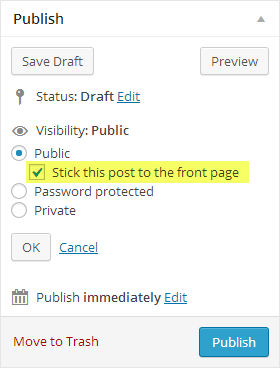
3 – You need to enable Sticky posts from within Theme Panel > Blogroll tab – http://dl2.joxi.net/drive/0012/0377/807289/150908/7eae4713f7.jpg
And then mark some posts as Sticky – http://strictthemes.com/wp-content/uploads/2013/12/doc_featured_posts.png
4- Choose blogroll template from within Theme Panel > Blogroll tab – http://dl1.joxi.net/drive/0012/0377/807289/160115/c410628e5b.jpg
5 – Setting up menu – http://strictthemes.com/documentation/getting-started/setting-up-the-menu/
6 – Choose footer template from within Theme Panel > Layout > Footer tab – http://dl1.joxi.net/drive/0012/0377/807289/160115/dbdc001165.jpg
7 – Enable social icons and drop links on you social profiles from within Theme Panel > Layout > Header tab – http://dl3.joxi.net/drive/0012/0377/807289/160115/92ceffe88d.jpg
8 – Drop needed widgets to the sidebars on Appearance > Widget page – http://dl1.joxi.net/drive/0012/0377/807289/160115/cefc81d579.jpg
—
The theme package comes with documentation you should follow it.
Also you can take a look online manuals:
Regards, Nat
Hello, how do i set the sticky post around the header?
Hello,
You need to enable Sticky posts from within Theme Panel > Blogroll – http://dl2.joxi.net/drive/0012/0377/807289/150908/7eae4713f7.jpg
And then mark some posts as Sticky – http://strictthemes.com/wp-content/uploads/2013/12/doc_featured_posts.png
Regards, Nat
That has already been marked. I meant the post at the top of the menu like this ones: https://imgur.com/9XkaU3Q
Hi,
Then make sure you set the Frontpage in the proper way – http://strictthemes.com/documentation/getting-started/setting-up-the-frontpage/
Regards, Nat
Thanks for that but that’s not what i was asking either. I meant the 4 boxes at the top of the navigation menus like in the demo. How do i get them?
These are sticky posts. I wrote you how to set sticky posts. But before that you need to set the Frontpage in the proper way.
Let me know URL of your website, I will take a look.
Regards, Nat
I’ve done the frontpage thing. Here’s my url: http://www.livethejoyfullife.com
It seems you haven’t activated Sticky posts from within Theme Panel > Blogroll – http://dl2.joxi.net/drive/0012/0377/807289/150908/7eae4713f7.jpg As I wrote you before.
I have that checked already but nothing still. Does it come up with a certain widget or what?
Hi,
Let me know an access details (to your WP admin) through the contact form – http://themeforest.net/user/strictthemes I will take a look.
Regards, Nat
I have sent the details
Done.
You haven’t read my instruction carefully:
You need to enable Sticky posts from within Theme Panel > Blogroll – http://dl2.joxi.net/drive/0012/0377/807289/150908/7eae4713f7.jpg
And then mark some posts as Sticky – http://strictthemes.com/wp-content/uploads/2013/12/doc_featured_posts.png
Regards, Nat
I did exactly that but it didn’t work. I guess you must have a magic hand or something. Thank you so much for your help
You are welcome 
Hi,
How do i write the smaller text at the bottom the bigger text just like in this image please? http://imgur.com/cvgkOYX
Hi,
This is about the Title Attribute on Appearance > Menu Page – http://dl1.joxi.net/drive/2016/05/22/0012/0377/807289/89/9ab9edfeb2.jpg
In case you don’t have it you need to enable on the Screen options – http://dl1.joxi.net/drive/0012/0377/807289/160307/e7edfc2ac2.jpg
Regards, Nat
Awesome! Its working perfectly. Thanks
Great. You are welcome.
Rate our work – http://themeforest.net/downloads
It will take 5 seconds
Regards, Nat
Do you plan on making this theme PHP 7 compatible? I tested it briefly today and found the theme and Stkit doesn’t work at all with PHP 7.
Hi,
Sure. We are planning to make ST Kit and our themes compatible with PHP 7.
Regards, Nat
Dear,
I’ve purchased Truemag.
Please makes identical options for Page like on Post Theme Panel. So we can choose to show Featured images, etc.
Then why not makes an individual post and page setting to bypass / enable global settings. E.g. I have enabled to show featured image for every post on theme panel, then on some post I can set it to don’t show the thumbnail by their individual post / page’s settings.
Thank you.
Hi,
Thank you for your suggestion. This is matter of time.
Regards, Nat
Thanks for your kind reply.
Yes, I think such features are very important for improvement of every of your themes. Cannot wait until we can see that features on your awesome themes.
Hi There,
My website has seem to lost its formatting. How does this happen and how can I fix it?Thank you for your help!
What exactly has lost formatting? Let me know URL of your website.
Regards, Nat
www.breathenourishlove.com
I have no idea what has happened. I was editing and everything looked great and when I came back to my computer a few hours later it looked like what it does now.
Hi,
Your website is not available for me. Let me see screenshot. Check latest plugins you’ve installed.
Regards, Nat
Hi there, I am having trouble changing the colors of the theme. Also, how do I get rid of the TrueMag in order to make it the title of my own website?
Thank you for your help!
Hi,
1 – It’s about cache. It might be cache on your browser, or cache on your host, or cache on CDN (in case you’re using it). Some hosts come with mandatory built-in cache, thus you’ve to flush it manually.
2 – This is about Yoast SEO metabox on the Frontpage – http://dl2.joxi.net/drive/2016/05/11/0012/0377/807289/89/d7d7134ac2.jpg
Regards, Nat
My site (uk-deals.co.uk) the ads aren’t running (adsense) any reason for this?
Hi,
1 – Make sure you use one solution (original Adsense code or ST shortcode, widgets) for whole website.
2 – Check the IDs of ad slots and AdSense code.
3 – The delivery of ad units on the Google AdSense side only. Thus only AdSense script consider which and when deliver ad units. It’s based on the results of parsing your content by AdSense crawler.
If you need more assistance let me know an access details (to your WP admin) through the contact form – http://themeforest.net/user/strictthemes I will take a look.
Regards, Nat
Hi,
I’ve inserted my own AdSense code and it displays fine, see results:
http://dl1.joxi.net/drive/2016/05/13/0012/0377/807289/89/d5ecfebdc5.jpg http://dl2.joxi.net/drive/2016/05/13/0012/0377/807289/89/104b4df125.jpgMake sure your AdSense account is active. Check codes you’ve inserted.
Regards, Nat
Can you please tell me how to bring that 4 blocks which is on the top of your template ?
and do you have any explanation video ?? so i can easily understand how to setup complete blog
Hi,
The theme package comes with documentation you should follow it.
—
There are some of important steps:
1 – The theme installation – http://strictthemes.com/documentation/getting-started/installation/ Don’t forgot to install ST Kit plugin. ST Kit brings an extended functionality to WordPress themes created by StrictThemes.
2 – Setting up frontpage – http://strictthemes.com/documentation/getting-started/setting-up-the-frontpage/
3 – Slider (on your screenshot) – You need to enable Sticky posts from within Theme Panel > Blogroll tab – http://dl2.joxi.net/drive/0012/0377/807289/150908/7eae4713f7.jpg
And then mark some posts as Sticky – http://strictthemes.com/wp-content/uploads/2013/12/doc_featured_posts.png
4- Choose blogroll template from within Theme Panel > Blogroll tab
5 – Enable Most viewed posts from within Theme Panel > Blogroll tab – http://joxi.ru/82QYKoBh1VlYW2.jpg
6 – Setting up menu – http://strictthemes.com/documentation/getting-started/setting-up-the-menu/
7 – Choose footer template from within Theme Panel > Layout > Footer tab – http://dl1.joxi.net/drive/0012/0377/807289/160115/dbdc001165.jpg
8 – Enable social icons and drop links on you social profiles from within Theme Panel > Layout > Header tab – http://dl3.joxi.net/drive/0012/0377/807289/160115/92ceffe88d.jpg
9 – Drop needed widgets to the sidebars on Appearance > Widget page – http://dl1.joxi.net/drive/0012/0377/807289/160115/cefc81d579.jpg
—
Also you can take a look online manuals:
Regards, Nat
Hello i just purchase your template
Hi,
Thank you for purchasing.
Regards, Nat
Hello, How are you?
I try to follow your “GETTING STARTED” guide but my theme doesnt look the some that your demo.
Please, can you help me?
http://mails.supportthank you!
Hello,
I’ve checked your website and found you’ve almost done.
You need to drop some widgets in the Secondary Sidebar – http://dl2.joxi.net/drive/2016/05/06/0012/0377/807289/89/9300b1be33.jpg
Regards, Nat
Hi I just purchased Truemag Theme from Themeforest I am doing my install and trying to install ST Kit and received the following error
Warning:require_once(/home/content/p3pnexwpnas05_data01/46/3237546/html/wp-content/plugins/stkit//functions/global.php): failed to open stream: No such file or directory in /home/content/p3pnexwpnas05_data01/46/3237546/html/wp-content/plugins/stkit/stkit.php on line 182
I have a godaddy hosted wordpress site (instead of building locally ) I’m using the temporary domain 0a7.8b6.myftpupload.com
http://0a7.8b6.myftpupload.com/wp-admin/Also I did try the direct install but that didnt work either. Hope you can help
Thanks Cindi
Hi Cindi,
Thank you for your purchasing.
It’s about security settings or PHP settings on the server. The file request returns a redirect to 404 page instead of normal including with require_once() the PHP function. You should contact your hosting provider.
Regards, Nat
HI I asked then and they said It seems to be missing files. Can you help us out and tell me what the settings need to be? Thanks
They said I am missing the /functions directory from that archive. Should I delete and reInstall?
OK It’s INSTALLED Thanks!
Hi,
Great. You are welcome. Let me know if you need more assistance.
Regards, Nat
I’ve purchased Truemag and I’d like to know if I could integrate as “post types” the posts created by “Download manager” and “The event calendar plugins” as new post types within the types that already exists.
Thank you in advance.
Hi,
Thank you for purchasing.
Yes, theoretically there is possible to customize a loops for displaying a custom posts together with normal posts in same blogroll. We can write a child theme in accordance with your needs for some extra. If you are interesting drop us a line at info@strictthemes.com
Regards, Nat
give me that file
hi HTAccess file is missing. where it is?
Hi,
By default .htaccess file locates in the root directory.
Regards,
Hi there,
I’m really sorry to bother you, however, I’ve accidentally purchased your lovely template by mistake. It does look lovely, but wasn’t the one I intended to purchase. I know it sounds cheeky, however, would it be possible to get a refund?
I was intending to buy one which has the same name, so I hope you can understand my error, to anyone else who’s looking at this template, please kindly note that this message is only intended to be a comment on a mistake my end, and bears no reflect to the authors template, its just a shame that many things have the same name on ThemeForest, and I hope you understand my error.
Many thanks, Chris
Hi Chris,
Accepting payments is on the Envato side only. Please contact them to resolve this issue – https://help.market.envato.com/hc/en-us
Regards, Nat
Hello, is there recommended size of featured image? On highlight post there is white space between image and title. We tried several different image sizes and still can’t figure out best size or ratio. That also reflects on thumbs on front page, white space bellow images. Any ideas?
Hi,
Your support period is expired. In accordance with Envato policy you have to renew support for getting assistance. Please buy a new support package and will be glad to answer for your questions.
Regards, Nat
Hi Nat, Sorry to hear that this kind of question you qualify as support. We will not ask this kind of questions if your theme works out of the box. I will not extend support. Your theme doesn’t work very well. Uploading special size or aspect ratio images for featured images is not convenient way in 2016. Looks like you prefer losing customers over simple issues that other themes don’t have. Moving to other theme seems as better solution right now. Anyway, thanks for your time.
Sorry to hear about your decision. Many thanks for your feedback. We will add a possibility for such option in future updates. By default a special size or aspect ratio images is the recommendation. Each theme has own concept and features, so there is no possible to cover everything. That’s a theme, not a magic wand.
In case with Truemag, at this moment there are two quick ways for tweaking that option. We will be glad to provide it to you under Envato support policy.
Kind regards, Nat
There are few of themes which “recommend” ideal size of featured image and no, most of the themes don’t have recommendations for featured images. On your theme, front page after installation, for example, looks broken with thumbnails leaving white space all over the place just because original images don’t have recommended size or aspect ratio. What about installing theme on already existing website? Go through all old images and re-upload them with perfect size?
Some of themes that have recommended sizes, they even include that information in documentation, instead putting it behind ‘support’. What are you saying to me right now is that you have recommended sizes for featured images but you don’t want to provide them because they are part of support not a ‘free’ information. I can always resize some of images from your perfect demo and get aspect ratio or ideal size from it, but I expected that information should be provided. What if someone ask this as pre-purchase question? You will tell to them “Buy our theme and we will reveal our magic numbers for featured image”? So, yeah, it’s just a theme, but featured image shouldn’t be created with magic wand and then uploaded (or cropped/resized in WP image editor).
Hi Nerdrag,
I’ll email to you today.
Regards, Igor
Hello, how to install the theme through FTP and why in Word Pres does not want to install?
Hi,
Make sure you upload the theme zip only, not whole package. Take a look the instruction – http://strictthemes.com/documentation/getting-started/installation/
Regards, Nat
My fault, obviously I chose the whole package. Thanks :))
The theme installed, but when you try to see her live before coming here this installation
https://www.dropbox.com/s/djwt91vh0jze5v3/20160312_162522.jpg?dl=0Hi,
You need to disable Simple Tag plugin.
Regards, Nat
?? , Ty
Hello,
I’ve tried to reduce the dimansion of the main picture (main article) on the homepage (574×300px) by adding this code in custom CSS :
div.posts-highlighted a.post-thumb { display: block; height: 300px;}
It works perfectly for big resolution (computer). Unfortunately I have a blank space between the picture anf the title of the article on smallest resolution (tablet and smartphone), due to responsive.
Do you have an idea to fix it ?
Thanks a lot !
Sorry I’ve found myself vy adding this kind of code in custom CSS :
@media only screen and ( min-width: 960px ) and ( max-width: 1319px ) { div.posts-highlighted a.post-thumb { height: 187px; }}
Thank you 
Hi,
Great. I’m glad you’ve found the solution
Regards, Nat
Hi there,
It’s been over a year we’re using TrueMag for our blog (optiderma.com) and it seems the Twitter share count doesn’t work at all (and never worked), whereas all the other social networks counts have been working properly. Any know issues?
Could you please have a look and let us know? You can find the native share counts at the bottom of each post page (eg. http://www.optiderma.com/articles/benefits-spirulina-skin-cancer/)
Please note it wasn’t working either before the addition of the Sumome plugin.
Thanks a lot, Stephane
Hi,
Your support period is expired. In accordance with Envato policy you have to renew support for getting assistance. Please buy a new support package and will be glad to answer for your questions.
Regards, Nat
I purchased the theme. And I am getting this error installing it…
Installing Theme from uploaded file: themeforest-7493855-truemag-ad-adsense-optimized-magazine.zip
Unpacking the package…
Installing the theme…
The package could not be installed. The theme is missing the style.css stylesheet.
Theme install failed.
Hi,
Thank you for purchasing.
You need to upload the theme zip only, not whole package. Take a look the instruction – http://strictthemes.com/documentation/getting-started/installation/
Regards, Nat