6200 comments found.
Hi, I purchased extended support for my license but when I try to send you a ticket through select.ticksy.com I get the message that my support has expired. Can you please look into this?
Update: I just tried again and it seem to have worked.
Hello,
Thanks for updating on this, glad to hear you made to submit a ticket.
Select

My ticket (private, #703871) in your support system is already 2 days(!) without any answer! Are you sure you do have support?
Hello,
Apologies for waiting a bit longer for the response, an agent has been assigned and the ticket will be processed now, you should hear back from support team on ticksy soon,
Select
So.. if 2 days is “a bit” longer, what is usual term to get support from you?
Hello again,
The average response time from our support is within 24hours from ticket submitting.
Select
I would like a full screen menu like the demo at: http://demo.select-themes.com/stockholm6/
However, when I select ‘Enable Fullscreen Menu’ and change the background colour in the Select Options nothing changes.
Hello,
At the moment, you don’t have full screen menu on your page as we can see.
In Order to have it like our demo, you need enable FullScreen Menu in Select Options -> Header http://screencast.com/t/BHADTQY1l , set the background color for it there, and then in Appearance -> Menus, make sure to check your menu as fullscreen navigation http://screencast.com/t/gsysdMROMT
Select
Ok, does it say in the documentation about enabling ‘Full Screen Navigation’ in Appearance > Menus? I didn’t see it. Thanks
Hello again,
It’s mentioned in Menus section, that you can assigned your menu as top navigation or as fullscreen navigation http://screencast.com/t/ws82R9yacyc
Select
hello i have page error. only text appear.. please check ‘Private Ticket #705865’ thanks
Hello,
Just checked it with our support team, your ticket was processed this morning, please check ticksy and continue the conversation with our agents there if necessary.
Select
Hi,
how can you disable right click (saving/opening in new tab) images?
thanks a lot!!
Hello,
There’s no direct option for this. You would need to find and use some plugin that disables right click and protects content. There are several plugins online for this, we haven’t tested any within our theme, so we can not give a specific recommendation which one to use.
Select
How come you never check up on my responses om my Private Ticket #691475, and I every time have to post a “complaint” here?
I’m getting pretty frustrated about it!
My last post was 11. march 7.38 am 
Hello,
Just checked this with support team, the ticket was processed earlier today. Please check ticksy, and apologies for waiting a bit longer on the answer.
Select
Hi, Your theme is great and I am excited to buy and use this, but before installing this theme, I have a question.
can I make a grid layout like http://hamyarwp.com/tutorials ?
Awaiting your reply.
thanks again
Hello,
Glad you like our theme, thanks. Yes, of course. You can use Portfolio list for this for example, and each photo in a grid will link you to the new – single portfolio page, where there will be appropriate content.
Check this for example http://demo.select-themes.com/stockholm1/four-columns-standard/
Select
hello, i’ve tried to only add certain portfolio categories to certain pages on my site, but they show all the categories. I just put the slug with comma to separate the categories but it doesn’t work. any suggestions?
im working locally at at the moment.
Hello,
It should work just fine, just make sure that you’ve written right slugs for your categories http://screencast.com/t/jIHoa3Cy
http://screencast.com/t/jcvDehvmUZuVSelect
I changed the template to Blog Large Image Whole Post. But nothing has changed.
Hello,
The page template- Blog Large Image Whole Post refers to Blog lists, not the single post pages, like the one from your url.
Single Posts content is always displayed in grid.
For this single posts you gave us url to, the first of the images is small, so it’s not taking up the full container width. You can either upload bigger (wider) photo, or apply some custom css to make it stretch to full width of the container.
Select
Hi! I was wondering how can I make this happen – http://bit.ly/1YSjfIQ with out the right sidebar. Because I can’t seem to make it happen here – http://bit.ly/1MiOcPa with my single posts. Basically, I just wanna remove the sidebar and have all photos in my posts (including featured, everything) occupy the full width of the container. Thank you. 
Hello again,
First thing you need to do – is to remove sidebar from every post you have. In your WP admin , go to Posts -> each post, and set sidebar to default http://screencast.com/t/4EXCiIRlBGX , and in Select Options -> Blog, set NO SIDEBAR for Blog Single http://screencast.com/t/J4v6m5KER
and then you need to add some custom css, to make the content on single posts stretch across full screen width.
If you need help writing precise css, submit a ticket to https://select.ticksy.com , with a link to your site, and our support agents will provide precise css for this.
Select
Any news on the theme update…?
Hello,
Thanks for your message.
The update for the Stockholm theme is currently in preparation, we hope it will be released soon.
Select
Hello,
Could you please submit a private ticket to https://select.ticksy.com , with a link to your site, and our support team will provide some css to style this dropdown to look just like all the others.
Select
I provided a screenshot above. You can fix the theme in it’s next update based on that.
Thanks, it’s been forwarded to our dev team. It will be corrected for the next update, we just meant if you want to have it styles before that, our support can help.
Thanks again.
Select
I’m getting a little frustrated!
I still have some issues with theme I just bought.
Your 24/7 support doesn’t work and I have to keep writing here, to get you to take a look at my ticket.
Please check my tickets until my issues are taken care of. Thank you! Private Ticket #691475
Hello,
Apologies for that, just contacted support team, an agent has been assigned and will process your ticket, you should hear back very soon from them on ticksy.
Select
Hello, Kudos for your theme ! I was wondering why the SEO is not working. I’ve written the meta description in each page but I can’t see it in google. For the records, I did not disable “Select SEO” and I did refresh and resend the sitemap. Thank you for your help
Hello,
We have just tested our SEO fields , and no problem there, all work just fine.
Please submit a private ticket to https://select.ticksy.com , with a link to your site and WP admin access, so that our support agents can inspect this.
Select
Hello,
It looks like you’ve tried importing several times, and your menu is doubled. And you haven’t installed/activated Visual Composer plugin , that’s why you’re seeing all these shortcodes on your page.
You should see a notification at the top of your WP admin, that this required plugin is missing, so click on it to install/activate it.
And in Appearance -> Menus, you can create your own menu and set it to be Top Navigation.
If you need more help, submit a ticket to https://select.ticksy.com and our support agents will help.
Select
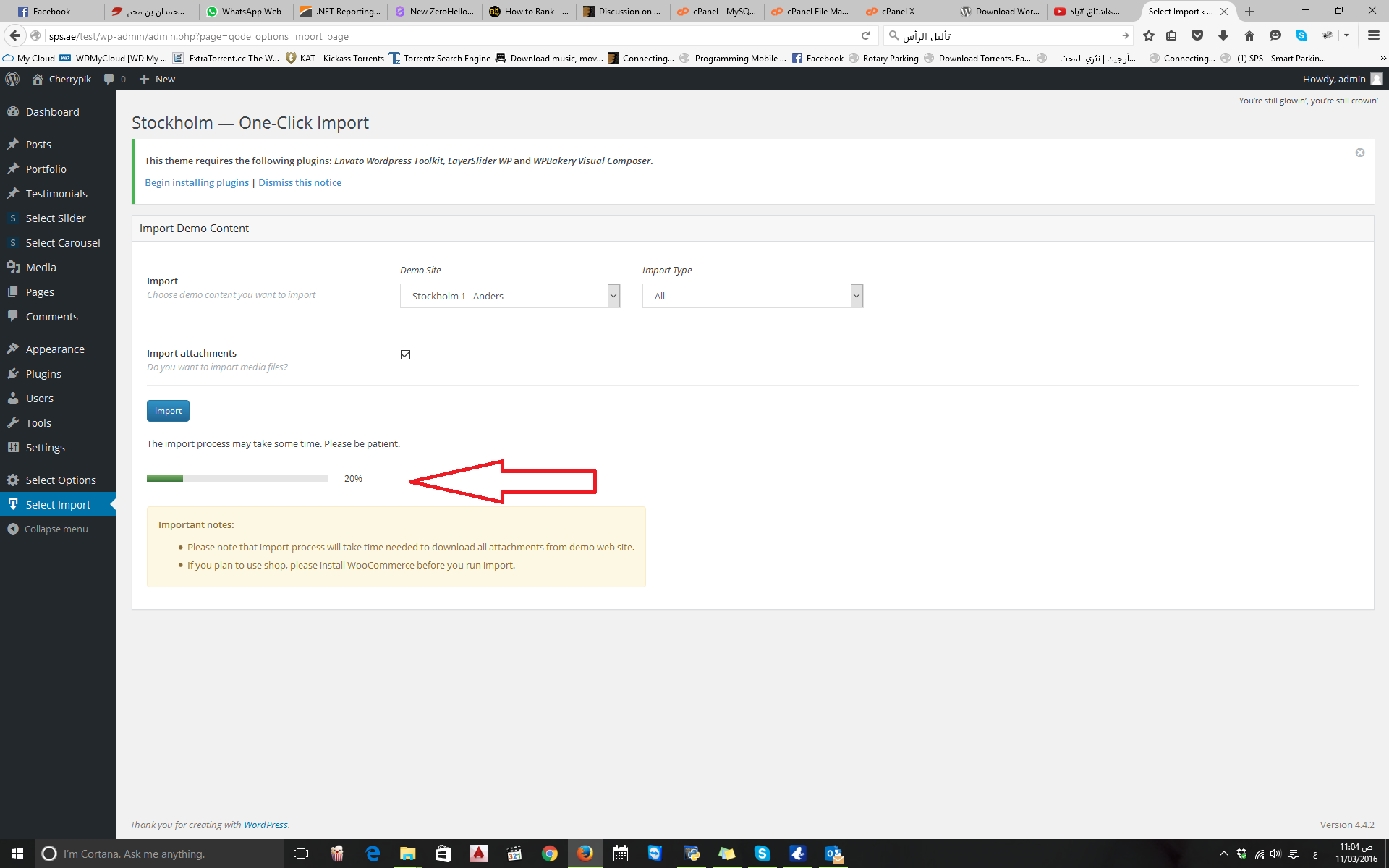
thanx for your replay .. yes I import the data more than one time the reason because when I try to import the data for the first time the par time stuck on the 30% or 20% I try to delete all WordPress and reinstall it again but same problem.
please see the pic from this link
http://www9.0zz0.com/2016/03/11/10/212610018.pngHello,
Most likely your server resources are low, and import process gets stuck.
Can you please submit a private ticket to https://select.ticksy.com , with a link to your site and WP admin access, and our support team will help get the demo content properly imported.
Select
hi, can i apply a background image to the home page only? i want the rest of my pages to have white color backgrounds.
Hello,
This can be done with some custom css, to target just your homepage and set background photo for it. If you need help with writing a css for this , submit a ticket to https://select.ticksy.com , and include a link to your site, and our support will provide the right css for this.
Select
Is it possible to have a different image behind the title area for each portfolio single item? I would like the image to go with the project. Is so, how can i? Thank you.
Hello,
Yes of course In WP admin, Portfolio -> each portfolio single, scroll down to Select Title and set title image for each single portfolio item http://screencast.com/t/lhrDFSBGPJ
Select
hallo, i can’t open a ticket as my support period is expired.
there is a conflict with slider revolution and visual composer 4.9.2. devs at slider revolution told me that the conflict is solved with visual composer version 4.10. do you plan to release a new version of the theme, with the new visual composer, anytime soon?
thanks a lot
Hello,
The new update is in preparation at the moment, and it will include the latest version of Visual Composer, yes. We can not give precise date of release, but hopefully it will be out soon.
Select
thanks!
You’re welcome.
URGENT!! Could you please take a look at my Private Ticket #691475 – I posted it 7. march and made some more comments since I have some serious problems with the themes behaviour – Thank you.
Hello,
An agent has been assigned to your ticket, it will be processed soon, please follow ticksy and continue the further conversation there with our agents once they answer.
Select
Hello, I am wondering how I can make the top menu content (logo, header widgets, menu tabs) boxed format or confined to a specified width, while having the menu background color extend full width across the page. I would also like to do the same thing for the footer. Thank you!
Hello,
In your WP admin, go to Select -> Header, and set Header in Grid to YES and down under it you can set header background color
http://screencast.com/t/EBVE0yVEg61Select
In demo 2, 1st level sub items on nav menu have no hover state, but on 2nd level yes. Also, wanted to look at the tab options available and see how they were styled – to save me opening all the demos and searching everywhere, where can I find a page with them on?
Ah, found top tabs in shop. Did you have any side tabs?
Hello,
The hover state can be turned on for the 1st level submenu ( check demo 1 for example http://demo.select-themes.com/stockholm1/ )
As for the tabs, check this link for example http://demo.select-themes.com/stockholm1/tabs/
Select
Thank you – perhaps you misunderstood ref menu hover – nothing happens if you hover over the first level of dropdown items. So, it looks like it isn’t working.
I’ll have a look at the tabs now – not sure why I couldn’t see that page before!
No, we understood you right , we sent you the link to demo 1, so you can see hover in action, we just didn’t set it for first dropdown level on demo two, but it can be set of course

This item was featured on ThemeForest

Power Elite Author
Contact the Envato Market Help Team