38441 comments found.

Hi how I can edit my (php) product page. I’d like to translate te button “share”, I tried to edit the “themes/salient/single.php” but doesn’t worked. Can you tell me ?
Hey,
The “review_quickview” function inside of the functions.php contains this content
Cheers
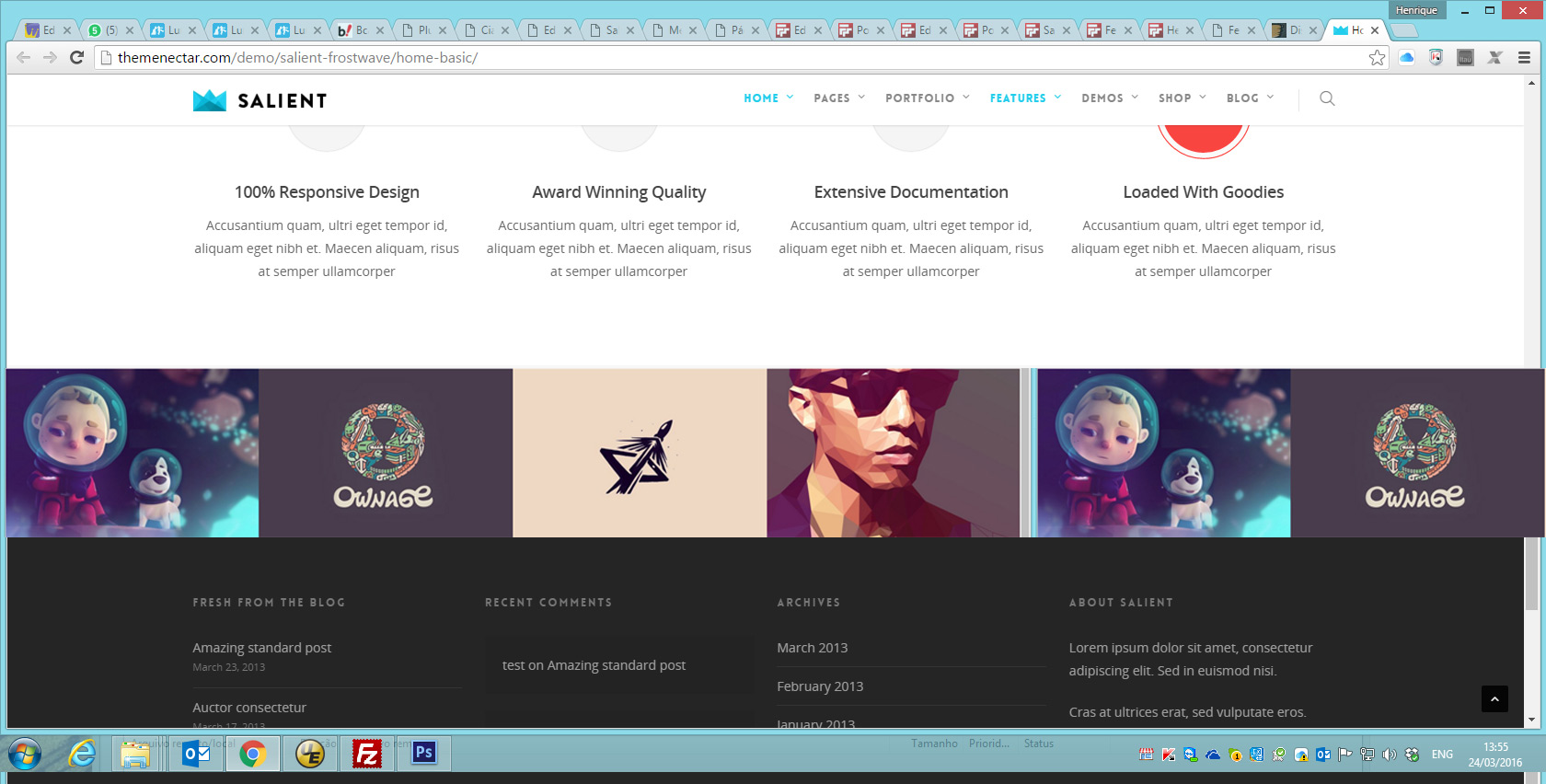
Hey – the element used in that page at the bottom is the recent projects element with the “Full Width Carousel” option activated
Cheers
Thanks a lot!
Are you using a recent projects element on your setup or a portfolio element? Could you please share your URL where this is used in regards?
I’m using recent projects, but only 4 elements is showing. URL: http://felipemoveisplanejados.com.br/site/
Open your init.js file located in the js folder and search for
standardCarouselInit()Then change this line
var colWidth = ($(this).parents('.carousel-wrap').attr('data-full-width') == 'true') ? 500 : 453 ; to this:
var colWidth = ($(this).parents('.carousel-wrap').attr('data-full-width') == 'true') ? 300 : 353 ;
Thanks a lot! Fantastic!
You’re welcome 
Images issues in regards with Visual Composer
Images are massive now and if i would resize it, at the back end on text editor it will work but on front end it would be extremely large and blurry.
I have deactivated all plugins one by one and It is Salient Visual Composer.
Please see image http://www.antalfranchising.com/files/Imagesize.PNG
Hey,
You’d need to either use columns inside of VC to format the images or delete this rule out of the style.css file inside of Salient
.row .col img {
    margin-bottom: 15px;
    max-width: 100%;
    width: auto;
    height: auto;
}
Cheers
Using the latest version of Salient and the mobile menu default to the off-canvas navigation, which is fine, except on Android devices because it’s ALWAYS visible and you can’t see the actual site. I’ve tested in Browser stack Android 2.2, 2.3, and 4.1 and same thing across the board.
Hey,
Are you only able to see the issue on the very old versions of Android Or does it also appear for you on more current ones? I’ve noted to test this further to fix for the next release
Cheers
Anything older than Android 4.1 I believe. Looks great on newer versions! We test back to Android 2.2 just because a fair share of Android users still use 2.2+. I did find a workaround by just reverting to the traditional dropdown menu on mobile. But any help in the future release would be awesome! Keep up the great work!
Hi ThemeNectar!
I need to do with a logo something stupid like here https://dl.dropboxusercontent.com/u/25411552/logo.png
I did absolute position for header#top #logo img but I dream about resized and smaller logo when scroll. Could you tell me how to do it subtly and elegant?
All The Best, Marcin
Hey, please share your URL so I can see what you have so far
Just starting, I’m not proud of but catch: http://goo.gl/Z0UDe9
DO you still have the header resize effect turned on in the admin panel?
Now I have and it makes the menu very high. It would be great if it affect only at the logo and the menu had a constant.
You can control the header height with the header padding in the Salient options panel > header nav section and use this css to shrink the logo when scrolling down
.small-nav header#top #logo img {
    height: 250px!important;
}
Cheers
You’re wonderful!!!!!!! Just one more thing. How to add “position: absolute” when mobile logo is shown.
@media only screen and (max-width:1000px) {
   header#top #logo {
      position: absolute!important;
   }
}
This may seems pretty basic but can anyone help me like without step by step instructions for updating my theme. I’ve spent a lot of time building my website and working on the SEO and haven’t had a problem. All I want to do is change the background color for the blog post but I need to update the theme I guess? How can I update the theme and visual composer without losing any content, setting, css, etc.?? I would really appreciate any help. Thanks in advance.
I’m sure its installing a child theme but in the process and not sure about entering the individual header info in the style.css sheet
Hey,
If you share your URL I could provide the css needed for this and you wouldn’t have to update the theme
Cheers
Can we have the standard mobile menu option for Corporate demo? (not the side menu or the overlay menu)
Hey,
Yes – you just need to turn off the sticky mobile header option in the Salient options panel
Cheers
Great that worked! Another question – is there a way to turn off the zoom when hovering over fancy box?
Add this into the custom css box located in your Salient Options panel:
.nectar-fancy-box .box-bg {
    transform: none!important;
}
Awesome, worked perfectly – thanks!!!
You’re welcome
You’re welcome
what size photos recommended for Page Header Image?
Hey! It depends on how high quality you want for desktop monitors – in general around 1600px – 2000px for the width would allow for good quality with not an overwhelming file size
Cheers
and the aspect ratio? height x width
Hey – The page header can be set to any height so it would depend on what you’re defining
size photos
Are you setting a height for you page header? The input is called “Page Header Height” and is located in the page header settings metabox
After reading your comments you clearly have an issue with your header color I don’t know why you made your damn header settings so complicated put all the logo options in one spot, this transparency bullshit just confuses people, please let me know how to set my header color to white YES IT’S THAT EASY so why can’t I do it? It remains black, changing the custom CSS to #FFF instead of #000 will only make my text on other sections invisible. URL – http://bizimobile.ca/demo/
I am awaiting your answer that will most likely not fix a thing, let me guess “have you set the starting text color” uh, yeh it’s white but it’s showing up black.
Hey there, please open a ticket in regards with your admin credentials so I can take a look at what’s going on themenectar.ticksy.com/
Hi,
Is this file one of your core files?
wp-content/themes/salient/nectar/redux-framework/extensions/vendor_support/vendor/ace_editor/mode-php.js
It is showing up in my sites containing an eval() function and base64() decoding function, commonly used for spamvertising.
Thank you.
Hey – yes, it’s included as part of the ace editor package https://ace.c9.io/#nav=about it’s true that those functions could be used for wrong, however it is not malware in this case
Hi, still loving the theme thanks. Using Firefox mobile browser, the entire website is squeezed to about 50px on the left side the mobile screen. Is there a way to fix this issue? Cheers
I’ve managed to fix it, if you select a menu size over 40px for mobile use it will squeeze the pages to the left whilst using Firefox mobile browser. Once set to 30 px the site acts normally. Thanks
Hey – that’s strange but I’ve noted to test with it to fix it
Cheers
Hi,
Thanks for the awesome support so far. I just stumbled across another small question: How do I align the subtitle below the portfolio items to the full size of the image (i.e. no early linebreak)? I was trying around with .portfolio-items .work-meta but so far, I couldn’t figure out how to fully stretch the text to the right border (so just below the heart-wrap + counter).
Here is my side (I’m referring to the first three items in the top row):
http://www.sparksupply.de/sparks/Cheers!
Hey!
Add this into the custom css box located in your Salient Options panel:
body .portfolio-items .work-meta {
    width: 100%;
}
body .portfolio-items .nectar-love-wrap {
    top: auto;
    position: absolute;
    right: 0;
}
Cheers
Hello,
Now that responsive images are supported as of WordPress v4.4 (https://make.wordpress.org/core/2015/11/10/responsive-images-in-wordpress-4-4/) I was wondering if there are plans to add this functionality into the theme? If so, what would you guess the timeline for it to be. If not, wondering why and what you might suggest as a solution?
Really love this theme and the more I get into building out our website, the more I respect the work you’ve put into it. That said, huge images look amazing with this theme in particular and with 5k screens becoming more common with the new iMac’s wanted to sort of future proof the media we’re uploading as best we can.
Thank you,
Allen
Hey – unfortunately there’s no ETA as of now but have noted this for the next major update
How are these tabs (below the product) added?
http://themenectar.com/demo/salient-ecommerce/product/large-button-down/Also, how do you move the social sharing buttons to here: http://themenectar.com/demo/salient-ecommerce/product/ship-your-idea/
My button is to the right of the product title and forces the title text to wrap.
I am an idiot. Please disregard. I found the option in the Salient > Woocommerce menu. Thank you for your time and excellent job with the recent 7.0.7 update.
Hey – glad you found it
Cheers!
Hi, A quick presales question. Will all demo websites have a demo content to upload? I’m mostly intereseted in ascend and onepage. Thanks! Regards, Remco
Hey,
yes they will be available to import from the Salient options panel > however please note that most demo images are replaced with placeholders
Cheers
Hi!
I have a little problem : the caption animation on the nectar slider doesn’t work well. You can see a video capture here :
http://cloud.mathieuclauss.com/3B0o331q1s0aIt’s only on Chrome.
Can you help me ? thanks a lot.
Math
Hey,
Please share your actual URL in regards so I can take a look at that further for you
Cheers
I imported the corporate demo data and created the main menu. Now I want to highlight the last item (like Buy now – button in corporate demo) – How to do this?
Hey,
When editing your menu in appearance > menus there’s a dropdown for “Menu Item Style” on every menu item
Cheers
Hey Phil,
A quick question regarding linking a blog post to facebook and linking my website to facebook.
When I use a link to invite someone to my site it only shows a few images out of many that I have on there to chose from to draw attention to the post..
I also noticed the same when linking a recent blog post except it doesn't give me any option to use one of the pictures in the blog post to represent my posts on facebook.Is there a way to setup say, a plugin to cache all the pictures on my website so I can pick what ever one I want when linking various aspects of my site?
Hope I explained that OK?
-CS
Hey,
The plugin Yoast SEO allows you to set the Facebook OG tags http://kb.yoast.com/article/219-getting-open-graph-for-your-articles
Cheers
Hi ThemeNectar, loving your Salient theme. However, I’d really like to make my mobile menu into the a dropdown menu rather than the slide to the right version. I’m using v7.0.7 and I can’t find where I can set the mobile menu into dropdown mode. I know that the dropdown menu is working for another site I have access to that runs v4.5.22. Thanks in advance.
Hey,
You just need to turn off the option for sticky mobile header in the theme options
Cheers
Thank you! I got the dropdown menu working now.
Glad to hear
Hi,
So for some reason my website is very slow. The load times are way too long.
What are the steps I can take to make sure my website is running at peak speed.
EDIT : even when I navigate through the dashboard, the loading is slow.
Sometimes my server does not work and I can’t access my website my url : www.varanno.com
Hey,
http://i.imgur.com/EBztp0u.jpg currently i’m seeing between a 2-4 second load time depending on the page, if you’re having times of experiencing longer loads you may want to speak with your hosting provider in regardsHey,
Every time I check the page load times it is always 5.5 seconds or higher. I would love to improve the website speed so I can make more conversions and rank higher in SEO
according to Gmterix.com I received an “F” in:
-Specify image dimensions -Leverage browser caching -Remove query strings from static resources
and a “C” in :
-optimize images, and -combine images using CSS sprites.
How exactly can I improve upon these?
Any advice would be appreciated
Thanks.
Hey,
W3 Total cache is the plugin I recommend for browser caching https://wordpress.org/plugins/w3-total-cache/
Cheers