112 comments found.

This is compatible with wordpress 4.5.3?
Hi,
yes, it’s compatible with the latest Wordress version. Thanks.
Kind regards
Is there a demo file for this theme?
Hi,
yes, demo content is included. Thanks.
Kind regards
Hi,
Can you help me out with a couple of questions:
- Does you offer a translated version of the theme or do I need to translated the webly.pot file?
- In the theme options I have seen many styling options but I can’t find any for the footer background color. Is it somewhere available or do I need to style it via CSS?
- When I use the widget “Webly – Premium Recent Posts” the post title is cut, e.g. “Das SocialHub Mag ist da: unser neues Ma” Is it possible to show the full title or cut it smarter, e.g. add 3 points and don’t cut it in the middle of a word?
Many thanks,
Philip
Hi,
Additionally to my previous questions, I have one more: - I tried to use a custom font under Appearance > Theme Options > Typography. Unfortunately the selected font isn’t displayed on the frontend. Furthermore in the main menu it uses Times New Roman as fall-back font because of the undefined font in options.css:
.pagenav a { font-family: Array !important; font-size: 14px; font-weight: normal; color: #000000; }
I overwrote the settings with custom CSS: .pagenav li a { font-family: Arial !important; font-size: 16px; }
Can you replicate the issue that custom (Google) fonts are not working in the theme or do you have any idea what I’m doing wrong?
Many thanks,
Philip
Hi,
1. you need to translate it, we don’t offer any translated files.
2. footer background color can only be changed via css yes.
3. for other inquiries please contact us via support tab so I can forward it to our support staff. Thanks.
Kind regards
Hi,
Thanks for your reply.
Philip
No problem 
Hello,
Is there any way to display the thumbnail image on all items?
http://labs.colinadigital.com.brHi,
not on this particular grid. This is the same as:
http://webly.premiumcoding.com/grid/You can have all featured images in this grid:
http://webly.premiumcoding.com/grid-2/Kind regards
the revolution slider is missing from the recommended plugins folder
Hi,
I uploaded the new version with rev slider included. In the meantime you can write via support and I can provide it. Thanks.
Kind regards
Hi! I purchased the theme and I’m loving it. But, how can I show excerpts instead of full content on the category and home pages? I didn’t find this setting in theme options.
Hi,
thank you
for this you need to add the “read more” in your posts. Check our FAQ to see how:
I bought this theme but it’s not compatible with wp 4.5 , i cant change the colors and there are a lot of problem i have..
Hi,
this has nothing to do with WP 4.5. This is permission issue on your server. For support please open ticket via support tab.
Best regards.
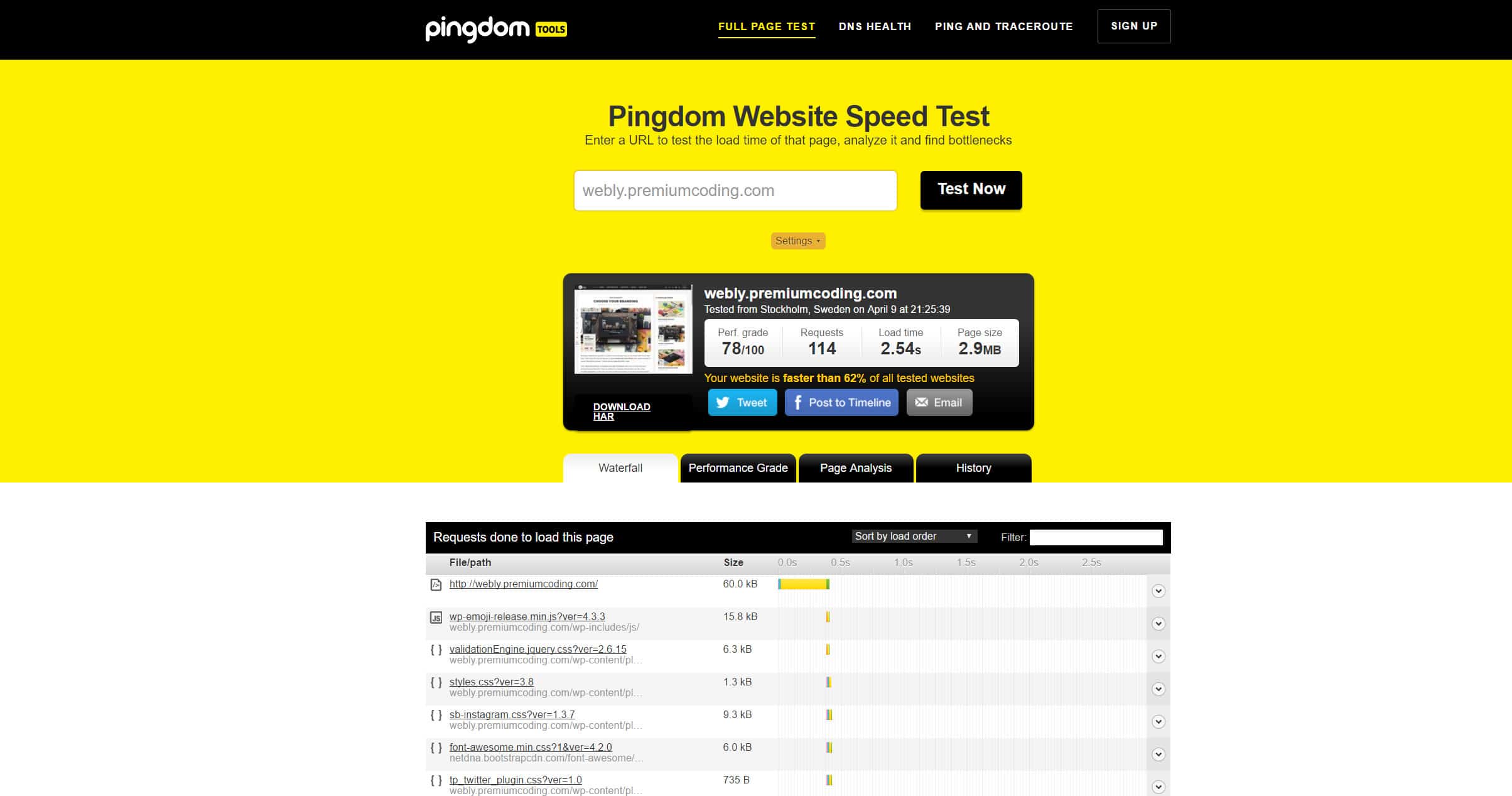
You say the theme is “fast loading” but the tests I’ve done prove otherwise. GTMetrix and Pingdom both show 4-9s load times with a failing PageSpeed grade (55%). I love the look of the theme but the load time is unacceptable. I’ve tested a couple of other sites using this theme and saw the same results. So, if you can fix the site speed to around 2s, I’ll definitely purchase (and I’m sure many others will as well).
Hi,
Pingdom shows 2.5 sec load when I test it:
GTMetrix will look at everything and the critical updates that it suggest are:
- optimize images (images are in high resolution and not optimized becase I want the best quality)
- minify js and css (obviously we can’t have that in a commercial theme, you can do that with plugins)
- leverage browser caching (you can use plugin wp cache)
- enable compression with gzip (also something we can’t implement into a theme that is for sale).
Optimizing images, minifying js and css and browser caching are up to the user and would decrease the loading time in Pingdom by another second (making it 1.5-2 seconds).
Kind regards
Thanks for the quick reply. All points made are valid, so I went ahead and made the purchase.
I activated the theme on my site and when I tested the speed, I got 1.9-2.2s. Very pleased.
Thanks!
Hi,
no problem and thank you for the purchase. I am glad everything is ok . But yes, in a lot of cases a user can do quite a bit when it comes to optimizing the website, the theme just needs to follow certain standards.
Kind regards
Hi, is there a way to align the Header of the post to the left? It`s in the center by default. Thank you.
Hi,
CSS like this would do the trick:
.blog-category, .content.blog h2.title, .content.singledefult h2.title, .post-meta {text-align:left; padding-left:0;margin-left:0;}
copy that in custom style css box in styling tab in theme’s options and save the settings twice. Thanks.
Kind regards
didn`t work.
Just doublechecking – I go to “Theme options” -> Styling Options -> Custom Style (at the bottom) -> copy the code you`ve given -> save x 2.
Right?
Now it works Thx. Thank you for great Theme by the way.
Hi,
no problem and I am glad you like it .
Kind regards
Guys, I love the theme but having issues with the mobile responsive version. Can I add someone on skype or online chat to fix?
Hi,
for support please open ticket via support tab.
Best regards.
Hi, How can I put in my instagram feed. It just shows [instagram-feed] and no options to put in my account or anything. Also when I add my logo it seems to be shifted up a bit. Maybe a padding issue? Thanks
Hi,
did you install the instagram plugin that is in the recommended plugins directory and then connected the plugin with your account? For the logo issue please post url to your website. Thanks.
Kind regards
Here is my site – www.thebesttech.co
Hi,
adding this css to custom style css box in theme’s options would fix the logo issue:
div#logo {margin-top: 12px;}
and then save the settings twice. Thanks.
Kind regards
Love the theme! I use it for: http://whyvideoisgreat.com
I had some issues in the beginning but the support solved everything perfectly.
Hi,
thank you very much for the rating and nice words . I am glad you like the theme .
Kind regards
I think you forgot to answer my last support request. Have been waiting for an answer since 9 days.
Hi,
I didn’t find the ticket under your username. Can you tell me your ticket number? Thanks.
Kind regards
My request is #75122.
Hi,
sorry for the delay. Can you please check I made some adjustments. Thanks.
Kind regards
Hello, i´ve been trying to edit the template and its really complicated, the instagram box won´t work, and the slideshow won´t work either.
Can i trade this theme for another one that you have that is named presenter? I think it would suit better for my site.
Hi,
please write via support tab and we can talk about both solutions. Also provide url and wp logins if possible. Thank you.
Kind regards
Hello,
can not I register in to your support site. He says I’m a bot. Can you tell me the form in which you want the url of the website?
Thank you
Hi,
I’m trying to change the font for the body. It can’t be changed from Halvetica. Tried both custom and default typography settings but it didnt work. Its the same with menu typography.
I want to change it to Source Sans Pro. Is there a way to manually do this by editing theme files?
Hi,
can you please open ticket via support tab so we can check this.
Best regards.
Hi,
It’s OK I managed to get it fixed. Thanks.
Hi,
ok, thanks for letting us know. Enjoy the theme .
Kind regards
Just purchased the theme, love it. How come the socials don’t work? They don’t work on your demo site either…I am talking about the circular social share icons that are underneath each blog post. Thanks!
Hi,
I have just tested it on our demo and all works fine. Plese open ticket via support tab and send us logins so we can check it.
Best regards.
It was my adblocker that was causing the issue, thanks
Hi,
ok, thanks for letting us know, it might help someone else also .
Kind regards
I get “Parse error: syntax error, unexpected ‘add_action’ (T_STRING) in /home/mywebsite/public_html/wp-content/themes/webly/includes/widgets/popular_post_widget.php on line 1” I used binary transfer but nothing is changed. Please help !
Hi,
please write via support tab and provide url and wp logins so we can check it out and install the theme for you. Thank you.
Kind regards
I registered on support forum. But how can i send support ticket ?
Hi,
please check: https://premiumcoding.com/registration-process-at-premiumcoding-support/
Best regards.
Hi, my support ticket not answered now for 4 days. Can you help with the problem? the child theme is doesn;t contain the exact CSS to the main theme after I important the demo?.
Hi,
what is your ticket ID number?
69929
ticket 69929
Hi,
we don’t have any ticket with this number 69929. Can you send us mail to support@premiumcoding.com so we can check this.
Thank you.
Best regards.
I resent it now – 70041
Thanks, I forwarded it to our support staff.
Hello I have sent multiple tickets and it seems like the support staff does not even try to help. They just keep on giving generic answers that i have already researched and tried! Someone please help
Hi,
I am sorry to say but you didn’t update the theme like instructed, I have done this for you now and social icons are ok. Please clear your cache and refresh with F5 to see the changes. Thanks.
Kind regards
I downloaded and installed the theme two days ago, your last update was on December 22. I am looking for a refund, who can I talk to for this?
Hi,
for refund please contact Envato support as they handle all financial matters. Thanks.
Kind regards
Hi! Where do I find the option to have a grid with images only? I would like to have a grid without text only squares. Thanks!
Hi,
which grid do you mean? In this one:
http://webly.premiumcoding.com/grid/the images and text are ordered randomly so there is no way to have only images.
Kind regards
Even with with Code-changes it isn’t possible? Without the possibility to only show images in the boxes of the grid, the theme becomes useless to me, because I was under the impression it is possible.
Hi,
we can change this for you, just open ticket via support tab and send us wp and ftp logins.
Best regards.