

3574 comments found.

Hi, I can’t see all my products at the product page? How can I see all the products? Like this page: http://musthaveparty.nl/versieren/folieballonnen/ and I can’t find this product: http://musthaveparty.nl/product/love-folieballon/.
Thanks for helping!
Dear customer,
Support is currently away and very limited, we will be back on April 11.
When we are back, if you still have the same problem just write us again, and we will reply to you.
We apologize for any inconvenience and hope for your understanding.
Have a nice day!
Hello!
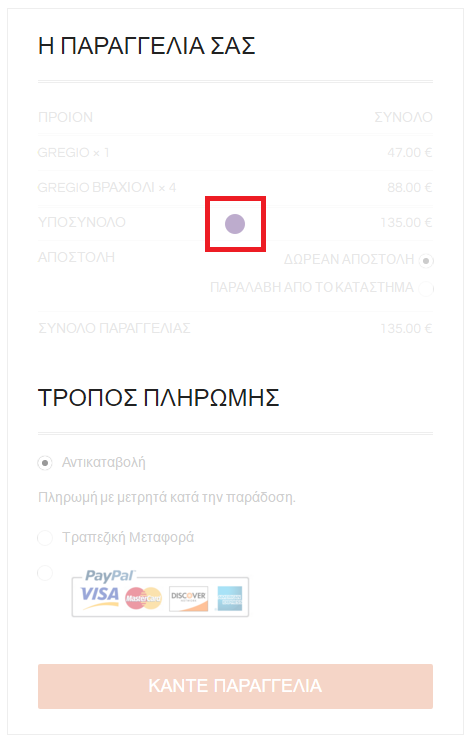
I have been trying for hours to change the color of a dot in the checkout page but I cannot find where it is at the CSS. Could you please write for me the css in order to change the color? You can see which dot I mean at the screenshot here (http://monogramma-jewels.gr/order-image.png).
Thank you in advance!
Appe
Hi Appe,
Thanks for reaching out! Upon checking, your provided screenshot doesn’t seem to be working. Would you mind resending the screenshot with the issue imprinted? So that we can offer you with a possible solution.
Best,
Imran
Hello again!
Yes the link took an extra character by mistake. This is the correct one.
http://monogramma-jewels.gr/order-image.pngHi Appe,
Thanks for your response! Upon checking, everything seems to be working as expected at our end (http://drops.laborator.co/13O0c ). Would you mind confirming the issue again?
Best,
Imran
Yes everything does work fine! What we want is to change the color of the round circle dot when the order is loading at the start. We have placed which dot we mean in the red square at the screenshot on the link we sent you. As you can see when the page loads the dot is purple. We want to change the CSS in order for it to be orange. Could you provide us with that CSS code please?
The website is http://monogramma-jewels.gr if you want to check it out.
Hi AppeStudios,
Thanks for your response! The particular customization could be possible with custom development, but this would be outside the scope of support we can provide. You may wish to consult with a developer, who can help you with this. Please read the following for more details about this situation:
http://themeforest.net/page/item_support_policy#whats-not-included-item-supportBest,
Imran
Hi, I am using basic demo setting. Home page’s Product Carousel shows 6 products in PC mode. (I checked that Home > Visual Composer > Products Carousel > Columns count > 6 Columns ) When I check from mobile phone, one item shows in row. Is there any way to change to show two products in row instead? One is two big for screen. Thanks.
Hi there,
Thanks for reaching out! Would you mind providing us with the link to your site and some screenshots with of the concerned area? So that we can offer you with a possible solution.
Best,
Imran
Hi there, thanks for answering question about the mobile menu.
Unfortunately, after testing on other mobiles, it seems the menu button itself is hidden until the user swipe their fingers to the right. How do I make the menu button (the bar icon) to fit the width of the whole screen for mobile screens.
I have attached the screenshot of the problem, and another screenshot of what I want it to do here: https://www.dropbox.com/sh/s1tutzrj4xjdbgj/AADyfo7f4wC05Mh2Gtm0f24Ba?dl=0
Site: http://littlewarblers.co.uk
Thanks
Hi there,
Thanks for reaching out! Please try out the following code to your Laborator -> Theme Options -> Theme Styling -> Custom CSS field:
@media (max-width: 600px) {
  .logo-dimensions {
    min-width: 230px !important;
    width: 230px !important;
  }
}
Best,
Imran
Yay! Lovely… it works. Thank you!
Glad that it worked out for you and thanks for reporting back.
If you have any other question or issue related to Aurum, please let us know. Have a good day! 
Hey there,
I’ve got a problem: The cross (Add to cart) isn’t there if I activate the plugin “WooCommerce Germanized”. Is this a problem with the theme or the plugin?
Maybe you’ve got a fix for this?
Greetings Nico
Hi Nico,
Thanks for reaching out! The particular plugin is not fully compatible with our theme. You may try some alternate plugins of “WooCommerce Germanized” to the following:
https://it.wordpress.org/plugins/Best,
Imran
Thanks for your answer. But thats the problem: there is no alternative on the german market.
Dear customer,
Support is currently away and very limited, we will be back on April 11.
When we are back, if you still have the same problem just write us again and we, will reply to you.
We apologize for any inconvenience and hope for your understanding.
Have a nice day!
Hello, we bought the template and we have a small problem. I activate the “search” and “cart” icons on the top of the site in the admin panel, but we still can’t see them on the header of the website. Do you know how to fix this problem or how it can be fixed? Thank you so much. Neting
Hi there,
Thanks for reaching out! To enable search and cart icons in the header of your website, please go to the Laborator -> Theme Options -> Header and select the option of ‘Show’ under Top Menu Bar tab and select the “show” option for all the header widgets. For more information, please take a look at the following screenshot: http://drops.laborator.co/10c1K
Best,
Imran
HI, Firstly, I like your template. I found a little bug on mobile page and here is how to duplicate the issue. 1. In theme option > Shop settings > Product Columns 2. Set odd number “5 columns” 3. Check on Mobile page that showing two in columns. 4. 3rd row has only one in columns. Please fix this issue at next release. Thanks.
Hi imteddy,
Thank you for your nice words, and for reporting this problem. We just put this on our to-do list, and if this is a bug we will fix it on the next release
Kind regards,
—Ylli
I’ve got a lot of problems/ questions I can’t figure out on my own (I’m new to wordpress and stuff).
1) Buttons: a. I would like to change te appearance of the “read more”-button (find on posts). Screen shot => http://s20.postimg.org/k3bai8jal/Screen_Shot_2016_04_05_at_23_46_24.png b. I would like to change the color (with hover effect) of the checkout-button in the “little cart”. c. How can I change the color (with hover effect) of the “add to basket”-button on the wishlist page (YITH wishlist). Screen shot => http://s20.postimg.org/6dgr9fw6l/Screen_Shot_2016_04_05_at_22_43_44.png 2) Text banners: a. I would like to change the appearance of the text banners you see when you send a contact message or so, see following screenshots of all the text banners I would like to change: http://s20.postimg.org/59wmxhbjh/Screen_Shot_2016_04_05_at_23_25_35.png http://s20.postimg.org/pc6bg41pp/Screen_Shot_2016_04_05_at_23_59_20.png http://s20.postimg.org/wboyt7r1p/Screen_Shot_2016_04_05_at_21_22_57.png 3) Social networks: a. The option to share products doesn’t seem to get through. b. Sharing items from the wishlist page also doesn’t show the social network links/ icons. http://s20.postimg.org/6dgr9fw6l/Screen_Shot_2016_04_05_at_22_43_44.png c. How can I add social media icons (links) to the footer menu? http://s20.postimg.org/c9aowubhp/Screen_Shot_2016_04_05_at_23_46_54.png d. How can I add the option to share blog posts? 4. Online store: a. I would like to edit the following blocks on the “shop”-page and the “single products”-page: http://s20.postimg.org/c9aowubhp/Screen_Shot_2016_04_05_at_23_46_54.png b. I would like to edit the footer menu but seem to fail in entering the menu, adding options next to each other ( now I have three items under each other; faq/ wishlist/ tracking). So I want to add items to the menu that appear under “help” and then social icons under “social networks”. http://s20.postimg.org/c9aowubhp/Screen_Shot_2016_04_05_at_23_46_54.png c. How can I edit the “sorting”-drop down block? and add one to other pages? http://s20.postimg.org/nbfrva5kd/Screen_Shot_2016_04_05_at_23_57_04.png d. When you add a product to wishlist the button changes in “BROWSE WISHLIST”. Well it doesn’t link to the wishlist page (it goes to the 404 page). http://s20.postimg.org/oy4zgihm5/Screen_Shot_2016_04_05_at_23_58_44.pngSorry for all the questions!! And thank you for your time!!! Loulou ++
Hi there,
Thanks for reaching out!
1 a Please follow the directions (http://prntscr.com/aoq38h).
1 b Would you please confirm that you require changing the color of this button: http://prntscr.com/aoq4c1?
1 c Please add the following code to your Laborator -> Theme Options -> Theme Styling -> Custom CSS Editor:
.shop .item-info.summary form.cart .button {
  background-color: #ddd !important;
  color: white;
}
2 Text banners The particular customization could be possible with custom development, but this would be outside the scope of support we can provide.
3 Social networks a, b You can find out the social networks by going under Laborator -> Theme Options -> Social Networks. Please make sure that you have added networks into the visible section (http://prntscr.com/aoq95w). Please try enabling the product sharing options (http://prntscr.com/aoqc4u).
3 Social networks c Please read out the following: http://prntscr.com/aoqcl8.
3 Social networks d Please go to the Laborator -> Theme Options -> Blog Settings -> Share Story, as per shown here: http://prntscr.com/aoqdiu.
4 Online store a Please go to the Laborator -> Theme Options -> Shop Settings.
4 Online store b Please go to the Laborator -> Theme Options -> Footer and add the following shortcode to exhibit the social icons: [lab_social_networks].
4 Online store c You can try out by going under Laborator -> Theme Options -> Other Settings.
4 Online store d You can reset the permalink array by going to the permalinks tab in wp-admin and simply re-saving the permalink structure.
Navigate to: Admin Panel -> Settings -> Permalinks: Click “Save Changes”
Test your URL. If the 404 goes away, something caused an issue with your permalink structure and this fixed it.
Best,
Imran
Hi Loulou,
1a) This is created with Visual Composer plugin and is not our original blog, if you want to use our blog just go to Settings > Reading and set the following:
If you still want to use VC element then you need to contact Visual Composer support.
1b and 1c) Please send us the link of that exact page
You can change your Skin by going to Theme Options > Theme Styling > Custom Skin Builder too.
2) What do you want to change in these alerts and info boxes, this is not possible via the Theme Options but you can do it through Custom CSS, firstly let us know how you want them to appear and how would you like them to look like.
3a) Can you be more specific please, what do you mean with this?
3b) That’s really strange, have you set up the Social Networks first in the Laborator > Theme Options > Social Networks
3c) Go to Appearance > Widgets in the Footer Widgets area add a Text widget and in the Content paste this code: [lab_social_networks]
3d) Go to Laborator > Theme Options > Blog Settings and scroll down where you have to enable the sharing options.
4a) Those can be managed by going to your Wordpress dashboard > Appearance > Widgets
Then you just need to place them on the page you want with Widgetised Sidebar element
4b) Can you please try to be very specific about the question and explain it more to us, in this way we can easily understand you and give you the proper answer
4c) You can not edit it, this is a WooCommerce thing and you can find more help if you read their documentation or ask them for support.
4d) Please go to your Wordpress dashboard > Settings > Permalinks
and then click “Save Changes” button. Then check if that fixes your problem.
P.S: I would advise you to take some time to play with the theme cause this way you will understand how it works.
Also here you can read our theme documentation Aurum Documentation.
Also if you need WooCommerce documentation jus visit their Documentation link.
Kind regards,
—Ylli
Hey I’ve tried my best to try out all your suggestions and still have some questions/ problems.
1) Buttons
a. “Read more”-button: I have two “blog pages” Blog: http://www.louloujoao.com/blog/?v=d3dcf429c679 Portfolio: http://www.louloujoao.com/portfolio/?v=d3dcf429c679
With the visual composer plugin I made a post grid and so would like to change the “read more”-button that appears on every post in de grid. Screenshot: http://s20.postimg.org/6chud04vh/Screen_Shot_2016_04_06_at_20_25_28.png b. Yes it is the checkout button in the mini cart I would like to change. Screenshot: http://s20.postimg.org/crlgnf0z1/Screen_Shot_2016_04_06_at_20_26_29.png c. The piece of code you’ve send me doesn’t seem to be working:
.shop .item-info.summary form.cart .button {
  background-color: #ddd !important;
  color: white;
}
So I want to change the “add to basket”-button on the “wishlist”-page.
Screenshot:
http://s20.postimg.org/o57zymbhp/Screen_Shot_2016_04_06_at_20_39_12.png
2) Text banners
So I want to change all the text banners seen in the following screenshots: http://s20.postimg.org/40eft5hnx/Screen_Shot_2016_04_06_at_20_41_36.png http://s20.postimg.org/3owzge17x/Screen_Shot_2016_04_06_at_20_41_43.png http://s20.postimg.org/9r4m6vpnx/Screen_Shot_2016_04_06_at_20_42_09.png http://s20.postimg.org/m1xkqybot/Screen_Shot_2016_04_06_at_20_42_22.pngI want all the text banners to have a dark grey filling so the white text and border can stay ( just change the red or green into grey).
3) Social networks
I would like to centre the “social media”-icons, now they are aligned to the right. Screenshot: http://s20.postimg.org/er22etval/Screen_Shot_2016_04_06_at_20_51_33.png4) Online store
a. On the “single product”-page I would like to change the “related products”-block to a “recently viewed”-block. I can remove the “related products”-block but I don’t seem to understand how I can add a “recently viewed”-block underneath the description, not as a sidebar or so ( I’ve already added a “recently viewed”-widget to the “shop single widgets” but it doesn’t do anything). Screenshot: http://s20.postimg.org/yzpg0julp/Screen_Shot_2016_04_06_at_20_59_40.png http://s20.postimg.org/cp1l0kxbh/Screen_Shot_2016_04_06_at_20_59_30.png b. Edit footer menu: So I just need to know how I can centre the footer menu. Now it’s like aligned to the left. Screenshot: http://s20.postimg.org/d5re0ragd/Screen_Shot_2016_04_06_at_21_03_27.png5) Reviews
How can I disable reviews on the “single products”-page? Screenshot: http://s20.postimg.org/4c0hjnnhp/Screen_Shot_2016_04_06_at_21_17_56.png6) Other devices
When viewing the site on a tablet or mobile device de entire site gets like pushed to the left. (only the blog and portfolio page) So the content and the footer are pushed to the left. Screenshots: http://s20.postimg.org/j98yko0q5/12941218_10208783540483037_119470098_o.jpgThank you so much for your time! Loulou
Dear customer,
Support is currently away and very limited, we will be back on April 11.
When we are back, if you still have the same problem just write us again, and we will reply to you.
We apologize for any inconvenience and hope for your understanding.
Have a nice day!
Hey I’ve tried my best to try out all your suggestions and still have some questions/ problems.
1) Buttons
a. “Read more”-button: I have two “blog pages” Blog: http://www.louloujoao.com/blog/?v=d3dcf429c679 Portfolio: http://www.louloujoao.com/portfolio/?v=d3dcf429c679
With the visual composer plugin I made a post grid and so would like to change the “read more”-button that appears on every post in de grid. Screenshot: http://s20.postimg.org/6chud04vh/Screen_Shot_2016_04_06_at_20_25_28.png b. Yes it is the checkout button in the mini cart I would like to change. Screenshot: http://s20.postimg.org/crlgnf0z1/Screen_Shot_2016_04_06_at_20_26_29.png c. The piece of code you’ve send me doesn’t seem to be working: .shop .item-info.summary form.cart .button { background-color: #ddd !important; color: white; } So I want to change the “add to basket”-button on the “wishlist”-page. Screenshot: http://s20.postimg.org/o57zymbhp/Screen_Shot_2016_04_06_at_20_39_12.png 2) Text banners
So I want to change all the text banners seen in the following screenshots: http://s20.postimg.org/40eft5hnx/Screen_Shot_2016_04_06_at_20_41_36.png http://s20.postimg.org/3owzge17x/Screen_Shot_2016_04_06_at_20_41_43.png http://s20.postimg.org/9r4m6vpnx/Screen_Shot_2016_04_06_at_20_42_09.png http://s20.postimg.org/m1xkqybot/Screen_Shot_2016_04_06_at_20_42_22.png I want all the text banners to have a dark grey filling so the white text and border can stay ( just change the red or green into grey).
3) Social networks
I would like to centre the “social media”-icons, now they are aligned to the right. Screenshot: http://s20.postimg.org/er22etval/Screen_Shot_2016_04_06_at_20_51_33.png 4) Online store
a. On the “single product”-page I would like to change the “related products”-block to a “recently viewed”-block. I can remove the “related products”-block but I don’t seem to understand how I can add a “recently viewed”-block underneath the description, not as a sidebar or so ( I’ve already added a “recently viewed”-widget to the “shop single widgets” but it doesn’t do anything). Screenshot: http://s20.postimg.org/yzpg0julp/Screen_Shot_2016_04_06_at_20_59_40.png http://s20.postimg.org/cp1l0kxbh/Screen_Shot_2016_04_06_at_20_59_30.png b. Edit footer menu: So I just need to know how I can centre the footer menu. Now it’s like aligned to the left. Screenshot: http://s20.postimg.org/d5re0ragd/Screen_Shot_2016_04_06_at_21_03_27.png 5) Reviews
How can I disable reviews on the “single products”-page? Screenshot: http://s20.postimg.org/4c0hjnnhp/Screen_Shot_2016_04_06_at_21_17_56.png 6) Other devices
When viewing the site on a tablet or mobile device de entire site gets like pushed to the left. (only the blog and portfolio page) So the content and the footer are pushed to the left. Screenshots: http://s20.postimg.org/j98yko0q5/12941218_10208783540483037_119470098_o.jpg Thank you so much for your time! Loulou
Hi Loulou
1. To apply style for Button you need to add custom CSS, and it depends what style of button you want to use, I tried visiting your site and see the links you provided but there were no “read more” buttons on those pages.
As you may have seen that buttons in mini cart have different colors:
b. But you have overriden with custom CSS. Can you please tell me what color do you want to apply to “Checkout” button?
c. For wishlist buttons, if you want to apply #ddd background and #fff text use this CSS:
.wishlist_table .button {
    background-color: #ddd !important;
    color: #fff !important;
}
2. Add this Custom CSS to change the colors of these alerts/success messages:
.woocommerce-message {
    background: darkgray !important;
    box-shadow: 0 0 0 6px darkgray !important;
    border: 0 !important;
}

.alert,
#yith-wcwl-popup-message {
    background: darkgray !important;
    border-color: darkgray !important;
}
3. I was viewing this page:
And did not show sharing section, have you removed it?
4a. There is a plugin for this: https://wordpress.org/plugins/yith-woocommerce-recently-viewed-products/
This will add that feature.
4b. Because you are just using 3 columns, set this option in theme options:
5. To disable reviews add this CSS:
.shop-item-single .nav .reviews_tab {
    display: none;
}
6. I tried this on my computer to resize the screen and it was working fine. Can you tell me which device type do you view this problem and send me page urls with this issue.
Best regards,
Arlind
1. b. I want the “checkout”-button to be the same as “view cart”-button. So to turn purple when hovering over it. For the “view cart”-button I used this:
.cart-bottom a.button.btn.btn-default.btn-large.btn-block.wc-forward { background: #0d0d0d; } .btn.btn-default:hover { background: #7a3d8f !important; }
For the “checkout”-button I tried the following (doesn’t work):
.cart-bottom a.button.btn.btn-primary.btn-large.btn-block.checkout.wc-forward { background-color: #0d0d0d !Important; }
} .btn.btn-primary:hover { background: #7a3d8f !Important; }
c. The piece of code you gave me doesn’t seem to be working. So I want the “add to basket”-button to be the same as in the previous question (1b): color: #0d0d0d when hover: #7a3d8f
3. No the sharing section is still there? http://s20.postimg.org/dldtvbkfh/Screen_Shot_2016_04_14_at_00_03_59.pngSo I want the icons to be centred and add other social media icons.
4 a. And how do I remove the “related”-block? http://s20.postimg.org/m4x7t2srx/Screen_Shot_2016_04_14_at_00_08_40.png 6. Yes when resizing on my computer it looks fine as well but when I check on my iPhone or iPad it gets weird. The following pages get put to the side (including the footer so the complete site): http://www.louloujoao.com/blog/?v=d3dcf429c679 http://www.louloujoao.com/portfolio/?v=d3dcf429c679The numbers that aren’t included anymore are all solved!!
Thank you,
Loulou
Hi Loulou,
Thanks for your response! To resolve and fix this for you, please provide your login credentials with the following information to imran@laborator.co:
1) your WordPress user/password/URL
2) reference the URL of this comment in your email
Best,
Imran
Hi Loulou,
Thanks for the logins! Unfortunately, your logins credentials seem not to be working at our end. Would you mind re-sending again? So we can go into the further process.
Best,
Imran
Hi again,
Thanks for being patient! I’ve made the changes to your site. Please confirm if your issues are resolved now.
Best,
Imran
Hey!
1. On my iPad it’s fine now but on my iPhone 6 it’s still pushed to the left. http://s20.postimg.org/e8rwc70a5/13036369_10208888301061986_1154832292_o.jpg 2. On the cart page (http://www.louloujoao.com/cart/) The checkout button needs to be the same as the update cart button so when you hover it it turns purple. http://s20.postimg.org/i7p3v0ox9/Screen_Shot_2016_04_19_at_15_16_45.png 3. On the blog and portfolio page there are 2 share blocks. I would like to keep the upper one ( the one with the icons), but I also want to add sharing options (now there’s only share on: twitter/ facebook/ google+) http://s20.postimg.org/rzwdeep7x/Screen_Shot_2016_04_19_at_15_22_48.pngThank you for helping so much with my site!! Loulou.
Hi Loulou,
1— Can you please try to be very specific about the question and explain it more to us, in this way we can easily understand you and give you the proper answer
2— Can you please add the code below to Custom CSS
#proceed-to-checkout:hover {
    background: #7a3d8f !Important;
}
3 and 4— Can you please send us a links of one single blog and portfolio page, because i can’t find them on your site.
Please update your theme to the version 2.9.1 that we released yesterday, and then don’t forget to update your plugins by going to Appearance > Install Plugins
Kind regards,
—Ylli
2. On the blog and portfolio page there are 2 share blocks. I would like to keep the upper one ( the one with the icons), but I also want to add sharing options (now there’s only share on: twitter/ facebook/ google+) http://s20.postimg.org/rzwdeep7x/Screen_Shot_2016_04_19_at_15_22_48.png
I don’t really know how to be more specific. See the following links: http://www.louloujoao.com/self-perception-29/?v=d3dcf429c679As you can see you have: Share this: icons Related SHARE THIS STORY ON
So I want to delete the “SHARE THIS STORY ON” section and add sharing options (icons) with the “Share this: icons” section.
3. http://www.louloujoao.com/self-perception-29/?v=d3dcf429c679 On this link you can see that the image is zoomed in, I want the image to have the same layout as on the single post page: http://www.louloujoao.com/shop/test2/?v=d3dcf429c679 So also that you can hover over the picture to zoom.4. And I would like to update the theme but I just discovered I need to work with a child theme so I don’t lose the changes I’ve made. So I’m figuring out how that works.
Loulou
Hi Loulou,
You are using an old version of our theme (2.9) and the latest version for the moment is (2.9.1), please update theme first and then the premium plugins.
The easiest way to update our themes is if you use Envato Toolkit. On this link How to update Themes and Plugins
you can learn this easy step-by-step procedure
Important: After you update the theme please don’t forget to go to Appearance > Install Plugins to update all your premium plugins to the latest version that we support.
Kind regards,
—Ylli
but won’t I lose all the changes if I upgrade?
Hi there,
If you have changes that you made in the theme files and you’re not using a child theme then all your changes will be lost, otherwise if you have only custom CSS and you’re using the child theme the changes will remain the same.
Kind Regards,
Art
I made all the changes in the theme files without using the child theme so how can I transfer my changes to the child theme?
Loulou
Ok I’ve managed to update, so now I still need help with the following:
1. Well the following pages get pushed to the left when viewing on an iPhone http://www.louloujoao.com/portfolio/?v=d3dcf429c679 http://www.louloujoao.com/blog/?v=d3dcf429c679 as you can see in the following screenshot: http://s20.postimg.org/e8rwc70a5/13036369_10208888301061986_1154832292_o.jpg 2. On the blog and portfolio page there are 2 share blocks. I would like to keep the upper one ( the one with the icons), but I also want to add sharing options (now there’s only share on: twitter/ facebook/ google+) http://s20.postimg.org/rzwdeep7x/Screen_Shot_2016_04_19_at_15_22_48.png
I don’t really know how to be more specific. See the following links: http://www.louloujoao.com/self-perception-29/?v=d3dcf429c679 As you can see you have: Share this: icons Related SHARE THIS STORY ON
So I want to delete the “SHARE THIS STORY ON” section and add sharing options (icons) with the “Share this: icons” section.
3. http://www.louloujoao.com/self-perception-29/?v=d3dcf429c679 On this link you can see that the image is zoomed in, I want the image to have the same layout as on the single post page: http://www.louloujoao.com/shop/test2/?v=d3dcf429c679 So also that you can hover over the picture to zoom. 4. And I would like to update the theme but I just discovered I need to work with a child theme so I don’t lose the changes I’ve made. So I’m figuring out how that works.
Loulou
Hi Loulou,
1— Have you fixed this problem, because i can’t see this problem anymore, (tested with iPhone 6S).
2— This problem is also fixed.
3— I’m sorry but this is not possible, maybe a plugin can do that.
4— If you haven’t touched our core theme files, such as PHP, JS, or CSS files inside the theme, you will now loose anything
Kind regards,
—Ylli
Thank you for the help!
Still need some for the following:
1. So it’s not possible to show the image (http://www.louloujoao.com/self-perception-29/?v=d3dcf429c679) in full. Like you can see the full image here: http://www.louloujoao.com/portfolio/?v=d3dcf429c6792. My about page (http://www.louloujoao.com/about/?v=d3dcf429c679) looks really weird when viewed on mobile version and I don’t know how to make it better.
3. On the mobile version the menu button is white (http://s20.postimg.org/jamclcfn1/Screen_Shot_2016_05_02_at_23_21_20.png) I would like for it to be black.
Loulou
Hi Loulou,
1— I’m really sorry but this is not possible, and this is happening because your image is vertical. If that vertical image shows full on the single post it would look very bad and long.
2— This is a custom request, and we don’t give support for those cases, because you can handle this from Visual Composer but i will help you this time only
So can you please add the code below to Custom CSS on that page only
@media screen and (max-width: 768px) { .vc_row.row.vc_custom_1462178840410 { padding-right: initial !important; } }
.vc_custom_1462137960284 {
    margin-top: 0px !important;
    margin-left: 0px !important;
}
.wpb_single_image .vc_figure {
width: 100% !important;
}.vc_custom_1462179002124 {
margin-top: 0px !important;
}3— Can you please add the code below to Custom CSS
.transparent-header header.mobile-menu .mobile-logo .mobile-toggles .toggle-menu svg {
    fill: #000 !important;
}
Kind regards,
—Ylli
Can’t seem to get the map coordinates to work. I go to add a new map point and start typing in the search for location field box but nothing auto-fills / pops-up. Any ideas?
Hi Duranike,
Thanks for reaching out! I recognize you don’t have the “Support Subscription” for this theme listed next to your name; we can’t provide support for customers who don’t have the support package.
Best,
Imran
Hello, testimonials are WC default product reviews or a custom post_type of Aurum theme? Thanks
Hi retroriff,
We have 2 different testimonials areas on Aurum, one is on single product, which is part of by WooCommerce and the other is widget.
Kind regards,
—Ylli
I understand that reviews are native WC reviews and testimonials is a WP post_type. While reviews relate to products, testimonials let users write a review about the site, isn’t it?
Dear customer,
Support is currently away and very limited, we will be back on April 11.
When we are back, if you still have the same problem just write us again and we, will reply to you.
We apologize for any inconvenience and hope for your understanding.
Have a nice day!
Hello,
We are confused as to how the order tracking page incorporated into this theme functions. We have checked woocommerce and did not find any option to input tracking numbers into our order details. Do we need to add a plugin to keep a database of tracking information on completed orders, so we can use the “Tracking” page? or can you explain how this functionality will be enabled?
Thank you for your time.
Hi,
Firstly thanks for the nice theme it i has really cool features for users which to find easly.
I need to improve my webpage speed. I know there is many different reason what making it slowly.
I tested your demo page and it looks like there is a very bad permofmance on it too. I have a speed connection around 25 Mbps.
You can check here: http://tools.pingdom.com/fpt/#!/eEGPHS/http://themes.laborator.co/aurum/fashion/
Perf. grade : 76/100, Load time: 9.46s
What do u think about it and what do u suggest? I need to improvement speed of webpage as well as every buyers of this theme. For my webpage ”/?wc-ajax=get_refreshed_fragments” and ”/ajax” urls are taking to much time.
Thanks
Hi Ghorky,
Thanks for writing in! You may try W3 Total Cache plugin, which is a well know WordPress caching plugin with using the ‘page cache’ function for better performance. I’d also recommend compressing your images before uploading to your site. Always make sure you are uploading images as a minimum in size as possible. For compression, you can use a plugin WP Smush It or an online tool like https://tinypng.com/
It would help us a lot if you could rate Aurum on ThemeForest from your Downloads tab. If you don’t know how just open this link
Best,
Imran
Hi again.
I just tested with the Full Page Test in Pingdom Tools.
This specific test was done on April 4 at 18:30:08 from Dallas, Texas, USA. The web page took 8.94 s to load, used 87 requests, and weighed in at 5.7 MB.
The Google Page Speed performance grade for this web page is 69/100.
There’s a ton of more information you can check out here: http://fpt.pingdom.com#!/J8tEi/http://www.lesrina.com I also use cdn. but it is really slow. do you have any suggestion about my page load problem?
Thank you
2- I enabled to register on website but it doesnt show on my page. there are only CUSTOMER LOGIN. 3-there are some space between menu and slider. how can i remove that space? 4-some currencies icon dont show on some browsers. how can i fix it? for example Turkish Lira.
http://prntscr.com/ao23m35- I can’t change site title and tagline.
Hi Husame,
Thanks for reaching out!
#1 You can try W3 Total Cache plugin, which is most famous WordPress caching plugin with using the ‘page cache’ function for better performance. I’d also recommend compressing your images before uploading to your site. Always make sure you are uploading images as a minimum in size as possible. For compression, you can use a plugin WP Smush It or an online tool like https://tinypng.com/
#2 Please provide some more clarification of your requirement.
#3 Please try out the following code to your Laborator -> Theme Options -> Theme Styling -> Custom CSS Editor:
.page-container {
  margin-top: 0px;
}
#4 Please provide us with some screenshots of the area of the currency icons, so that we can provide you with a tailored answer.
#5 To change site title and tagline, please go to the Appearance -> Customize -> Site Identity as per shown here: http://drops.laborator.co/1hIry
Best,
Imran
3 i think that space belons to slider. then how can i edit now? because it didnt work with that codes.
4 firefox shows my website bad. its related to fonts? how can i fix it?
Hi,
I’ve bought this theme and I’m very happy with it. Now I’m having problems with the translation. I’ve set Woocommerce to Dutch, but the theme gets only partly translated. Is there a translation file for the Dutch language or a switch where I can set the language to dutch?
Hi there,
Thanks for writing in!
To translate/rename theme strings, you can do this via Loco Translate plugin. If you don’t have this plugin, please install and activate it in your WordPress site.
1. Then go to Loco Translate > Manage Translations
2. Click “New Language” for the current active theme (if you didn’t created it yet, otherwise ignore this step). On the new language page, choose these options – click here http://d.pr/i/1ewoc
3. After that you will be redirected to the editing screen for theme translations. Before you continue make sure this is true – click here http://d.pr/i/18h0w
4. Follow these instructions to learn how to translate strings – http://d.pr/i/1jsek
5. The changes will be applied immediately – http://d.pr/i/1ju6w
Note: Translation files will be saved to wp-content/themes/{theme-name}/languages folder. Here you have the explanation – http://d.pr/i/1lBCJ
After you make your changes, always save a backup when there is new theme update. After you update the theme (languages folder will be replaced), just move the backup files you previously saved to the same languages directory and your changes will still be applied.
However, you can also use the most famous plugin “WPML”. For more information, please read out the following:
http://documentation.laborator.co/kb/aurum/getting-started-aurum/multilingual-plugin-installation-wpml-3/Best,
Imran
I’ve changed the menu colors, wich works perfect. But unfortunately there is a problem. When you click on a menu item in the header and slighty drag your mouse a black background shows up. I can’t find anything in the CSS, is there a way to solve this?
Hi there,
Can you please send us your site URL first, so we can investigate your site and then get back to you with possible solution.
P.S. make sure you’ve disabled the Maintenance/Coming Soon mode
Kind Regards,
Art
Sorry, ofcourse: www.mondavin.com
Adding the following code to your Custom CSS will fix it:
.nav > li > a:hover, .nav > li > a:focus {
    background-color: transparent !important;
}
Kind Regards,
Art
Great, t works! Thank you very much
Is there a way to get the multi language website?
Hello, I want to buy this nice theme, I’m just undecided whether to instead buy aurum kalium or oxygen, however I have only two little questions, to wich I have not found an answer in the support forum. Is there any problem with https in the installation of these themes? In Aurum, Can I show the name and the price of products in home or catalog page normally below the image, without mouse over? Thank you
Hi there,
Both of the themes are great it is upon your choice and style which one you like more, there is no problem with the HTTPS for these themes but if you’re having any issues we will always be there for you.
Kind Regards,
Art
Hi,
My main menu does not look like the Homepage 2 example. It just sticks on top and doesn’t appear under the main menu.
Do you know how i can fix it ?
Thanks.
Hi tritue,
Can you please write us your site URL here on comments first? We need to investigate your site and then get back to you if we have possible solution.
Kind regards,
—Ylli
Hi, Here is the website : http://mokusei.fr/
Regards, Tri Tue
Hi Tri Tue,
There seem to be some problems with your site header, have you set the right header settings and not set the header to Absolute cause it will ignore the white background and be transparent.
Kind Regards,
Art
Hi, don’t remember to have modify something like that. Where can i find this option ?
Hi tritue,
Just click Edit Page, and then you can find Parameters and Options area.
Kind regards,
—Ylli
For anyone having a problem with SSL just install a plugin called Really Simple SSL.
Hi inkedHQ,
Thanks for helping other users, can you please tell us what problems did you had with SSL and our theme please? Was that any issue that was coming from our theme?
Kind regards,
—Ylli
No problem, not sure if it was the theme causing the problem or not, but for some reason the images were not being encrypted.
Hi inkedHQ,
Thanks for reporting this, we will see if this is a theme issue
Kind regards,
—Ylli
Hello, It shows a blank page when I try to edit pages in admin area.
I have disabled all plugins to see if that was the problem and it is still not working.
Hi inkedHQ,
Can you please write us your site URL here on comments first? We need to investigate your site and then get back to you if we have possible solution.
Kind regards,
—Ylli
My website is https://chokershop.co.uk
Hi there,
Your website is on Maintenance mode, can you please disable it for a moment until we check your site?
Kind regards,
—Ylli
Oops please try again
Hi there,
Can you please enable WP Debug Mode because I am not able to exactly know what kind of issue is this.
To turn on WP Debug Mode, follow these steps:
1. Open wp-config.php
2. Find WP_DEBUG constant (written as define('WP_DEBUG', false);)
3. Set value to true (define('WP_DEBUG', true);) and save file.
4. Go to the same page, refresh it and you will see a PHP warning or fatal error being display. Copy the error or better send me the screenshot so I will be able to understand what kind of issue is that and will give you proper fix to it.
You can upload screenshots on this site if you don’t know any other service.
Kind Regards,
Art
Hi,
It’s showing an error in functions.php. Here you go. http://i.cubeupload.com/uihR3N.png
Hi inkedHQ.
You must install and activate Advanced Custom Field.
Just go to Appearance > Install Plugins to install and activate all the plugins there.
Kind regards,
—Ylli
Hello,
All working now. thank you very much for your support.
Have a nice day.
Love the theme by the way. I’ll be sure to leave a good rating.
Hi inkedHQ,
Glad to hear that, have a pleasant week
Kind regards,
—Ylli



.)



)

