925 comments found.

Hi,
I am sure there is a very simple thing that I am missing but how do I get projects to load up as a full-page slider?
I have had no problems setting up the homepage slider but cannot seem to figure out the projects page.
Thanks in advance, – Luke
www.trissas.co.uk
Sorry, revised question – why can’t I get the Slide Caption and Slide Text to appear on my projects page (trissas.co.uk/projects)
Hi,
Have you tried setting below?
Navigate to Appearance > DE Panel > Slider > Slider Style (Projects) > select setting ‘Show Title & Description.
That is all set up okay.
I have the page title showing as well, I’m not sure if this has anything to do with it? I want it look just my homepage but with a different slider.
Is there a specific page template or slider shortcode I need?
Hi, do you have any ideas?
Yes it possible to custom slider for homepage. You need to set group name for each slider item you want to use as homepage. Once you done you can set it by navigate to Appearance > DE Panel > Slider > Slider Group Name > insert slider group name you’ve created.
But there is no option to put in a slider group name for the portfolio page? How do I set up a portfolio slider? Do you have any tutorials? Maybe I am missing something obvious
Please read documentation file inside folder name ‘help’. The look at section ‘Setting Up Portfolio’.
Hi,
I would like to change the slide_text to have no box, I have managed to get the slide_caption to do this but I cannot figure out how to what needs to change in the stylesheets to do it for the slide_text.
Any help would be greatly appreciated.
– Luke
REFERENCE SITE: http://www.trissas.co.uk/
Hi,
You can insert code below in custom css on DE Panel.
.slide_text {
background:none;
}
Awesome! Thank you so much
Hello,
we have a small problem with our menu: If you watch the demo-site of the Template PHOTOGRA, there is a small yellow line on the left side – between the main-navigation (over the line) and the navigation of the photo-categories (below the line).
Now we have installed the Theme, and in our site the line is gone. Where can we find it? Is there any button to switch the line on and off?
Regards, Marian
Hi,
Please try to set accent color by navigate to Appearance > DE Panel > click ‘Save Changes’.
I changed the Accent color, but the small line is still gone. No solution…
...see it on www.motivwerk-fotografie.de
Hi, if you can allow me to see your admin page for further investigation. Are you use child theme?
The complete Navigation Menu on website http://www.wadadlicats.com/ does not seem to be visible. I’ve checked the Theme Options and all seems to be in place. I’ve also used a different theme and the Navigation Menu appears so this would indicate that the issue is with the theme.
There are other issues with the display of the website.
This is how it looked previously: http://web.archive.org/web/20160208094924/http://wadadlicats.com/v2/
Please advise as soon as possible.
Hi,
Sorry for late reply. Please read my message before.
Hello,
I love the theme, it is very slick and simple but I am having one issue. I have set up a homepage slider and a ‘project’ slider for a seperate page.
I want to set up Slide Text and Slide Captions for the my ‘Project’ slider but I cannot figure out how to do it.
Any help would be hugely appreciated.
Thanks in advance, Luke
00cb8fc9-8e0f-4e60-895f-d0c3cbfb0c6d
Hi,
Thanks for your purchase!
Navigate to Appearance > DE Panel > Slider > Slider Style (Projects) > select setting ‘Show Title & Description.
Is this theme wp 4.6 ready?
Yes sure, theme preview use latest wp version.
Hi, I still can’t receive mails from my Contact page. When I click on “submit”, i get a blank page and never receive the mail from my customer. I tried with many email address in DE Panel and got the same result. But it works with another Contact Form (Contact Form 7) I updated Wordpress to 4.6 recently Here is my Contact page : http://www.damiensour.fr/me-contacter/
many thanks for your help Damien SOUR
Hi, if you can allow me to see your admin page for further investigation. Also i need email address @your-domain for testing purpose. You can send message through my profile.
(Message sent to your profile ;o) )
Hi, We have had a number of issues recently with a website using your theme. Specifically, the page layout for example the Navigation Menu does not appear correctly etc.
This is how it looked prior to last week: https://web.archive.org/web/20160111193729/http://wadadlicats.com/v2/
This is how it looks now: http://wadadlicats.com/v2/
I did some investigating and I’m afraid that I can’t see why the main Navigation Menu only displays some of the pages not all of them.
The website contents seems to be in tact however it no longer displays correctly.
Any help or advice as to how I go about restore the website would be much appreciated.
Thank you for your time.
Hi,
Sorry for late reply. Make sure to created ‘primary menu’ by navigate to ‘Appearance > Menu’. If issue persist, i need to see your admin for further investigation.
Hi, Thanks for getting back to me. The Primary Menu has been selected and the issue still persists unfortunately. Please advise how I would go about sending the admin credentials privately.
You can send message through my profile page.
Thanks, I’ve just sent the message with the details
Done. Please check. Its little issue on theme.
Thank you for restoring the main Navigation Menu, could you advise what the problem was please? Also the format of the pages have changed, this is how the Home page used to look like: https://web.archive.org/web/20160111193729/http://wadadlicats.com/v2/ Do I just need to amend the theme options?
Any further assistance would be much appreciated.
Thanks!
It could be done by small css addition.
Navigate to Appearance > DE Panel > Styler > Custom CSS > insert code below:
.sidebar{
      background:rgba(0,0,0,.8);
      height:100%;
}
For value 0,0,0 is RGB color, for value .8 is opacity.
Thanks for the response. The left hand sidebar has been changed by using the Custom CSS but the format of the page itself has changed e.g., there is no right hand sidebar. I looked at the Dashboard and couldn’t find widgets so I’m not sure how this would be added to each page. I also went through the documentation and couldn’t find anything that refers to sidebars.
Please advise what I need to do to restore the website format to how it was previously as shown here: https://web.archive.org/web/20160111193729/http://wadadlicats.com/v2/
Hi, Have you had the chance to look at this issue? Any further assistance would be much appreciated.
Hi, please let us know if you have had the opportunity to review this case.
Hi,
We’re sorry but widget has been disable on this theme, we will try to make improvement with widget support.
Hi, I don’t understand, which widget are you referring to please?
Hi, which widget are you referring to please? I’m trying to understand why the theme has changed so any help or clarification that you can give would be appreciated.
Which widget are you referring to please? Any help would be much appreciated.
Hi, I don’t understand, which widget are you referring to please?
Can I have an update regarding this matter please as it has been outstanding for some time. If I can do anything to expedite this matter, please let me know.
Hi,
We’re sorry for late reply but sidebar is not supported on this theme, we will try to make improvement with sidebar support.
Hi,
Which sidebar are you referring to please?
Any clarification would be much appreciated.
Hi,
Which sidebar are you referring to please?
How can I change the style (coulors) of a link?
Hi,
For link color on content area, you can adjust color form custom css. Navigate to Appearance > DE Panel > Styler > Custom CSS then insert code below:
#content a {
    color: #EEEEEE;
}
Change #EEEEEE with any hex color code
Hi, I updated my theme but I can’t find the filter in the gallery, where can I turn this on? Thanks.
Hi,
You can select gallery masonry template from page attributes. See below: https://snag.gy/LBKTkW.jpg
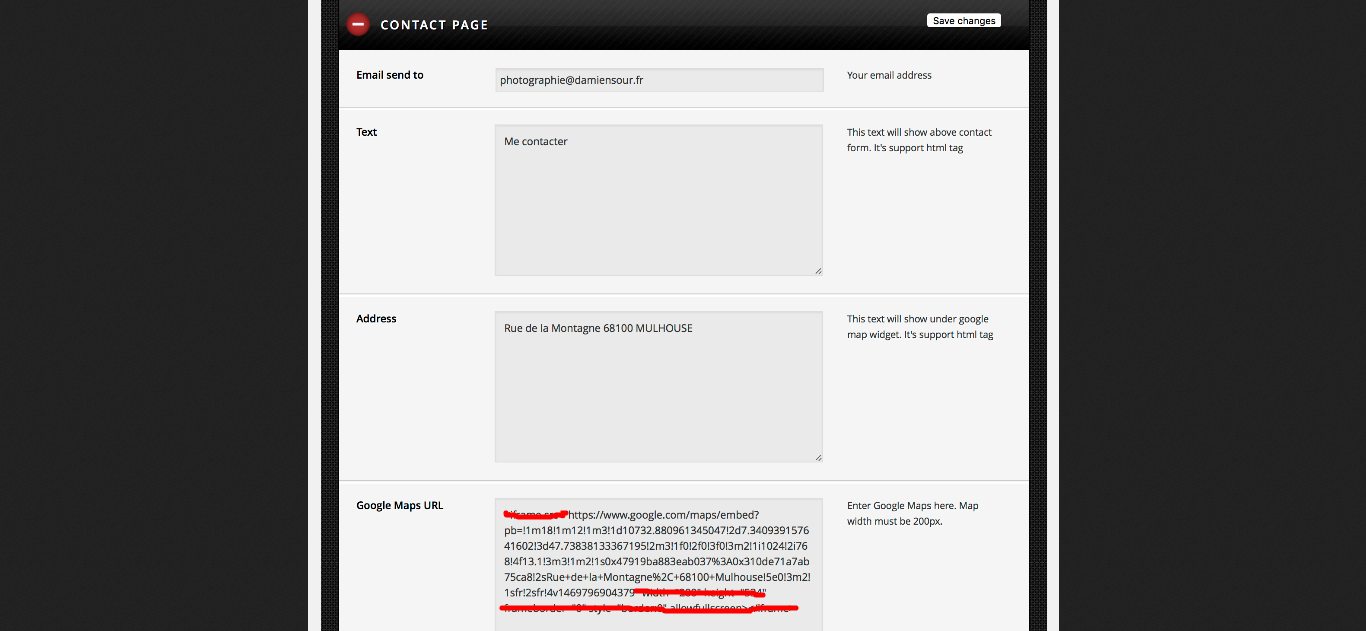
Hi, I can’t set up my contact page. I’ve already insert a Google Map and my email address, but I can’t watch the map (“Forbidden Access”), and I never receive messages through the Contact Form into my webmail. Here is my DE Panel page : http://galeries.damiensour.fr/panel And my Contact Page : http://www.damiensour.fr/me-contacter/
Thanks for your help! Damien
Hi,
For google map, what you need to insert is just value inside src variable not whole code you got from Google Map https://snag.gy/lA1u8C.jpg
For your email issue, i need your permission to access your admin page for further investigation. You can send message through my profile.
Hi, Trying to create a gallery and I have some trouble to select the right template. When I edit the gallery i have no Page Attributes widget I am unable to I am using WordPress 4.5.3 with Photogra 1.6 no lucky with Crome and Firefox. Any idea? thanks
Hi, if you can allow me to see your admin page for further investigation. You can send message through my profile.
The theme is very beautiful on a large desktop monitor, but on a mobile device, the landscape images do not display well. Is there a way to show portrait ratio images on mobile devices and landscape ratio images on desktop computers?
Hi,
Thanks for your purchase!  Sorry, its currently not possible.
My site navigation disappears on mobile version. Any idea where in code I can look to troublehoot this? I’ve restored the original sidebar.php file and the original css/style.css files and still no navigation menu on mobile.
www.trevoray.com
please disregard this. issue fixed. can’t figure out how to delete my comment above.
Hi, I’ve started to use your theme and have been customising as per my clients comments. One of the comments is to have the background images on the homepage fade in and out (simple, I’ve done that), however, the text fades in and out too; I’d like this to be static, can this be done? I’ve tried to cheat by adding the same text to each slide.
Also, are you any nearer to adding Rev Slider support to the homepage?
Thanks in advance.
Hi,
Thanks for your purchase!
It could be possible like this http://www.photogra.themenesia.com/about-us/ but it only for inner page. I will consider to make slider background with static text for homepage on next update.
How is that happening? When I import the sample data the image on About Us page is static? Can assign the inner page as the home page within Wordpress?
Hi, to create page with slider background, you need to create slider item and set group name. Once you done you can open page or post that you want to use slider then look for ‘Slider Page Background’ below of editor. It also can be assigned as the homepage.
Great, thank you
Hi, I’d like to add a “zoom” effect on the slides (as you can do with Revolution Slider plugin) but I find no options to do so. If it’s not possible, could you tell me how to set an slider revolution slider as background in this theme? Also, is there a way to put the title and description of each slide in the center, and change the background colour to transparent?
Thanks!
Hi,
We have plan to include revolution slider plugin for future update. We currently still work on theme update. Please wait.
Hi, I’ve been trying to add an sticky bar at the bottom of the website, with the contact information, so visits can easily find it. But I can’t put it because I can’t find where to add some widgets. The’re normally in Appearance/Widgets, but in this theme I can’t find them. Could you tell me how to do it, or how to add something that could be similar? Thanks a lot. ps: the website is http://rubenoralarife.com/wordpress
Hi,
Sorry for late reply. Did you meant fixed footer on each page? Here is custom css code to make fixed footer. You can insert code below in custom css field by navigate Appearance > DE Panel > Styler > Custom CSS > insert code below:
#footer{
position:fixed;
bottom:0;
left:0;
background:#222;
width:100%;
text-align:center;
border:none;
height:30px;
}
Hello. You can go on my page to see what is going on: shax.ca
So… If I try the mail page, I send and email and nothing happens… It tells me that the email is sent: Thank You! Your email was successfully sent.
But I never receive any emails in my inbox. How can I fix this.
Also. I would love to change the message. My website is going to be in French and I would like to change the notification message that says: Thank You! Your email was successfully sent. And also the colour of the green box in which it appears. Thanx for your help. Chak.
Hi, i thought you use a Gmail. A solution used by some people is to simply create a new email address email@your-domain.com. If issue persist i would suggest to ask your hosting provider for permission to send php mail.
To change email notification message you can navigate to Appearance > Editor > page_contact.php > find text below then replace with your text.
Thank You! Your email was successfully sent.
Hi, I just updated the theme and now the menu in all pages besides the Home Page has a weird gray background behind every link: http://www.wickedsensualcare.com/products/
Also, the slides in the Slider on the front page used to be clickable, to go to product pages but it doesn’t work anymore.
Thank you!
Hi,
Is there any css code on custom css field on DE Panel? For slider on front page you can insert url on Slider Picture > URL field.
No, there’s no css code and yes I can click on the Slide Name (The text box) and go to a linked page but we used to just click anywhere on the slide and it would work.
Hi,
We actually don’t have Photogra version with whole slider is clickable like you said. Just curious how you got it.
Hello Again,
wondering where the support in 2 Busynessdays went… 
I try to put the pattern Background in slider on another than the Starterpage. It doesn t work. – in DE Panel there is pattern Background activated….What s wrong?
Hi,
Sorry for late reply. Once you activated background pattern it will used for whole website. If you can send your page url related with your issue so i can inspect it.
Hi, i thought so. Here is the link to a slider page http://wandgestalten.de/wordpress/comics-und-charikaturen/
Hi,
Please try to update your theme with latest version Photogra v1.6. You current Photogra theme version is 1.5.1. If issue still exist just let me know.
The package could not be installed . The theme is missing the style.css stylesheet .
The Theme install failed .
is what wp told me. so. another idea how to fix it?
I just changed the Text on the Start-Slider of my Blog and now it just shows the “loading Wheel” -what happend here? (Look at “Herzlich willkommen slider” on Wandgestalten.de)
hi, as i told ya 2days ago, wp could not install your updated version, because -as protocoll told to me: there is no style.css i stuck right here and need your support….
Hi, seems you upload wrong file. Please extract package file you have download from ThemeForest. Then upload file “Photogra.zip” not the package file. Also you can read here: http://support.envato.com/index.php?/Knowledgebase/Article/View/269
That worked out good. Thank you!