38438 comments found.

Hello,
I can’t seem to view my Portfolio, I constantly receives a 404, how to fix?
Thanks!
Hello,
Never mind I got it solved!
Hey, glad to hear! 
umm the new visual composer isnt showing up on my plugins.. at all.. i deleted the old one, updated the theme and nothing.. not sure what to do..
Hey, i’m glad you got it sorted – let me know if you have any further issues
Cheers
Portfolio – 3d parallax on hover
1) On hover state – How do I disable the 3d effect?
2) On hover state – How can I edit the transparency?
Hey,
Add this into the custom css box in the Salient options panel
html.cssreflections .portfolio-items .parallaxImg-container {
    transform: none!important;
}

.portfolio-items[data-ps="6"] .parallaxImg-layers > div:first-child .bg-img:after {
  background-color: rgba(0,0,0,0.2)!important;
}
CHeers
Perfect! Very much appreciated : )
You’re welcome
Hey Salient,
Is there a way to decrease the height of the header i.e make it smaller? I didn’t find this option maybe you can help out. Thanks
Hey,
Are you referring to the header navigation? If so, you can set the header navigation padding and the logo height in the Salient options panel > header navigation tab. These two options completely make up the header height
Cheers
Hi, the Meta from bottom on hover + entire thumb link look pretty good in desktop, but for mobile in some cases the description use the whole image so you can see only the text and not image anymore, or well maybe 30% of the image. I try to hide the meta description only for mobile view but without success.
This: @media only screen and (max-width: 1000px) { .bottom-meta { bottom: 0!important; } } doesn’t work anymore? I can’t see any changes if I set the custom css.
Thank you very much for your advice! Cheers, Thomas
Hey,
Could you kindly share your URL in regards so I can take a look for you?
Cheers
Cheers, Thomas
Cheers, Thomas
Hey, add this into the custom css box in the Salient options panel
@media only screen and (max-width: 690px) {
  body h3, .row .col h3 {
  font-size: 20px!important;
  line-height: 25px!important;
}
}
Thanks for the support. But this only works if I add the code to the css for each page and not in the general salient option panel (custom css code). Right?
You’re welcome – it would work in the general settings tab as well. Is it not for you?
In the generell settings tab doesn’t work.
So sorry, it works. Think was the Chrome cache.. Sorry!
No worries
Cheers
Regards, my client wants their web load fast and there is no script for loading (She highly values SEO) but when I turn off the transition of the page and the page loads effects make rare items.
The elements are centered and then adjusted to size. It lasts just a second effect.
Can you load the page and which elements appear well placed? Thank you
Hey,
Could you share your URL in regards so I can take a look?
Cheers
Unfortunately there’s not much you could do about that other than to use the loading screen (which won’t slow down your website speed or affect SEO) since javascript is being used by Visual Composer to calculate those positions
Cheers
Hey Nectar, I’m trying to change the color of the header nav menu (regular not mobile menu) to be of a specific color (only the menu not the links of the submenu underneath) let’s say #FFF only on a certain page. I know I can insert the CSS on that page via PageBuilder CSS section but which code should I use for this? Thanks
- artDirectorMax
Hey, try this
body #header-outer {
   background-color: #fff!important;
}
I tried…unfortunately it doesn’t do the trick 
Hey, please share your URL in regards so I can take a look
Since you’re using the transparent option you’d need to change the snippet to:
html body #header-outer[data-transparent-header="true"][data-has-menu="true"].transparent {
   background-color: #fff!important;
}
Hi, by adding your code, the header appears again in white and that’s not what I’m looking for. I just want the font color of the navigation menu (clickable nav items in the header) to appear in white color, the header itself shall remain transparent. thank you!
Ah, use this instead:
body #header-outer.transparent header#top nav > ul > li > a:hover, #header-outer.transparent header#top nav .sf-menu > li.sfHover > a, #header-outer.transparent header#top nav .sf-menu > li.current_page_ancestor > a, #header-outer.transparent header#top nav .sf-menu > li.current-menu-item > a, #header-outer.transparent header#top nav .sf-menu > li.current-menu-ancestor > a, #header-outer.transparent header#top nav .sf-menu > li.current_page_item > a, #header-outer.transparent header#top nav > ul > li > a:hover > .sf-sub-indicator > i, #header-outer.transparent header#top nav > ul > li.sfHover > a > span > i, #header-outer.transparent header#top nav ul #search-btn a:hover span, #header-outer.transparent header#top nav ul #search-btn a span.icon-salient-search {
    color: #fff!important;
}
body #header-outer[data-lhe="animated_underline"].transparent header#top nav > ul > li > a:after, body #header-outer.transparent header#top nav>ul>li.button_bordered>a:before {
     border-color:  #fff!important;
}
Thanks mate. We are almost there Please check the site link to see what the actual problem is: http://bit.ly/1rugvGN . Your code is working well as for highlighting the menu items, but I would like the menu items to be white from the beginning, not just when going over with the mouse. If you could help with this one, it would be fabulous!
Thanks mate. We are almost there Please check the site link to see what the actual problem is: http://bit.ly/1rugvGN . Your code is working well as for highlighting the menu items, but I would like the menu items to be white from the beginning, not just when going over with the mouse. If you could help with this one, it would be fabulous!
Keep what you have and add this
body #header-outer.transparent header#top nav > ul > li > a, body #header-outer.transparent nav > ul > li > a > .sf-sub-indicator [class^="icon-"] {
    color: #fff!important;
}
Thanks, it works!
You’re welcome
Hi there!
Quick heads up – the Video Lightbox is having issues over HTTPS – this is the error I got hit with in Chrome (it’s not working at all) – I tried placing ”//www.youtube.com….” in the URL but that didn’t work either.
ERROR: Mixed Content: The page at ‘https://XXXXXXX.com/' was loaded over HTTPS, but requested an insecure resource ‘http://www.youtube.com/embed/XXXXXXX?rel=1&autoplay=1'. This request has been blocked; the content must be served over HTTPS.
Have an awesome night!
Hey! Thanks for the report – have you tried to switch the theme lightbox in the general settings > functionality tab of the Salient options panel?
Cheers
Hi there!
Sweet – the Magnific option works without issue. Thank you for mentioning that to me.
Have an awesome day!
You’re very welcome
Hello, I have two problems. I bought your theme a while back, but it is no longer in my themeforest downloads. My second problem is images are missing on the site any help would be appreciated. Thanks! http://www.brandmedia.tv/
I just read your post about the version of salient.. I have Salient Version: 4.5.22. Why can’t I download the newest version? Why isn’t it in my downloads in Themeforest? Thanks!
Hey, have you tried to use the Envato Toolkit plugin in regards? http://code.tutsplus.com/tutorials/toolbox-of-the-smart-wordpress-developer-the-envato-wordpress-toolkit--cms-23883
The theme still doesn’t show up even with the plugin installed.
Hey, you need a license key for the theme to use that plugin – if the theme has disappeared from your downloads and you don’t have it written elsewhere I would recommend reaching out to Envato in regards https://help.market.envato.com/hc/en-us/requests/new?ticket_form_id=37840
Hi, on July 11th we bought Salient Template (for religiosasasuncionmexico.org) everything was great, but now we can’t use visual composer. I asked Envato Market and they told me to write you. Can you tell me what to do? My username is JuanManuel777 And my email is: aurelio_perez@hotmail.com
Thanks in advance
Hey,
The only version of Salient that is compatible with the latest WP is Salient 7.0.8, and the only version of Salient Visual Composer that is compatible with WP 4.5 is 4.11.2. If you’re using older versions of these and have updated to WP 4.5, your visual composer will not work.
Once you’ve updated Salient, head to the plugins section of your admin panel to update Visual Composer. If you’re having issues after using both the current versions, check for third party plugin issues – WP 4.5 added a new version of jQuery and a lot of plugins broke because of it.
Hi, on July 11th we bought Salient Template (for religiosasasuncionmexico.org) everything was great, but now we can’t use visual composer. I asked Envato Market and they told me to write you. Can you tell me what to do? my username is JuanManuel777. Thanks in advance
Hey,
The only version of Salient that is compatible with the latest WP is Salient 7.0.8, and the only version of Salient Visual Composer that is compatible with WP 4.5 is 4.11.2. If you’re using older versions of these and have updated to WP 4.5, your visual composer will not work.
Once you’ve updated Salient, head to the plugins section of your admin panel to update Visual Composer. If you’re having issues after using both the current versions, check for third party plugin issues – WP 4.5 added a new version of jQuery and a lot of plugins broke because of it.
How do I create a 1/5 1/5 1/5 1/5 1/5 row using Visual Composure?
Hey – as of now this would require custom css as VC is built off a 12 column grid system so 1/5’s don’t exist by default in the css
How can I make my portfolio thumbnail hover 100% opacity lagandwind.com
i also want the color to be #1e1e1e
It looks like you already have that working on http://lagandwind.com/ourportfolio/ – do you still need assistance?
Hey guys!
For everyone who hasn’t seen the announcements,
In regards to WordPress 4.5
The only version of Salient that is compatible with the latest WP is Salient 7.0.8, and the only version of Salient Visual Composer that is compatible with WP 4.5 is 4.11.2. If you’re using older versions of these and have updated to WP 4.5, your visual composer will not work.
Once you’ve updated Salient, head to the plugins section of your admin panel to update Visual Composer. If you’re having issues after using both the current versions, check for third party plugin issues – WP 4.5 added a new version of jQuery and a lot of plugins broke because of it.
Templatera requires 4.11 version of Visual Composer plugin to be installed and activated on your site. Current version is 4.10. can you help me with this?
Hey, Salient 7.0.8 provides Salient VC 4.11.2 with the theme. Once you’ve updated the theme, go to your plugins section of your admin panel to update the VC plugin
Cheers
Thank you!
You’re welcome
not so smooth so far, theme wouldn’t upload into wordpress and via ftp broke the site. submitted ticket #752400. will update as soon as i know.
Hey – checking the URL in that ticket, i’m seeing what just appears to be a fresh install of the theme. Could you kindly let me know in more detail what you’re referring to with breaking your site?
Cheers
i delete the ftp upload and dragged the zip folder into the cpanel and had better luck. but, now in the salient options panel im only showing the ‘ascend’ skin and no others. i imported all of them through the demo loader.
Hey,
please add your admin credentials to the ticket so I can log in and inspect the setup
Cheers
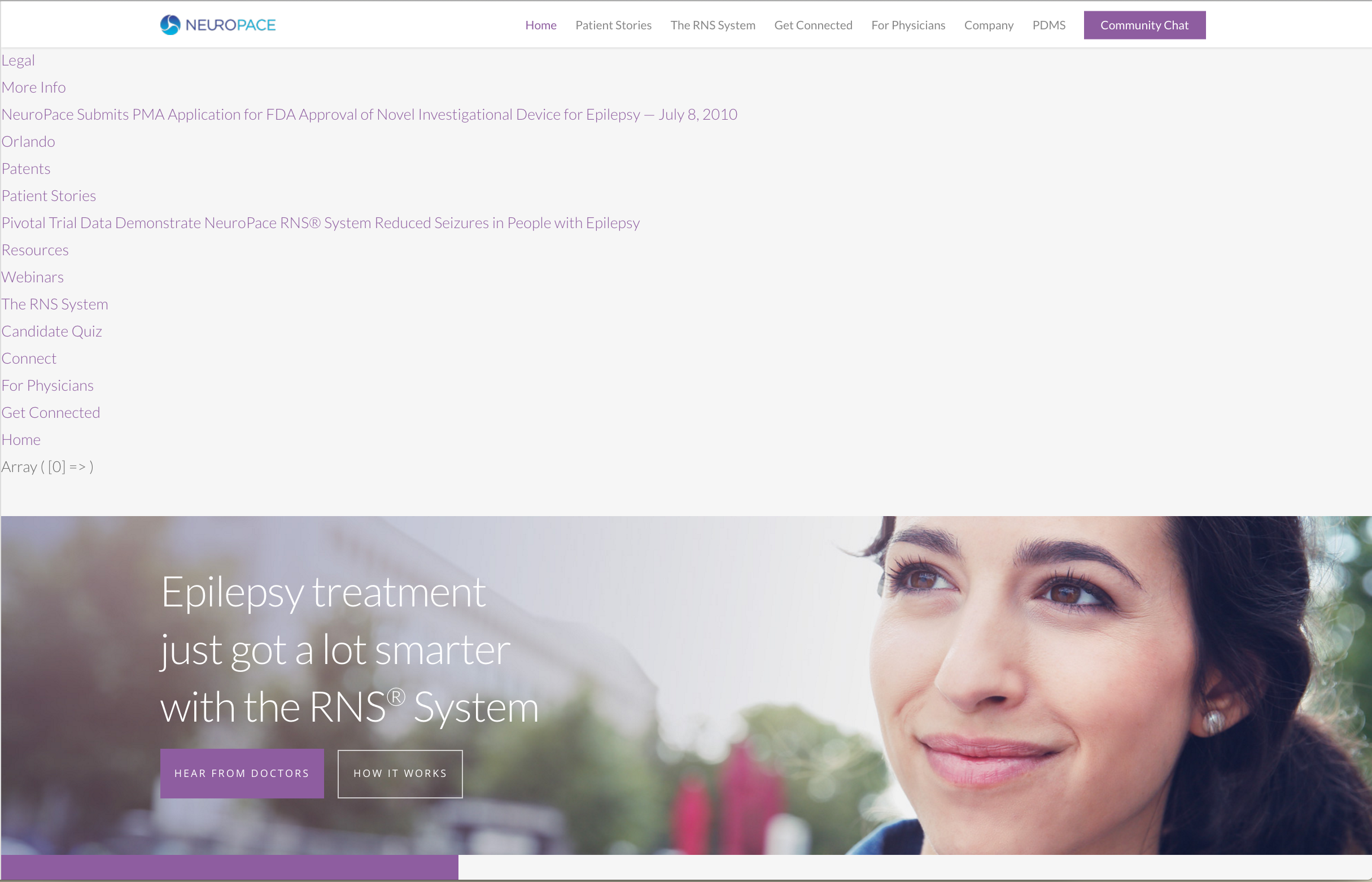
The homepage seems to displaying an array of all our site pages at the top of every page. Do you know why it may be doing this?
URL: www.neuropace.com
We’ve reverted to 7.0.7 as a temporary fix but the issue occurred on 7.0.8.
Please let us know when you’re looking at the url and I’ll re-activate 7.0.8 so we can troubleshoot. Thanks!
Hey,
currently i’m not seeing this – could you provide a screenshot of what you’re seeing?
Cheers
Any update on this?
Thanks
Hey, how did you update through FTP or by using the Envato toolkit? Are you using a child theme and have you also ruled out third party plugins from causing the issue before you reverted?
Cheers
Hi, I updated the theme and the visual composer, but my sliders are screwed up. See: http://www.hub88.nl How can I fix this?
Already solved! Deleted my history….
Hey, glad to hear
Good afternoon , all right?
After the upgrade , I can not find where to add the buttons of social media on the menu.
can you help me?
Hey,
Which menu are you trying to add them to? Could you kindly share your URL in regards so I can see your setup?
Cheers
See , social media buttons above the menu . No longer have after upgrade option to place these buttons . I was in Header .
https://uploaddeimagens.com.br/images/000/612/242/full/midiasocial.jpg?1462118851The options for those should still be located in the header navigation > layout options tab http://i.imgur.com/nGxHjSJ.png
Cheers
Is there a way to remove the black featured box if not image is assigned to the portfolio item? I just want it to go to the portfolio page.
Nevermind. I’m a goof.
Hey, no worries – glad you sorted it