10680 comments found.

Is Layout #13 not available yet within Magento v2?
Thanks for using Porto,
Yes, Layout #13 is not currently available on magento2. We are till updating Porto M2
Regards
Hi, its already available in version 2.2
Sorry for my confusion,
Its already available. Magento2 version now provides 11 demos from M1 version
Regards,
So Layout #13 is now available? We only see 1 to 11
Magento 2 version has different order for homepage variations, you can check one by one.
hi im waiting for reply to my ticket thanks
Please check the comment in your ticket,
Regards,
OK please check my reply in ticket
why you dont want to understand me? All the time you just tell me different things
ADD THIS extension is not working clearly: and you just offered me to disable it. Then why did you add this extension to the theme????
heyyy
Hello,
1. You showed three images into ticket, and want me add these custom menu in your mega menu. These are not theme issue, i am just trying to help you.
2. I just share you way to disable Add this, if not working, you pls notice me. I will check it then.
Please calm down, and work together.
Thanks for understanding.
Hello,
1. That images is a screenshot of your theme, demo 4. please check your theme.
2. Forget about this extension, its just important to fix megamenu.
Please be attention on my tickets. I already work with a developer but you should know this. Right?
Thanks for understanding.
Thanks for your reply,
Yes, those images are screenshot from our demo 4. You want all menu custom, dont want to show all categories in mega menu. So, Just sent you the content to add into your custom menu. Please reply the comment in your ticket!
Regards,
hi
when do you think maybe next version release will happen?
Thanks for using Porto.
We’re planning in the end of this month.
Hi, i cant add new posts to my blog. In Admin panel i cant access to Blog/Add posts, Blog/Posts Blog/comments or Blog/categories. My server works with php7
Thanks for using Porto,
Are you using AW Blog? Please try to reinstall this theme
Regards
Hi, Can you help me ? I want to move the price block & tier prices & add to box & stock qty to the right column in the product view page.
http://www.wypo.cl/media/PRINT.jpg
I am willing to pay for the job. Thanks.
There is no setting in Magento to do what you need. To do that, you will need some custom works from some files, such as view.phtml, addto.phtml… If you are intersted, pls contact us via email under Profile section.
Regards
Wish I had not bought this theme for Magento 2, too many problems and not getting fixed, various tickets, but still no resolutions, no problems with same Theme on my other Magento 1.9 website. How can I get my money back
Sorry for any inconvenience may caused you,
Actually, i fixed your issues yesterday. I dont know whether you did check it or not. Please check the commend in your ticket and give me feedback.
Regards,
Just checked your site again directly with your developer. Your mentioned issue was not theme issue. Could you please consider to change the review? We tried to help you as much as we can. Hope you to evaluate our effort for this theme and support to you so far, and leave at least 4 star review. Thanks for your understand.
Regards,
Hello i’m using porto 1.5.1.2 and i think i found a bug. I’m trying to create a configurable product like you can see in this image http://imgur.com/lYu0UkP .
At the beginning it was impossible to make the double selection “Color e-bike” and “cerchio” because something went wrong. After many hours i found that if i write the number like this 28” (i mean with double quote) the script doesn’t work if i write the number without double quote it’s ok.
Can you confirm me that this is the problem? Do you have any update for the script of configurable product?
Thank you very much
Thanks for using Porto,
DId you install Color Swatches patch which included in theme package yet?
REgards
Yes sure i remember the patch and i install it. If you want i can give you the access to the my test web site
Please send us your details via helpdesk (under Support section) to get the support.
Regards
Hi! My team and I were using your theme but we came across an issue. The quick view extension doesn’t have any styles in it anymore, It didn’t use to be like this so I think maybe a member of the team accidentally removed it somehow because when we did an inspect element the <head></head> code was absolutely empty. Do you have any idea how we add the styles and js to the head again (like what file to put it in, perhaps?)
thanks 
Please contact us through purchased account.
Tried to contact you guys via the “support” link but it’s a broken link so hopefully you can help me via the comments. My developers have implemented your template and we’re almost ready to deploy and they are having trouble because “There is no custom tab showing in category Magento2 admin”. They’re having me contact you because I purchased the template. If it’s easier, please contact me via maryomaher@gmail.com to further discuss.
Thanks for using Porto.
Custom tab feature is not available in current version, we will add this in next release.
Hello Support,
When I installed this theme then I can not see any tab with name SW Menu in – /catalog/category/edit/ section. Can you please help me for same.
Please send us your info details via Helpdesk (under Support section) to get the check for that,
Regards
Hello support,
Can you please provide me email or URL in which i can send you detail..!!
As I can not see any Helpdesk link under support section . 
Thanks I have submitted my issue. Looking forward to your support.
Hello,
We are waiting for your response…
Regards
Product description is embedded in top of header section. Text in product description is pure text.
can you please resolve this as soon as possible?
Thanks for contacting us,
Please kindly check the comment in your ticket
Regards
what comment?? the issue is not resolved you can see on link as well
I replied you some days ago, but till not get your response “Please check your html content inserted in Product Description. Something are wrong in HTML content”.
Now, pls check my new comment in your ticket,
Thank you!
Hi, How to show sort by discount features in porto theme? Also how Ajax auto scroll will work in Porto theme?
Hello,
Thanks for contacting us again,
1. There are no such magento feature.
2. You can enable it in System > Configuration > SW Extensions > Ajax Catalog > General Settings.
Regards
Thanks for using Porto,
We are fixing the issue with helpdesk system. Please try to use this url for now https://smartwave.freshdesk.com/login/normal
Regards
But it has JS Errors like @blacktopventures said. How do I fixed it? I modified the ’$’ to ‘jQuery’ , the ”$(window).stellar is not a function…” is gone. But error comes to “Uncaught TypeError: Cannot read property ‘bind’ of undefined” “Uncaught TypeError: base is not a constructor”
My Magento version is 2.0.4 and I used Chrome to debug.
Thanks for using Porto,
Please try to enable merge javascript files in Stores > Settings > Configuration > Advanced > Developer > JavaScript Settings.
Regards,
Already tried it. No use for my website.
Pls open new ticket at our helpdesk to get the support,
Regards
Hi, I’m using “Homepage 11” with “Header Type 4”. However, the header is not exactly like your demo. Can you please tell me how to make it exactly like your “Demo 11” ?
I think that it doesn’t load “Top Header” properly, or at all.
Thanks for using Porto,
Pls send us your info detail via helpdesk under Support section to get the check for that.
Regards
Ok thank you.
Could you please use the details I attached on ticket no:301?
Sorry, it’s no:3011.
Thanks for your info. Let me check this now
Please try to set correct permision on pub,
What is the correct permission?
I set it to 3744. Could you please try again now?
I set the permissions on the “pub” folder to 744. Is that ok or I have to set it differently?
Thank you, i will notice you when everything done. Please check the status of issue in your ticket 3011.
Ok. Thank you very much.
I’m facing a problem signing in to your support ticketing system: I’m putting the login credentials and I get this message: “We’re sorry, but something went wrong. We’ve been notified about this issue and we’ll take a look at it shortly.” It’s been like this since last night. Any ideas?
Please try to use this url for now: https://smartwave.freshdesk.com/login/normal
Hi, how can i activate the vertical thumbnail gallery? I see it’s hidden in the menu, but i don’t know hot to activate it! Thank you
Thanks for using Porto,
Are you mentioning to the gallery images below the main product image?
REgards,
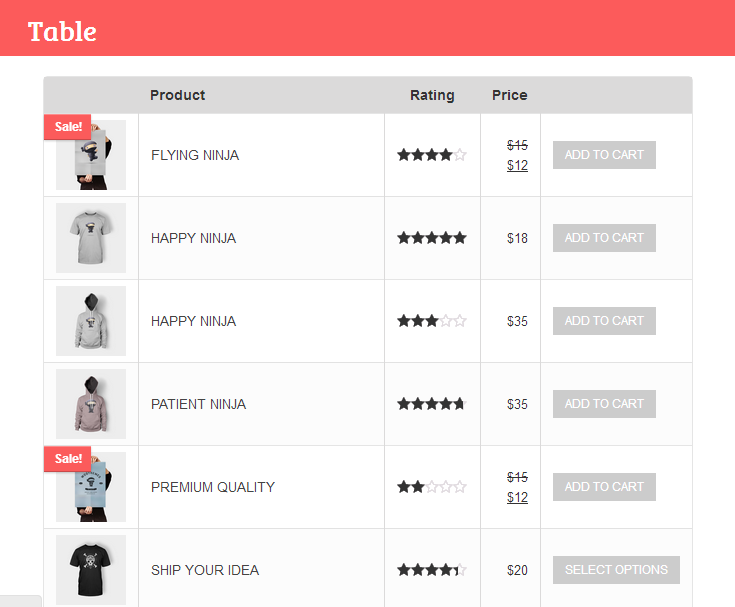
Hello,Porto theme is really nice.. I have two query..regarding Category view..how can I show my products in table format..when clicking any category..products are showing in a list and grid mode..but I need in table format..like everything in one row… is it possible ?
In Products page..when we select list mode is it possible to show products in three columns?
please help me regarding this..
Thanks
Thanks for using Porto,
I am not sure of what you want to custom Category view. Could you pls give me a screenshot or sample url?
Regards
Hello..please this is url – https://0.s3.envato.com/files/134770522/dp/Table.png I need to show my products in table format for particular category..
Sorry for my late reply,
But it is possible to custom group product in that way.
Regards
Magento2-home version 09 : - vertical menu is TEXT LINK or VERTICAL MEGAMENU EXTENSION ? - 1024px page width mode.(Magento 2.x) is availlable ?
Thanks for interested in our product,
That is SW Mega Menu extension. In Porto M2, you are able to choose Maximum Page Width as full width, 1170 or 1280px.
Regards
Please help to answer: Hello Supporter,
I would like to increase the size of the search box (Input Text). How can I do?
Because my result box has width the same as input text width. So I need to increase the width. See my website: cabdia.com
I’ve already got the answer. Thank you.
Hello Supporter,
I would like to increase the size of the search box (Input Text). How can I do?
The orginal is 38 height x 198 width. I need to change the width to 400px.
Please try using this content in cusotmization Setting:
.header-container.type4(your type) .header #search_mini_form { width: 450px;
Regards
Hi Guys, in 2.2 you applied the injection patch, which individual file were patched.
I’d rather just copy them over, I’ve done a few edits and didn’t do a child theme
Sorry to be a pain
Many thanks – IAn
Thanks for using Porto,
I cannot understand what you mean. In Porto 2.2.0, we included the fix for quickview extension’s security issue (m1). Please refer this guide for update work:http://45.55.39.151/magento/porto/documentation/#update
If you need any further help, pls contact us via helpdesk.
REgards
ok…........
In your changlog (on here, not your help files – because there out of date)
You state: Quickview Extension’s SQL Injection Vulnerability issue.(Magento 1.x).
All other changes are for magento 2
I want to update my 2.1 Porto with just the patch files for “Quickview Extension’s SQL Injection Vulnerability issue.(Magento 1.x).” out of 2.2 Porto
I’ve done some edits I don’t wish to overwrite and stupidly did not create a child theme.
Many thanks – Ian
Please open new ticket at our helpdesk to get the quickview patch,
Regards

This item was featured on ThemeForest

Power Elite Author
Contact the Envato Market Help Team