28307 comments found.

Hi!
I don´t know what happens but when I auto translate in english the discount price number changes to letter… -50% goes to “fifty”...
You could check it on
http://glamtown.es/Select translate into english..
*--
Your Support time has expired. Please renew your support by clicking ‘Renew Support’ button on
this page.
You may have “FIXED: Image size bugs on Product Page.” in V2.9 but I’ve noticed with one of these latest updates the images on the category grid are now blurry and nothing fixes it.
When using Masonry Grid on category page the images are randomly cropped, the top part of the product images are cropped on some of the products. Is this by design or a bug?
Does this theme not have fly out menus?
Hi there, sorry the theme only have Drop Down menus.
Hello, first: I love your theme. One issue while translating your theme, I was not able to translate the term “Search for products” – can you please tell me why?
*--
Your Support time has expired. Please renew your support by clicking ‘Renew Support’ button on
this page.
I think you can change that in WP Admin > YITH Options
Thanks – thats awesome!
I see this theme uses blocks. How does that work with SEO? For instance the contact page displays the FAQ with a block shortcode. Are those Questions being indexed on the actual contact page?
Hi there, blocks are only a shortcode that gets rendered on the page, so it’s basically normal content so it works perfect with SEO.
I need this [product_categories number=”10” columns=”5”] to display main categories, not by alphabet including subcategories. How can I define that?
Not doable?
Hi DigiSpaceNO,
Sorry about our late reply to this!
Please click the item support tab or email support@uxthemes.com to get help. That’s the correct way to get support. Include a link to your site if possible 
Cheers!? UX Themes
Hello,
I’m using the Woothemes Product compare plugin to compare products in the shop: http://www.dssdev.be/vanrooy/e-shop/
If we check some products and go to the page where these products are compared, the entire frame of the page is gone. I mean; this page takes up the entire width, so sidebar and filters are gone. http://www.dssdev.be/vanrooy/products-compare/Is there a fix for this please? Can’t we integrate the comparison page better into the shop page? I’ve already contact the authors of the plugin, but they’ve sent me back to you.
Thank you! Bruno
Hi there, could you email this and the plugin to post@uxthemes.com so we could test it?
Hi, I want to listing all variable options like a horizontal tabs, not in dropdown box, how could I do that? Thanks.
Another problem, how could I reposition Additional Information and Your order in my checkout page, like Additional Information box will be in top right and your order in bottom of page. Thanks. You can checkout my page: http://goo.gl/d92PRC
*--
Your Support time has expired. Please renew your support by clicking ‘Renew Support’ button on
this page.
Sorry, but I asked this question 2 weeks ago (which support haven’t expired yet) and got no response until now
Ah, sorry about that.
1) That would require a plugin like this https://www.woothemes.com/products/variation-swatches-and-photos/
2) Hi there, that is currently not possible without custom development of the theme, and that’s not something we can provide. You could try contact http://codeable.io to get help with custom development.
Hi There,
I will make an eCommerce site is more than one language is used. I doubt at this point: I will use both wpml and woocommerce at the all areas like product page, options place, plug-in and widgets etc. So that can i use your theme without any problem depends on these conditions?
Best regards
Is there a way for the change color in a active li in main menu?
Hi there. Please click the item support tab or email support@uxthemes.com to get help. That’s the correct way to get support. Include a link to your site if possible
Hello. A presales question. Can we have smaller picture sizes and have 4-6 pic in a row on the products page, for the bigger monitor screens? Thank you
Hi,
how can I disable the theme’s Google Maps API? Right now it’s blocking a google maps plugin which I need for the extended functions.
Hi there, we only use the Google Maps API on the Map shortcode. Try remove the shortcode to remove it
Hello! Pre-buyer question: Is it possible to have a full width menu and header like on this page? http://www.snorasskydd.se/Svensk/
Thanks in advance!
Hey guys,
I have a question that was asked 4 months ago but never answered by @RedDice. The question is:
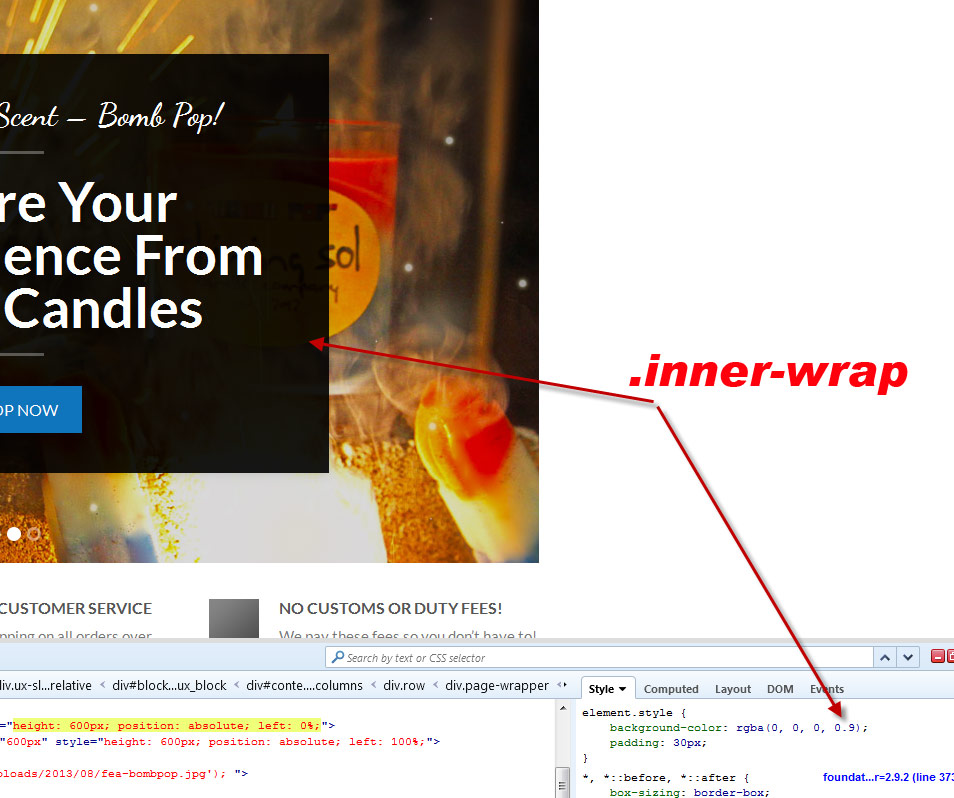
Which js file is the slider text background opacity settings? i want to change it from 0.9 to 0.6 and i just can’t find the file.
...div class=”inner-wrap animated fadeIn start-anim” style=”background-color:rgba(0,0,0,0.9); padding:1px”
There doesn’t seem to be a setting to change this in the builder like I expected.
http://www.creationnation.com/clients/innerwrap.jpgFellas? I have a launch this morning would love to know if there is a built in option for this?
Hi,
Sorry about our late reply to this!
Please click the item support tab or email support@uxthemes.com to get help. That’s the correct way to get support. Include a link to your site if possible
Cheers! ?UX Themes
Hi there.Does this theme allow this plugin for product pages? – WooCommerce Single Product Page Builder http://codecanyon.net/item/woocommerce-single-product-page-builder/7605299
I post the products, but the page is not found like this : http://perutlapar.com/index.php/shop/ quick view can, but, click the image the page is not found
Hi,
Sorry about our late reply to this!
Please click the item support tab or email support@uxthemes.com to get help. That’s the correct way to get support. Include a link to your site if possible
Cheers! ?UX Themes
Hello,
How I can change the speed of the UX Slider?
thx
Hi,
Sorry about our late reply to this!
Please click the item support tab or email support@uxthemes.com to get help. That’s the correct way to get support. Include a link to your site if possible
Cheers!? UX Themes
Hallo, how i can traslate this theme to greek?
Hi there @amd4ever,
We have put a link in our documentation which directs you to a WooCommerce guide on how to translate the theme: http://uxthemes.helpscoutdocs.com/article/63-how-to-translate-the-theme. Hope that helps!
Best regards, UX Themes
Hi amd4ever, I can see that you have rated us with a 1-star review. Is there anything we can do to make you change your mind regarding the review?
I have a question when I buy this theme I go it as it , which mean I can use it directly without any changes on the layout, or just I will have the layout and then I have to customize everything .

This item was featured on ThemeForest

Power Elite Author
Contact the Envato Market Help Team