1277 comments found.

Is this theme compatible with PHP 7?
Yes, it is. If you have any issues please let me know and we’ll help you to fix them.
hi i am a developper and a customer has made a change to his website and i have to make this work he has baought the theme som e years ago (www.vita-veritas.com) and the problem is it is difficult to find the details of the purchase
so the problem is that i m trying to update the theme but it has some problems with the features it used to have the features menu at the right side and this is disappeared from the next updates is that true? he has the v.6.5 of the them so if we want to upgrade it (its ok if we have to buy another license or support) but how can we update the features menu not to disappear? thank you
anyone can help please?
Hi,
Yes, please purchase support extension for your client purchase or another license if you are not able to find the previous one (you can check in downloads section – https://themeforest.net/downloads/ ) and create new topic on our support forum – http://support.quanticalabs.com Our suppor team will help with update and your issue with menu. Thank you!
it is compatible with php 7 ?
Yes, it is. If you have any issues, please let us know.
Dear Sir/Madam,
I would like to import the dummy content to my current website, will it delete all of my current content (mostly the blog posts)? Is there anyway that I can have the demo content but still keep my current posts?
I hope to hear from you soon!
Hello,
No, it won’t delete any content. This operation will import only new post/pages/widgets etc. but will not remove any of your existing contents.
Thanks! Will I need to download all files or just the installable wordpress file only? I tried to download all files but it failed while the only instaballable wordpress file is downloaded without any problem! Is there any guide to import the dummy content?
Please check our Getting Started section on the support forum: http://support.quanticalabs.com/forum/topic/9677/getting-started Thank you!
hello very interested in your template but i have one question in the timetable, i have three doctors in the Pediatric Clinic and all three time of service is monday 7-9 am, can the time table time slot in monday 7-9 am show all three doctors in Pediatric Clinic time table? because i saw your demo seems one time slot can only show one doctor?? let me know thanks
and one more question, is this theme just support one language? because we have two language in our original website, one english, one french
Hello,
You can assign to hour block only 1 doctor but you can use description fields and set any text for an hour block. So it’s possible to put there 3 doctors names in a form of description.
Theme supports multiple languages but you’ll need to use some language plugin for that purpose like WPML, qTranslate etc.
ok this theme is almost perfect for me, but just wonder if the doctor names in time table, can i link to their personal page in the web? for example , when browsing the timetable primary health care and can i click the name of ann blyumin and link to the profile http://quanticalabs.com/wp_themes/medicenter/our-doctors-2-columns/#gallery-details-ann-blyumin-prof ? because i cant access to the admin page i am not sure if i can add this kind of link , thank you
To add the link on the doctor you’ll need to edit source code. Our support team can help you with that.
Hello, it is possible insert menu icon into the horizontal main menu? Like for example language icon? Thanks a lot!
Hello,
By default menu doesn’t supports icons. So you’ll need to prepare some custom css code or use some menu plugin.
Hi, I have same problem with Visual composer licence. It is the second time … I didn’t know I should pay for Visual composer when I purchased your template. It isn’t a good way to manage customers.
Hi,
You don’t need to pay for Visual Composer, it’s included. If you’ve updated theme to the newest version, you also need to update Visual Composer. Instructions here: http://support.quanticalabs.com/forum/topic/6423/faq-frequently-asked-questions#question_55 (Q: How can I update the Visual Composer plugin?)
I did every steps you have writen in your email but it doesn’t work…
In this case please extend support period and create new topic on our forum, we’ll check this for you and provide a fix.
if your template updated version doesn’t work automatically it should be a your matter, why I have to pay for your assistance?
Theme works well, so it’s probably some issue on your end. Please make sure that you’re using the newest version of theme – 8.3 and included Visual Composer – 4.12. If not, please update, instructions here: http://support.quanticalabs.com/forum/topic/6423/faq-frequently-asked-questions#question_21
I read from Envato conditions that “All the items you buy are quality checked by Envato. Any future update made available by the author is included with every purchase. Plus, item support includes:
Availability of the author to answer questions
Get assistance with reported bugs and issues
Help with included 3rd party assets"Yes, all correct. Do you have the newest version of theme and Visual Composer installed? Please also note that your support period has expired. Updates are available for you but if you need assistance with update process or you have some issues with theme, then you need to have valid support period to get help from us.
Full item support policy here: https://themeforest.net/page/item_support_policy
So the 3 points which you’ve posted:
Availability of the author to answer questions
Get assistance with reported bugs and issues
Help with included 3rd party assets
applies only when you have valid support.
If you don’t fix your upgrade problems I’ll purchase a new theme
Why did you ask me to update Visual composer plugin and not your theme? Now I have to update your theme too even if I did not want to do it because last time I did it I had so many problems…
You should use the Visual Composer included with theme (current version 4.12). It’s available with the newest version of theme – 8.3. The update process (theme+VC) is described here: http://support.quanticalabs.com/forum/topic/6423/faq-frequently-asked-questions#question_21
You can update only VC if you would like to. Simply download the newest version of theme and you’ll find js_composer.zip installation file for Visual Composer inside theme zip package under plugins directory.
I had already deactived your theme, canceled VC plugin, reactived your theme and uploaded newest VC version but it doesn’t work. Now I have downloaded your newest version of your theme and I have found the js_composer.zip. How I should import it? Using FTP or from WP control panel? Thanks
I’ve sent you a link to instructions before: http://support.quanticalabs.com/forum/topic/6423/faq-frequently-asked-questions#question_55
You should remove current version of VC from WP admin area or via FTP and then install the new one. You can install it via WP admin area or upload it via FTP.
Please note that you should use also the newest version of theme. With older version there may be some compatibility issue.
I went to edit my site and Visual Composer isn’t working anymore. It’s also asking me to activate it. I purchased this theme already, how do I get this fixed????
I have also tried logging into your support forum to post this question but it doesn’t allow me. I need to get this fixed ASAP!!
Hello,
Please extend your support period and create new topic on the support forum, our support team will help you.
You can also search the forum for an answer, it’s available in read only mode if your support period isn’t valid anymore.
When I try to search the forum, I get this message – You don’t have permission to view this topic. Also, I’m not understanding why I have to pay for support in order for this WP theme I purchased to continue working. Really not happy with this! Can you send me a public link where I can have instructions on how to update Visual Composer??
Even if your support period has expired you can still view the forum in read only mode but you need to be logged in. Support is valid only for 6 months after purchase, then you need to extend support period to get help. Here is the support policy: https://themeforest.net/page/item_support_policy
You can find update instructions here: http://support.quanticalabs.com/forum/topic/6423/faq-frequently-asked-questions#question_55 (please login first).
When I try to login, I’m taken to this link: http://support.quanticalabs.com/wp-login.php
That is ok. Please provide your login and password. I can see that you have an account on our support forum already, so you’ve probably created it in the past. If you don’t remember password please use password restore functionality or send me password reset request via email and I’ll reset it for you.
Hello. Can I remove the button “Leave a reply” under post data so only reply form remains? Many thanks.
Hello,
Yes, it’s possible.
Nice. This could fit the current project. Would you be so kind and answer also these:
1) 3 blue rectangles on homepage – is it possible to auto-hide them somehow – so only “Emergency Case, Doctors Timetable etc” would be visible. Then you click on it and it slides up an reveals fully?
2) in these 3 rectangles is it possible to write opening hours (like in demo) on top, then two short sentences below and finally a button below that? How hard is this to do? A client wants to make the changes himself. Are these opening hours connected/automised with the timetable somehow?
3) possible to set transparency for these 3 rectangles?
4) I would need to get rid of the comment counters everywhere on the site (we won’t use comments) in light blue rectangles next to the post date – and in single post, below the post date…doable?
5) possible to hide the homepage slider bar, showing on which slide we are?
6) is there an “under constructions” option?
7) is it possible to show main menu again at the bottom?
Sorry for so many questions, I have these demands and am trying to find a theme that would suit us most. Thanks.
1. No, theme doesn’t offer such a functionality.
2. Yes, you can put any content in the home box. The hours are not conntected with timetable, they need to be provided manually.
3. Yes, with custom css code.
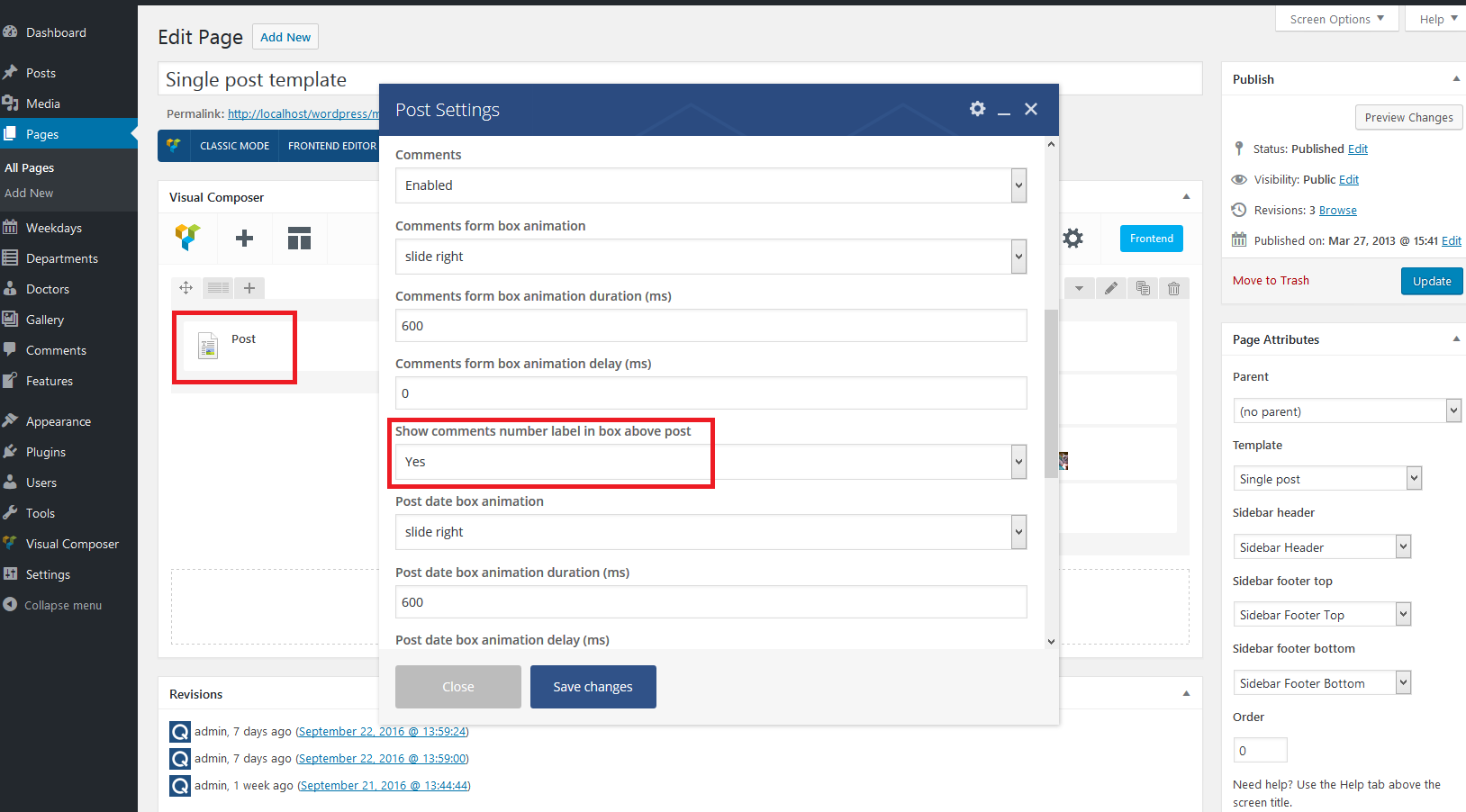
4. Yes, there is ‘Show comments number’ option under appropriate components settings.
5. Yes, with custom css code.
6. No, to have this option please install some ‘under construction’ plugin.
7. You can use custom menu widget to display it in the footer. Anyway it won’t have the same styles as the one in header.
Many thanks for your quick reply. If I get a positive answer, I am back and buying.
You’re welcome!
Going through every point you answered but I stopped at 4) ..In my experience when you make a new post you don’t have any option to customise how a post looks like. For hiding “Leave a reply” link in a single post view – is this a general option that affects all posts? A command in your theme, a custom code of some kind?
There is a template called ‘Single Post Template’ which you can use to make a config for your posts (takes effect for all posts). Please check this screenshot from admin area: http://support.quanticalabs.com/wp-content/uploads/2016/09/medicenter-theme-single-post-template-comments.png
Ok. Will check it out, thanks.
You’re welcome!
great theme
Thank you!
Hi just purchased this theme and its really good. Can we remove the date from features page?
Hi,
Support for all our items is conducted through our Support Forum.
Please register an account and search the forum or create a new topic, we’ll answer as soon as possible. Thank you!
Hi,
Can I have this theme customized in a child theme, I just need a few tweaks. Can I PM or Email what I need for a quote please?
Hi,
Yes. If you would like to have some customizations, please contact me via contact form in my profile.
hi I have a problem importing demo content
Hi,
Support for all our items is conducted through our Support Forum.
Please register an account and search the forum or create a new topic, we’ll answer as soon as possible. Thank you!
Hi, I am having trouble to set the category ordering in the gallery section .. plzz help me.
Hi,
Support for all our items is conducted through our Support Forum.
Please register an account and search the forum or create a new topic, we’ll answer as soon as possible. Thank you!
I intend to purchase this theme, any special characteristics the server I am going to install this needs to have?
You need server with PHP support and mySQL database.
Hi, pre sales Q: is this theme ready for multisite? Does it come with a child theme?
Hi,
Yes, it works on multisite installations but for each of your sites you’ll need to purchase separate license. Yes, child theme is included.
is this theme compatible with software version WP 4.6 ?
Yes, it is.
Visual Composer is not working properly for a while now. I have not received a reply to the ticket I opened on your support site. This is not the first time Visual Composer stops working. It does not happened to me these many time on any other WP theme I bought on Envato. Please help!
Hello,
Could you send me a link to your ticket as I can’t find in on our Support Forum?
Hi, I filled the contact form. Never got a ticket #. It was sent under Fabian Borges name
Hi,
We’re providing support only via our Support Forum so you need to create a topic there. Thank you!
We have a potential client that is a Dentist but needs both identical Horizontal and Vertical nav menus. Can this Theme do that with or without a plugin?
MediCenter have only horizontal menu predefined. If you would like to use the same menu in vertical layout you’ll need to prepare some custom css code.
For managing the timetable and doctors availability/time slots – is additional plugin needed to buy?
No the timetable functionality which you see here: http://quanticalabs.com/wp_themes/medicenter/timetable/ is included.