390 comments found.

Hi guys, someone has problems visualising Apicona Facts in Digits on our Website https://villadonatello.com They remain blocked on “0” but if you interact with the page in some way (for example changing a slider using manually an arrow) they appear… Is there any known issue about this problem? THanks in advance…
Hello,
Nope there is no complain like this. It looks like some plugin or code is effecting FID area.
We need to check admin sectionfor this. Please contact us via our official support system at http://support.thememount.com/ and send us WordPress admin login details so we can check and provide you solution.
Thanks, Bob
hello,
I use the carousel effect of Apicona Blog Box Settings, the carousel can not auto play even I turned on, and the prev / next button also don’t work.
Please help.
Hello,
This should not happen. Please contact us via our official support system at http://support.thememount.com/ and send us your site URL with admin login details so our team member will look it and will provide you proper solution.
Thanks, Bob
Hello,
I am still enjoying your theme. I have been trying to center my logo between my set of menus but when I go to admin>appearance> menus, I no longer see the CSS Classes for me to add “logo-after-this”.
I need help.
Thanks
Hello,
This is default WordPress setup that it will hide the Class input box. To show this, just click on “Screen Options” tab on top-right corner on menu page. Than check the “CSS Classes” checkbox. Here is the screenshot for more details:

Than you can insert “logo-after-this” class.
Thanks, Bob
Hello,
I installed WPML, how can put the language switcher into the top bar right or left ? Thanks.
Hello,
Just write this shortcode:
[languageswitcher]
You will find more details here:
http://apicona-advanced.thememount.com/documentation/shortcodes.html#language-switcher
You can also contact us via our official support system at http://support.thememount.com/ so our team member will guide you properly.
Thanks,
Bob
Hello,
How can make the vertical menu of left side like this page?
http://apicona-advanced.thememount.com/team-group/ophthalmology/Thanks.
Hello,
This is special menu generated on Portfolio Category and Team Group page automatically. There is no direct way to copy that menu. But we need more information on this so we can guide you with alternative way. So please contact us via our official support system at http://support.thememount.com/ and describe more so we can guide you on this.
Thanks, Bob
How can I insert your schedule box for opening hours?
Hello,
We are not sure which box you like to use. Please contact us via our official support system at http://support.thememount.com/ and send us more details with screenshot so we can understand it perfectly.
Thanks, Bob
I mean this one: http://apicona-advanced.thememount.com/homepage-version-2/ “Our Working Hours” ...
Just add “ThemeMount Schedule Box” via Visual Composer and add content in “Scheduler” tab.
Bob
Also here is the sample shortcode so you can use it in Widget too:
[tm-schedulebox title="" heading_sep="no" scheduler="%5B%7B%22weekday%22%3A%22Monday%22%2C%22timing%22%3A%2209%3A00%20-%2017%3A00%22%7D%2C%7B%22weekday%22%3A%22Tuesday%22%2C%22timing%22%3A%2209%3A00%20-%2017%3A00%22%7D%2C%7B%22weekday%22%3A%22Wednesday%22%2C%22timing%22%3A%2209%3A00%20-%2017%3A00%22%7D%2C%7B%22weekday%22%3A%22Thursday%22%2C%22timing%22%3A%2209%3A00%20-%2017%3A00%22%7D%2C%7B%22weekday%22%3A%22Friday%22%2C%22timing%22%3A%2209%3A00%20-%2017%3A00%22%7D%2C%7B%22weekday%22%3A%22Saturday%22%2C%22timing%22%3A%2209%3A00%20-%2017%3A00%22%7D%2C%7B%22weekday%22%3A%22Sunday%22%2C%22timing%22%3A%22Closed%22%7D%5D"]
Thanks, Bob
And that`s the big problem. I don`t see in the visual composer the “ThemeMount Schedule Box”.
We need to check why it’s not showing. Please contact us via our official support system at http://support.thememount.com/ and send us login details so we can study it.
Thanks, Bob
Hi the plugin WPBakery Visual Composer and revolution slider . have installation problems. I have also sent emails with ftp access, assistance but received no response. It ’s very urgent. I need to get the zip file and try to install them on. www.ambulanzeglobalmedical.com
Hello,
We just received your login details. I see that you replied our email and didn’t write directly in ticket. Please note that we recommend you to write in ticket directly and don’t reply our system email as system email will merge late. We already written this in all emails and also on our support page (please see texts in blue color).
As we can see you sent us email reply and it’s just merged in our system so you will get reply today.
So please write on our ticket system and don’t reply our system email.
Thanks, Bob
Hi,
Is it necessary to activate the plugin of CF Post Formats, what does it work for?
Thanks.
Hello,
The CF Post Formats plugin is for post formats with some extra features (for Blog post only). So if you are going to use different post formats in your blog than we recommend you to use this plugin. We designed data developed by this plugin so we recommend this plugin.
So normally (without this plugin) you will get post formats as simple radio button like this:

But by using this plugin, you will get TABs for each post format (with some extra flexible options) like this:
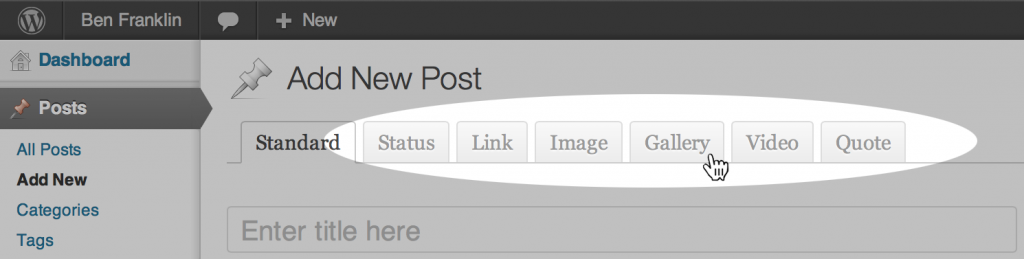
Thanks, Bob
Hello, love the theme! I really like the look of the floating bar… I just don’t need such a search option. Is it possible to have the red thingy just be a link to a certain page?
Hello,
Yes that is possible. But we like to know which design/view you are using as Apicona has now two different designs/views.
We recommend you to contact us via our official support system at http://support.thememount.com/ and send us your site URL with admin login details so our team will guide you on this.
Thanks, Bob.
Hello,
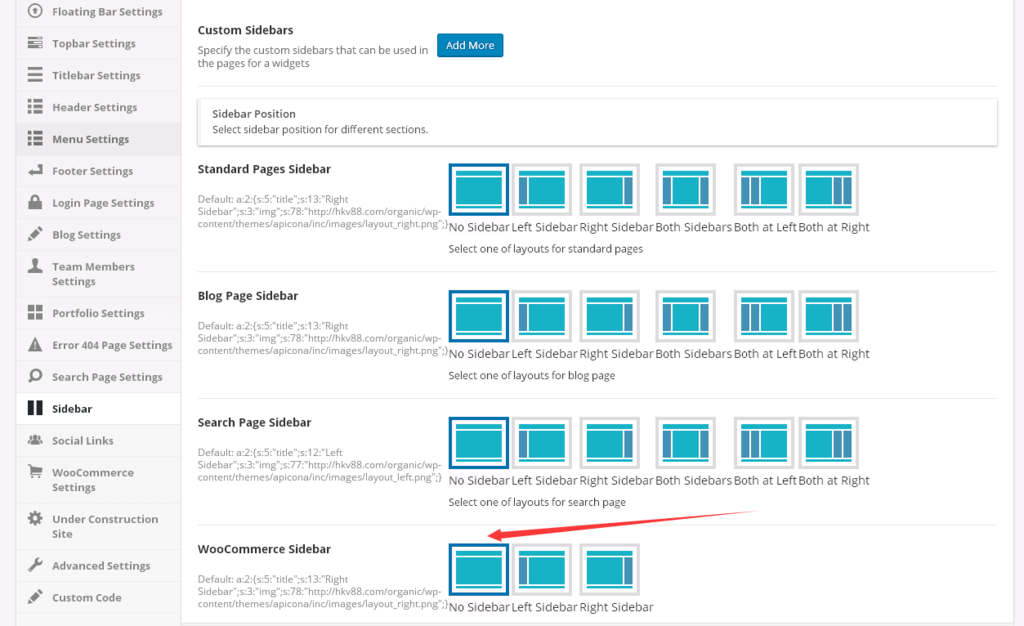
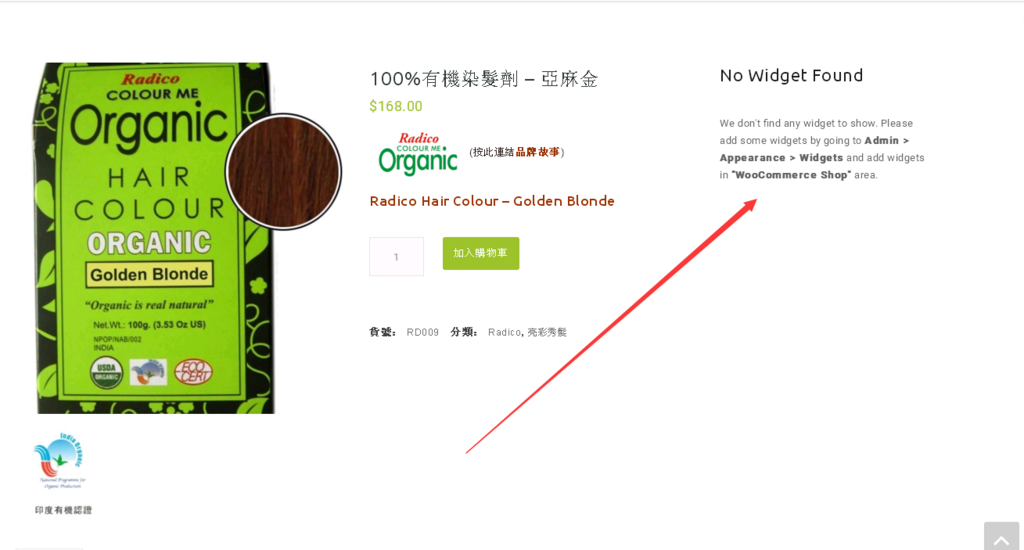
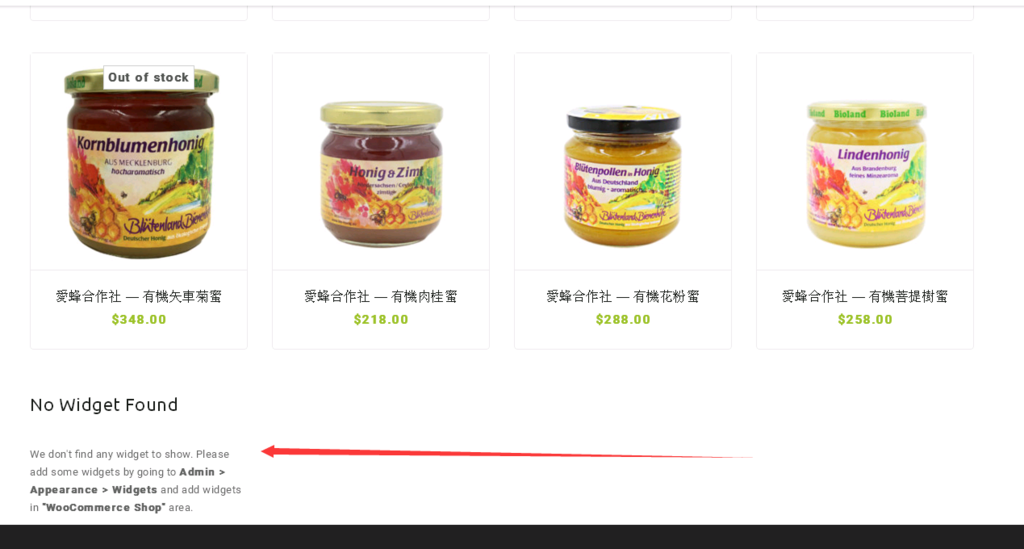
I already set no WooCommerce Sidebar, but there are error shown: “No Widget Found” at the bottom of product category page and at right side of product page. And I don’t want to put any widget or sidebar in those pages,
http://i261.photobucket.com/albums/ii44/bluewe/sp.png http://i261.photobucket.com/albums/ii44/bluewe/pp.png http://i261.photobucket.com/albums/ii44/bluewe/cp.pngplease help.
And also in the Product List page, how to set when click product photo can link into that product page, now only the product name has link
Hello,
Please contact us via our official support system at http://support.thememount.com/ and send us your site URL with admin login details. So our team member can check your settings and will guide you.
Thanks, Bob
hi again 
I have one more question. I need to manage portfolio category detail with “visual composer”. Is it possible? I chacked visual composer setting and i didn’t find a solution. Please help! 
Thanks
Hello,
We are not sure what you need. Please contact us via our official support system at http://support.thememount.com/ and send us more details so we can guide you perfectly.
Thanks, Bob
hi,
I changed portfolio slug as “packages” and re saved permalinks. Now in “three-column-research/” page, i can’list my package list like your demo. What should i do? can you help me?
Thanks
Hello,
We are not sure what you need. Please contact us via our official support system at http://support.thememount.com/ and send us more details so we can guide you perfectly.
Thanks, Bob
how can i import this demo, http://apicona-advanced.thememount.com/classic-header/
Hello,
You can import the new Apicona Advanced layout by using the one click process as described here: http://apicona-advanced.thememount.com/documentation/democontent.html (make sure you are using Advanced version)If you are not sure than please contact us via our official support system at http://support.thememount.com/ so our team will guide you on this.
Thanks, Bob
How do I hide the topbar only in mobile.
Hello,
Yes we are providing option for this. Just go to “Theme Options > Topbar Settings” and select proper option in “Show/Hide Topbar in Responsive Mode” option. We are providing different options to show/hide in different devices.
Thanks, Bob
Hello Bob,
Thanks for reply. I didn’t see this option (Show/Hide Topbar in Responsive Mode) in my theme, so I updated to 12.0.0 Version. New version doesn’t work with child theme. Child theme seemed to be broken. All of my plugin and wp are latest versions. Have you any solution?
Kind Regards, Ibolya
Hello,
Yes that option is available for Apicona Advanced theme. The new version is v12.1.0 so please update it and so the child theme should be working.
Also please create a new support ticket on our official support system at http://support.thememount.com/ and send us your site URL with admin login details so we can check and solve error directly on your server. This way we can provide you fast support.
Thanks, Bob
Also please note that v12.x is major release and we added fresh new look in our theme and all main files are modified. So you need to re-check your child theme and modify it as the new code.
Thanks, Bob
Thanks. I have already updated child theme, but there is broken. I will create a support ticket. But the original problem doesn’t solve. In the “Theme Options > Topbar Settings” (updated Version: 12.1.0) is not this option: “Show/Hide Topbar in Responsive Mode”, only “Hide Topbar”. Regards, Ibolya
Hello,
We checked and found that you created ticket on our official support system today. Our team will guide you on this by replying on your ticket so we will continue discussion at there.
Thanks, Bob
How we can update the theme with latest update? Do we need to copy paste the theme directory.
Hello,
No you just need to update via Envato Market plugin. We described update steps here:http://apicona.thememount.com/documentation/faq.html#faq-2
Just install the “Envato Market” plugin and update the Apicona theme.
Thanks, Bob
http://apicona.thememount.com/documentation/migrate.html
Thanks, Bob
Hello, I wondered if you could help?
I’m looking to have the social media icons reversed so they are grey on hover and the blue colours on static. Can you advise how to do this?
Kind Regards, Louise
Hello,
This can be done by custom CSS code. Please contact us via our official support system at http://support.thememount.com/ and send us your site URL so our team member can provide you proper code.
Thanks, Bob
hi good day!
i purchased this theme yesterday and i really like it but the breadcumb thing is really annoying me, is there any possibility i can get normal breakcumb layout instead of in side the titlebar? i dont want title image but when i close the title image breadcrumb get closed with it. plz help.
Hello,
Yes you can do this easily. But you need to change some options to make it perfect. Please contact us via our official support system at http://support.thememount.com/ so our team member will guide you perfectly.
Thanks, Bob
I have downloaded and installed the latest version of the theme, but, visual composer is still not working. I don’t understand why.
Hello,
It looks like you didn’t updated Visual Composer plugin. Make sure you installed latest version of Visual Composer v4.12
If still not solved than please contact us via our official support system at http://support.thememount.com/ and send us admin login details so our team member will check it directly on your site.
Thanks, Bob
Is there a tutorial for the pricing tables?
Also where is the code for the appointment form?
Hello,
For the pricing tables, we are using Easy Pricing Table plugin. They are not providing separate documentation but the plugin is very easy to use. Just see on the plugin page and you will find basic idea about how to work with it. If you have questions than please contact us via our official support system at http://support.thememount.com/ so our team will guide you on this.
For the appointment form, we are using Contact Form 7 plugin. Here is the code of the form:http://pastebin.com/XcsfyBUG
If you still have questions than please contact us via our official support system at http://support.thememount.com/ so our team will guide you perfectly.
Thanks, Bob
I forgot to ask you..
1. I need to have a LOCATION BASED Medical Professionals Listing. Is it possible with your theme? What is required to make this happen? 2. Are the doctors user profiles integrated with Wordpress user profiles.. 3. I also need to ADD hospital listings to the site. Another CUSTOM POST type needed… Please advise how is it handled with your theme. 4. I need to have RATINGs on the doctors etc… How can that be achieved with your theme please? Also BLACK LIST and WHITE LIST
Regards,
Hello,
Thanks for contacting us. There are so many questions and we need some more details on some questions too. So please contact us via our official support system at http://support.thememount.com/ so our team will guide you on all points.
Thanks, Bob