373 comments found.

Hello, i appreciate the theme , nice work.
but i have a question => how can i change the heading background to image here http://esprit-fondation.tn/qui-sommes-nous/ i tried with the heading option in the page editor, and in theme general settings, but always got this heading background.
Hello, thanks for contacting!
In fact it is rather hard to say what can be causing such a problem without seeing the website and investigating the issue from your end. We have not received any similar reports so far, that’s why we would appreciate if you submitted us a ticket so that we could take a look at the issue from your end – submit now. Just please make sure to add all the needed credentials to your ticket.
Thank you!
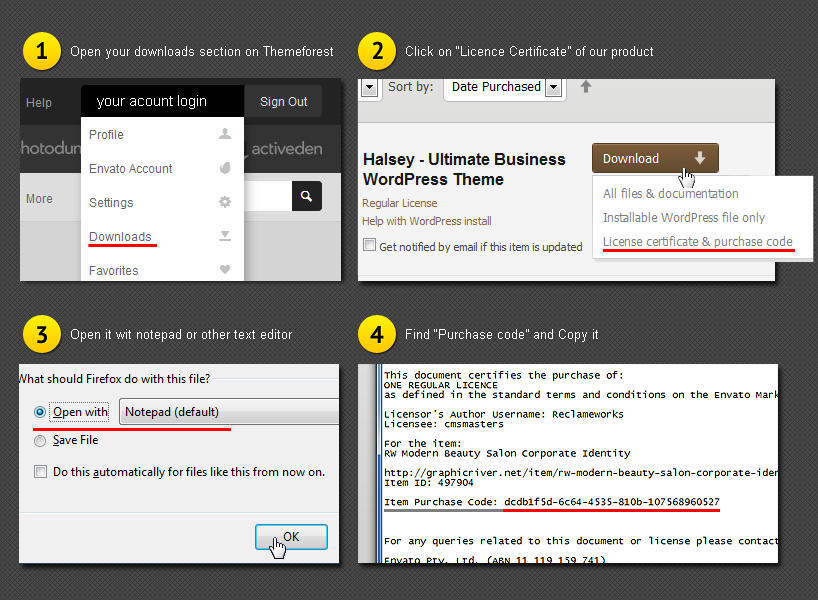
Okey i will try to get my Purchase Code,can you tell me where can i find it? it’s someone from my family who bought this theme for me.
Thanks for your reply!
You can find the purchase code in this file within the “Downloads” tab of your Envato account – please see the screenshot.
Thank you!
Great theme, I was wondering if it is possible to change the width when selecting boxed layout instead of liquid?
So another question, I see that we are able add a donate button in the header, but where can I set the link for this button?
Hello, thanks for asking!
Speaking about changing the width of the boxed layout – the matter is that desired result requires serious theme customization that is beyond our support policy and besides it is not recommended to implement such changes because it may lead to the incorrect site responsiveness (the site may resize improperly). Appreciate your understanding.
As for the donate button – it links on the donation page by default. If you need to set the Donations page with the form like on our demo please proceed to Settings -> Donations and choose the Donations Submit Form Page from the drop-down list.
To edit the Donations page please proceed to Settings -> Donations -> Form and choose all needed settings.
Hope it will be helpful. Please let me know if you have further questions, or if I can help with anything else. Thank you!
hi,
how to remove the “trackbacks & pingbacks” from my displayed post page? i think i dont need to display that to my web viewer
Hi, thanks for contacting!
To remove the trackbacks & pingbacks please edit the post and scroll down to the Discussion section where you will need to uncheck the option “Allow trackbacks and pingbacks on this page.”
Please don’t hesitate to ask further questions. Thank you!
hey! Love the theme! Question for you – I imported all the content for the theme and the homepage that loaded with it is not the same one in the theme live view. I want the “Homepage classic.” When I go to my site (thec3church.com), you can see the link to Homepage classic on the main menu but I dont see it in the backend to edit it. Can you help?
Hello, thanks for contacting!
At the moment I cannot see your site as it redirects me to http://www.c3churchatlanta.com/
We’ll be happy to help you with the theme setting up, and we’d kindly ask you to submit us a personal request for the deeper investigation of the issue. Please make sure to add WordPress and FTP credentials to the ticket and remove the redirection.
Thank you!
Hello, I have problem with the menu, it does not allow me to add pages to keep thinking
Hello, thanks for contacting!
We have not received any similar reports so far, and we would be really thankful if you submit us a support ticket with the needed credentials so that the support team could investigate the issue on your end and help you.
Thank you!
I have this error “Fatal error: Call to undefined function in cmsmasters-sermons-shortcode.php” on line 145. I get this error when choose to paginate my sermons. I have installed the envato market to check for updates for the theme but I could not find notification for any update. Thanks
Hello, thanks for contacting!
As the problem is a specific one, we need to see what happens on your end. Please send us a request here and our support team will investigate your case and help you. Please make sure to add WordPress and FTP credentials.
Thank you!
Hello!
I am very happy to say that the website was launched this week and it’s been a huge success! I am just having a problem with the plugin contact… I created a form contact and it works fine… It says that my message was sent, but the e-mail never arrives… How can I work that out? I configure the email to send on the contact page, but it never arrives when I send a form.
Hello, thanks for contacting!
Please be sure that add your email address to the Contact form shortcode settings while editing the page with the form.
Don’t forget to add all the fields you used to your Message Composer, as shown on the example screenshot. Just click on all the fields you used save changes. Then message received when contact form is submitted, will include the entered information.
In a case the issue remains actual please contact your hosting provider to find out if the mailing option functions properly for your site. If the mailing option is turned on and functions correctly we kindly advise you to use Contact Form 7 plugin. Our Contact Form uses POP3 or SMTP protocol and the plugin we mentioned – another protocol of sending messages. Some servers do not support our protocol of sending, that’s why we recommend you an external plugin, which is surely compatible with the theme.
Thank you, should there be anything else you wanted to ask please do so!
Thank you for the quick reply.
I’ve already done the configuration of the contact form shortcode settings on the page with the form and I got no sucess. I also added all the fields for the message composer and nothing…
I’m using my own e-mail for trial on this and I get no messages at all, and the website say the form was sent.
I’ll look foward to contact my hosting provider, but I think this is really odd. I really wanted to use your contact plugin, I founded it way easier to manage compared to contact form 7 plugin.
I’ll send you news eventually from this question.
Thank you for now!!
Thanks for your reply!
As I mentioned before, this issue seems to be caused by the server settings, that’s why contacting your hosting provider should be helpful.
Please feel free to ask any further questions should you have any, we’ll be happy to answer them! Thank you!
hi, i just bought your theme.
i have some issues:
1. i try to use shortcode “protfolio” to display my projects. i found that the featured image not shown, it’s only white box displayed like this: http://kepribadianmu.com/tes/
2. how to create project grid on my pages, like the demo? i dont find the feature to create this
3. how to create post in timeline style, like the demo?
thank you, it’s great theme!
Hi, thanks for contacting!
1. In fact it is rather hard to say what can be causing such a problem without seeing the website and investigating the issue from your end. Please send us a request here and our support team will investigate your case. Thank you!
2. For projects grid displaying we use the Portfolio shortcode with Projects Grid layout.
3. To create the Timeline blog please add the Blog shortcode on needed page and set the Timeline layout.
In fact the easiest way to make your site look like our demo one is to import demo content. The theme comes with a .xml file that allows you to import all the pages and posts like they are on the demo site. You can find this file in the Demo content folder you downloaded from the Themeforest.
Please note, that all the images are not included and are substituted with placeholders, as according to our license we can’t redistribute them. Please install the WordPress importer plugin, then proceed to the Tools-Import-WordPress, upload file and import. You’ll need to import the Content itself and the theme settings.
The theme documentation contains rather detailed instructions concerning the demo content import (you can find it at the DOCS folder you downloaded with the theme archive – please open index.html file in any browser)
Hope this will be helpful. Thank you, should there be anything else you wanted to ask please do so!
thank you for your reply.
i’m already import the demo and it’s solved the portfolio project grids issue,
but, the problem shift to “blog – timeline” when i use “standard” option, the blog shown very well, but if i choose “timeline” or “columns”, the blog won’t show up (but there is a white clickable area that linked to the posts)
like this: http://kepribadianmu.com/artikel/
what should i do to fix this?
thank you
Thanks for your reply!
We’d really appreciate if you submitted us a ticket here so that we could take a look at the issue from your end, as the problem you have is a specific one. Just please make sure to add all the needed credentials to your ticket.
Thank you!
hi, thank you for your respond,
after i delete all the post and start to add from beginning, the timeline blog show up well. i dont know what cause the problem, but everything is fine now.
anyway, i try to use MyCred plugin, but when i activate the plugin, the website appearance become screw up. All sliders not show up.
is My-Religion theme is not compatible with MyCred plugin?
Hi again, thanks for your reply!
We don’t guarantee MyCred plugin compatibility with the theme as we haven’t implemented tests with it. There are tons of different plugins available and we cannot ensure compatibility with the theme for all of them. We do our best the theme compatible with the most popular plugins, but can’t ensure absolutely proper functioning with all the variety of existing plugins, that’s why such cases might occur. Appreciate your understanding.
Thank you!
Hi i would like verify the Purchase Code of my ownership with this theme to us the slider revolution but i downloaded word license and purchase code text and insert in the slider revolution for me to have it but it says that my purchase code is wrong do it means i need to purchase it separately?.
Hi, thanks for asking!
Revolution slider plugin is already included in the theme package, there’s no need to purchase it separately. As for the messages concerning purchase code – as developers we are the owner of proper purchase code exactly for Revolution and Layer Sliders. Slider licenses prohibit us from distributing sliders purchase codes, that’s why we can provide it. Theme purchase code won’t be accepted in slider as it refers to a completely another product. But please note that purchase code isn’t required for slider functioning, it allows to get plugin updates via dashboard, it’s not necessary as updates will be provided in theme updates on the Themeforest.
Thank you, should there be anything else you wanted to ask please do so!
Hello!
I am having a trouble with the events page… It shows the message “index of /eventos” and I can’t get it to work properly… Can you please help?
Thanks!
Also, I’ve got a really amount of events named the same, but in different days. What I am getting when I open up a event is a list of related events that got the same name. How to take that off? Thanks.
Hello, thanks for contacting!
As the problem is a specific one, we need to see what happens on your end. Please send us a request here and our support team will investigate your case. Just please make sure to add all the needed credentials to your ticket.
Thank you!
Hey Guy! I was facing a problem with the sermons pagination. I was saying something like “call to undefined function at line 45” (something like that.)
Problem: There is a function wrongly called in the supporting plugins with this theme.
Solutions:
Please edit the following file:
plugins\cmsmasters-sermons\inc\cmsmasters-sermons-functions.php
Lin 145:
Change ” $out .= pagination($query->max_num_pages); “
To
”$out .= cmsmasters_pagination($query->max_num_pages);”
Thanks
Good Luck
Hello, thanks for contacting!
The needed fix is already included in the latest theme version that available on the Themeforest. If you are still experiencing any difficulties with it, please make sure that you are using the updated theme version.
Thank you!
I am noticing only a handful of Google fonts. how do I add the Google font that I want? Also, in each text designation it gives a standard option and Google font option. How do I select the Google font, so it doenst pull from the standard font that is selected?
Hello, thanks for contacting!
Please submit us a personal request here and we’ll provide you with the detailed instruction for google font adding.
Concerning the font choosing – there are system and Google fonts drop down available because in the case when Google font can’t be displayed for some reason (for instance, because of the browser settings), your content will be shown using system font. Appreciate your understanding.
Kindly let us know if you have any further questions or any assistance is required. Thank you!
Hello, very confused about why Google Maps don’t load correctly. Is there a way to figure out what I’m doing wrong by just seeing the page? http://mikadobaptist.org/new/google-maps/
Hello, thanks for asking!
The matter is that a while ago Google changed the way Google Maps should function and now API key is required (it wasn’t required previously). Please add your key in Theme Settings – Elements – Custom codes tab. The key can be generated here. Here is a video instruction so that you can see how the key should be generated. Please be sure that you activated the Google Maps JavaScript API and Google Maps Geocoding API.
Thank you, should there be anything else you wanted to ask please do so!
Hi, Just bought this, failed to keep a stable version of this installed, mostly due to compatibility with the latest version of the plugins, wanted to know when you will release a new version which is compatible with the latest versions of all the plugins including wordpress?
Hi, thanks for contacting!
In fact the latest theme version that is available on the Themeforest for download includes the latest plugins versions, and should function with WordPress 4.7 correctly.
We have not received any similar reports so far, that’s why we would appreciate if you submitted us a ticket so that we could take a look at the issue from your end – submit now. Just please make sure to add all the needed credentials to your ticket.
Thank you!
Hi, sent you a ticket and the details you require, haven’t had feedback and no changes on the site, please assist
Hi again, thanks for your reply!
Could you please specify a ticket number so that we could check the progress for you? As soon as request is submitted, a user receives automatic response with company policy and ticket number. The letter might be redirected to Spam folder, please check it as well.
Thank you in advance!
29837
29837
29837
Hello, thanks for the information!
The matter is that you haven’t provided the purchase code in this ticket and our support agent Kate asked you about it but haven’t received a reply. You see, exactly a purchase code is a requirement for us to start working on your request. Such are the rules of our support policy we can’t get around and we need to follow. Appreciate your understanding.
I can see the purchase confirmation on your account here, so there is no need for you to provide the code now. I tried to install and activate all needed plugins for you, but received the 500 Internal Server Error. We’d advise you to contact your hosting provider, as the problem is server-related. It occurs because of some server restrictions only hosting provider can change as in fact we don’t deal with server configurations. Maybe there are some limits set on the server and there is a need to increase them.
Kindly let me know about the results on your end. Thank you!
Hi, just the hosting provider to increase all the limits, apparently its working again, please try again
Hi again, thanks for your reply!
Pleased to inform that our support agents successfully installed and activated all needed plugins for you, imported demo content for the Revolution slider used on the Home page, imported the Theme Settings and demo content for custom post types, set the main menu as primary navigation.
Please check your site now. If you need any further personal assistance with setting up the site, please don’t hesitate to contact our support team via this form.
Thank you!
Thanks! all done
Thank you for your help with the last few issues. I’m wondering if you could also please tell me how to remove the profile details section on the profile pages? Thank you
Hello again, thanks for the question!
You can remove the unneeded information by unmarking the boxes in Theme Settings – Single Posts – Profile tab and delete the Profile Details Title, Social Icons and Profile Info while editing the profile. It should be helpful.
Kindly let us know if you have any further questions. Thank you!
Hello,
NIce theme!
I have seen you can only divide the section of the theme into 4. I want to be able to divide a section into 5 equal columns. Is there a way to do that?
Thanks.
Hello, thanks for contacting!
Speaking about 5 columns layout – the matter is that desired result requires serious theme customization that is beyond our support policy and besides it is not recommended to implement such changes as the fifth column adding because it may lead to the incorrect site responsiveness (the site may resize improperly). Appreciate your understanding.
Thank you, should there be anything else you wanted to ask please do so!
Can we use the WPML plugin for translations with this theme?
Hi, thanks for asking!
Yes, this theme is compatible with WPML plugin, just please note, that it should be purchased separately.
Let us know if you have further questions, thank you!
Thanks for your reply! We already have the plugin and want to buy this theme very soon. Amazing work!
Thank you very much!
Please don’t hesitate to contact us in case of need.
Hi,
I’m trying to install and activate all of the plugins and I keep getting this message with timetable:
Downloading install package from http://clcnorthbay.com/wp-content/themes/my-religion/framework/admin/inc/plugins/timetable.zip…
Unpacking the package…
Installing the plugin…
Destination folder already exists. /home/content/06/8534406/html/wp-content/plugins/timetable/
Plugin install failed.
How do I correct this so I can get it installed and activated?
Thanks 
The MailPoet plugin won’t activate either. Every time I click it the screen just goes white (the activate portion-not the entire screen-I still see the dashboard). When I go back to the activate screen again it is still sitting there saying it needs to be activated
Lots of questions here! I’m going through the documentation trying to follow each step but nothing is explaining how to make it look like the demo site. I get I need my own images but I don’t see any explanation on how to get the primary boxes, all the photos and text portions as I scroll down, how to edit the info that’s in the footer (like the address, service times, etc.) Am I missing something?
How long does it typically take to get help on this page? I need to be able to work on my site but can’t until my questions are answered.
Every time I go to customize theme I also get this message
Fatal error: Allowed memory size of 67108864 bytes exhausted (tried to allocate 19456 bytes) in /home/content/06/8534406/html/wp-admin/includes/template.php on line 1711
How do I fix this? I’m trying to figure out how to put the main header image on my site and I’m assuming it’s through this link?
Sorry for all the questions. I’ve never had this much trouble figuring out a theme before!
I’m getting this on the layerslider page, too. Parse error: syntax error, unexpected T_STRING in /home/content/06/8534406/html/wp-content/plugins/LayerSlider/helpers/phpQuery.php on line 2
Not sure if I did something wrong or the file I got with this download is just really corrupt. I need help, please.
Hello, thanks for contacting! Please note, that response time might be up to 2 business days, though we surely do our best to reply to the requests as fast as possible. We highly appreciate your patience and understanding.
My Religion theme is used successfully by hundreds of our customers, besides all our theme are checked by the ThemeForest reviewers, so the theme archive that you have downloaded should function correctly.
Concerning the plugins errors – usually such problem occurs because of server restrictions and only hosting provider can remove them. As a possible solution we’d advise you to upload plugins manually via FTP in the wp-content/plugins folder. All theme plugins are located in the theme archive, here’s the path: /my-religion/framework/admin/inc/plugins folder. It should be helpful.
“Fatal error: Allowed memory size…” is also not theme-related issue, as you can see from the error message it refers to the memory limits set in /wp-admin/includes folder. We kindly advise you to contact your hosting provider and ask him to increase limits that are set for uploads on the server. In fact we don’t deal with server configurations and only your hosting provider can find a solution for the issue. Appreciate your understanding.
Have you imported demo content by following instructions from our How-To? After demo content import your website will be similar to our demo.
This section is made as a Bottom sidebar. To edit it you need to proceed to Appearance – Widgets tab.
In case you still experience any hardships with importing content and theme setting up, please don’t hesitate to contact our support team, we’ll gladly assist you. Just please make sure to add all the needed credentials to your ticket.
Thank you!
Hi, Please is there a tutorial on how to edit the demo template and ? if so, please share the link. I am having difficulty editing certain parts of the demo content.
Hi, thanks for contacting!
Documentation can be found in Docs folder, that’s index file, please open it with your browser. It includes detailed instructions for the site elaboration.
If you still experience any problems, please submit us a personal request here with relevant WordPress and FTP credentials and our support agents will be happy to help you with the theme set up.
Thank you!
Hi
Nice looking theme:) Question: what plugins are included with this theme if any? Events pro is 89USD a year! bit expensive!
Hi, thanks for contacting!
We used the following plugins for the demo: CMSMasters Contact Form Builder, CMSMasters Content Composer, CMSMasters Donations, CMSMasters Sermons, CMSMasters Mega Menu, Contact Form 7, LayerSlider WP, Slider Revolution, PayPal Donations, MailPoet Newsletters, The Events Calendar, The Events Calendar PRO, Timetable Responsive Schedule For WordPress, WooCommerce. All these plugins don’t need to be purchased separately, they’re included in theme package or can be easily taken from the WordPress repository. Our theme will offer you to do that, all plugins can be installed quickly.
The only plugin isn’t included is The Events Calendar Pro – it’s prohibited for third-party distribution. With its help you can have additional options for the widgets and calendar views, but please note that its usage isn’t critical for the website.
Thank you, should there be anything else you wanted to ask please do so!