2001 comments found.

Demo import freezes. Please help!
Hi,
Please, submit a ticket on our support forum at https://select.ticksy.com/ and include your site URL with wp-admin access so our support agents could try to do import job on your behalf.
Best, Select
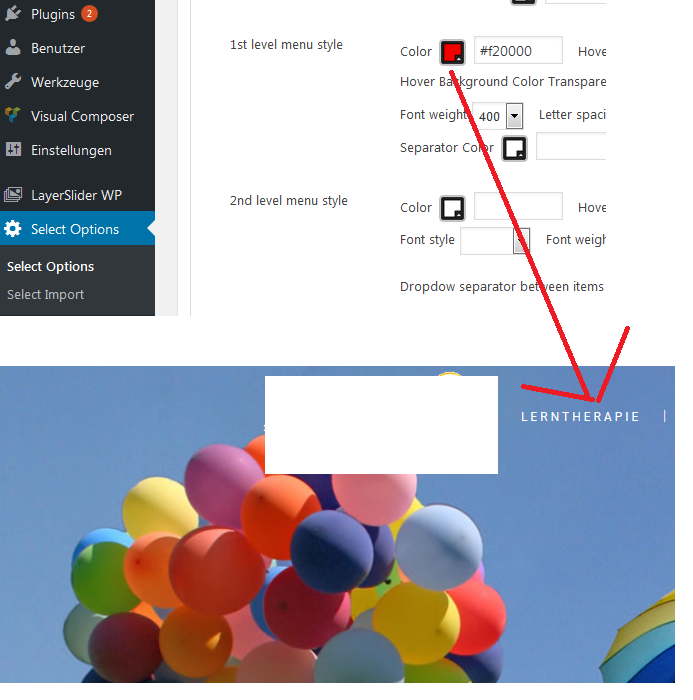
Looks fine. Can I have support via Email? So I can prove my purchase code. Question: How can I change the menu font color? Somehow it’s white and I can’t change it – tried a lot.
Hi,
To edit menu styling, just go to Select options > Fonts > Header&Menu > 1st Level menu and there are plenty of options https://www.screencast.com/t/tX3ZUM9D3O
For further assistance, submit a ticket on our support forum at https://select.ticksy.com/ and our agents will help you.
Select
Hi, thanks for your effort! That was my first try but it doesn’t work.
http://fs5.directupload.net/images/170309/c6l6lemw.pngMy backend-menu also looks a little different. :/
Hi again,
It looks like you are using Light header there https://www.screencast.com/t/6ay2j1kdG
Please, note this could be overridden on each page, too. So, change it to default if you want to apply those colors https://www.screencast.com/t/GoUo683vfx6 since, light/dark are forcing white/black text colors.
Select
Thank you very much – it was the local setting which confused me. Thanks again!!
You are welcome!
Is it possible to get email support? I’ve purchased the theme with another account. On my page I have the handpointer cursor permanently? Where can I change this?
Solved it
Glad to hear this. thank you for the update!
Hello, I’m using fixed header with hiding menu (centered logo) but I want the logo right aligned to the site margin (maintaining all the ‘fixed with hiding menu (centered logo’ header characteristics. Is it possible? Many thanks.
Hello,
If you add minor custom css, you’ll achieve this look https://www.screencast.com/t/ZVVfrraCrf and after scrolling it will look like here https://www.screencast.com/t/Boc8tC8WCmCXSelect
Many thanks for the quick reply. I would like to have the logo perfectly right aligned to the picture below it, is it possible to move it to the right margin of the site? Also, when scrolling (hidden menu) I would like to mantein the logo centered as default. Is it possible? Many thanks again.
Hi,
With this part of code, image is moved just to the right side https://www.screencast.com/t/le0Xna5xq header.fixed_hiding:not(.scrolled) .logo_wrapper { float: right; }and with the code we provided, header layout after scrolling want be affected.
Best, Select
Great. Thank you for the support.
You are welcome!
Sorry for writing you after these days, but I just notice that with the code you provided the logo go out of the right border of the site when visualized on iPad or when resizing the browser like in this screenshot (approx the size of an iPad): https://www.screencast.com/t/VqRgxY6kbrPq Is it possible to make your solution working also on iPad? Many thanks.
Hi again,
Theme is using fixed grid so resizing browser window isn’t good representation of responsivness since fixed grid is covering devices from real life and some resolutions are not covered. Use Chrome emulation and refresh browser on for chosen resolution and logo will be positioned correctly https://www.screencast.com/t/HkzcdeaG . Other, non existing resolutions cannot be covered without additional custom coding.
Select
Ok, thanks for the support, I was using a logo too much bigger so it went out to the border of my iPad. Now I fixed it, thanks again.
Glad to hear this has been fixed. Thank you for the update.
Hello!
How do I remove the ZOOM feature for featured portfolios on the home page and on the portfolio archive page? I do not want to zoom on the featured image of each portfolio because it is misleading my clients when they click on it as it does not show all images within the portfolio page.
So to sum it up: on the home page and portfolio archive, in the featured portfolio masonry, I’d like to only have the LINK and the LIKE icons… NO ZOOM.
See here for what I mean: http://kristinstudio.com/remove-zoom.pngThank you.
Hi,
Just edit your Portfolio List and under settings for this shortcode, set No for Ligthbox https://www.screencast.com/t/Mf6qIpWQ
You are welcome.
Select
PERFECT!! Thanks!
You are welcome 
HI, how do I get rid of the “Custom Field” in the single blog page? I don’t need or want it in all of my blog pages.
Hi,
We located your ticket on our support forum and our agent is working on it. You could check response on ticksy soon.
Select
Hi, that ticket on the support forum was not the same question. The question above is different. Can you please let me know? Thank you!
Hi,
Please, send us blog post link here where you have custom field so we could take a closer look.
Select
Thanks!
Hi,
Just edit your portfolio item and remove custom field below in Select Additional Sidebar items custom fields https://www.screencast.com/t/CROPq870h
Select
Oh wow, I never even noticed that area before.  Thanks!
You are welcome
Hi!
I was wondering how to make the Active Mark text in the Pricing Table look like the example on the right in my image here: http://kristinstudio.com/active-mark.png
To summarize: I would like it to go to 3 lines of copy, not 2 lines as shown. Also, I would like (if it fits) for the font to be one size larger than the default size.
Can this be done in the CSS?
Thank you!
Hi,
Yes, it could be done.
Please, add this part of code in Select Options > General > Custom Code > Custom Css:
.q_price_table.active .active_text span {
    width: 50px;
    padding: 0 7px;
    margin-top: -5px;
}
Best, Select
PERFECT! Thank you.
You are welcome.
Hi, my social icons are not responsive when they are clicked. I used the template that was set up for the footer widget in my template. There must be something wrong with the code, or somewhere else? Let me know, thanks.
[vc_separator type=”transparent” position=”center” up=”35” down=”0”]
[social_icons type=”normal_social” icon_pack=”font_elegant” fa_icon=”fa-adn” fe_icon=”social_facebook_circle” size=”huge” link=”https://www.facebook.com/kristinstudio/” target=”_blank” background_color=”#3d3d3d” border_color=”#3d3d3d” icon_color=”#ffffff”]
[social_icons type=”normal_social” icon_pack=”font_elegant” fa_icon=”fa-adn” fe_icon=”social_instagram_circle” size=”huge” link=”http://instagram.com/kristinstudio/” target=”_blank” background_color=”#3d3d3d” border_color=”#3d3d3d” icon_color=”#ffffff”]
Site: kristinstudio.com
Hi,
We could see you’ve added facebook and instagram icon in footer column 2 widget area, but are not sure on what exactly do you mean, when you say that icons are not responsive. Please, write on our support forum at https://select.ticksy.com and include your site URL with wp-admin access. Also, it would be helpful to add some screenshot of the part you want to style better and our support agent will provide you possible solution.
Best, Select
On my live website, the icons do not work. When you click on the Facebook or Instagram icons the do not do anything. They are unresponsive and do not go to Facebook or Instagram. ... Something in the code must be wrong? ... I’ll submit a ticket. Thanks.
Your icons are set by our support agent. Please, check your site now.
You are welcome.
THANK YOU!
You are welcome!
Hello,
I bought the template “Hazel” with the mutiple combinations that one can choose. I want to put the model Hazel4 – Brigitte that I can not put. But the basic design works. I did a lot of tests, look for tutorials nothing works on WordPress 4.7.2. Is it compatible with this version ..? If so, do you have a solution or tuto so that I can install the model Brigitte ..?
thank you in advance, Justine
Hello there Justine,
Please, submit a ticket on our support forum at https://select.ticksy.com/ and include your site URL with wp-admin access if you need help with import process. Here is also our Official Manual http://demo.select-themes.com/hazel-help/
Best, Sleect
My website won’t work because Visual Composer needs to be updated. Are you guys going to update Visual Composer or am I forced to purchase a direct license? It wasn’t made clear anywhere when purchasing that I’d have to continually buy a license.
Hello,
After latest core WP update to version 4.5+ you need to update also our theme to latest version http://themeforest.net/item/hazel-multiconcept-creative-wordpress-theme/8146099/faqs/20983 and then update VC (came bundled) to latest version http://themeforest.net/item/hazel-multiconcept-creative-wordpress-theme/8146099/faqs/20984 After this, make sure your cache is cleared (browser and server) and then everything should be working back fine. You have access to latest versions of our theme and VC, there is no need for extra purchasing.
Select
HI, best theme ever!!! i have 2 question, 1 – is possible add a subtitle in the “portfolio list” rollover, there are the title and category but my client need a subtitle? where can i modify the code?or add custom field? 2 – in the portfolio small slider appear the category at last…i need to pass this field in the revolution slider but i don’t know the name of custom field…you can help me?
thank stefano
Hi there Stefano,
Thank you for your nice words
Hopefully, this would be helpful for you.
Best, Select
hi, my version of hazel theme looks different… https://we.tl/0iqTF2Gx5U let me know thanks
Did you add any subtitle on your portfolio item https://www.screencast.com/t/4F5DKDqq ?
yes, but nothing change…
Please, submit a ticket on our support forum at https://select.ticksy.com/ and include your site URL with wp-admin access so our support agents could take a closer look and help you there.
Select
Hi, I have been working on my site for a couple of weeks, and love the theme so far! Except, I have 3 questions/issues:
1. Something happened to my ‘portfolio_page’ (I just changed the slug to only ‘Portfolio’). It was set up as Hover-No-Spaces, but now it looks like Single Image / Full Page. I want it to go back to the Hover style. Help?
3. After importing all the demo pages and XML after installing, my Hover overlay (over the Portfolio feature images) shows incorrectly. It should be padded equally on all sides, but instead, mine is padded only on the bottom and left sides. The white overlay goes to the edges on the top and right sides. Where would I fix this?
2. This probably requires custom CSS, but, on the home page, in the ‘Portfolio section’ (which I have set up as Hover-No-Spaces), when I click the ‘Zoom icon’ it shows only the ‘Feature Images’ as the larger scroll gallery. I don’t like this as there is no need to scroll through only the 6 shown Feature Images. I want the Zoom icon to scroll through the Portfolio gallery for that single-portfolio.
Your help is appreciated—look forward to getting my site done!
Overlay screen capture: http://kristinstudio.com/overlay-incorrect.png
Portfolio-page issue: http://kristinstudio.com/portfolio-page--issue.png
Hi there,
1) Please, note that portfolio single slug needs to be unique. So, if you set there portfolio, you should not have any page with ‘portfolio’ slug.
2)&3) Please, submit a ticket on our support forum at https://select.ticksy.com and include your site URL with wp-admin access so we could take a closer look.
Best, Select
I will submit a ticket. Thank you.
For #1 above however, I don’t have anything else with the slug ‘portfolio’. I have pages names things like ‘portfolio_not_working’ for a slug, but nothing with just ‘portfolio’. Still, the portfolio page is showing as single large images instead of the hover-no-spaces look.
Hi,
We located your tickets on our support forum and our support agents will get back to you asap.
Select
Hi, love the theme. Need to know 1) how to change drop menu TEXT color from gray to white…. and 2) make the backgr color of those greem drop menus slightly transparent. Screenshot of item I am trying to alter > http://bit.ly/2lOB3ec
Thank you for the help! K.
Hi,
Glad to hear you like our theme.
1) Just go to Select options > Fonts > Header & Menu and there choose desired Text Color https://www.screencast.com/t/LAsCNEmsnXI
2) Options of this are placed in Select options > Header > Menu https://www.screencast.com/t/fpvXlDKml
You are welcome.
Select
How can I change the language of the “comments” section in your theme?
Hi there,
All theme text strings are registered labels, and you can translate them with poedit software. You need to create translation file for your language and to translate theme labels. Use poedit software https://poedit.net/, load translation file from theme folder / languages, translate it, and name it according to WP Codex https://make.wordpress.org/polyglots/teams/
Best, Select
[15-Feb-2017 09:13:27 UTC] PHP Deprecated: Methods with the same name as their class will not be constructors in a future version of PHP; Qode_Import has a deprecated constructor in E:\Domains\s\mydomain.com-1082646441\user\htdocs\wp-content\themes\hazel\includes\import\qode-import.php on line 7 [15-Feb-2017 09:13:28 UTC] PHP Deprecated: Methods with the same name as their class will not be constructors in a future version of PHP; qode_Theme_Options has a deprecated constructor in E:\Domains\s\mydomain.com-1082646441\user\htdocs\wp-content\themes\hazel\includes\qode-options.php on line 14
Please advice
Hello,
It looks like you’ve upgraded your PHP verison on server to version 7.0 We have already added compatibility for it, just update our theme to latest version. Here are instructions https://themeforest.net/item/hazel-multiconcept-creative-wordpress-theme/8146099/faqs/20983Best, Select
Hi, I purchased Hazel and would like to set it up as the demo Olivia. Is there a manual or file that I can refer to?
Ah, I found it already!
Glad to hear this has been sorted out. Thank you for the update. For any other doubt, you could reach our support team at https://select.ticksy.com/
Best, Select
map won’t appear error due to missing key map api
hello follow up query how can i adjust the lightbox image the one after you click the image and lightbox image appeare
Hello,
Please, check this article to solve Google Map api key https://select.ticksy.com/article/9876 For further assistance with image dimensions in lightbox reach our support agents at https://select.ticksy.com and include your site URL with wp-admin access.
Best, Select
Hard returns are not giving me an extra space as would be expected w/in paragraphs. Is there some adjustment I can make to fix this issue? Love the Hazel theme!
Hello,
Space between paragraph is disabled by default, so because of that you have two options
1) Is to use separator shortcode between paragraph text and to control each space like you want (we used this in our demo sites)
2) Just go to your admin panel -> Select Options -> Fonts -> Text -> Paragraph -> Top/Bottom Margin (px) -> And set some value for text space, for example 8 and save
We hope this would be helpful. Glad to hear you like our theme.
Select
Perfect, that works – thanks for pointing out the option!
You are welcome
Hi,
I’m trying to create a woocommerce shop page with the Hazel theme. When I select ‘Woocommerce’ template and add products and elements using the visual composer, the page is just blank when I preview it (still with the usual header and footers on the web page – but an empty space with no products in the middle).
When I use the default template the products are on there but they aren’t in the columns I set them as. I wanted it to look like the shop with sidebar like on the demo.
Can you explain where I’m going wrong?
Thanks.
Hi,
We made our page with template woocommerce https://www.screencast.com/t/i4GVrOOQB
We set our main shop page in WooCommerce > Settings https://www.screencast.com/t/KaQTt7iRnmt
Also, we set desired sidebar in custom fields https://www.screencast.com/t/Ky74za2HU8d9
If you need further assistance, just write on our support forum at https://select.ticksy.com and include your site URL with wp-admin access so our support agents could take a closer look and help you there.
Best, Select
Perfect, got it working now.
Thanks!
Great. Thank you for the update. You are welcome.
Hi,
I have downloaded the Hazel theme with the Elena options, but I’m struggling to make the top menu transparent? I have changed the Header bottom border transparency to 0 but that hasn’t worked.
Thanks
Hello,
You should add background color and transparency like here https://www.screencast.com/t/oHHGN4QNY7 For any further assistance, please, reach our support agents at https://select.ticksy.comBest, Select
Hi,
I’ve just set them all at #ffffff and it is transparent when you scroll down, but not when you first land on the page. I already opened a ticket for this on your support system about 17 hours ago and haven’t had a response yet. (Ticket #1045753)
Thanks
Hello,
Your ticket has been answered by our support agent, please, check response on ticksy.
Best, Select
Hi, I would like to ask if this theme is compatible with Bedrock Wordpress framework or not?
Thank you
Hello there,
We didn’t test our theme with Bedrock. Please, note that our theme is made in our Select framework and there are plenty of options for customization inside it.
Select