360 comments found.

Hi. I’m using your theme in my website. Where should I place the Analytics Code in the theme? Thank you.
Hi there,
we recommend this plugin for Analytics https://wordpress.org/plugins/google-analytics-for-wordpress/Best,
Colm
Hi. Ok, now, where should I put the Adwords code that I need to have in the header. Have no place for it in the plugin above.
Hi there
This is a useful plugin which allows you to add any kind of js code to a header or footer: https://wordpress.org/plugins/insert-headers-and-footers/
Regards
Simon
So there’s is no space in the theme for this. Ok, I’ll use a plugin then. Thanks a lot for your help!
Yes, this kind of functionality is better served with a plugin in case you switch themes in the future.
Article about it – any js code also applies: https://wptavern.com/why-you-should-never-add-analytics-code-to-your-wordpress-themeBest
Simon
Hello I bought your theme, I would like to know how to update the plugin layer slider to the latest version. Where do I find the plugin purchase code in order to do the upgrade?
Hi there
Updates to Layerslider and Visual Composer are part of theme updates.
We’ll be bringing out an update to Factory in a couple of weeks with these updated plugins included once we’ve tested them.
For now you can ignore these update messages, they are not critical releases.
Best
Simon
There is a issue between Visual Composer and LayerSlider, when do you plan delivery the update thath fix that? I have the latest version of the theme…
Hi there
We’re not aware of any problem with Visual Composer and Layerslider. You can submit a ticket via the ‘Support’ tab above with a screenshot and a description of the precise issue you’re having.
The updates to both plugins are minor and have no affect on the theme. We’ll be including them in a scheduled update in a couple of weeks.
Best
Simon
Hi there
This is covered in our online knowledge base for Factory – https://commercegurus.freshdesk.com/solution/articles/12000024280-changing-the-sidebar-features-color
Best
Simon
Hi. Is there a way to change the order in which the logos appear in the Commerce Guru Logos block? Other than deleting all the logos and upload them again in the preferred order, I mean.
Hi there
If you install this plugin you’ll be able to drag and move each logo post item into a different order – https://wordpress.org/plugins/post-types-order/
Best
Simon
hello I put the slider in the home page with the display fullwidth, I replaced the photos but the texts have moved to the center of the image. where can I find the text of the management positions of the slider?
Hi there
Can you submit a private ticket via the ‘Support’ tab at the top of this page, including your site link, WP login and a screenshot of the issue.
Thanks,
Simon
hello I bought your theme, I’m trying to modificate the slider on the home page but every time I make a change loses responsive fullwidth-image display. I tried to update the slider to the latest version but it does not accept the item purchase code.
Hi there,
Make sure that the background size is set to cover in the slider settings e.g. https://i.imgur.com/IYqlQq6.pngBest,
Colm
I note that you indicated a year ago that you were in the process of adding a ‘Projects’ option to your Factory theme. I do not see it. Does such an option exist? Also, how does your theme handle Staff postings?
Sorry – there’s no portfolio or staff posting functionality. They’d both be plugin territory.
Best
Simon
Thanks. Do you have suggested plugins for Staff and Portfolio that have successfully been used with your theme?
Hi there,
not off the top of my head – Jetpack has a custom content type for Portfolios which works well with some of our other themes.
Best,
Colm
Hello I PURCHASED YOUR THEME, I AM TRYING TO SEE THE “breadcrumb-BAR” WITH IN RIGHT THE NAME OF PAGES AND ON THE LEFT THE BUTTON OF SHARING. HOW CAN I DO TO it ACTIVE? WHEN NOT VISIBLE IN ANY PAGE. THANKS FOR YOUR HELP
Hi there
This is covered in Step 6 of the install guide, be sure and go through everything.
https://commercegurus.freshdesk.com/solution/articles/5000691011-setup-factory-install-guideRegards
Simon
I have purchased and installed this theme and I must first of all say that this is an awesome theme. Congratulations. So here are my issues, a few things I have observed. : 1. After installing the theme, I can’t find the ‘Below Main Content’ widget section in the Widgets tab. What do I do to get this? 2. How do I change the page title background image on each page (I want to place unique images on each page like in the demo). The theme options only allows for one site wide change but I would like to make specific changes on each page. 3. In the news section, when I choose to display Grid (3 columns), it only displays the default version. How do I get this? http://factory.commercegurus.com/news/?newslayout=grid-news&blogsidebar=none When I choose Grid (3 columns) nothing happens. Thanks.
Hi there
Firstly, thanks!
- Factory doesn’t have a ‘Below Main Content’ widget section – where are you seeing this?
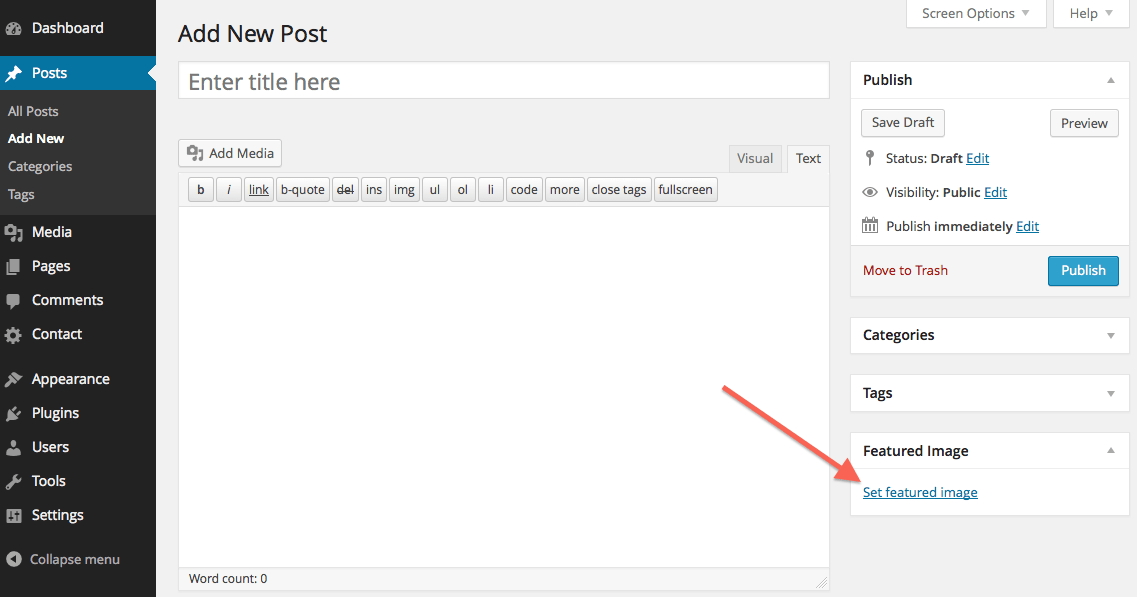
- Just add a Featured image to any post or page – https://createandcode.com/wp-content/uploads/2017/02/Set_Featured_Image.png
- You’ve set this in Theme Options > News Settings? Send a link to your site and a WP login via the ‘Support’ tab above and I’ll check this out.
Best
Simon
On my web the image looks very dark. That does not happen on your website. See picture of engineer with blue helmet. Also my image moves, what is the correct size? My web: https://powermtahosting.com/planes-seo-website/ His web: http://preview.themeforest.net/item/factory-industrial-business-wordpress-theme/full_screen_preview/14026307?_ga=1.65394862.1094228580.1486738939
Well one is a slider – the other is a page heading background. A darker opacity layer is automatically added to page heading backgrounds. Plus, that particular image you’ve chosen has already a dark layer on the image itself.
So, I’d use a different image. The page heading images on the demo site are 1350×650 px.
Best
Simon
What part of the code do I have to modify to remove that dark layer?
The dark layer is added so that heading text on the image is more clearly visible.
You can remove it by adding this rule to Theme Options > Custom Code:
.header-wrapper .overlay { opacity: 0; }
But the image you’re using is quite dark in the first place – using a brighter one would be more effective.
Simon
one last question. What is the slideshow plugin that is in the demo?
It’s LayerSlider. It’s covered in the Item Details page and is a suggested plugin when installing the theme.
Simon
LAYER SLIDR is already included in the theme or do I have to buy it?
It’s included with the theme – you don’t need to buy anything.
Just read through the item details page – https://themeforest.net/item/factory-industrial-business-wordpress-theme/14026307
Simon
The slider comes out below the image, how do I delete the image above? https://powermtahosting.com/que-es-powermta/
Hi there
For support queries, submit a ticket via the link below, including your WordPress login details.
https://commercegurus.freshdesk.com/helpdesk/tickets/newSimon
Hi Awesome Theme, have a question before I purchase. When I view the demo via the mobile app, the header that states, ‘Leading Provider, Number # & Certified’ am I able to remove this? Thanks!
Hi there
Thank you! Yes, there’s a theme option which allows you to disable those header features on mobile if you wish.
Best
Simon
How can I create the DOWLOAD menu and GET A QUOTE? I see you have another color. Where is it created? Is it oto menu or is it the same? http://preview.themeforest.net/item/factory-industrial-business-wordpress-theme/full_screen_preview/14026307?_ga=1.64279471.1094228580.1486738939
Hi there,
this should help https://commercegurus.freshdesk.com/solution/articles/12000002636-adding-right-hand-side-menu-items-with-icons-manually-Best,
Colm
I do not have the CSS code can you send it to me?
I do not know what to write in the input box CSS CLASS
Hi there,
The css clases are in the link I sent.
Re: input box for css – you just have to switch it on – see here https://premium.wpmudev.org/blog/customizing-the-wordpress-menu-with-custom-classes/Colm
How much do you charge to create those 2 menus? It is very difficult. I can not do it. I do not know what to put in CSS CLASS
Hi there
The CSS classes to enter are referenced in the knowledge base article.
https://commercegurus.freshdesk.com/solution/articles/12000002636-adding-right-hand-side-menu-items-with-icons-manually-Please read it carefully and follow the instructions.
Simon
Hi there,
I would like to ask two questions, 1. How can i disable-hide the sidebar from a specific page? 2. Can i edit-customize the search page, for example the “Search Results for:” title?
Thank you in advance.
Hi there
- When you edit a page just change the ‘Template’ dropdown on the right-hand-side to ‘Full width page’
- We have a string translation guide via the link below or you could use a plugin such as Loco Translate.
Regards
Simon
How do i license the them for auto-updates?
got it. Worked for the main theme—but what about bundled plugins?
How can I add a font?
Hi there,
You can choose from hundreds of Google fonts in Theme Options -> Typography. That’s what the core theme supports.
Best, Colm
I want to use a font that is not from google font. Buy a font and I want to use it. I’m not interested in the sources that come with the subject. It’s possible ?
Hi there,
That’s not supported by the theme.
There are plugins which allow you to do this e.g. https://wordpress.org/plugins/use-any-font/However, you will also need to define your own custom css rules to actually use the font. You will also need to ensure the font you load is web safe and allowed to be used on the web – not all fonts are.
Best,
Colm
How do I change the color of the Page Sidebar Buttons (Download Brochures & View Our Testimonial)?
Hi there
This should help: https://commercegurus.freshdesk.com/solution/articles/12000024280-changing-the-sidebar-features-color
Best
Simon
Hi Simon, Thanks, that’s very close. But it changes both buttons backgrounds to red (or whatever color), completely ignoring the border for both.
I’ve tested this on our demo site and it seems to work fine. Submit a ticket with a link to your site (the exact page) and I’ll check it out.
https://commercegurus.freshdesk.com/helpdesk/tickets/newSimon
hi i’m install the theme, after admin panel Appearance >> Customize used means it will display the error
Fatal error: Class ‘WP_Customize_Panel’ not found in
/home/cp247mbspuser/public_html/vclaim.in/wp-content/plugins/redux-framework/ReduxCore/inc/extensions/customizer/inc/customizer_panel.php on line 11
now how to correct this error.
another question http://vclaim.in/solutions/agricultural-processing/ in left side sidebar (BROWSE) i want to create like that for other services page, so how to create that sidebar
Hi there,
I don’t see this error so it’s most likely something specific to your host – this error refers to the Redux framework plugin rather than the theme.
the main theme options are accessible via WordPress -> Theme Options – do they load ok for you?
If not, please open a ticket here with your WP site url and Wp admin user/pass https://commercegurus.freshdesk.com/support/tickets/newRe: left sidebar page list – you need to create sub pages that have the Agricultural Processing page as their parent. The sidebar loads child pages.
Best,
Colm
hi customize option not working
Fatal error: Class ‘WP_Customize_Panel’ not found in /home/cp247mbspuser/public_html/vclaim.in/wp-content/plugins/redux-framework/ReduxCore/inc/extensions/customizer/inc/customizer_panel.php on line 11
how to customize the theme now
Hi there,
We’ve not heard of any other customers reporting this issue.
The main theme options are in WordPress -> Theme Options – not Appearance -> Customize.
Can you access the main theme options?
If not, please send us a ticket with your site url and WP admin user/pass below https://commercegurus.freshdesk.com/support/tickets/new Best, ColmHello,
(1) Please, how can i change the Advance Sidebar Pages Menu from black to another color, when it display on pages. http://prntscr.com/dxvbc9
(2) Also, how can i make individual page have different sidebar menu
Thanks.
Hi there
1) First add this css plugin: https://wordpress.org/plugins/simple-custom-css/
Then, within Appearance > Custom CSS – add the following – changing ‘red’ to your own #hex.
#secondary .advanced-sidebar-menu ul li.current_page_item > a,
#secondary .advanced-sidebar-menu ul li.current_page_item > a:hover,
#secondary .advanced-sidebar-menu ul li.current_page_ancestor > a,
#secondary .advanced-sidebar-menu ul li.current_page_ancestor > a:hover {
    color: red;
}
2) This can be achieved with the WooSidebars plugin – read the documentation for the plugin to see how it works.
https://woocommerce.com/woosidebars/Regards,
Simon
Thanks so much for your prompt response, but…
(1) Have done so as you instructed http://prntscr.com/dyhpil , but it still not giving the result i wanted http://prntscr.com/dyhra4 .
Thanks in advance
Can you submit a ticket to our helpdesk via the link below, referencing this comment as well as your WordPress login details.
https://commercegurus.freshdesk.com/support/tickets/newThanks
Simon
Hello, I love theme and all its options. I am just wondering if it supports RTL as the website I am building will be in Arabic and English. Thanks
Hi there
Yes, it does 
Best
Simon
Great, thank you so much
One last question, can I change the currency to (SAR) Saudi Riyal?
There’s a plugin for WooCommerce which seems to add that currency – https://wordpress.org/plugins/woocommerce-all-currencies/
Best
Simon
Ohh ok, thanks