28306 comments found.

Hi there. I would like to change the box radius of the contact form box. How could I do that to make it more square? Thanks
Hi there,
This CSS should do the trick. Place it in Theme Options > Style > Custom CSS
.wpcf7-form-control.wpcf7-text, .wpcf7-textarea{ border-radius: 10px; }
Hi, It didn’t work. Have a look here
https://www.wildd.co.uk/blocks/newsletter/Kind Regards, Victor
Does the theme offer contact form builder or we use a plugin?
Hi there,
You will need a third party plugin to build forms. We recommend https://wordpress.org/plugins/contact-form-7/
hello What css class i need to add to have i mobile and tablet version, would to have in menu. When i am on the simple page, In menu this page is not selected, would to have example “font bold” this page
People which open menu meobile and tablet menu know on current page are
Lukas
Hello Lukas,
I am afraid I can’t quite understand what you mean. Please elaborate on email via support and we’ll look into it.
how can i enable the “Customer who buy this also buy this …” module?
Hi there,
You will need to add cross sell items to your products https://docs.woocommerce.com/document/related-products-up-sells-and-cross-sells/#section-2
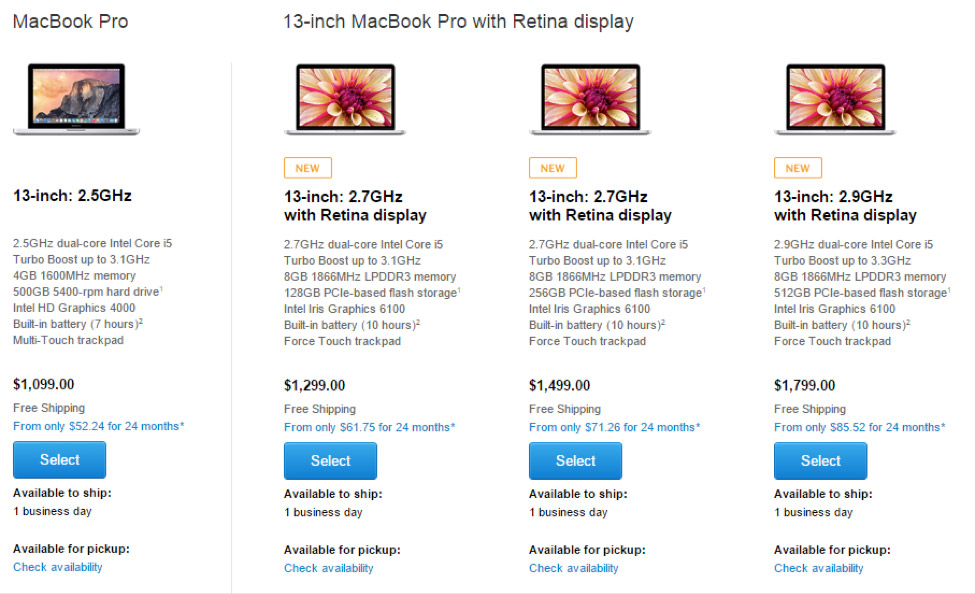
Hi, is there any way to add images to the pricing tables? Or Custom CSS?
I want to create tables on my homepage that looks similar to this: https://blog.kissmetrics.com/wp-content/uploads/2015/04/macbook-pricing-page.jpg
Hi there,
You could achieve a better layout using the products element http://flatsome3.uxthemes.com/elements/products/
Hello. I want to disable UX Builder completely. I do not want it to show the button above title when creating new page and also I do not want it in quick menu in page list. Is there a way just to turn it off as it was possible in Flatsome 2. Thanks.
Hi there,
I am afraid there is no setting to disable the UX Builder. You can place a feature request for this here https://uxthemes.canny.io/flatsome
Hi there,
I am afraid there is no setting to disable the UX Builder. You can place a feature request for this here https://uxthemes.canny.io/flatsome
hi i uploaded the website onlive but the icons are missing
Hi there, sorry for the trouble.
Please shoot an email via support and we’ll look into it.
Awesome Work, how can i get your email or skype?
Hi there, thank you for the kind words.
Please contact the author here tommy@uxthemes.com
How to disable woocommerce single product page ?
Hi there,
I am afraid there is no setting to achieve this. You will need to modify the theme files.
Im having an issue with making products variable. Im getting an error message. Everything is setup correcting in the product options.
Fatal error: Call to undefined method WC_Product_Variable::get_variation_default_attribute() in /home/lashpalace/public_html/wp-content/themes/flatsome/woocommerce/single-product/add-to-cart/variable.php on line 40
Hi there,
Please ensure that you are running the latest version of Flatsome (Version 3.3.5) and WooCommerce (Version 3.0.6).
Hello. I need to change the domain name of my site. Can I disable the license for the old site and activate it for the new site? Thanks!
Hi there, yes that’s possible 
Hi Guys,
We logged ticket ID 46309 a few days ago about missing header and footer when child theme is activated…
You asked for login details which we gave you but we haven’t heard from you…
Could you please give us an update as the problem is affecting our live production system.
Thank you
Replied to you on facebook
yes thank you for solving the problem
Hi,
If I buy this theme, would you help me install the theme with demo content + WPML (multi-language)?
And do you have a custom CSS part in the theme?
Best.
Hi there,
I am afraid we do not offer installation services. You can hire a WordPress expert to assist you with this here https://studio.envato.com/express
Yes We have a custom CSS section in the theme options.
Hello, I’ve got some pre-purchase question.
1) Does Flatsome support woocommerce vendors plugin?
2) Can Flatsome be used as a marketplace that allows multiple vendors to sell?
Hi Arthur,
1. Unfortunately, until now there is no official compatibility testing with the plugin. But, Flatsome uses WordPress coding standards so any plugin that uses these same standards should work with our theme.
2. Yes
Hi, How do I change the layout for variable product to display from 99$ instead of 99$-199$?
Thank you!
Hi there,
Please add this snippet to your functions.php file https://pastebin.com/Q2azwtTS
Thank you, one more thing. I want it to say “from” where do I add the word?
Can someone please help here. 2 weeks and no answer.
hello, it is possible in instagram feed on mobile version have 3 colums like it is orginal instagram page.
thank for help.
Lukas
Hello Lukas,
No  You will need a bit of modification to achieve this.
Hi team, currently the product breadcrumb is without the product name (it is shop name instead shop name/shop category/product name).
I want to add the product name too, which function should I edit/change/replace in order to add it?
Hi there,
The breadcrumb function is handled by WooCommerce. You will need to edit the class-wc-breadcrumb.php file in woocommerce\includes\
Does anyone know the CSS to hide the ‘QUICK VIEW’ button, or disable its functionality as its giving me errors.
Hi there,
You can disable the quick view feature in Theme Options > Shop > Category Page >
Ah must have overlooked it, thanks for quick response.
Hi,
Any reason why the UX Builder has stopped loading. I get the following message.
TypeError: undefined is not an object (evaluating ’s.angular.element’)
Thank You!
Hi there,
Please see this troubleshooting guide http://docs.uxthemes.com/article/202-missing-customizer-or-ux-builder
Hello, I have noticed that when i put my mouse over a product image (before i have clicked into the product), it seems to be showing me a label with the image name.
How can i stop this label from appearing? As i have some images labelled strangely.
Thank you!
Hi there,
That is a default browser feature which we don’t have control over. You can try to remove the title attribute on the image itself. Go to Media > Library panel.
Ok, thanks. Is there any way of inserting a disclaimer automatically on all the product pages (preferably under each image) to say images are for illustration purposes?
Hi there,
I am afraid there is no setting to place the text under the images. You can use the HTML BEFORE ADD TO CART BUTTON or HTML AFTER ADD TO CART BUTTON sections in Theme Options > Shop > Product Page

This item was featured on ThemeForest

Power Elite Author
Contact the Envato Market Help Team