21582 comments found.
Can I display an online store in this http://the7.io/corporate/ template? If so, what kind of design and styles will it have?
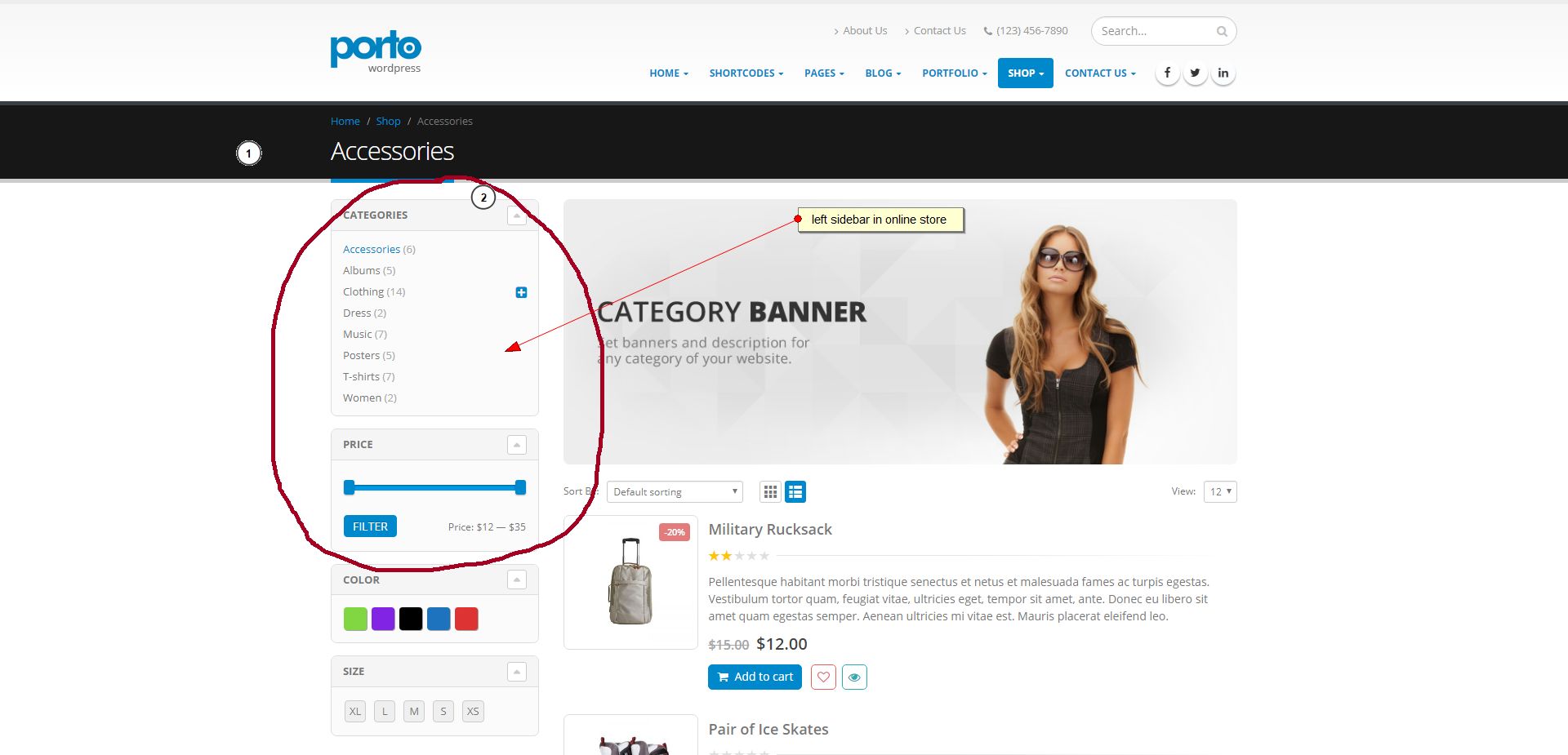
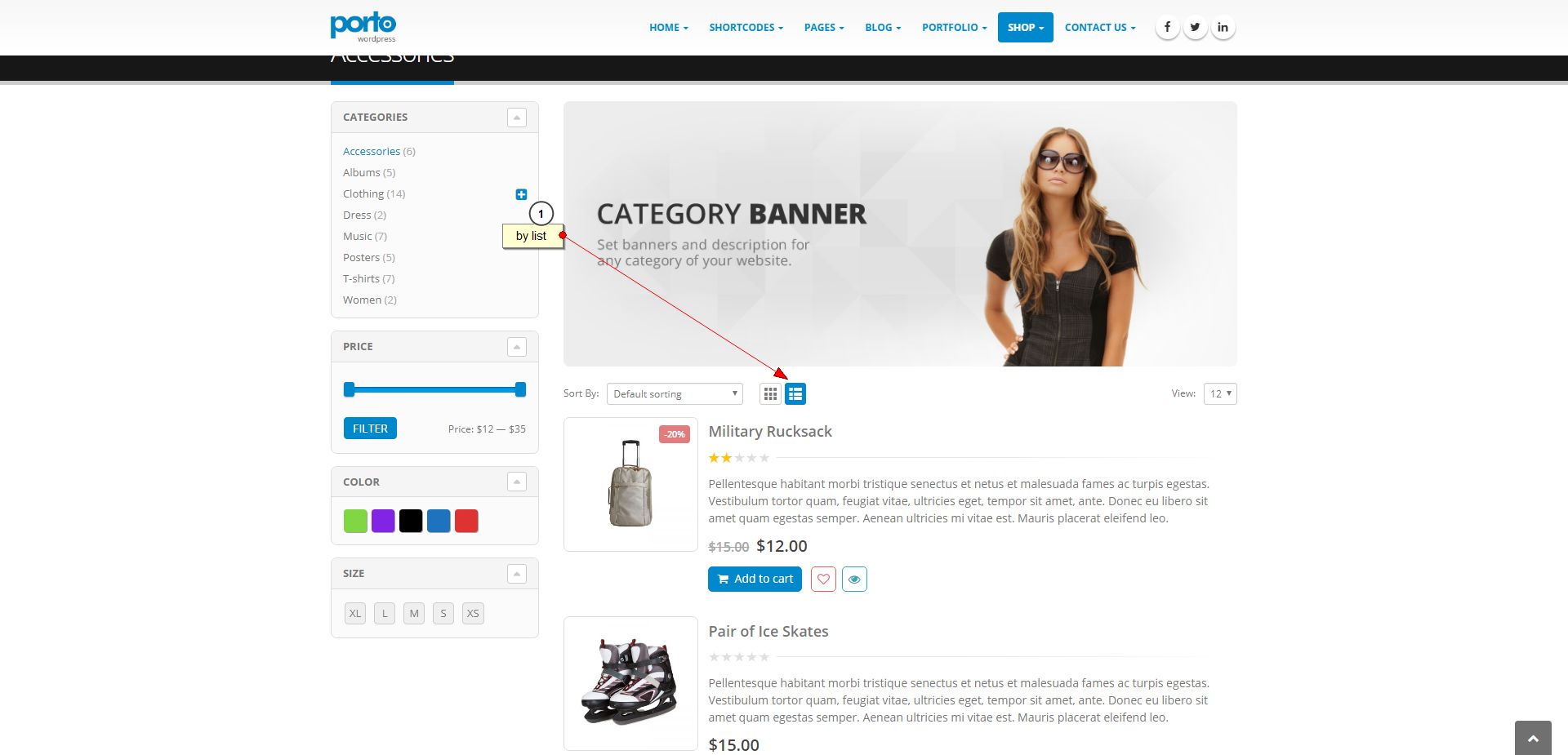
I’m interested in the possibilities of displaying products in the catalog. 1) Is it possible to display a side column with categories in the left side widget on the store page? like here http://easycaptures.com/fs/uploaded/1127/2102084052.jpg
http://www.newsmartwave.net/wordpress/porto/classic-original/product-category/accessories/ 2) Is it possible to output goods not in a grid but in a list, as it is implemented here? http://easycaptures.com/fs/uploaded/1127/4701506544.jpg http://www.newsmartwave.net/wordpress/porto/classic-original/product-category/accessories/Hello,
> Can I display an online store in this http://the7.io/corporate/ template?
Yes, you can.
> what kind of design and styles will it have?
It will match the style of your site. http://the7.io/corporate/ in this case. + You will be able to set up layout and other settings.
To other questions: yes 

Hello, Is there any way to add multiple custom fonts to the theme? Like putting code in the header for instance?
Thanks!
Hi!
Yes, we have a knowledge base article about it. Adding custom fonts will require small PHP tweak.
Hi I am using the SEVEN PRODUCT THEME when i’m clicking on items from menu and then i refresh the page it gaves me this error.
I need to fix that bug asap thank you for your reply
Uncaught Error: Syntax error, unrecognized expression: #%21/up at Function.fa.error (jquery.js?ver=1.12.4:2) at fa.tokenize (jquery.js?ver=1.12.4:2) at Function.fa (jquery.js?ver=1.12.4:2) at Function.a.find (jquery-migrate.min.js?ver=1.4.1:2) at a.fn.init.find (jquery.js?ver=1.12.4:2) at a.fn.init.a.fn.find (jquery-migrate.min.js?ver=1.4.1:2) at b (ultimate.min.js?ver=3.16.13:7) at HTMLDocument.<anonymous> (ultimate.min.js?ver=3.16.13:8) at i (jquery.js?ver=1.12.4:2) at Object.fireWith [as resolveWith] (jquery.js?ver=1.12.4:2)
Hi!
We can provide support only via our online help-desk: http://support.dream-theme.com (here in comments we can only answer some general and pre-purchase questions). Submit a ticket there and we’ll get back to you ASAP.
Thanks!
where can i find icons list for the7 theme?
Hi!
We can provide support only via our online help-desk: http://support.dream-theme.com (here in comments we can only answer some general and pre-purchase questions). Submit a ticket there (please describe what icons you mean: header social icons, content iconts, etc.) and we’ll get back to you ASAP.
Thanks!
Hi
How do I set category page to full width?
Kind regards
Hi!
We can provide support only via our online help-desk: http://support.dream-theme.com (here in comments we can only answer some general and pre-purchase questions). Submit a ticket there and we’ll get back to you ASAP.
Thanks!
Hi I have this Javascript Error Seems to be a bug in the Theme SEVEN PRODUCT Uncaught Error: Syntax error, unrecognized expression: #%21/up
(problem with anchors)
how can i fix that ?
thank you
Hi!
We can provide support only via our online help-desk: http://support.dream-theme.com (here in comments we can only answer some general and pre-purchase questions). Submit a ticket there and we’ll get back to you ASAP.
Thanks!
The Fontello Icons I used in my website (and are still visible in the Icon Bar) no longer appear on the website. The FontAwesome Icons still work. Has something changed since the last update (how can I get them back)?
Hi!
We can provide support only via our online help-desk: http://support.dream-theme.com (here in comments we can only answer some general and pre-purchase questions). Submit a ticket there and we’ll get back to you ASAP.
Thanks!
Hi Support – I need this looked at please =Ticket #58117 = which is the issue the theme’s had for almost 10 days now – Visual Composer not saving when adding or updating within theme.This is an issue that was apparently addressed and “fixed” by an update push last week. However, I update all items – theme, pliugins- and problem still persists, your “fix” didnt fix things, Miroslav. Really need this ASAP, thanks~
Hi folks – just to say ticket resolved, no issues. All taken care of nicely, Super fast response too (:I’d messed up my queue spot by asking questions, pushing me further back down the line – so Dont ask itl its been attended to at least once) Thanks Safeer~ (for those with a similar issue, check for a broken script tag in custom code area)
Thank you for the feedback, glad to hear everything is resolved! We would really appreciate your review here https://themeforest.net/item/the7-responsive-multipurpose-wordpress-theme/reviews/5556590 
Hi We have bought the7 theme for many of our websites! First of all let me say that we are very satisfied! but i do have a question.. all the plugins that are with the theme, do we have a license for all these plugins? because with visual compozer a lot of it is not updated… hope you guys can help us out!
Hi!
Thank you for your loyalty
Plugins licenses are assigned to Dream-Theme (as theme author). You can update bundled plugins through Dashboard -> The7 -> Plugins. If you see license activation notices, please simply switch plugins off an on. It should help.
Здравствуйте. У меня два сайта на Вашей теме (The7.2 ver 2.3.3, ver 4.2.0) Автоматически обновления не приходят. Как обновить их до последней версии?
Пока ждала ответа – разобралась сама. Надо заново загрузить тему.
Добрый день! http://support.dream-theme.com/knowledgebase/procedure-to-update-the7-v2-to-the7-v3/ – это для The7.2. А для ver 4.2.0 – просто обновить.
Hi,
The theme gave me this error message: Failed to create customization .CSS file. To improve your site performance, please check whether “…/wp-content/uploads/” folder is created, and its CHMOD is set to 755.
I already set it to 755 and 777 but it isn’t working
Hi!
We can provide support only via our online help-desk: http://support.dream-theme.com (here in comments we can only answer some general and pre-purchase questions). Submit a ticket there and we’ll get back to you ASAP.
Thanks!
Здравствуйте! Подскажите, пожалуйста, можно ли в вашей теме сделать второе меню под основным? Для примера сайт http://stal63.ru/
Здравствуйте! Вы можете имитировать его с помощью обычных кнопок. Либо использовать “Widgetized Sidebar” с виджетом меню + CSS чтобы отобразить меню в строку.
I simply want to change the text on my home page….anyone can help?
https://www.wakefieldlax.com/Thank you
Hi!
Could you please submit a ticket to http://support.dream-theme.com and describe the problem in more details. Thanks!
I imported a demo however I cannot find how to remove the hyperlinks in the bottom bar. They include “Brand Management”, “Creative Agency” etc. The demo I imported was ‘Marketing Agency’
Hi!
We can provide support only via our online help-desk: http://support.dream-theme.com (here in comments we can only answer some general and pre-purchase questions). Submit a ticket there and we’ll get back to you ASAP.
Thanks!
Hi, I have a problem with the UNI CPO plugin. When I insert the product with the variants made with this plugin, they are not included in the cart and in the order. I tried to deactivate the them putting one another and everything works well. Thanks
Hi, I’ve sent you access data privately. Do the tests you want because it’s a test site. Thank you
Hi!
Pardon, but we have never tested this plugin with the theme. Could you please try using WooCommerce instead. Thanks!
Thank you for the reply. I’m using woocommerce. UNI CPO is a plugin that serves to do math calculations and works perfectly with woocommerce. It also works with other themes but with THE7 no. I’ve already sent you the access data privately and then see if the disabled THE7 works. Thank you
I have to use this plugin because i need to do math calculations and woocommerce does not run them
Hi I have some performance related thoughts. Since the latest updates I noticed that you use the icomoon font for social media icons and dropped the svg icons. Why not use the font-awesome which already is enqueued and has loaded all social icons and save one request?
Hi,
Because not all icon we want are in the font-awesome
Please send me step by step process.
Hi,
Please note that we can provide support only via our online help-desk: http://support.dream-theme.com (here in comments we can only answer some general and pre-purchase questions). Submit a ticket there and we’ll get back to you ASAP.
Thanks!
dt_portfolio_jgrid settings not opening
Hi,
Please, submit a request via our online help-desk http://support.dream-theme.com – we’ll get back to you ASAP and take a look what is wrong.
Thanks!
Whenever I register my theme it always have an error cURL “error 28: Connection timed out after 10001 milliseconds” can someone help me please? I already sent a support ticket on this issue! please help me thanks.
Hi,
Please, submit a request via our online help-desk http://support.dream-theme.com – we’ll get back to you ASAP and take a look what is wrong.
Thanks!
Hello. We sent a ticket regarding issues with HTTPS. Please help us. http://support.dream-theme.com/tickets/problems-with-https-in-core-files/
Hi,
Please be advised that we will not prioritize one ticket over others. This is not fair to other buyers. I imagine you will not be happy if we prioritise some other buyer over you, right?