9432 comments found.

Hi, i have to add into the homepage a map of all my properties, there is any shortcode? Thanks a lot.
Hi,
Banner area Properties Map display properties on it based on the listed properties below.
There is no shortcode to display Properties Map in the page content area. But if you want to display all properties on that banner Properties Map then create a support ticket on our support site and our support team will help you in this regard.
Thanks
Quick Suggestion for next update and is a must…
1. Kindly add the ability for us to add estate(a community where logo of certain housing community will appear to the post once added) this is always misunderstood as state.
2. Kindly add more designs to allow us to upgrade to a better listing site.
3. Add an ability to make all images and files hosted in CDN either Amazon, Max CDN or other CDN provider this helps us avoid consuming too much hosting resources and make the loading of website faster.
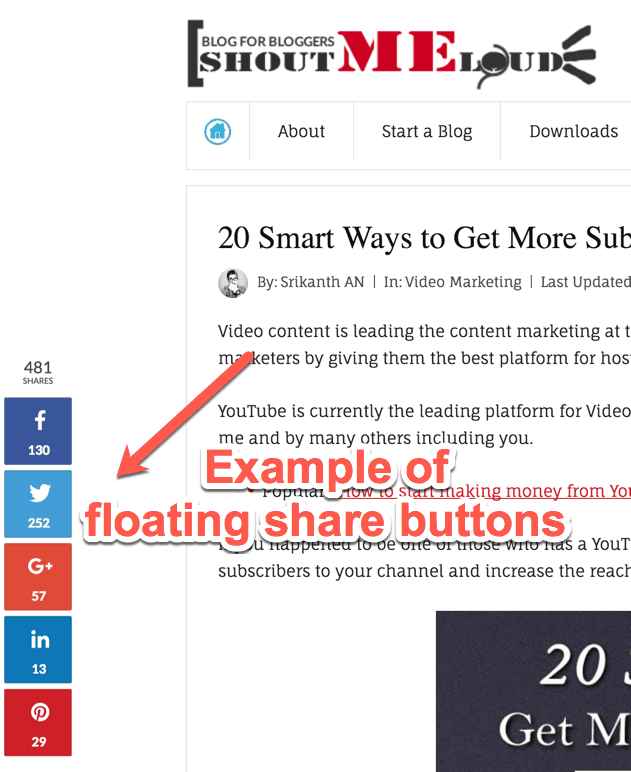
4. Floating share to social media
5. Amount of people who view this property
6. Rate this property
7. Add an ability to add video together with the graphics carousel so we can add video tour of the property
Hi,
Thanks for your valuable suggestions.
1) I am confused about it. Please, can you explain it a little more so that I can understand it properly?
2) Are you aware of Real Homes Modern Design? We revealed it in theme version 3.0. For more details please look at http://inspirythemes.biz/welcome-to-real-homes/
3) This is a standard WordPress theme. So any CDN service can be used that supports WordPress. For example https://wordpress.org/plugins/cloudflare/
4) This theme offers social sharing on properties detail page by default. However, there are many social sharing plugins in vast variety on wp.org repository to meet the user requirements.
You can use any of theme that suits your needs.
5) This feature has been added to this theme in recent update version 3.1.0 already.
6) We have it in our plans and it will be added near in the future.
7) This theme offers 360 virtual tours and video already. You can set it up from the property add/edit page.
Kind Regards
1. Estate is where in a community there is the name and brand of the whole community. So if you have 5 different community people needed to see that.
2. Yes I am aware of the new design but would be much better if we have like 5 or more designs
3. CDN needed to be added but if the CDN option doesn’t come from a plugin and automatically embed to the theme that will be much better.
4. Social sharing what I mean to say is floating social sharing that will not need any plugin to make it happen and can have the ability to show numbers of people who like and share. e.g. https://wpsutra.com/wp-content/uploads/2013/07/floating-social-media-share-button-examples.png
5. If its available then that its great I will have to locate it.
6. Thanks for that..
7. Is it located as part of the featured image gallery that will be a great spot.
1. There is no such separate option. I guess you can add those brand images to a property through its contents area from add/edit property page.
2. We have it in our plans to add several design variations time to time.
3 & 4. Forwarded to the product development team as suggestions. So they might consider it in the upcoming theme updates.
7. Unfortunately, it’s not available to use at the place of the featuerd image.
Thanks
Estate is where in a community there is the name and brand of the whole community. It should be automated where its part of the filter. Thats not part of it right now.
Can you please share any example site? So that we can understand it better and implement in future updates.
Thanks
Here are some graphics I prepared to the suggestions I am trying to say…
It includes the estate filter, estate logo that appears to left side when somebody add estate, social share floating bar to the left side…
https://www.dropbox.com/sh/r034q8db9xe237b/AAALR1doBo_5bVdIK6cjc4oza?dl=0Hi,
Thanks for your efforts.
I have forwarded your suggestion to the theme author. So he might consider it in the upcoming theme updates.
Kind Regards
hello; is it possible to make modern design property details slider same like the classic property details slider (with thumbnails bottom)?
Hi,
I am afraid it would require code customization in the theme. For any custom requirements, you may consider our customization services here: https://inspirythemes.com/theme-customization/
Thanks
We installed the Real Home theme. But once I import Demo Date,the site showing blank. page. Please help
Hi,
Please share your site link so that I can have a look and guide you accordingly.
Thanks
I bought your theme 3 years ago. Im not sure what happened. My sub menu drop downs has stopped working. Im on the latest WP and theme update. Im not sure if the WP or theme update broke it. I de-activated all my plugins and same issue. Can someone please help. I don’t have theme support 
www[dot]permanenttrust[dot]co[dot]za
Hi,
Please update your whole theme files with a fresh copy of this theme. Hopefully, your issue will be fixed.
If that doesn’t work then you must need to reach our dedicated support staff through our support site after renewing your support period. So that they can help you to fix this technical issue.
Support site can be found here: http://support.inspirythemes.com/
Thank You.
HI. I did exactly that. and uploaded a fresh copy of WP and its still the same. It was working all the time. I cant understand why I need to pay for support that Im never going to use again
Hi,
That’s the way we can help our users through a secure channel.
I hope you will understand.
Kind Regards
I post this topic I’ve just partially discussed on private email: the latest version in modern style have a problem with the banner because both images and revolution slider are not shown. I’ve tried to switch to classic style and in this case only image banners are allowed. Substantially revolution slider is an option but never works. Could you please check and fix it because I’m planning to put revolution sliders in banner position on several pages to create a modern effect quite like the home page. Many thanks in advance, Luca
Hi Luca,
Please create a ticket on our support site and copy the issue details in that ticket along with your site URL. Our support team will help you in this regard.
Support related links are given below.
Thanks
Do you have an app comes with this theme? Some people are more app inclined (not same thing as having a responsive theme).
Can one use this site as a portal for different people (unrelated agents) to list their properties?
Is it possible to hide the contact details of agents from the public?
Thanks
Hi,
Thanks for your interest in Real Homes theme.
1) This theme doesn’t require any external source to use it. However, everything is explained about this theme in depth on its detail page here: https://themeforest.net/item/real-homes-wordpress-real-estate-theme/5373914
2) I am not sure how you think about a portal. But yes, this theme allows your different users to list their properties on your site once they are registered through signup form.
3) There is no default option to hide agent details. But if you simply don’t want your users to see it our support team can help you to hide it completely on front-end side.
Kind Regards
Thanks for fast response.
You are always welcome 
Please help me to change the below text from login & register page
Registration is complete. Check your email for details!
Hi,
You can edit that text string of the theme using https://wordpress.org/plugins/say-what/ plugin.
The text domain name is: framework
For any further assistance, you can reach our support staff through our support site. (Support related links are given below)
Thanks
Please find the below options that i got from SAY WHATS
Original string
Text domain
Text context
Replacement string
please let me know what should i type there to change the Registration is complete. Check your email for details!
Hi,
See below:
Original string = Registration is complete. Check your email for details!
Text domain = framework
Replacement string = Your desired text that you want to use.
Leave the text context as it is. Let me know if you still would need any help from my side.
Thanks
If someone register in the website . the y are getting email in junk / spam box please help me
Hi,
Ensure you have configured your default email sender information properly.
For this purpose, you may use https://wordpress.org/plugins/wp-mailfrom-ii/ plugin.
Thanks
i changed still the new user registration mail going to spam … iam loosing the new users because of this
is it possible to change option register page . i want to set option for password in register page
Hi,
This is a standard WordPress theme and uses default WordPress email sending functionality.
The default ‘from’ field quite often results in the notifications being marked as spam. Change it to a proper email address.
If that doesn’t help and it’s actually the server you are hosting the site on that has been blacklisted, have a look at the WP plugin that allows you to use SMTP rather than the PHP mail() function.
http://www.wordpress.org/extend/plugins/wp-mail-smtp/That can sort it too.
Thanks
how can I remove the Prefix “Agent” in the modern version? thanks.
Hi,
You can change that “Agent” prefix by editing the realhomes-theme/assets/modern/partials/property/single/property-details/property-agent.php file as displayed in this screenshot: http://jmp.sh/GNU2pbz
For any further assistance, you can reach our support staff through our support site. (Support related links are given below)
Hi I’m using the modern theme and would be happy if possible to set the search form in responsive mode with the “advanced search button” more or less as happening when on bigger screen. I find that now, especially on a mobile phone, this form force user to scroll down the page too much to see contents.
Thanks as always for your superb assistance, Luca
Hi Luca,
Thanks for sharing your concern with it.
I have forwarded it to our product development team as a suggestion. They will consider it in the upcoming theme updates, hopefully.
Please share with us if you have any other such valuable suggestions.
Kind Regards
Pre sale question – my question is that can we show property cities listing on parent property city page. for example I am added a country India then I have added state under it so If I visit property-city/india property city page then all the states should be listed on this page. Is it possible to do or not. If yes do it required some coding or It can be done from backend.
Thanks
Hi,
Thanks for your interest in Real Homes theme.
You can list properties based on any location using only backend area.
Regards
I think you didn’t got my point. Properties can be listed but I want to list in an hierarchy like I have added India in city then under india I have added delih then I have added connaught place under delhi. What I want if I visit India page then there should be Delhi listed not properties. in same secquence if i visit Delhi city page then connaught place should be listed at that page and then I have added properties in connaught place. So when I visit connaught place city page properties should be listed there.
Hope above brief will make u understand my requirement.
Kindly let me know is it possible or not. if yes does it required coding or it can be possible from backend.
Thanks
Hi,
Unfortunately, there is no direct option to do that. I am afraid it would need some code customization in the theme.
For any code modification you may hire our customization services here: https://inspirythemes.com/theme-customization/
Thanks
Hello, I’m Bruno, I’m a service provider and I install wordpress templates and do translations for my clients.
I’m presenting your site template, because I see that it has great potential.
I follow the themeforest privacy policies correctly, for each new client, I make a new purchase of the license code.
I want your permission to insert your logo on my site? in this way I believe that I will have more notoriety and I will get more clients, and make their income increase and mine too.
Thank you
Hi,
Please provide your website address using contact form on our website https://inspirythemes.com/contact/ and we will discuss further details there.
Thanks & Regards
Hi, I just updated wordpress and the theme. The problem is that I can not upload files into the page editor anymore. It opens the media windows but it doesn’t upload any file I select. Have a look please https://prnt.sc/gjy55j Thank you !
Hi,
It’s a technical issue. You need to create a support ticket on our support site and provide your site details. So, that our support team can look into it and debug the issue.
Support site can be found here: http://support.inspirythemes.com/
Thanks
Hi, my support for the theme has expired a few days ago. Can you please help me solve only this problem? I don’t want to pay for support again only for a single problem. Thank you very much !
Hi,
We have dedicated support staff to help you out with such queries. Our support team requires your site access details and proper communication with a user in a secure channel to fix such issues.
So please renew your support and reach our support team.
Thank You.
how can I change the social links that appear on the footer of the modern version? been looking everywhere. thanks
Hi,
You can change them from Customizer > Footer > Social Icons options panel.
Regards
Hello, I would like to know if I can use it as a portal for many real estate agencies and not for one agency only. Thanks
Hi,
Thanks for your interest in Real Homes theme.
This theme support agents only. You can add multiple agents to your site and assign them to different properties.
Thanks
Hello ,
I am getting an error when i click on active theme
Parse error: syntax error, unexpected T_OBJECT_OPERATOR in /home/content/82/13209782/html/newbudget/wp-content/themes/realhomes/framework/meta-box/extensions/mb-term-meta/mb-term-meta.php on line 56
Please help me
Hi,
Make sure you have PHP version 7 or greater. For more details about a WordPress site requirements please see: https://wordpress.org/about/requirements/
If the issue persists, then create a ticket on our support site and our support team will help you to fix it.
Support related links are given below.
i am using godaddy hosting php 5.6 only available
You should use managed WordPress hosting as they described here: https://pk.godaddy.com/help/software-versions-shared-hosting-897
Or a VPS as guided by their support team here: https://pk.godaddy.com/community/Developer-Cloud-Portal/Newer-version-of-PHP/td-p/1428
Hi, how are you? I have a question about the homepage of the theme (the modern version of real homes). When I go to the agents section on the home page just let me put 4, how can I do it to put more than 4 agents?.
Hi,
Unfortunately, that’s not an option for the time being. However, I have forwarded your request to the product development team as a suggestion.
Thank You.
Translation of the “For Sale” label onver the homepage slider?
I’ve translated all the .po file but i’m not able to find out where is this translation
https://gyazo.com/8ea7a6cf004782a7cd02123f1ea533f0We have dedicated support staff to help you out with such queries. Kindly create a ticket on our support site and our support team will take care of you.
Support site can be found here: http://support.inspirythemes.com/
I’ve purchased the theme and is very nice. I still usign the “modern” version.
I’ve some requests to improve performance and usability
1) Minify JS scripts and CSS where is possible,
For example minify all js scripts :
realhomes-common-scripts.js (optimized: https://gtmetrix.com/reports/www.top-casa.it/MbnJ1Zyb/pagespeed/realhomes-common-scripts_d1b2ab2fc11ab1e75795bd0aba3bf6d0.js)
custom.js (optimized: https://gtmetrix.com/reports/www.top-casa.it/MbnJ1Zyb/pagespeed/custom_3d9cfcc8afc65e73ea20d885542fce29.js)
inspiry-search-form.js (optimized: https://gtmetrix.com/reports/www.top-casa.it/MbnJ1Zyb/pagespeed/inspiry-search-form_28c3b54bea4ed84144a47ac9042da211.js)
And where is possible defer js to speedup the page loading. Could be nice to have an above the fold fixed for all templates. This will grant to have a great performance on GTmetrix and Google speed test.
2) don’t incorporate flex slider code if flex slider is not used and installed (realhomes-common-scripts.js), same with other required plugins (like mortgage is is enabled but not used)
3) How i can change Google maps colors?
4) Is your theme compatible with Elementor? i don’t like to use Visual composer, i prefer the code generated by Elementor and is more visual.
5) Is possible to add a new field (rooms) here? : https://gyazo.com/1177883df73749f859b6cd42895d266e I would like to add another field that owner can fill and show in addiction to others. Is there a way to add also a searchable option like bathrom min?
6) is possible to have diferent logos on top of the page and on the footer? The same logo is complex to manage cause i use a black footer and the logo is black. should be nice to have different logo options (and no logo on footer too)
Thanks
Hi,
Thanks for purchasing Real Homes theme.
1) You can enable/disable the JS and CSS files minification from Customizer > Misc control panel.
To check the site performance difference you can use https://tools.pingdom.com/ tool.
2) I have forwarded it to our product development team. So they can look into it.
3) Please create a support ticket on our support site and our support team will help you in this regard. Support related links are given below.
4) We haven’t tested this theme with Elementor, unfortunately.
5) You can add custom Property Meta fields by following https://support.inspirythemes.com/knowledgebase/how-to-add-property-custom-meta-fields/ knowledge base article.
However, there is not an option to add custom “Advance Search” form fields yet.
6) Unfortunately, there is no option to change footer logo separately. If you want to remove that logo completely. Then you can do it by adding the following code to the Customizer >> Additional CSS box.
.rh_footer__logo {
    display: none;
}
I have forwarded this option to the product development team as a suggestion. So they will consider it in the upcoming theme update.
Thanks

This item was featured on ThemeForest

Power Elite Author
Contact the Envato Market Help Team