1277 comments found.

Does this theme have VC
Yes, it does. The WPBakery Page Builder is included.
Hello! I updated the theme from version 8.3 to the last, but it loses all CSS configuration. (my css is defaut)
I saved the permalinks again, but the problem continues.
What can I do?
tks!!
Hello,
Please check this FAQ section: http://support.quanticalabs.com/forum/topic/6423/faq-frequently-asked-questions#question_65 it is describing what you need to do after update from v8.3 or lower.
Before I renew my Support, i want to know is it possible to change the DEPARTMET to SERVICES and DOCTORS to STYLIST?
Yes, it is possible. You will need to change the slugs in theme source code. Our support team will help you with that.
Hello again. Hope all is well. One more question. I updated to 9.8 and there are options missing and I can’t figure out how to fix it. In the bottom footer widgets, the old version had an option for Facebook icon and a link to facebook page (see here: seenceyecare.com) In 9.8, look at dev.seenceyecare.com. Is there a plugin that gives you the option?
Hello,
Support for all our items is conducted through our Support Forum.
Please register an account and search the forum or create a new topic, we’ll answer as soon as possible. Thank you!
Did something change in the newer versions?
If you have updated from v8.3 or lower please check this FAQ section. There was some changes in components and widgets.
Hi
Im interested to buy this theme but i want to clarify things
1. Support RTL? i can choose between english and arabic in the website?
2. Can the client can create an account? and from their account we can send results such as Xray, Blood Test, etc?
Thank you
Hi,
1. Yes, theme supports RTL mode.
2. By default there is account creation functionality in WordPress. Anyway theme is not providing any tool that will allow you to send some results automatically to your clients. You’ll need to integrate some plugin or add this functionality on your own.
hi could you provide me with just the code for a Doctors profile page layout?
Hi,
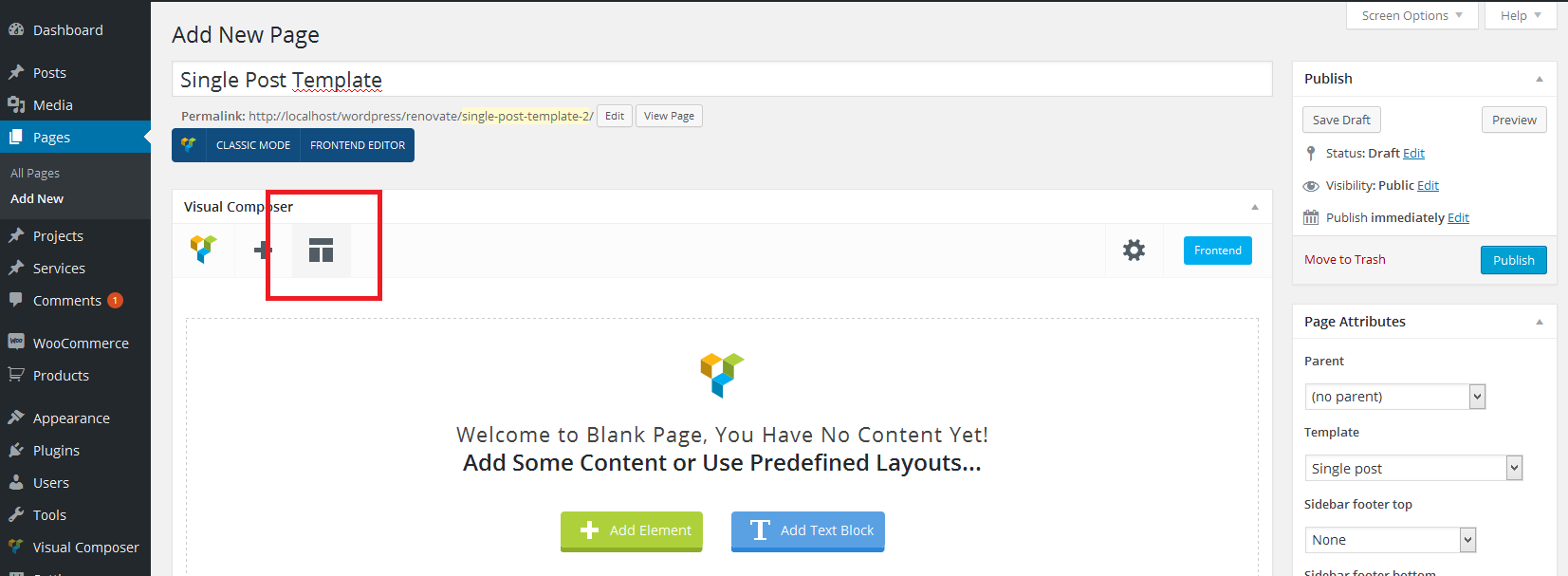
You can add it from the Visual Composer. Please click ‘Templates’ button: screen and switch then to ‘Default Templates’ tab, you will find there ‘Doctor Page Layout’ template which you can use. If you will need more help, please create new topic on our Support Forum and our support team will help you.
I have some question before purchase. Please consider. 1. It seems like your theme not attached Woo Commercial License. If I only purchase your theme, how to using Woo Commercial without attached plugin? 2. Store should have homepage with best products, feature products or sale products… So I could change homepage some like that and you recommend anything about your theme used as Medicine Store. Thanks for read.
1. WooCommerce is a free plugin, which you can download here: https://wordpress.org/plugins/woocommerce/
2. You can use some of available components to build your custom page, anyway predefined layout for such a page is not included.
Do you guys offer an automatic theme update function? A lot of other themes offer this service. cheers
The automatic update is available with Envato Toolkit plugin. After you’ll install it, you should be able to use automatic theme update function.
sorry but i have a client that have your theme,but i dont have the code for checkit. I wana know if you can help me whit a problem.
so I checked this week and found an error in the link http://serviendoscopias.com/mejor-gastroenterologo-bogota/
In this link should appear a section that is in the gallery of people working in the company. but now the content of the blog is the one that appears, I tried to modify it but it does not leave me, and the editor is left thinking as the adjunct.
I appreciate your help
We’re providing support only via our Support Forum. You need to have purchase code to access it. So please ask your client for the code and register an account on the forum to ask questions. Thank you!
Hi an d sorry for ask again but the template that i used is the theme free and really i nned your help. i dont know what happen whit the blog and categories, may be its the free theme to old? please what do you recomend. y do clic in blog and dont show y nothing and when i do clic in each catagory show mi onli a post but not all. please help me
MediCenter is a premium theme and it has never been available for free. To get support for it you need to purchase a license.
Hello,
Before I’m buying your theme I wanted to know if it fully compatible with other builders like elementor?
Hello,
It is integrated with Visual Composer and theme components are prepared for Visual Composer. Other builders will work with theme but the components compatible with Visual Composer won’t be available.
From version 16.0 theme introduces Elementor integration with demo content available to import and includes 30 dedicated Elementor widgets.
We have Theme Version 5.8. and Visual Composer V 4.3.3. Visual Composer isn´t working anymore so we deleted the old theme and installed the new one. But Visual Composer is still not working. We are unable to update it as well… What can we do?
Please remove your current version of Visual Composer and theme will display notice to install new one. Follow screen instructions then.
Thank you for answering. That doesn´t work. Nothing happens when we click “deactivate” or “delete” the plugin WP Bakery VisualComposer. The plugin remains in the plugin list. It shows the option ”...no automatic update. Download new version from CodeCanyon.” Any idea?
Probably you have hidden the notice in the past. So please remove the plugin and then go to ‘Apperance->Install Plugins’ and you will be able to install Visual Composer from there. If that won’t help, please create new topic on our Support Forum and our team will check this for you.
Hi QuanticaLabs, great theme, I have a customer for it  A quick pre purchase question: On top of the header is it possible to have several phone contacts (x2) instead of address? like S.Paulo +55 000001111 Rio +55 111111000? is that possible? Thank you in advance, Best regards
Hi,
Yes, it is possible. This area is customizable, we’re using a widget there.
medicenter v9.7 is compatible with wp 4.9?
Yes, it is. If you will have any problems, please let us know.
Hi, is it possible to have a look into the backend of the theme befor buying it? My client should be able to work with it in the future and I need a really intuitive handling for him. E.g. the theme Impreza provides the possibility to make a test account. Thank you!
Hi,
I can see that you have already purchased theme. If you will have any questions, please ask them on our Support Forum. Thank you!
Hi, I have a question befor buying this theme: is it possible to push the three blue boxes down, so the image / the slider is not covered? Perhaps onle for the desktop version and not for mobile. Thank you! Eva-Judit
Hi,
Support for all our items is conducted through our Support Forum.
Please register an account and search the forum or create a new topic, we’ll answer as soon as possible. Thank you!
Hi,
The theme works great, but I want the contact form to link visitors (after filling in the contact form) to another page, how can i do this?
Hi,
Support for all our items is conducted through our Support Forum.
Please register an account and search the forum or create a new topic, we’ll answer as soon as possible. Thank you!
Hello, after update last theme version. I got this layout error in mobile responsive, See attach img: https://prnt.sc/h9kqyo
Site: esmacentremedic.com
I deactivated all plugins and happens the same, only with screen equal or less than 479px. I tried with something in body like position: absolute; but nothing 
Please help, i know i dont have renew support, but sure if this is so easy to fix this, then i will renew support for future errors. Thank you so much
Happens the same with scroll to top see img: https://prnt.sc/h9l4b0
Hello,
You need to create new topic on our support forum to get help. Please renew your support and we will check this for you. Thank you!
Will I be able to use your theme if I have my hosting on Wordpress.com? I am reading about the installation and things keep referencing the cPanel, php, etc, which I don’t seem to have access to. I’m brand new to Wordpress and love your theme, but I just need to make sure it will work without the need to purchase additional products.
Thank you!
As I know you need to have premium account there, anyway please contact Wordpress.com support and ask them to make sure.
I have a problem with visual composer giving me an error, I installed 5.1.1. I tried installing 5.2.1 downloaded from your download but did go wrong the site, how can i do it?
The mistake I have is this: You can not access the product properties directly. Backtrace: do_action(‘wp_ajax_vc_get_vc_grid_data’), WP_Hook->do_action, WP_Hook->apply_filters, call_user_func_array, Vc_Hooks_Vc_Grid->getGridDataForAjax, WPBakeryShortCode_VC_Basic_Grid->renderAjax, WPBakeryShortCode_VC_Basic_Grid->renderItems, Vc_Grid_Item->renderItem, Vc_Grid_Item->attribute, apply_filters(‘vc_gitem_template_attribute_vc_btn’), WP_Hook->apply_filters, call_user_func_array, vc_gitem_template_attribute_vc_btn, vc_include_template, require(‘D:\Siti\BiotechmedDevelop\wp-content\plugins\js_composer\include\templates\params\vc_grid_item\attributes\vc_btn.php’), vc_gitem_create_link_real, apply_filters(‘vc_gitem_post_data_get_link_real_link’), WP_Hook->apply_filters, call_user_func_array, vc_gitem_post_data_get_link_real_link_woocommerce, vc_gitem_template_attribute_woocommerce_product, WC_Abstract_Legacy_Product->__get, wc_doing_it_wrong. This message was added in version 3.0.
and visual composer tell me that it is solved with later versions, but with this theme do not install ps3 later versions otherwise the site will no longer work
The currently supported version included with theme is 5.2.1. We’ll update it to the newest one in a few weeks. When does this issue occurs? Could you give me a description of how can I emulate it on my end?
I also installed woocommerce and think it happens when i put a product in the cart. In fact I had to set the woocommerce that when you put a product into the cart goes directly to the cart, otherwise if I use the ajax function go to a white page with a top 1. So I solved you by sending the user to the cart, but the error appears in the PHP error logs. The version of your theme I have installed is 9.5 and if I try to install the Visual composer 5.2.1 the site goes into error 500 so i left version 5.1.1
You’ll need to update theme to version 9.7, it is including Visual Composer 5.2.1 and WooCommerce files update. Soon we will release v9.8 with another updates for WooCommerce and VC.
ok thanks
You’re welcome!
Today this error has also appeared, will this also be resolved with the next update? PHP Fatal error: Allowed memory size of 1073741824 bytes exhausted (tried to allocate 32768 bytes) in D:\Siti\BiotechmedDevelop\wp-content\themes\medicenter\vc_templates\vc_row.php on line 130
It is hard to say what is causing this issue. We will need to check your code and configuration. Please create a topic on our Support Forum and our team will take a look.
Hello I think i found a bug.
In the articles page, every sidebar have this photostream section. https://prnt.sc/h5608h I tried to change the sidebars, it keeps appearing. I tried to add photos there. Cannot.
This si not a support request, this a a bug, and i need it to have-it solved or at least helped with a hint
Thanks
Hello,
It is not a bug. You can edit this sidebar under ‘Pages->Single post template’. You will find more informations in the FAQ section here: http://support.quanticalabs.com/forum/topic/6423/faq-frequently-asked-questions#question_58 (Q: How can I control the single post layout?)