

38442 comments found.
Hi,
In my CF7 form on this page: https://www.kraamverzorging.net/aanvraagformulier/ I have a drop down menu with a long list of option values (40+). When I click the box ‘Zorgverzekeraar’ the options are shown but only partially. The selection box seems to dive under the footer. There’s no option to scroll down with my mouse or move down with my keyboard to the options that are not visible. I already tried to add this CSS code:
.selecteerveld {
  overflow-y: scroll!important;
  max-height: 400px;
}
It works but it does not look good. Can you provide me with a good workable solution?
Thanks on beforehand for your everlasting top quality service !
Cheers, Marc
Hey Marc, have you tried to simply enable the option for “Fancy Select/Checkbox/Radio Styling” in the Salient options panel?
Cheers
Yes, it was the first thing I tried … no success. This must be an issue more people experience.
Yes TN, this was one of the first things I tried. No success however. It must be an issue more people using long selection lists (countries, etc) experience …
Hey Marc, the only way to handle a situation like this is to give a scrollbar for the user The plugin Salient uses in the fancy form styling option has the ability to set this. If you can eanble it again and allow me to take a look I’d be glad to help out
I activated the Fancy Form Styling option and something really weird happened; a double down down box appeared. See screenshot: http://online-fotoservice.nl/mijnscreenshots/Aanvraagformulier_Kraamverzorging.jpg.
I’m really confused now 
Hey, are you using any custom code/plugins for the select dropdown? Something else is initializing it with javascript to make it more than a standard HTML select
You were right … I was running the plugin ‘Bettr™ CF7 Style Editor’ to get more control over the CF7 form …. but instead it caused the problem. Now the form looks good and the problem is solved. THNX !
I do like to know however how I could get the drop down values to show over of the footer instead of disappearing below the footer.
Hey,
Right now on that URL with using the fancy select styling, i’m seeing a scrollbar for the items so it never gets anywhere near the footer – are you not seeing that?
Cheers

Hi,
Is it possbile to allign the text in a flip box to the bottom. I tried looking for it but can´t find out how to do it.
Thank you
Hey sandorvdberge,
Have you purchased the theme on another user account? I currently don’t see this one showing a license
Cheers
Yes I am using this theme for my internship, dbrouwer.
Could you please share your URL in regards?
And you have the vertical alignment set to bottom? https://imgur.com/a/RUA8g
Yes but could it be lower or is custom css required for that
Hello, i would like to know if it is possible to change my photo gallery https://www.alexandrameric.com/beauty-make-up-artist-paris/ with smaller pictures? but the same way i did. Thank you
Hey canaplex,
Are you just trying to get more columns per row?
Cheers
Hey , thank you but how i can change ? because i see only max 4 columns in setting .. thank you
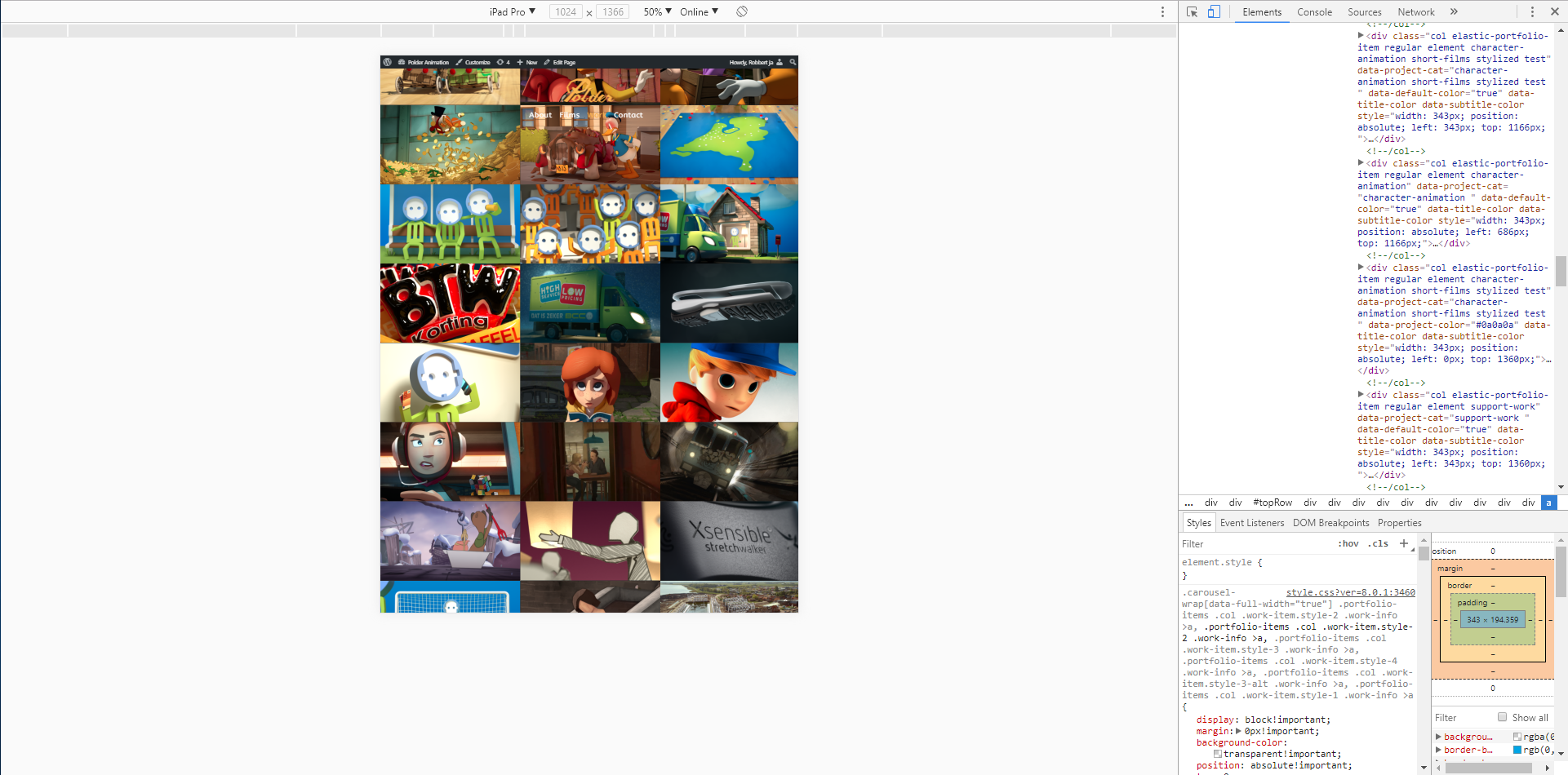
Hello! I’ve got a question, our header does not stay fixed on an iPad. Example page: http://polderanimation.com/wordpress/work/ Is it possible to keep it fixed on an iPad?
Example of it going wrong: https://i.gyazo.com/6e6aabaf72a0e1f40cd4f691a6d352a1.png You can emulate an iPad by inspecting it and selecting iPad option.
We tested it on various actual iPads and were maybe hoping for any hints as to where to look to disable the menubar scrolling.
Any help would be appreciated! 
Hey robbertjanvanommeren,
The iPad view in landscape will show the same site as on a small desktop, which you don’t have a fixed set for. Only on a portrait view would the mobile menu kick in which you’ve separately set to be sticky
Cheers
hi, i use Loco translate for your theme translate to TR_tr. But i can’t translate anything. For example “read more” buttons, never change. Anything never change. Please help me, i need translate theme
http://prntscr.com/h79xdz > this itemHey sinayes, I just tested with that plugin on the same string for the recent post featured item and was able to translate it. Please open a ticket in regards with your admin credentials https://themenectar.ticksy.com
Cheers
Hi, i buy this theme very old years ago. Can’t open ticket. Are you don’t help with this about? This is general problem, isn’t my own problem?
Are you planning on coming out with any more eCommerce Features, such as a WooCommerce Product Page Customizer, or more WooCommerce Product Page Layouts? There are many new layouts competitor themes are using and I have not seen any updates in this category. Or how about a live search function?
Please tell….
Hey freerunner,
yes there will be a future update dedicated to eCommerce
Cheers
Hello
Is there a way to have horizontal scroll like this withe last update ? responsive ? http://www.tonylillo.com/albums/olympus-pen-f/Thanks
not possible with Salient ? Help
Hey rafyc,
A feature like that was not added in 8.5, but new carousel options are now available. Please see the changelog in regards http://themenectar.com/changelogs/salient.html
Cheers
Quick question for you – the Recent Posts link above my blog posts links to my Home page, not to my blog page (“Recent Journal Entries” in this image: http://www.sarasheehy.com/wp-content/uploads/2017/11/journalentries.png). How can I get that to link to my blog?
Website: www.sarasheehy.com
Hey LemhiRG! Do you have the posts page defined as a different page in Settings > Reading within the admin panel?
Cheers
Yup, I did. That fixed it. Thank you!
You’re welcome
Hi guys,
I’m also experiencing a bug on on the portfolio. After using the filter and clicking an item i get the following message: this image could not be loaded.
Could I get a fix for this ASAP please.
https://www.eliteticket.co.uk/Thanks
Hey elitemediaagency,
Please update to v8.5.1 – it should sort this for you
Cheers
Hi there,
Reporting a new bug I am experiencing in my portfolio: after I chose a filter category, clicking the “More details” button on hover on a portfolio item does not go to the single portfolio item page anymore but sends a message “The image could not be loaded”: https://sustainabilityillustrated.com/en/sustainability-videos/. The button does work when the portfolio page is first loaded or reloaded. The bug appears only after using the filter.
Hope it helps
AM
(Big fan of Salient for 5 years now :-))
Hey hypeio!
Please update to v8.5.1 – it should sort this for you
Cheers
how to disable date display in the projects?
Found)
Hey Nicko_217, glad you found it
Hi,
How can we use the full screen rows on our homepage and keep the full screen header background image with downwards arrow navigation to page content, similar to your demo page: http://themenectar.com/demo/salient-agency/
Cheers
Hey Micatuca,
Unfortunately as of now that’s not possible as of now, but i’ve noted your +1 for the idea on the wishlist
Cheers
Ok no worries,
Do you have some custom CSS that we can use to achieve this in the meantime?
It would require more development than just CSS unfortunately. A fair amount of JS editing would be required as well
thanks oioiofilip for the Help! After I edit the hotspot settings in Visual composer…I close the hotspot settings …and then save the page…It Works 50%.. The hutspots I added are not visible on the website unfortunately…Is there someone who knows how to deal with this problem..Please let me know
Hey TedBot, kindly see my response to your previous comment in regards
Cheers
Hi, i’m using your theme on this ecommerce website and as you can see, we have big logos for payment cards. If i change the theme for the default theme, logo sizes are back to normal size (32px). Can you please tell me what to do? Thank you Regards, David
Hey librexpo,
Add this into the custom css box in the Salient options panel:
label[for="payment_method_stripe"] img {
  max-width: 30px!important;
}
Cheers
Hi, thank you very much !
You’re welcome
Can someone please help me out….I have downloaded the salient theme…but I am encountering multiple problems…like: - If I place Image Hotspots, the changes I made wont upload to my page.. and the image I chose is not uploaded…It only show a blank object/ box - appearance >> customizer – I can see the interface but no preview available, if I edit thru the customizer it shows a 404 page
Hey TedBot ,
Have you purchased the theme on another account? I currently don’t see a license attached to this user
Cheers
Hi thanks for replying..I am a Intern at a company…That is the reason I dont have the license attached to my account
If you can get the license code, you could then open a ticket in regards in the support forum where we could assist you with this https://themenectar.ticksy.com
Cheers
726ed410-e82b-4410-b49c-993c38834f89
If you haven’t opened a ticket yet, you can also reach out via the contact form on my author page with your admin credentials so I can take a look https://themeforest.net/user/themenectar
Cheers
Hi there,
I am so happy with this theme. Great job you guys.
I have a question / advice / tip / wish:
I can only place a colored border around all menu items. It would be great if we could also place icons instead of text. So just a phone or mail icon. Or make a choice from a list.
This would really make this theme more complete.
Can you tell me how to manage this? Or when this will come? Make me more happy
And another question: If I turn on secondary navigation. I see the social media icons left. But where is the ability to place a text or button on the right side? Or does the entire bar remain empty? That looks weird. I want to place an quote or something.
Last question: Where can i change the font size of the dropdown off canvas navigation? Now it is the same thickness and size of the main menu. Can not find this option anywhere.
Hope to hear from you soon, cheers!
Hey Metelen,
1. For now it would require custom css, add this into the custom css box in the Salient options panel as an example:
#header-outer header#top nav >ul >li:nth-child(2) >a:before {
   display: inline-block;
    font: normal normal normal 14px/1 FontAwesome;
      content: "\f013";
     padding-right: 10px;
}
2. You can add menu items to it via the Appearance > Menus section in your admin panel
3. Please share your URL in regards so I can see your settings to assist
Cheers
1. Don’t know if you understand what i mean  This CSS is not what i mean.
Oke, let’s try it again. I want to add an CALL US icon in the menu. Not text. An icon. Same as MAIL US. But not text. Only an icon where visitors can click on in the menu. Not in the secondary menu. In the main menu.
For example: I want a menu like this: HOME – ABOUT – SERVICES – CONTACT – ICON PHONE – ICON MAIL
2. Found it!
3. Where in the Salient menu can i change the font size of the Off Canvas navigation menu / submenu? Must be somewhere right?
Many thanks! Cheers….
Before i was using this theme i used the Bridge theme. Not so good as this. But this was an really cool option i can choose in the menu option. Add pages in the menu / remove the name and change a menu title into an icon. Both options.
Hey,
1. In the Salient options panel > Header navigation > layout related tab select “Enable Social Icons?” and then check the ones you need. You can then fill out the URL related in the Social media tab of the options panel
3. In the typography > navigation & page header tab at the “Off Canvas Navigation” field
Cheers
Hi TN,
I have a problem with the text in a list. It’s showing lighter and less bold than other text.
As an experiment I created some text around a list. The text above and under the list appear to be darker and more bold than the text shown in the list. Can you tell me what happens and how I can fix this?
You can see an example at: https://www.erfrechtgids.nl/temp2/
Hope to hear from you soon.
Cheers, Marc
Hey Marc,
I currently can’t see a different in the color on my end, can you let me know what browser you’re on and possibly provide a screenshot?
Cheers
Hey Marc, here’s what i’m seeing on my end in Chrome: https://imgur.com/a/y4UYB are you on mac or windows and can you let me know the browser version?
Cheers
hi i just set ur theme and it’s awesome tnx. i have a question. if i want to make like that page, http://audrey.elated-themes.com/portfolio-columns/ how can i make by ur tool, visual composal ?
Hey meeromee88, the closest you could get to that would be a full width content row split into four columns. You could then use an element like the fancy box inside. In the Salient Studio you can search for the template named “Fancy box fullwidth parallax” to have a starting point: http://themenectar.com/docs/salient/salient-studio/
Cheers
Hello, I’ve updated the theme to the lastest version and I’ve got a big problem:
No slides are shown on my homepgae.
Link—> https://www.delord.it
Hey innobrain,
Please reach out in regards via the contact form on my author page with your admin credentials so I can look into this as currently there’s no known issues with the Nectar Slider like that https://themeforest.net/user/themenectar
Cheers
Made
Hey innobrain,
Thanks
Hi,
I have installed the plugin “Better WordPress Minify” as recommended in your documentation. However there ave been no updated to this plugin for over 2 years and it’s last wordpress compatibility was 4.0.20.
Should we still be using this plugin? or is there another recommendation?
Hey Suckerpunch, I’m unaware of any compatibility issues with the current version of WP, however you could also just use the minifcation within W3 Total cache at this point as well
Cheers






.)
