38442 comments found.
Hi Guys, looking to solve the same problem here, sadly the OP didn’t post her result…
https://themenectar.ticksy.com/ticket/1076779/Can’t figure out the method. Can you advise please? Thank you.
Hey! There are examples of that kind of layout right in the Salient studio such as the first one titled “About me – fullscreen vcard” themenectar.com/docs/salient/salient-studio/
Also the visual composer does not show up on pages anymore. visual composer plugin is installed and activated. I do not understand what is happening here. Please help.
Hey markimark, please see my response in regards to your previous comment
Cheers
Is there any know issue with the settings panel of 8.5.1 or 8.5.3 and wp 4.9? There is no content in the settings panel anymore, only the menu left, all other is blank. I tried in FF and Chrome and I tried to complete new wp installations and all plugins are deaktivated.
all container are set to display: none .redux-container .redux-group-tab { display: none; margin-bottom: 15px; }
How that? All I did was to make a fresh wp 4.9 install and then installed and activated 8.5.1 or 8.5.3
How can that happen?
Hey, this sounds like the known WP issue within the core when using certain languages. It throws a JS error, stopping any further js from executing from themes/plugins https://core.trac.wordpress.org/ticket/42574 there’s a quick fix listed in that article
Cheers
Actually you were right. I have used Swiss (Du) which is a special language. I changed to German, what I usually use and all is fine now. Thank you very much for helping me.
Hey, glad to hear 

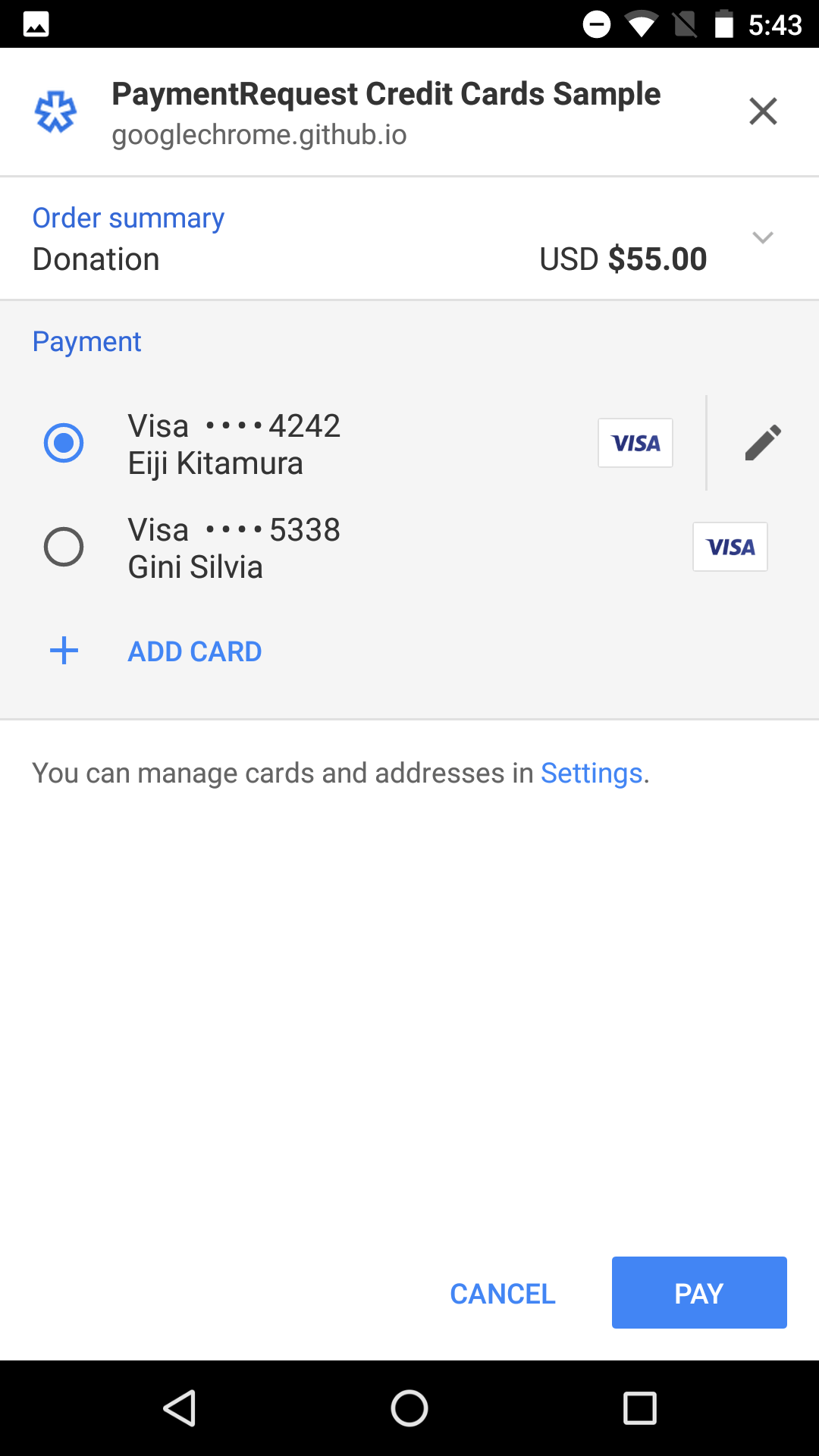
web payments api (customers can pay using payment details associated to their browsers) doesnt work with the standard woocommerce stripe plugin, on the cart page, it simply defaults to the checkout page, any quick fix for this? 
in case its unclear i mean this checkout that shows up on android devices (also a similar version shows up in chrome): https://developers.google.com/web/updates/images/2016/07/payment-request/3.png
all fine with standard woocommerce themes i should add
Hey steveok, could you please share your URL in regards so I can take a look at your settings?
Cheers
I just setup a test site with latest salient + woocommerce here:
https://dev2.dealtrove.comonly 3 plugins installed, woocommerce, stripe (by woocommerce) and salient visual composer: https://www.dropbox.com/s/wdd73up4vv2g2yk/salient-dev-plugins.PNG?dl=0
works fine with the standard storefront theme but switching out to salient and it stops working, can see quick video here:
https://youtu.be/yW9CJYs4TjEI also noticed the cart page doesn’t update via ajax with your salient theme, was a recentish feature added to woocommerce
let me know if you need anything else to help!
cheers
Steve
Hey Steve, thanks for the clear explanation of what’s going on – can you please try turning on the option in the Salient options panel > page transitions tab for “Disable Fade Out On Click” to see if that fixes it?
Cheers
Hi
just tried it and looks like its still not working, same for the cart page not updating via ajax either ☹️
Hey, could you please reach out via the contact form on my author page with your admin credentials for that test setup so I can examine it closer? https://themeforest.net/user/themenectar
sure thing, just sent it over
hope theres an easy fix!
Steve
Thanks! Just responded in regards
amazing, the google checkout works perfectly now + cart is updating via ajax, super quick support and still the best looking wordpress theme
Glad to hear it worked for you
Is it possible to have a following sidebar in a blog or are they restricted to portfolio posts? If it isn’t available, could it be added to an update?
Hey Incorporate_Design,
You can use a sticky sidebar for blog posts as well as of Salient 8.5
Cheers
Some demos is missing. I am looking for “Project slider” demo under portfolio. How do I download that demo?
Hey reker0080, the demo importer tab does indeed include that demo – it’s called “Fullscreen portfolio slider”. What version of the theme are you using?
Cheers
Hope you’ll like it And thanks again for your great support, you guys rock!!!
Étien’
Hey Étien! Nice custom work
Looks cool!
Thanks 
You’re welcome
Hi,
I installed the latest update.
On the homepage, when I have an image that is portrait, it shows ok as thumb.
However, when I click on it as lightbox in Chrome, the image is rotated 90 degrees on its side. 
In firefox the image lightbox is shown correctly.
How can this bug be fixed please ?
Hey omws,
That’s pretty strange – could you share a URL so i can take a look?
Cheers
The fullscreen row feature on mobile (iphone 7) is working poorly on transitions between rows after update to 8.5.3 on worpress 4.9. Is there any way to fix it?
Hey derbouwer, testing on an iPhone 7 locally I can’t see this occurring. Are you seeing it even on the demos? themenectar.com/demo/salient-product/ Also, are you using Safari?
Cheers
yes! on both browsers… and also on your demos…. and by the way, disable fullscreen rows on mobile was not my favourite option…
Hi ThemeNectar,
I have another problem, i need to display the nectar_page_header and sidebar in individual posts only when i am opening those posts from a particular blog page. When i open individual posts from all other pages, i don’t want to display both header and side bar.
Please help me in achieving this.
Thanks & Regards, djeevankumar
Hey djeevankumar,
This would require some custom development as of now that’s beyond what I can easily provide in the comment area
Cheers
On my contact page, my website is not allowing me to keep the white text when I put in numbers. I’m trying to put in my phone number and no matter what I do the numbers are showing up as black. You can only see this on the mobile side. The desktop version looks the way it is suppose to look. My website contact page is www.19theagency.com/contact
Hey 19theagency,
iOS automatically wraps phone numbers in an anchor tag, so it’s inheriting what you have defined for the link color
html body a {
    color: #000000;
}
Cheers
Ok thank you, but how do I fix it?
The css I listed above can be pasted in the custom css box in the Salient options panel. You can change the color to what you need i.e. #fff
I added the css listed, change the color, and it is still showing the number in black
Just a heads up, the WPBakery/Visual Composer is not reacting when clicking “Save” on the latest Firefox update. I’m reading replies that it was fixed but it’s still not working after upgrading to the latest 8.5.3 update.
Hey lookwhoo, you must update your version of the Salient VC in the plugins section once you’ve updated the theme. Just updating the theme alone won’t apply the fix.
Cheers
My mistake, you’re right. I completely skipped that step. Thank you!!
No worries
Is it possible to connect with Fb or Gmail ? There is a customized profile page ? There is a cutomized author page (that doesn’t look like wordpress admin page) ?
Hey rifipop,
Using third party plugins would be required for connecting your facebook or gmail account to the theme and also for creating a custom author profile page
Cheers
good morning, how to put the social icons in the center of the footer?
Hey iwhiteplus
For now you’d need to be using the one column footer layout
Great Theme, can you help with removing the blog like button on a variable height and meta overlaid blog? Thanks!
Or any blog I’ve tried the css below and its still not working. Thanks.
.nectar-love-wrap { display: none!important; }
Also do you know how to hide the category on the blog posts?
Hey gdavz!
Use this instead:
.single #single-meta li .n-shortcode { display: none; }

body .meta-category { display: none; }
Cheers
It took care of the like but not the category.
Could you please share your URL in regards so I can verify your blog settings?
Cheers
garwedavis.com/blog
For that style you’d need to also use this css
body #page-header-bg[data-post-hs="default_minimal"] .inner-wrap >a {
  display: none;
}
Great! that worked like a charm! Thanks!
You’re welcome
I’m trying to change the text size for a toggle panel and the css I’ve found here is not working. Here’s what I’m using…
body .toggle h3 a { font-size: 16px !important; }
It’s not doing anything. Help!
Hey Fresh_Start! Different toggle styles use different heading tags – which style are you trying to change?
Cheers
I was just experimenting with the default style but couldn’t get the text to change size. Wanted to try the different kinds. Is the code much different for each of them?
Hey,
The “minimal small” style is controlled by the h4 setting in the Salient options panel > typography > General HTML elements tab
the “minimal” style is controlled by the h3 setting also in the same location within the options panel
and the default style would require custom css to alter since it’s not effected by the options panel typography settings
Cheers
could you give me the code to change the font size on the default style? The ones I’ve found here haven’t worked. Thanks.
add this into the custom css box in your Salient options panel:
.toggle h3 a { font-size: 20px!important; }
Cheers
That code doesn’t seem to change the font size on my toggle panels. What else could be wrong?
Hey, that code is valid – something else must be preventing it from taking effect. Could you please share the actual URL?
Hi, my client site was running an older version of the theme (5.5.4), and we just updated to a recent version of your theme downloaded from a couple weeks ago (8.3?) to increase our compatibility with woocommerce 3.x.. The new theme is stuck on the circle loader and we can’t get past it. Any thoughts on this? Thanks!
Hey BMacko, do you have a ticket in regards? If so, please let me know the ticket ID here or just share your URL so I can take a look
Cheers
I don’t have a ticket yet. The website is windycitylinen.com , but I can’t leave the new template up (in the nonfunctional mode) as it obviously takes the website functionality down. What shall I do next?
Hey, do you have a staging server you could update on to show the issue?
Can you issue a change log for the last update pls? Thanks!
Hey MarkusB, the changelog has contained the details of the latest version since the release – have you tried clearing your cache?
Cheers
Hi, guys I´m using the theme minimal portfolio and I have one question, how I can get the key (HOME) of the keyword works with this theme?. The key (END) works but the HOME not. Thank you.
Hey LuisVoronov,
I’m not quite sure what you’re referring to – could you please try and elaborate a little more?
Cheer
When I am at the final of my page and I want to return to the top if I press the key HOME of my keyboard the page won’t go to the top, the tape don’t do nothing, but if I am at the top of the page and I press the key END the page go to the bottom. How can I fix this? I want when I press the key HOME of my keyboard the page go to the top.
Hey, if you switch your theme skin to the “Material” setting in the Salient options panel > general setting tab, it should allow this functionality
Cheers
Yes Sr. it works, thank you.
Glad to hear
Hi. The color pickers in the admin panel looks buggy after (one of the) latest updates. They look slightly misplaced when I click it, borders are missing on left and right. I tried to create a fresh install just to test it, and the same thing happens.
Hey amund_se, WP 4.9 caused this – they’ll be cleaned up in the next update
Ok, thanks!
You’re welcome