371 comments found.

Hi, I know its possible to change de color of the lines animated in the footer because the template has de “Constellation Line Color” option…but changing it there doesn´t work. I need some help with that. Cheers
Hi, please submit ticket to our support forum for help. Thanks.
Hello, I would like to put button “More info” into some page and open “on click” method as popup page. Just like in this url “http://monolit.kwst.net/site/portfolio-single7.html”
Unfortunately, I have yet to receive a reply from support. Please, can you help me?
Hi, please submit a ticket to our support forum for help: http://support.cththemes.com/?page_id=16090
Thanks.
Hi! Great work. Pre-purchase question: Is the documentation for the theme available somewhere so i can take a look before buying?
Here it is: http://documentation.cththemes.net/monolit
Thanks.
Hello! Pre purchase question: Is it possible to remove left bar on multipage?
Thanks
Yes, there is an option to disable it completely. Thanks.
Hello there, What a great theme. Well done guys!
I have one problem. I cant seem to get the share feature in the header to work. When clicked, it shows nothing even if i chose from the options panel some of the social media. Any help?
Hi, please submit a ticket to our support forum for help: http://support.cththemes.com/?page_id=16090
Thank you.
Sorry about my comment i was logged in with another account so dont reply to this
thanks
It’s ok. Thanks.
I think I encountered a bug: A YouTube video does play on desktop PCs as a backgroud of the homepage, but not on mobile. Instead, it shows the background image on mobile devices. Okay, understood. I’m fine with that.
This seems to work on my iPhone 5S, on my 2017 iPad 9,7”, but not on a 12.9” iPad, it seems!
While it shows the background image nicely on the first two devices, it just shows a white page on the 12.9” iPad which leaves a very bad impression to people visiting our page with said device.
Hi, send me the page link to check. Thanks.
Well, I’m sure that it’s independent from our specific homepag, but affects all theme installations. You can easily reproduce this on e.g. any current iPad Pro 12.9” device. Simply open the Safari browser and surf to any page that uses your theme and the video background on the homepage.
I believe that due to the big screen and the high resolution of an iPad Pro 12.9”, the device is no longer recognized as a mobile device. E.g. the main menu is fully visible (not collapsed) and the page overall behaves as if displayed on a desktop device.
The only problem is that the video doesn’t play and the background image doesn’t come up neither. So the screen remains totally white, which sheds a bad light on the page of course.
I’m going to send you a link and a screenshot of 12.9” iPad via email.
Hi, please add this style to Monolit Options -> Custom Code tab -> CSS Code – Large Desktop View editor:
@media only screen
  and (min-device-width: 1024px)
  and (max-device-width: 1366px)
  and (-webkit-min-device-pixel-ratio: 1.5) {
      .mob-bg {
         display:block;
      }
}
Ps: this fix will be added in the next update. Thanks
Thank you for looking into this. I already applied the fix.
While we’re at it… is there a way to set the background color, that is shown before the video starts to load, to black? Right now it’s white and that doesn’t really comply with our logo.
.media-container {
    background: #000;
}
If you have any question, please submit a ticket to our support forum for help: http://support.cththemes.com/?page_id=16090
Your theme is not compatible with WordPress 4.9.x. The reason is because Visual Composer 5.1.x is not compatible with WordPress 4.9.x. You will need to update your theme to run at least Visual Composer 5.4.3.
When can I expect this to happen?
Hi, you can delete the plugin then go to Appearance -> Install Plugins to install latest version.
Thanks.
Theme still has bugs when upgrading to Visual Composer 5.4.5 / WordPress 4.9.x.
I downgraded to WordPress 4.8.3 and the theme is working fine.
Hi, would you tell tell me what’s the problem?
Hello, how many plugins does template require?
Hi, it requires 5 plugins and 2 more recommended. Thanks.
Hello, I have a problem that I can not fix, then on the homepage in the menu o: portfolio – when I try to click, it does not work, but it is to open as a link and still it will not. (link: http://www.studiocoop.com.br)
Another thing is when breadcumb takes to the url portfolio without being able to move, but I’m actually using a url named: portifolioCoop (http://www.studiocoop.com.br/portfoliocoop/) and it does not let me configure for this URL.
In the same part of the portfolio (http://www.studiocoop.com.br/portfoliocoop/) it only opens when you click ONLY in the Title, and would like to work by clicking on the entire image block. Can I do this?
Thank you friends !!!
Hi, please check the solution on the support forum. Thanks.
Hi there, I bought this theme a few months ago and my support has expired. But the website should be working perfectly and now all of a sudden WordPress is doing strange things and I can’t seem to do proper changes any more?! Is there a way to update this theme without loosing all my work/content?
yes, just follow this detailed instruction: http://assets.cththemes.net/themeforest/monolit/changelog/
Ok so I uploaded the update but I still cannot make changes to my footer 
It tells me the following: Developer Mode Enabled – Please contact Developer of theme.
Hi, please go to Plugins menu to deactive Demo Mode for Redux Framework.
Thank you 
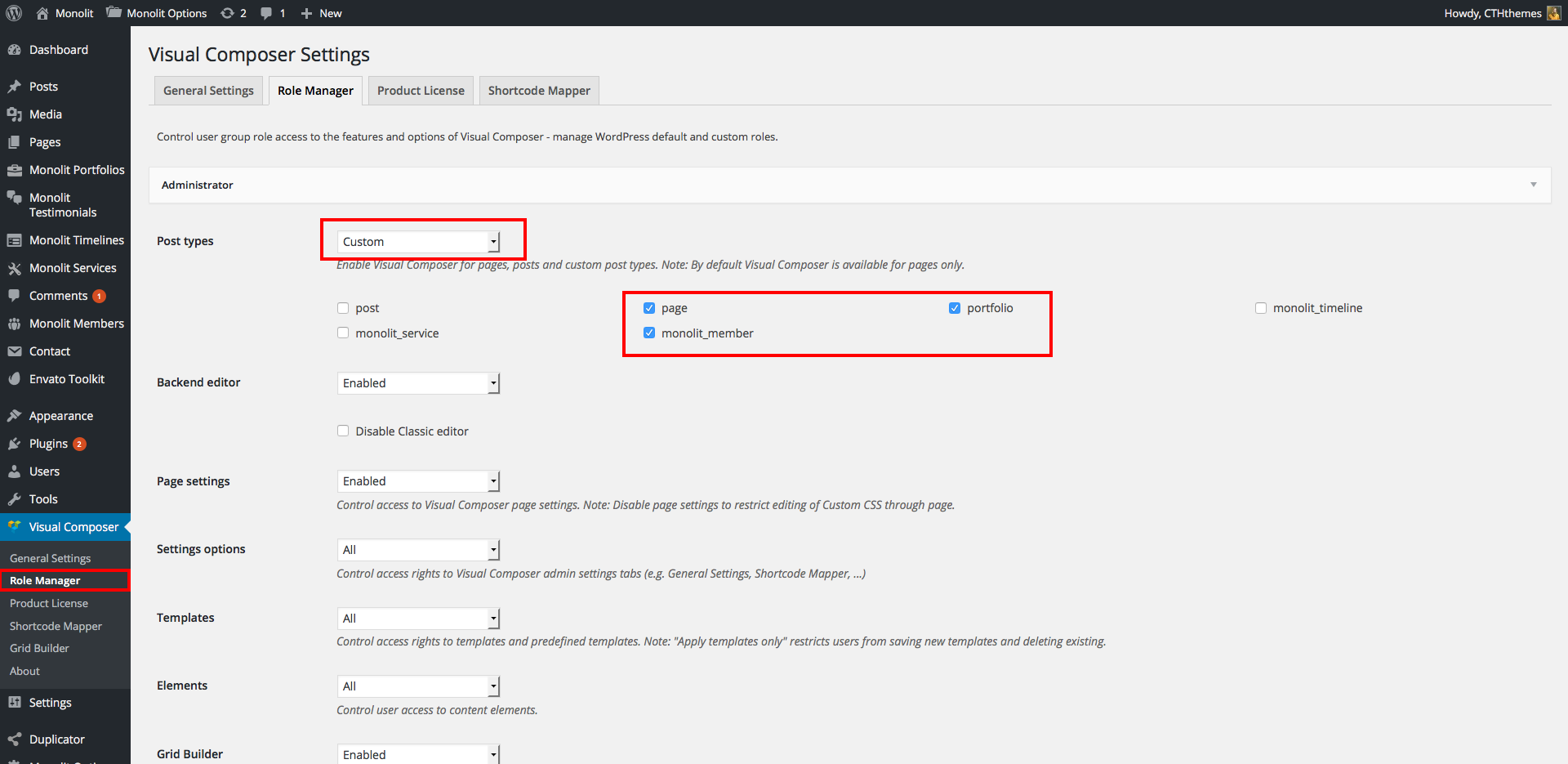
I can not activate the visual composer in the portfolio part, Timelines, Services and Members.
Would you help me?
I was able to solve it, I saw it in your previous comments, thank you, it works very well
Hello. What file should i edit to have the link on the portolio title on the featured image too?
Hi, please update theme to latest version then you can use Image Click option in Monolit Options -> General tab.
Hi !
I have a problem when i want to import the full demo content…I must wait a long time and nothing is working. It’s too long…Why ?
Thanks.
Hi, please submit a ticket to our support forum for help: http://support.cththemes.com/?page_id=16090
Thank you.
If I embed YouTube videos via the included VideoPlayer VC element, I cannot set them to not show “related videos”… This means that it brings up videos of other companies on our website when our video is stopped. This is a problem for us.
I already tried to implement videos with different plugins or directly with YouTube embed code, but in the “Monolit Services” section, this doesn’t really work. Other plugins are either not responsive or simply don’t work at all in the “Monolit Services”.
I’m really desperate as this already cost me so much time to research on this. How can I disable “related videos” playback with the Videoplayer VC element for YouTube videos? Please help!
Hi,
How could I update theme without replace custom code css and any other changes or paramaters?
Thanks.
Hi, did you mean css code in theme options panel? They are safe except changes from theme files. You can use Envato Market plugin to update theme, read more details here: http://assets.cththemes.net/themeforest/monolit/changelog/
OK thanks how could I update WPBakery Visual Composer?
Yes. Just delete it then go to Appearance-> Install Plugins to install latest version
Thanks!
Hi, I am interested to buy your theme but I need to know if your theme is compatible with WordPress 4.8.+ versions. Also, as I can see, you haven’t make any updates from April 2017…So I am wondering if you actually support this theme or not…
Yes, it’s compatible with WP 4.8+ Also We are updating the theme to fix some small errors and going to release tomorrow.
Thank you
Great news! When you do that, I am going to buy it! Thank you!
Hi, the update has been released. Thanks
Is it possible to create a link to a respective category of the portfolio?
Yes, it’s possible. Default format is portfolio_cat/portfolio-category-slug
Hi, I need to find a way to leave a part of the blog in the form of 3 per section as normal. Because of this problem my client is not available for search. You can help? I need a lot of help solving this problem. Regards,
Hi, please submit your question here: http://support.cththemes.com/?page_id=16090
Thank you.
Hi. I included the theme but I’m having problems, I can not use visual composer to work on monolit’s portfolio. And I do not know how to enable it, can you help me? What should I do?
Here it is: http://documentation.cththemes.net/monolit/assets/images/image_5_7_1.png Please read theme documentation for more details: http://documentation.cththemes.net/monolit/#!/portfolio-settings
Thank you.