28330 comments found.

Hi, what is the CSS code to set the font size for the footer texts? or is there another way to set footer text size?
Hi there,
This CSS should do the trick. Place it in Theme Options > Style > Custom CSS
footer p, a, span{
font-size: 14px; }
Doesn’t work. It should only be for the footer text.
Hi there,
Please see how to install and config the plugin here https://wordpress.org/plugins/variation-swatches-for-woocommerce/#installation
hello i am waiting your above feedback reply. also when i upload your theme under wordpress i am getting error http://prntscr.com/ho7pdh
Hi there,
In regards to the error while uploading the theme, please see this guide http://docs.uxthemes.com/article/199-are-you-sure-you-want-to-do-this-please-try-again
Hey, where I can find the Thank you page or order received/order confirmation page.? I can’t find it. thank you
Hi there,
If the Thank you page is missing kindly recreate one.
hi i just bought your theme. i want to know does all woocommerce plugins will work in your theme? i have multiple paid plugins which i bought yith, codecanyon, and woocommerce site please guide me how can i start work on child theme i do not want to import your demo data, i want to make very simple and light store and tell me which php , apach, verison your theme will support?
Hi there,
Flatsome has been built in accordance with WordPress coding standards and hence would work with any plugin that follows the same standards.
You can create and activate a child theme in the setup wizard and then skip the other steps if you would not like to import the demo data.
You will need at least PHP and MYSQL 5.6 and PHP Memory Limit of at least 256M.
Hi team.
3 Questions;: 1) Update about the item gallery BUG? It shows the scrollbar if I Add more image in vertical layout
2) Updates about the Variant gallery BUG? In this moment it’s impossible to add a variant gallery. Two months ago you have announced to have fix it. Two updates later, the bug is still there.
3) Considering the big problems concering some premium plugin, before buying it, Is it Table Rate shipping compatible
Hi there,
1. We reported the issue to the development team and are awaiting a fix.
2. You will need a plugin to have galleries for variations.
3. The plugin should work well with the theme, however it is important to note that there has not been any compatibility tests with the plugin.
2. I have already a plugin for that… But you have a bug in the website that doesn’t allow to use any kind of plugin.
You have promised to solve it 2 months ago. After two release, the bug is still there. So my question is: to solve a simply problem (that other themes doesn’t have), how much time we have to wait for?
Can you reply? Or can reply someone that effectly knows this bug?
I can not change font with plugin. I use use any font
Hi there,
Please see how to add custom fonts to Flatsome http://docs.uxthemes.com/article/224-add-custom-fonts-to-flatsome
it does not change again.
suport setting
setting support
i want setting support
Hi there,
Please reach support via support and we’ll be glad to be of assistance.
okay thank hihi
How do you make a textbox link? I made a text box and gave it some padding, so it crosses an image and wrote text in it. I would like to make it link when you click it, but I only know how to make the actual text link or the banner it self
Hi there,
I’m afraid we do not have a link option for the text box element. You can place a feature request for this here https://uxthemes.canny.io/flatsome
Hi!
How can I make the top menu to “float right” and remove the cart-icon. I could do some of this with css, but it would be better to do it through settings.
http://ramson.onewebsite.noHello again, I now found the solution after looking at some videos/tutorials. 
Awesome  Good luck with your site.
php 7.1 and php 7.2 compatibility?
Hi there,
I’m afraid we have some incompatibility issues with 7.1, it is advised that you stick to PHP 7 for a while.
Oh. And what can be bad when we upgrade our hosting company on php7? Can we see these problems? ..for example some changelog etc? ..because for example in few weeks we can maybe automatic update on this version so we know where will be problem. Thanks for answer.
If it isn’t secret, if you know, what can doing problems with php7.1 and flatsome, so you can write it here is short. Only for our information.
Hello. How to hide the “continue shopping” button from the cart? I don’t have any option to enable/disable this in Theme Options – Cart and Checkout. There are only “CART SIDEBAR CONTENT”, “AFTER CART CONTENT” and “CHECKOUT SIDEBAR CONTENT” positions in this part of the panel. Where to find disable option for “continue shopping”?
Hi there,
This CSS should do the trick. Place it in Theme Options > Style > Custom CSS
.woocommerce-cart .continue-shopping{ display: none; }
Great! Thank you
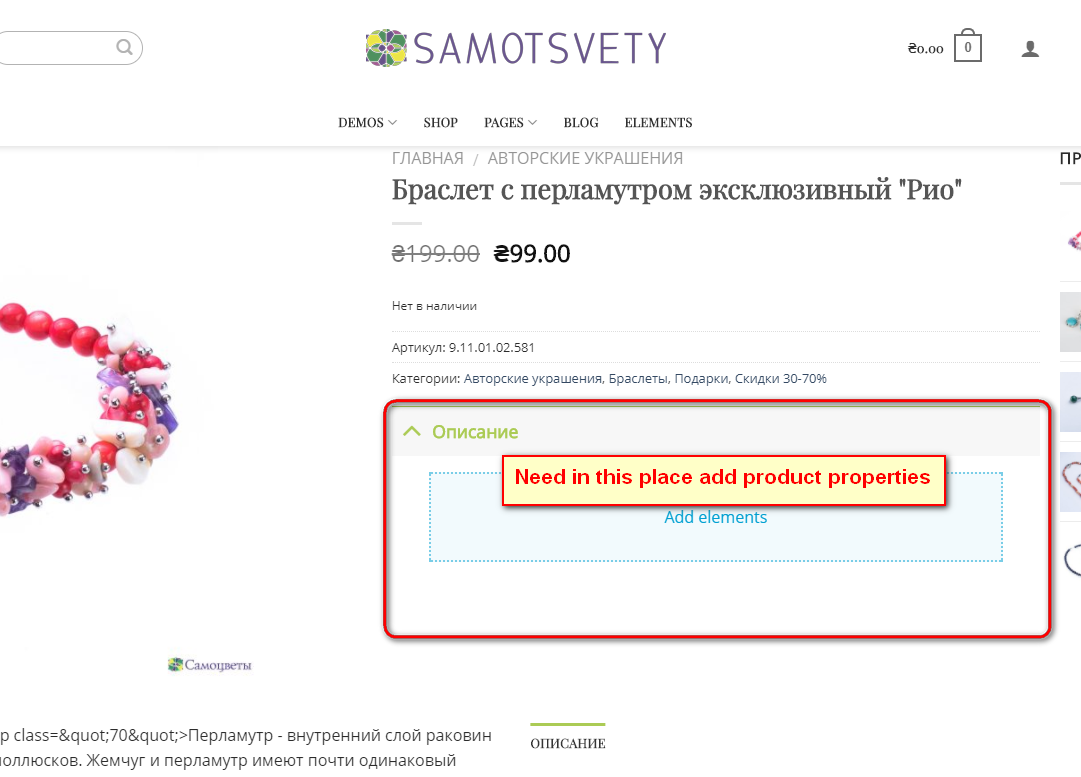
Hi. How to place the attributes of the goods in place of a short description?
Hi there,
You can use the custom Product page layout to place the elements just how you want http://docs.uxthemes.com/article/245-how-to-create-a-custom-product-page
You did not understand me. Theme have this items – http://img.webmister.pro/2017-12-18_134610.png.
I do not need a product tabs, but just an item properties of product.
Example – http://img.webmister.pro/2017-12-18_135042.png
Is it possible to get a badge like a sale, just for pre-order? I use the plugin “woocommerce pre orders”?
Hi there,
You can add a custom bubble in the product Data > Extra > Custom Bubble settings.
And what exactly there to write? To make it appear only with goods that are pre-ordered.
It is necessary not to replace the text, but add one more bubble.
Hi. How to remove “SHOPPING CART>CHECKOUT DETAILS>ORDER COMPLETE” from “thank you page”?
Hi there,
This CSS should do the trick, place it in Theme Options > Style > Custom CSS
.woocommerce-order-received .checkout-breadcrumbs{ display: none; }
It works. Thank you.
Hi
Could you help regarding color of the active link in main menu?
http://larido-projektywww.pl/akcesoria2017/For PAGES it is already solved. Active page has colored active link. But for such items like WHISHLIST menu item (far right main menu item) I can not force theme to display colored link if it is active link.
How to write css to force the wishlist link in the main menu be colored if it is active link?
Best Regards Larido
Hello Larido,
This CSS should do the trick. Place it in Theme Options > Style > Custom CSS
.woocommerce-wishlist .header-wishlist-icon font{ color: #c53b47 }
unfortunately provided code does not work.
this works for the wishlist link in menu (but it work in all states: normal, hover, active): li.header-wishlist-icon> a > span {color: #ba0818 !important;} but how to convert above style to work only if wishlist link is ACTIVE?
Best Regards Larido
Hello,
I just installed your theme and started testing the UX Editor. Now I ask myself how I can add content on top / bottom of categories with the UX Editor? Kind regards,
Alex
Hi Alex,
Create a block of the content you want displayed http://docs.uxthemes.com/article/237-ux-builder-how-to-use-blocks and then you can place the blocks in the Top and bottom contents sections in the Category options in Products > Categories > Edit Category.
Hi,
If I update my theme I get this error: An error occurred while updating Flatsome: Directory can not be added. flatsome/inc/admin/envato_setup/child-theme. I do know what it’s cause because I gave the theme another name. I think if the theme is called ‘Flatsome’ it works again. Can I rename my themefolder /wp-content/customname to ‘Flatsome’ again without losing any content and stylechanges?
Many thanks in advance
Hi there,
To rename the folder, please activate the default theme Twenty Seventeen, rename the folder and then reactivate the theme.
If I do, I lose my theme options
How does one add the left side bar filter thing, all my category pages dont show them
and how do i have “add to cart” under said product as right now there is only quick view
nevermind found the add to cart option
Its wierd I cannot get the shop sidebar into my shop pages – it only gives me the option of the normal sidebar
Hello Matthew,
You can activate this in Theme Options > Shop > Category Page > Category Layout > Layout and select the Off canvas layout.
Hi, we added product categories (using screen setting) to our main menu. When clicking on a main menu item, the active list item is colored. But this doesn’t happen while clicking on a product categorie in the main menu. How can we fix this? You can check it out on https://alpha.drone-kopen.be and clicking on ‘drones’ in the main menu.
Hi there,
This CSS should do the trick, place it in Theme Options > Style > Custom CSS
.menu-item-object-product_cat.current-menu-item a{ background-color: #1a9cf2 !important; }

This item was featured on ThemeForest

Power Elite Author
Contact the Envato Market Help Team