19076 comments found.
have you any Environment WordPress Theme???
Hi,
we do not have typical Environment pre-built website but maybe BeEco will fit to your needs.
Best regards,
Muffin Group team

I recently purchased this theme and I have a general question regarding the set up. I am lookin to create a custom website using the theme, and there are two different sections I like from some of separate demo sites that are included. In the past using other themes I’ve loaded them locally in order to reference the demo sites as I build out my own custom version. It looks like with this theme I can only build 1 site at a time since it requires the purchase code. Is there any way to be able to get familiar with the theme and load some of the demo sites locally without while building out a separate site?
Hi,
yes, it is possible of course. You can install extra WP installation locally and test there or use multisite. Such solution, will let you share one registered license among all parties connected with multisite.
Best regards,
Muffin Group team
Thanks for the response,
That makes sense, but that still uses up registration license on the multisite. I wouldn’t have a license code to use on the real project I am working on? Or is there a separate test license that could be used for the multisite?
You can create test environment under the sub-domain of the real project for example or if you want to have them in different places, you can de-register test license when it’s finished and then register key for the live project.
I have an issue with icons in the copyright section not showing. They appear on the homepage but no other page.
Hi,
as you can see, there is no “Purchased” label next to your nickname what means you did never bought this theme. And because support is for our customers only, we can not help you unfortunately. If your client bought it, tell him to create account on support forum and post your questions there.
Best regards,
Muffin Group team
all icons in your demos are blurred. are you dont offer reetina icons or vector icons?
Hi,
please send us link to page where icons are blurred because we are not sure what you mean.
Best regards,
Muffin Group team
All images in all demos like here the tick icons: http://themes.muffingroup.com/be/pay/pricing-list/ – I use a retina display.
Those are images and not the icons. If you want to use icons instead, you can replace those images with the icons, you can find on http://themes.muffingroup.com/be/theme/shortcodes/typography/#icons
No, I want to use images, but not blurred ones.
If you want to use images, then you need to have 2 same images but with different name and the bigger one should be twice size. More details about this feature, you can find in the documentation.
Make sure, you have Retina.js option enabled under BeTheme Options > Addons & Plugins > Addons section.
Hi,
one more question for you guys: how to create submenus tab-like in a blog page with categories? I managed to do that for portfolios but not for posts.
Thanks again! S.
Hi,
where did you saw such sub-menu on our demos? Please provide more details so we can avoid confuse.
Best regards,
Muffin Group team
There’s a tab subdivision on the BeforHome template on the products section(http://themes.muffingroup.com/be/home/products/).
Thanks, S.
This is Portfolio page for which we set category filtering user BeTheme Options > Blog, Portfolio & Shop > Portfolio section.
Yes- I tried doing the same for a blog page with post categories but it doesn’t work in the same way. Am I doing something wrong or this is not available for blog pages? Thanks!
How does it work on your end then?
I created post categories, in the theme options>Blog>Filters I picked the Show only Categories, but nada. No tabs in the UI. I was wondering if there’s another way to do it or it just doesn’t work on the blog side?
Please send us access to your wp dashboard so we can take a closer look on it then. Also, please do not forget to provide information in message, what for this access is.
Hi could you send me the Be Tuning theme psd files?
Hi,
for any PSD files, please always send us private message thru contact form which is on the right side at https://themeforest.net/user/muffingroup#contact (you must be logged into Themeforest’s account).
Best regards,
Muffin Group team
My visual composer did not update so I deactivated and deleted the old copy to try to get the theme to reinstall it but no luck any ideas
Hey,
please be so kind and send us WordPress dashboard access privately thru contact form which is on the right side at http://themeforest.net/user/muffingroup#contact and we will check what might be the reason. Please don’t forget to let us know in a message, what for this access is.
Best regards,
Muffin Group team
Hi There, i was bought a WPBakery Page Builder for WordPress (formerly Visual Composer) and would like to add to the theme, but seems like the theme disabled by using vc_remove_element. Can you advise? Thanks
Hi,
if you bought plugin’s license and you want to use it instead of bundled version, please switch to premium license under BeTheme Options > Addons & Plugins > Premium plugins section.
Best regards,
Muffin Group team
I have some doubt before purchasing this theme will you please guide me. 1. I want this for a travel agency so will it suits for travel agency. 2. I want mobile number registration with login and want mobile notification while ordering any package by customer. 3. does its support fully woocommerce 4. and last i want user can write blog which will be not publised until unless its approved by admin.
Hope you have all my questions answer 
Hi,
1. We do not see any reason why it won’t fit to such kind of website.
2. You need to look for a plugin because we do not have such feature included by default.
3. Yes, BeTheme supports WooCommerce plugin.
4. As far as we knows, this could be handled by WordPress itself.
Best regards,
Muffin Group team
Are your 300 demos built with Visual Composer or Muffin Builder?
Hi,
pre-built layouts were built with Muffin Builder tool which is much lighter, easier in use and faster. We can not build those demos with Visual Composer because it’s an additional plugin and in reference to right agreements, we can not force users to use 3rd party plugins. Also, for many users, Visual Composer just doesn’t work right because plugin is quite heavy and requires good hosting service.
Best regards,
Muffin Group team
Hi there, got a portfolio page Masonry Blog Style and I am not able to figure it out where to edit the text below the picture. Yeah! I’m having a blonde moment so please help! Thanks!
Hi,
this is post excerpt and you can edit it while post editing. If you don’t see Excerpt field, please click on Screen Options in the right top corner and activate it.
Best regards,
Muffin Group team
Works! Thank you a bunch!
You are welcome! 
After 20.7.8 and 20.7.9 update I have problem with Woocommerce. It always shows product even when I have it to show categories. I think this is some problem with BeTheme, because on my other few sites evertythink works fine. This is my website: http://glpower.eu/en/products/led-power-supplies/ (here should be categories, not products)
Hi,
yes, we know about this problem and it would be fixed with today’s update. Should be available within an hour.
Best regards,
Muffin Group team
Is it possible to keep the logo at the top but move the menu to the bottom of the page?
Hi,
the logo and menu are part of the Top Bar and it is not possible to separate them.
Best regards,
Muffin Group team
Compatible with the Elementor page builder?
Hi,
sorry but we never tested above plugin with BeTheme so we don’t know if it’s compatible.
Best regards,
Muffin Group team
I used the code for a test website. How do i transfer the license to a live site? I am getting an error…”Purchase code already used. Please deregister purchase code and remove theme folder on…” How do i deregister? I’ve already deleted that folder?
Hi,
if you have any issues with registration/de-registration, please send us always private request thru contact form which is on the right side at https://themeforest.net/user/muffingroup#contact
Best regards,
Muffin Group team
Pre-Sales Inquiry - Does it support WPMU DEV
Hi,
we did never tested theme with this wpmu dev so we don’t know if it works or not.
Best regards,
Muffin Group team
HI,
On one of my pages no longer updates any changes that are saved on the page. How can we fix this?
Regards.
Hey,
please be so kind and send us WordPress dashboard access privately thru contact form which is on the right side at http://themeforest.net/user/muffingroup#contact and we will check what might be the reason. Please don’t forget to let us know in a message, what for this access is.
Best regards,
Muffin Group team
How to add telegram to icons?
[button title=”Telegram” link=”#” align=”” icon=”???” icon_position=”right” color=”#01afec” font_color=”#fff”]
icon-telegram and fa fa-telegram – does not work
Hi,
as you can see, there is no “Purchased” label next to your nickname what means you did never bought this theme. And because support is for our customers only, we can not help you unfortunately. If your client bought it, tell him to create account on support forum and post your questions there.
Best regards,
Muffin Group team
Hi,
I’ve just started using the BeTheme after purchased it several months ago. I have to say this theme is easy to use, even I don’t have much experience of using wordpress.
However, I found some features do not exists as showed in your website
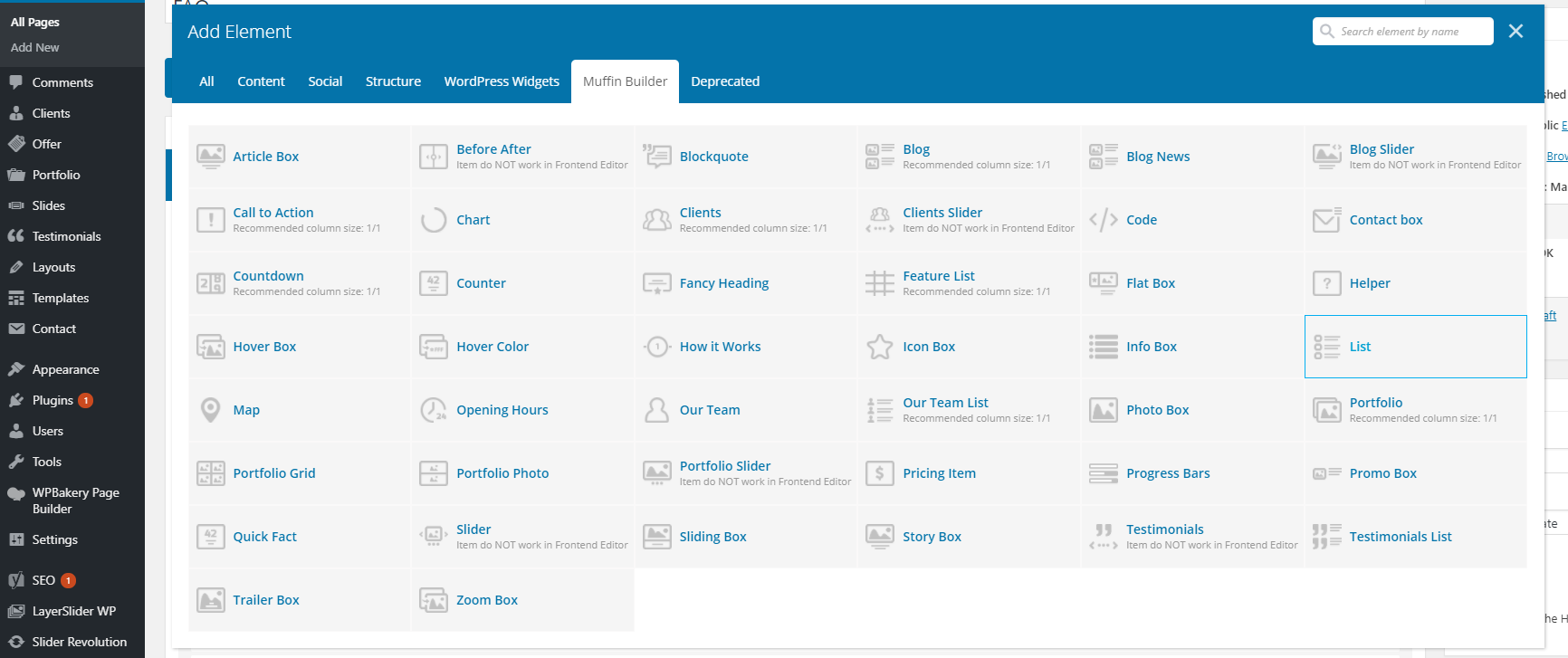
http://themes.muffingroup.com/be/theme/shortcodes/content-elements/#timeline http://themes.muffingroup.com/be/theme/shortcodes/boxes-infographics/#featureboxThese items cannot be found when I tried to add a new element using Muffin Builder. I am using the latest version (re-download it again couple of days ago)
Are these items terminated? bug? am I missing something?
Regards, Tanya
Hi Tanya,
both items are included into theme and exists of course. We suggest to re-install your theme by removing all theme files from FTP and uploading newest instead.
Best regards,
Muffin Group team
Dear muffingroup
I did as you suggested (with the Latest Version 20.8 – January 9, 2018) removing all theme files from FTP and uploading the newest, but it doesn’t work. The features I’m looking for do not appear  Are these features available on “Add element” when I’m using the backend editor?
Please help
Regards, Tanya
Those features are available for Muffin Builder. You need to click “Add item” button inside Wrapper element.
Dear muffingroup
I have already done what you suggested for the 3rd time, still failed. I have no idea what I was missing. There is no “featured box” and “timeline” in the list. (are they supposed to be here?)
http://www.step1990.com/wp-content/uploads/2018/01/lost_element.pngRegards, Tanya
We can see that you are using VC and not the Muffin Builder as you mentioned above. So, the items you are asking for works with Muffin Builder only and that’s why you don’t see them on the list of items included into VC plugin.
Alright, I understand now. I only focused at the “Muffin Builder” stated on the VC (as showed in the picture), not the other one. Thank you very much for you help for many days
Regards, Tanya
No problem
I read that each website needs a separate license except when it’s installed in subdomains. Is this also for addon domains?
Hi,
in reference to Themeforest license and agreements, once purchased license can be used for one site/domain only. If you want to use this theme for few sites, then you must buy as many licenses as many sites you want to build. This applies to all themes on this marketplace and there is no other license available.
For more details about the license of all products on Themeforest, please navigate to https://themeforest.net/licenses/standard
Best regards,
Muffin Group team