2458 comments found.

mate honestly the worst possible builder for mobile responsiveness. Great to build a fast site. but now i have lost two days fixing the issues and at this stage its pissed me off that much that im going to delete the site and start again back with a different builder. Glitches bad. & yes everything is updated to your latest patch.
Sorry to hear about that please contact us by visiting https://help.pixflow.net/hc/en-us/requests/new and we will answer your as soon as possible.
Hello, I have a lot of troubles to make my homepage responsive. This is the website: www.flyovertime.com. I’ve taken an other code to integrate the video since it’s not working well with Massive Dynamics but still the column just after my video are not responsive. One is going on the other one. Please help.
Hello there , sorry to hear about the issue you’ve had with Massive Dynamic , please contact us by visiting http://help.pixflow.net and we will answer you as soon as possible.
Hi,
I just bought the theme and I would like to congratulate you guys on the great work you have done.
I was just wondering, though, if you are planning on releasing more pre-built websites in the next release. If so, do you have a date for that?
Regards,
Hello there
Thanks for your compliment , actually there is no specific date for “new demo” release but we do our best to add more and more features to our theme in each update.
Hi, Is there an easy way with your theme to use a website in 2 languages? I don’t want to make use of WPML. I just want one simple website, where with a click of a button the person can view the website in a different language. That means that alle text, menu items, pages, posts etc., are translated into the other language when the users clicks on the button.
Hello ,
Massive Dynamic is translate ready and you have 2 options for translating it , one is to use plugins like WPML , Qtranslate and other ones or you can have 2 separate WordPress installation in one website so you can have two different language on your website..
Is there a way to enable scroll between sections with keyboard up/down arrows (it is not working on Media-agency and Landing demos)?
Thanks
Hello , Sorry but for now that feature is not available.
Is there a way to set the font size smaller than the default? Under customize > typography setting, it seems the smallest font size for Paragraph is 15px and I would like it at 13px. Any insights on how to do this?
Actually for doing that you should use custom css in site setting , please contact us by visiting http://help.pixflow.net and we will offer you a proper custom code base on the element you want to modify.
Hi I purchased this theme but am having some difficulties with it.
How do I embed a vimeo video to the page so that it can be played directly without opening a lightbox?
Hello there
Please use visual composer backend editor ( can be installed and activate by visiting admin panel >> appearance >> install plugin ) to insert “Raw HTML” shortcode so you can use vimeo embed code there.
Hi and thanks for the reply.
The visual composer did the trick for adding video to the page. However can I do the same to portfolios? I want to use the category filter feature and have it link the thumbnails to pages with description and images and videos (kinda like a behance project description). Is this possible?
Sure you can do the same for portfolio , please check following article https://help.pixflow.net/hc/en-us/articles/115004299714-Massive-Dynamic-Portfolio-guideline now you can read following article to see how you can activate visual composer for custom post type https://wpexplorer-themes.com/total/docs/enable-disable-vc/
I added the code in the css to remove the header but I still see it on mobile. How do I remove that from mobile?
Please use following code in site setting>> general >> custom css
@media (max-width: 1280px){
body:not(.compose-mode) .layout header:not(.retina-screen-header),
body.compose-mode.responsive-mode .layout header:not(.retina-screen-header) {
    display: none !important;

}
}
Actually what I want to do is show the regular menu (desktop) on mobile simple because I dont like the mobile menu. Is there a way to do this and remove the cart, search icons from the mobile and desktop?
Hi there
Unfortunately that procedure is not possible as it will cause many side effects.
ok, how do i remov?e the cart and search icons
Can I show a 2nd logo for the mobile view?
About those icons please visit site setting >> notification center or read following article about the logo you can set dark or light mode for responsive header by visiting site setting >> header >> responsive
Thanks for your response, one more question. There is a horizontal line under the centered menu… how do i remove it?
No problem at all , you can remove them by visiting site setting >> header >> appearance >> header style >>type.
I don’t see a “header style” in that sequence you gave.
So it must be hidden depends on the header you are using please contact us by visiting http://help.pixflow.net and we will answer you there as soon as possible.
Hi together,
I have a big problem with the theme. First of all I can not edit pages and got an HTTP500 error. Second, I found the the required plugins were deinstalled. When I install and activate them I can not acces wp-admin (HTTP500). I tried to pick only “WPBakery Visual Composer”, but it did not work, it seems to be the problem.
I have to say, before everything works fine for a long time! The issue must be some weeks old, don’t know exactly.
What do you suggest?
Regards
Hi there
Please contact us by visiting https://help.pixflow.net/hc/en-us/requests/new and we will answer you as soon as possible.
Thanks for the reply,
like I said it is a plugin, so point 3 don’t match in your requirements. Installation of “WPBakery Visual Composer” (js-composer) is the problem. Currently I am not able to edit a page. wp-admin and page are accessable.
What now?
I am waiting you help.
Regards
Thanks! I created the request and hope you have everything you need. Waiting for your answer.
Regards
Thanks , our support team we will help you as soon as possible.
Hello I’m facing the issue that font of a text (Rich Text, Text) changing when loading page. I means at first text loading as 1 font and after 1 or 2 seconds it changes to another font when page is still loading
Hi there
That procedure happens because we load our fonts in footer of website to increase website loading speed , you can use wordpress preloader plugins so your website shows up when it’s completely loaded.
Is that the only method ?
That’s one of many procedure we have for speed improvement in Massive Dynamic so we will not offer to disable that option.
tks for your support 
No problem at all.
Hi, I would like to ask some question regarding ninja popup error, my client buy this theme for me.
Why my ninja popup can’t show the header, subheader and text. I buy the plugin already and ask the plugin developer, here is their response:
“This is caused by this style in your theme – http://prntscr.com/i23hig – if your theme developers recommend NP plugin then they might have ready fix for that”
Can you help me on that issue, here is my web address http://getskybound.co
Hello there
Please visit http://help.pixflow.net so we can help you there with adding exception to that style.
Hello guys, My in page text editor does not work on my template. It only shows up if i add separate sections and then only on these. How can i fix this?
I am using the app2 template currently, but have the same problem on every one i tried
I was also wondering if you have a faq on how to use all the functionalities?
Please visit http://help.pixflow.net , you can read our documentation or our knowledge base for more information too.
Hello guys. I bought your theme but just know I saw that you theme looks really bad on mobile, even your demo.
I’m looking at http://theme.pixflow.net/massive-dynamic/digital-agency/ and every element is not aligned, spaces are too big or too small, I can’t see all the content in a section because when I scroll down it takes me to the next section, ...
I really need your help to fix this.
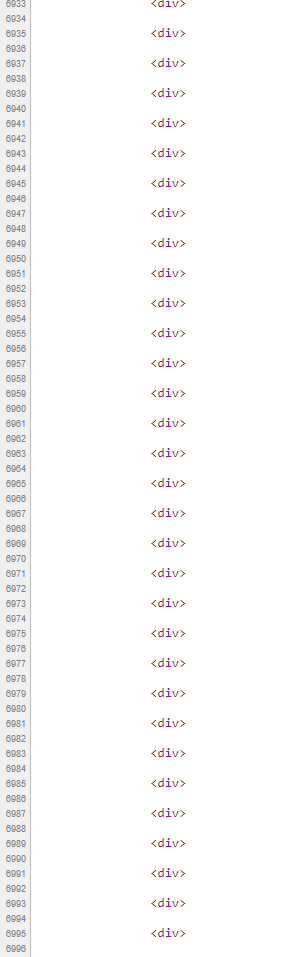
I must say that on desktop it looks good. Just one thing: +7000 lines on source code? And about this: https://i.gyazo.com/6a31a1c4fa28ac99a7bc6ba98ab5d93e.png
Hi there , we’ve already answered you in our help center , but for other user i can say the codes issue happens because of old rich text box shortcode which cause some additional div tags to show up but in new updates this issue will never happens.
Ok, thanks. Just let me know when you’ll provide a solution for mobile issues. As you understand, it’s impossible to launch the website without fixing those bugs.
Sure we will contact you in our help center about the mobile issue you’ve mentioned.
Hi, I want to know if your theme now compatible wordpress 4.9.2 currently?
Thank you.
Hello there , yes it’s compatible.
Thank you very much.
No problem at all.
hello, this is the last version of the theme. I installed it and it does not let me edit it for example, I installed the theme of the Digital Agency.
It takes time to load and then it shows blank screens. some plugins give problem.
Hello there , sorry to hear about that issue , please visit http://help.pixflow.net and we will answer you as soon as possible.
Hi there, a client has come with a website using this but i would like to purchase this myself and update the software as the whole site is barely working with this currently as its beyond glitchy. How would i update it after i purchase it? / is this possible without ruining the site?
Hello there ,
Please read following article to see how you can update your website theme , also you can contact us by visiting http://help.pixflow.net
Hello,
These are pre-sale questions:
1/ Can we have this kind of “angled” transitions between rows with your theme?
https://i.imgur.com/SsaymfJ.jp
Is it what you call “sloped edge rows”?
2/ Is your theme fully compatible with WooCommerce?
3/ I tested one of your demos with GTmetrix but I’m not getting the scores you’re claiming you get: https://gtmetrix.com/reports/theme.pixflow.net/uZ2e6N29
Thanks in advance for your reply.
Best regards,
Sorry, I just realize that the letter “g” is missing at the end of the image link in my previous message, so it’s: https://i.imgur.com/SsaymfJ.jpg
Hello there
1 – Please visit http://theme.pixflow.net/massive-dynamic/general/shortcode-row/ you can see an example of our sloped edge row.
2 – Yes it’s and we will be glad to help you with any possible issue.
3 – Actually we are running that procedure only on our general demo theme.pixflow.net/massive-dynamic/general/ and with same procedure you can get that score on any other demo.
Thank you for your reply. As for point 3, are you referring to http://theme.pixflow.net/massive-dynamic/general/ ? I tested this one too but the results are not as good as you claim they are: https://gtmetrix.com/compare/NLQteJ7R/B8BN7DCh
That happens because we are doing some technical server update so some scores may be reduced but you can achieve the 100 on proper hosting environment with proper configuration
Props for the hard work, the theme and the builder are working fine. I am just having some issues with activating a ninja pop-up with a button/link in the revolution slider. On page load the pop-up does it’s job, but on click it doesn’t work. I went to pages to edit the home page and entered classic mode to add [ninja-popup id=XX] and afterwards edited the text of the button in the Revolution Slider Newsletter, the following message appears on click: “The requested content cannot be loaded. Please try again later.”. Maybe I am missing something… I would be glad, if we can get this fixed. I am stuck on it for a while now and it’s getting frustrating. Thanks!
Hello there
Please make sure you are using one of ready template of plugin and then try again , if the issue happened again please visit http://help.pixflow.net so we can help you there as soon as possible.
I have a lot of problems with this theme/product. I’m not happy with this theme. So i want my money back. let me know, thanks
Please visit http://help.pixflow.net and if we were not able to help you we will accept your refund request.
I just did. I don’t have a code and i’m not going to use this theme anymore. Again there, sorry to say, but I have a lot of problems with this theme/product. I wanted a theme that’s easy to use and this ain’t it for me. I’m not a designer or wordpress specialist. so i can’t explain all the problems i got with this theme.
So i just want my money back.
Sorry to hear about that please contact by visiting http://help.pixflow.net and we will talk about refund procedure.
Hi, How do you change the currency of the product box? I need it to change to Indian currency? Where can I change that? Ps. AMAZING theme to work in. So intuitive, easy and flexible. Thank you. Cant find at (lib/extendvc/extend-mb.php) – 1921
Hello there , thank you very much for your compliment , please visit https://help.pixflow.net/hc/en-us/articles/236350828-Massive-Dynamic-Adding-custom-currency-to-price-shortcodes
Using this I’m still not unable to Change Currency in Pixflow price Box !
Please help.
Please contact us by vising http://help.pixflow.net and we will answer you there as soon as possible.