204 comments found.
Good evening, I don’t have the option to Activate MegaMenu, that is to say in the upper part if I can mark it, but when I see it in the MENU option I don’t go out to mark it.
That is to say, in the MENU itself, the option to dial MEGA MENU is not available.
Attached image: https://ibb.co/f0cYNS
Hello,
If you are using a plugin to add more features to your menu, please disable. Our mega menu options are bundled within the theme.
https://freevision.ticksy.comKind regards.
I have disabled all the plugins and we have the same problem, how can I fix it?
Submit a ticket already? Please submit one if you not sent one already, and grant me wp-admin panel access. Please don’t post private data here.
Okay, we’ve already sent the ticket.
Checking immediately.
All my fonts suddenly disappeared. I was editting some content, then refreshed the page and noticed all the font on the site defaulted to Times New Roman. I went to the theme’s settings under Typography and the dropdown for all the fonts are gone. This literally happened out of no-where. Any help will be great.
Hello, thanks for contacting us. Please open a ticket and state your case along with admin credentials so we investigate your issue.
Best Regards
Thanks, just opened the ticket.

Hello. Did the Instagram API depreciation affected the Instagram feed of the theme? Looks like mine stopped working today.
Hello,
We are aware about the situation, Instagram suddenly decided to stop services which is set for July 31 2018 previously. We will release an update once we done with it.
Kind regards.
FYI, the problem has been solved, an update coming immediately. Please make sure you are following theme updates on themeforest to not miss any.
Kind regards.
Bonjour, je cherche à traduire des termes du thème et en particulier ( Published By ) (WIEW NOW) merci de me répondre
Hello, thanks for contacting us. We recommend WPML plugin for multi-language or you can use translation files where located in “lang” folder. If you can handle it please open a ticket for us.
Also you can check out : http://doc.freevision.me/wedding-planner/knowledge-base/how-do-i-translate-the-theme-into-different-language/
Best Regads
Hello I’ve submit a ticket (#1519367) but no answer, so I try here. There is a bug with firefox (not with the other browser): an empty space is added on the top of the header menu… it also happens on your demo, so it’s a problem from the theme… could you please solve it as soon as possible, it’s really ugly…
Helle, your ticket has responded. Please respond on your ticket. Best Regards
Hello i have a little problem with translation. Where i can change text “Previous Post” and “Next post” to my language or delete the previous or next post option?
Hello,
You can use translation files or see functions/classes/helper.php line 927 and 949. Whenever you need further help, please submit a ticket via https://freevision.ticksy.com
Kind regards.
HI Sir/Madam,
I have purchased this theme on 8th March 2018, I’m unable to upload it on to my C-Panel from go daddy.
It is getting struck while getting uploaded to the port.. Can you please help me with getting the theme uploaded?
Ticket Number : #1056975
Web Site Address : www.greenmystevents.com or www.weddingcrafts.in
Hosting space if from Godaddy
Hello,
There is no ticket with this ID, please make sure your ticket reached to us, http://freevision.ticksy.com
Kind regards.
Hi, why in the mobile version there is not the music?
Hello, mobile devices does not auto play videos/music. Thanks for contacting us.
.
Hello,
plugins/mailchimp-widget/lib/ns_widget_mailchimp.class.php look for;
<input id="<?php echo $this->id_base; ?>-email-<?php echo $this->number; ?>" class="heading-font" type="email" name="<?php echo $this->id_base; ?>_email" placeholder="<?php echo __('Your email address', 'mailchimp-widget'); ?>" />
Kind regards.
Ok big Thanks to you! It solved my problem  .
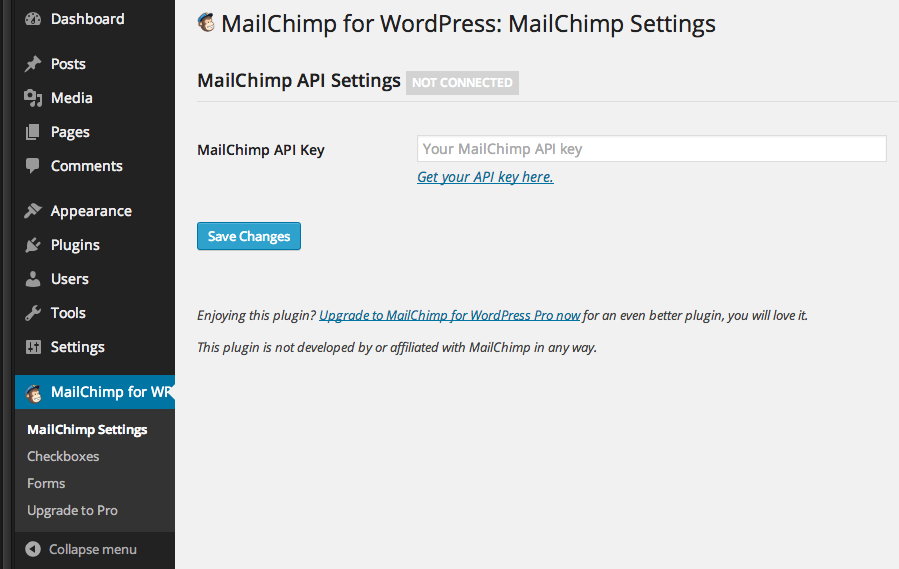
Can you tell me more about emailchimp? Where i can configure that plugin, because i haven’t got this option in menu wordpress menu https://int-dir.s3.amazonaws.com/uploads/howto_128_setup.png
when i write email adress on form i get an eror, i think it is caused by configuration.
.
Can you tell me more about emailchimp? Where i can configure that plugin, because i haven’t got this option in menu wordpress menu https://int-dir.s3.amazonaws.com/uploads/howto_128_setup.png
when i write email adress on form i get an eror, i think it is caused by configuration.
Please see, Settings > MailChimo Widget settings page, simply supply your MailChimp API key then you can set rest on the widget.
Kind regards.
i entered an api key and i still havent got widget options.
Hello, please open a ticket and state your request along with admin credentials, so we investigate your case in place. Regards
when i try to Connect your site with my envato account i get this “{error not found”}” so i need help here or email
Please use contact form on our themeforest profile page, so we can confirm your account once we get your email.
Kind regards.
i wrote this message and i still waiting. I need help with this widget man.. Can you write me by e-mail? Oskar@hertman.pl
I’ve sent you en email. Thank you.
i have not receive en email.
Please check your junk/spam box. Perhaps it’s blocked.
Hello,
plugins/mailchimp-widget/lib/ns_widget_mailchimp.class.php look for;
<input id="<?php echo $this->id_base; ?>-email-<?php echo $this->number; ?>" class="heading-font" type="email" name="<?php echo $this->id_base; ?>_email" placeholder="<?php echo __('Your email address', 'mailchimp-widget'); ?>" />
Kind regards.
Hi! I love your theme and I am thinking about purchasing. I just need to know one thing – when I click on “Portfolio” it shows bunch of images but when I click on one of them it doesn’t lead me to a photo gallery from that project. Is there a way how to achieve that? As a wedding photographer I need each photo in the “Portfolio” to lead to a full gallery from different weddings. Thank you so much!
Hello,
I am not clear about your question, but you can add whatever you want into a Portfolio page. And we are always ready to help customers for their little change requests.
Kind regards.
Hi, i try to install the theme but when it ends wordpress send mi this message:
Are you sure you want to do this?
Please try again.
Hello,
Please try to upload your theme via FTP, this is not a theme issue BTW, but might be about server/wp configuration. If you feel stuck, please submit a ticket via http://freevision.ticksy.com and let us try for you.
Kind regards.
Have you already, or do you have plans to add Woocommerce to this template?
Hello, thanks for contacting us. Currently no plan for woo-commerce. Sorry for that.
Having an issue where my site is trying to load retina images (@2x) and it’s throwing 404 errors.
Hello,
retina.js script throwing the messages, not server side. I’ve updated the scripts, so you will not get these messages when you update your theme with upcoming version (almost ready to upload, check back sooner)
Kind regards.
No, this is wedding-planner-global-plugins.js that is showing up in my chrome console.
Yes, the script is in this file, uploading the theme update right now, you can update it to get rid of this messages.
Ok. When will this be ready?
Check back in 1hour, version 1.8, if you are using 1.7, remove Visual Composer plugin and install again.
Is it made with Visual Composer? I know it’s compatible, but I need to know if it has been built directly with Visual Composer or not. Thanks!
Hello, thanks for contacting us. Yes all pages created by visual composer. Regards
Good evening, today I bought the theme, and installed the sample content, but at the time of viewing the demo page it does not show me the images.
Hello thanks for contacting us. Could you please open a ticket and state your case along with admin credentials so we check things in place.
Best regardsSince yesterday I sent a ticket and I’m waiting for an answer, and they don’t tell me anything, it takes so long technical support?
Hello,
As I checked the tickets, you’ve responded back (we have requested for wp-admin panel) few hours ago (and please mind time zone difference).
So, your ticket not waiting since yesterday (your first ticket arrived 19 hours ago) 
Anyway, we will login to your wp-admin panel and check your issues, then we will report you what was the problem for you.
Kind regards.
Yes, more than 6 hours ago I sent them the access (which is what they asked me to do) Please, I hope for a quick help. Thank you
You are right, but please mind the timezone difference too, responded your ticket already, please respond me back via ticket.
Yeah, thank you.
I already answered it, I hope you can fix it soon.
For sure, I’m try to debug why Visual Composer set the rows as invisible. Thank you.
Thank you for everything
Hi, great theme.
We have purchased and built our site with little to no issues, we are just experiencing one problem.
We are using two logos, the main logo is displayed on page load, and the alternate logo once the user has scrolled.
The problem is, on mobile, when I scroll, it is leaving the primary logo there also. So I have two logos appearing in the header bar. The primary logo is white, so not immediately visible, but it is pushing the secondary logo down.
How can I fix this so the primary custom logo disappears completely when I scroll
Thanks
oliviahooper.co.uk
Hello, thanks for contacting us. Please open a ticket and state your case along with admin credentials, let’s check things in place. Regards
how can i modify the background image in the coming soon page. I need also to modify the header section in the top left “Unit D2/D3, Wira Office Park LS16 6EB” and the mobile number in the top right
Hello, Info line can be change via Appearance > Theme Options > Layout / Primary Menu logo section.
AS for background image of coming soon page you need to upload image manually via FTP server into "images/assets" and override image name as "rings.jpg"That should work. Regads
Hi, we have bought the theme, and all is working great. However, we need to disable the secondary menu, specifically so that it doesn’t show on mobile.
Please can you let us know how to do this.
thanks
Hello,
Secondary menu? Do you mean the bar which has placed over main menu bar?
Kind regards.
Hi, thanks for the swift response.
I am referring to the Nav bar that appears on mobile view. See screenshot https://imgur.com/a/kHJzG
I would like the site to load on mobbed without a nav bar or menu icon, and for the hero revolution slider to future at the very top
Thanks
So, you want it for single page or site wide?
At the moment I would like it to be site wide, the site is live now so you can see what I am referring to. www.oliviahooper.co.uk
In the future I may wish to include it, however, at the moment we are having a simple one page site so navigation is not necessary.
Thanks
Try this (if you like to use CSS only);
nav.navbar.bootsnav{display:none;}
and
@media only screen and (max-width: 667px) {
#main {padding-top: 0!important;}
}
Kind regards.
Perfect! Thanks for your help and for the swift responses