740 comments found.

Is there a way to hide the variant image thumbnails on the product page?
So sorry I didn’t understand you mean, if you hide it so customers can not choose the variant before add cart. Can you make more clear for me ? Thanks
Say you have a t-shirt with 5 different color options. There will be 5 different thumbnails under the main product image. Can we hide the thumbnails that are attached to a variant, and only show cool product images. This way there will be no slider feature for product thumbnails
Hmzz, can you contact me with store url and admin account ? I will take a look
Thank you
Hello, was wondering if there’s an option or method of having a shop filter according to availability? We often have products sell out, but want to leave them available to view. Some customers have asked if there’s a way to view only the products that are still available. Is this possible?
Unfortunately we can only filter by tag but if your product out of stock so this label will show and customers will understand that product no longer 
Thank you
In the shopify dash >customize. How do I remove the annoying “Support Basel” badge?
Also, in the shopify dash. Customize > then bottom left when I click “theme actions”, how can I remove the demo import feature? I don’t want my client or anyone to ruin any settings by mistake down the road.
On the home page I can click “add section” and select one of the many cool modules you made, but I can’t do it on other pages? I tried selecting a default page and the “add section” doesn’t show up when I customize the theme? What am I missing?
In the shopify dash >customize. How do I remove the annoying “Support Basel” badge?
=> You can add this custom CSS to Setting > Custom CSS
.buy-basel {display: none;}
On the home page I can click “add section” and select one of the many cool modules you made, but I can’t do it on other pages? I tried selecting a default page and the “add section” doesn’t show up when I customize the theme? What am I missing?
=> Unfortunately we only support the section builder for home page, it impossible to have section builder for another page
Need some assistance with lost pages and the revolution slider. thanks!
Hi, can you plz contact me with issue information ? Thanks
You email us on the id we have sent you email
I managed to get the Slider going but I am still missing a few pages that I need. – - Newsletter signup goes to 404 NOT FOUND - Missing the Login/Register page - Missing the Accounts page
I tried looking for them in the files so I could move them over but no luck yet.
Hi, you need allow customer create an account from Setting > Checkout http://prntscr.com/ik7ei5
Thanks
Has the issue reported before: been fixed on this release? It is quite noticeable
Noticed the same issue reported by misteraven regarding font size changing during page load- please keep me updated as I would like to fix this issue ASAP.
Thanks!!!
Yes, thanks, we will update this option in next version
Thanks
Thanks, please let us know as we are intending to launch fairly soon.
how do I update the theme without losing all my settings?
Hi, you can help me check it: https://the4.co/knowledge-base/update-can-not-see-import-export-button/ and https://www.youtube.com/watch?v=3TbYN8RtvDI&index=15&list=PLA7nTzZdSen2OakP6oPNkMQk6YK__Y5j4
Thanks
any info about the latest update? Thanks
Hi, here is it
21-02-2018 – Update version 1.5.4
FIXED: Import demo config issue
FIXED: Small CSS issue in Newsletter section
UPDATED: Live change price when change quantity in minicart and cart page
UPDATED: Coupon field in cart page
Thanks
Hello, can you please tell us how to make font size smaller for product title on product pages, make fonts smaller on menu and mega menu. Fonts are also too large for up-sell, related products and product descriptions, how to change font size and make smaller? thank you
Hi, plz contact me direct, I will give you the custom CSS code
Thanks
I have send email to the4studio.net@gmail.com thanks much
Revolution slider gives an error, I cannot add or edit any sliders. I would like a full refund.
Can you show me the issue to the4studio.net@gmail.com ? I will take a look
Thank you
I saw that another customer reported not being able to use the demo import. Can you please email me the correct files. I have emailed you as you suggested above. I need these files today please if possible.
Hi, plz send the support email, Jm will send you file, we will update new veraion in ThemeForest on tomorrow Thank you
Email me on jakjim@gmail.com
Same problem as the nexturnstore user: I can’t find the Import Demo link. I’ve sent a private message, please reply as soon as possible, thanks
Hi, thank you for report, we found it and will update it soonest
Thank you
Hello,
The theme is not working as expected there is several bugs and errors with Chrome browser see here https://goo.gl/Cq1xo2
Also I am trying import the demo as your instruction in the documentation here https://goo.gl/fjCxMT but that menu is not there at all in Shopify see here https://goo.gl/nUebMz.
I contacted you several times since yesterday morning but your answers was not helping.
You asked me what version did I installed, I only downloaded what I purchased from you and that supposed to be the latest version and it should work with current Shopify version.
Also the (Nitro Powerfull Slider Partner app) that you recommended in your theme is not working, I am getting Ajax error when I try to install the slider as instructed see here https://goo.gl/fUXzSv and here is the Ajax error https://goo.gl/DUYjBV
Due to all these problems and your lack to respond, I have to tell you that I am really disappointed from the theme I really liked it at the beginning.
Can you please refund the money.
Thank you, Ibrahim
Oh I am so sorry about that, currently we are in lunar new year holiday so i can not check it exactly, hope you can allow us help you in 22 Feb. In case you do not agree, we will accept and refund to you. Thank you
We can not wait, Please refund the money
Noticed the same issue reported by misteraven regarding font size changing during page load- please keep me updated as I would like to fix this issue ASAP.
Thanks!!!
Hi, thank for report, we are in holiday now and will check it when back Thanks
Any updates pls?
Hi, I checked but I see only some elements need js load after CSS, I don’t see the font change, can you take a short video and send to us ? Thanks
Hello, was wondering where I can get more information about the pre-order feature, as well as the portfolio? I can’t find much info on either in the Documentation that comes with the theme. Thank you.
Hi, for pre-order, you can check how to config here: https://help.shopify.com/themes/customization/products/add-to-cart/allow-pre-orders
For portfolio, you can check this article from TeaThemes: https://teathemes.net/knowledge-base/use-portfolio-basel/
Thanks
Hi, is it possible to change the name of portfolio to something else? Seems that the function to display the portfolio template is tied to the name and wondering how we might be able to edit it so that it said something else, like “features”.
Thank you.
Hmzz may be we need to customize it because it require a lot of change in code
I need to import the demo but I couldn’t find the (More actions) menu, there is (Theme Actions) down but there is no Import demo.
Hi, which version you use ?
Thanks
I used Basel Main File 1.5.3
Basel Package 1.5.3 .zip
I purchase it today
Please email me on jakjim@gmail.com and I will send you updated package, We are on Holidays due to Lunar new year so we will update our package on Themeforest once we are back but I can send you updated files on email
We are sorry we don’t want the theme at all, we already waited for your reply for 3 days, we need the refund as we already bought new theme from Shopify.
So the one we just bought and downloaded from Themeforest 3 days back was old version and not compatible with Shopify, how come you are selling old version without informing the buyers, As I said before we were in hurry, and we couldn’t wait.
Please raise a refund request if you are not using our theme at all
pre sales question – with the demo import will I have a fully working demo that I can show someone or will I have to go adding in images etc.
Unfortunately import demo can only help you import demo config layout, you need config your image and product to show
Thank you
ok thanks, does the theme support sections?
Yes, of course our theme support sections
Thanks
Did you made any decision?
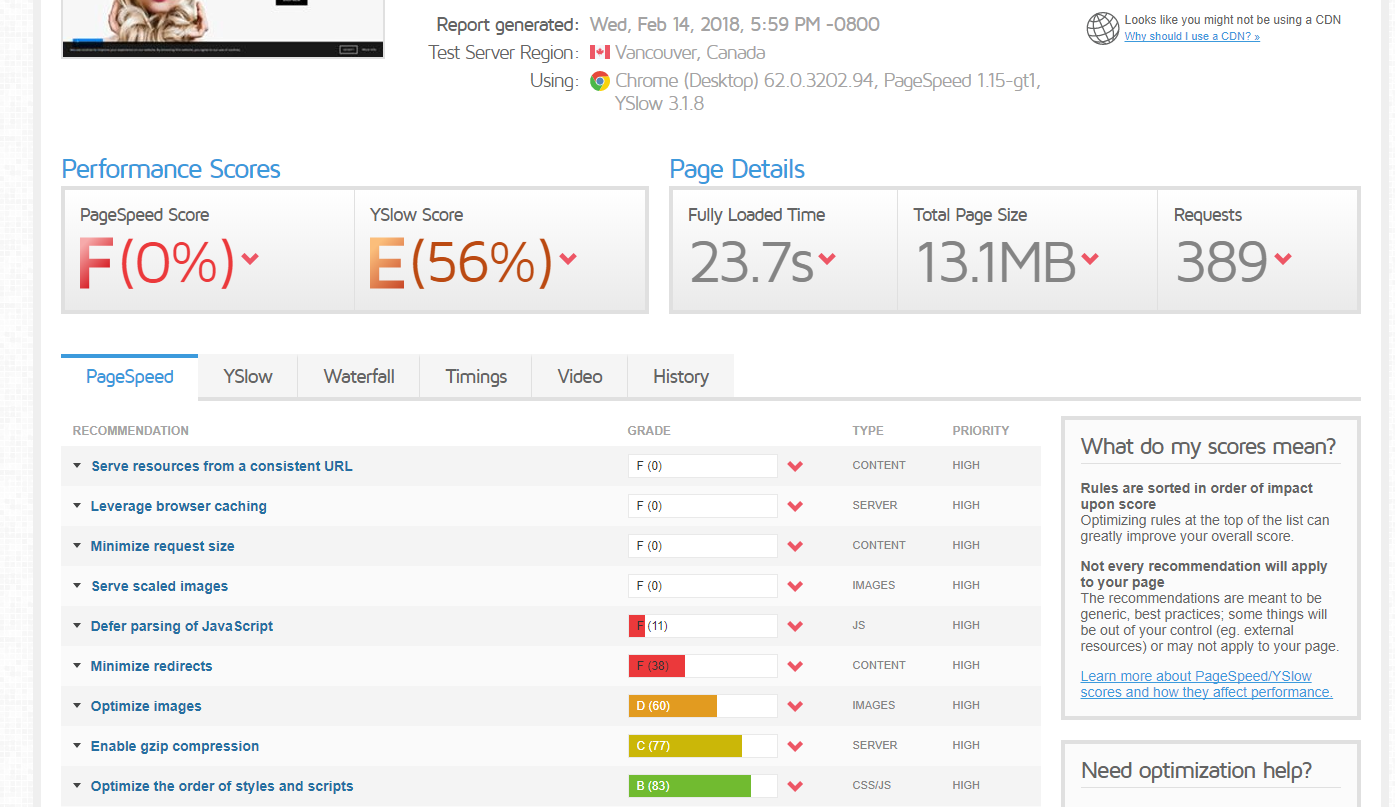
Hello. My page has a really poor performance and I need to fix this before I promote it.
https://i.gyazo.com/0a010ce45adc988bfecd25e457370d5f.pngCan you help me? Images are optimized, what can I do more? I’m mainly a WordPress user and I could fix all that there but I don’t know what to do here.
Thanks
Hi,
We are on Holidays till next week due to Lunar New Year but we will still try to answer your queries
Thanks for your patience
Thanks & Regards, Yoona
Hello, I just noticed a CSS issue after buying and installing the theme that I hadn’t noticed on the demo site originally. I went back and checked and see the same issue on the demo, which is that it seems to take a few seconds for the CSS to render all the type. So when loading a product page for example, you see the wrong font and wrong size for a moment before it all snaps into place. Example: https://demo-basel.myshopify.com/collections/all/products/backpack-double-strap-1?variant=38679493202
Hi,
We are on Holidays till next week due to Lunar New Year but we will still try to answer your queries
Thanks for your patience
Thanks & Regards, jim
when loading, font still correct, just some element / image need more js library load to show so it will delay a bit with text
For pre-order, you can follow this article: https://help.shopify.com/themes/customization/products/add-to-cart/allow-pre-orders
Let me tell you I’ve been using the theme for 3 months now. When you buy a theme you normally look for 2 things:
1. First is a theme that will work and will offer ALL the things you need for your website.
2. Secondly that you will be able to install it and customize it per your needs.
For point #1 this theme has a lot of theme variants that you can use and WILL adapt to your website. You can be almost sure by using the live theme and just playing around with it. Believe me when I say, most of what you see you can customize any way you want. Now I go to point #2, customer support!
For point #2 is really an amazing customer support. I’ve asked many questions and they respond within the hour and even for some small code changes they do it for Free, no questions asked. I love this theme BUT i love more the support it comes with it. Happy customer!
Many Thanks for your lovely comments
Thank you so much
Hi. There’s a way to customize the search results page? Like the collections page where we have the option to choose: ‘Number of products per page’ and ‘Products columns’?
Hi, can you make more clear for me ? I am not sure understand you mean or can you send me direct email to the4studio.net@gmail.com ?
Thank you
Right now, we have the option to change several things on the Collection page, thought the admin interface (customize -> theme settings), such as: ‘Number of products per page’, ‘Pagination’, ‘View Layout: grid/list’, ‘Product columns: 2/3/4/6’. So now my question: Is there a way to change/customize the ‘Search results’ page, or are we stuck with 12 products per page in a 4 products columns grid? Thanks.
So you want have this option for search page ? May be we need customize because we doesn’t support it 
Thanks