38443 comments found.

Is it possible to make Elements have a Conditional Logic? WooCommerce has Endpoints for Checkout, and Checkout>Order-Received, can we display an Element only for “Order Received” pages, and not regular Checkout pages?
Hey brandonthebuck,
That would require custom development as of now – however, you could use WooCommerce filters to hook in additional content on that template.
Cheers
hello 
Thanks a lot for this amazing theme!
I don’t understand why in this portfolio page why the social sharing options and the texte won’t display in the sidebar on the right, even though I selected this option in Portfolio functionality: http://arianetheze.com/oeuvres/remake-up-13/
Thank you
Laurene
Hey Laurene,
try to add this into the custom css box in your Salient options panel:
body.single-portfolio.material .post-area.span_9 {
    width: 68.5%;
 }
Cheers
Thanks it worked! But it’s a tweak, how do you explain it won’t display as it should whereas it works perfectly fine on one of my other websites using salient?
Hey LaureneCastor, the issue is only related to the new “material” theme skin, the other 2 skins should show the issue 
Oh great! So I changed the theme skin then! Many thanks! And again, wonderful WP theme! <3
You’re very welcome LaureneCastor
Hello, Can you please refer to ticket #1521929 for my issue with the Salient theme? Tahir requested that I post the ticket number here so you could take a look at the issue. Thank you!
Hey yskyejohnson14,
I just took a look and responded in regards
Cheers
Hi I am using this absolutely fantastic theme, but I am experiencing a couple of bugs with the responsive design, in mobile view (iPad, iPhone, Android etc.) and on all browsers.
To view the issues listed below here is a link to the live website I have created: http://terracritica.net/
1. On my pages that include the tables made up from “Horizontal List Items” in mobile view the columns are crushed and not kept aligned and separate. Is there a way to make these responsive? I would like all three separate columns to stay neatly divided on mobile. (See: http://terracritica.net/events)
2. On my page http://terracritica.net/publications, I have included a Page Submenu. For some this reason this appears to be hiding part of the top Nectar Slider Banner on my page. Is there anyway for the submenu to appear below the banner or to make sure the user can see all of the Nectar Slider banner here?
Thank you so much for all of your help and with any assistance here in advance!
Hey designish,
1. Add this into the custom css box in your Salient options panel:
@media only screen and (max-width: 1000px) and (min-width: 1px) {
body .nectar-hor-list-item[data-columns="4"] .nectar-list-item, body .nectar-hor-list-item[data-columns="3"] .nectar-list-item {
    width: 33%!important;
    display: inline-block;
}
}
2. It looks like you’ve already moved it below the Nectar Slider element, is that correct?
Cheers
Hey,
Thanks so much for that. For question number 2, the Page Submenu is below the Nectar Slider in my page hierarchy and on Desktop/Laptop display this is how it works. But on all mobile devices this is still appearing at the top of the page and blocking off part of the Nectar Slider.
Do you have any idea how to fix this?
Thanks!
Hey designish,
Can you do a quick test and see if changing the theme skin from in the Salient options panel > general settings tab to “ascend” fix this?
Cheers
Greetings!
I have been using your theme for more than a year and I am really satisfied.
I have been tweaking some options to increase my site’s speed and I have accidentally De-activated my ‘Visual Composer’ plugin. I activated again but now my whole site has CRASHED! Everything is off, the css is not working(Headers, logo are off) and even If i clone a page or make a new and set it up again, its not working as it was/should.
Could you help me out? Thanks in advance
Here is also my site : http://ixorvfx.com/wp/ there is an error but I did not change anything else. My issue seems to be something with the theme css, since even new pages, while the content is placed in the page, the position of columns and Items(Such as the logo) are off.
I managed to find the issue that was bugging the site. The plugin “Better WordPress Minify” was making this issue. I had enabled this plugin because on GtMetrix and tools.pingdom it indicates that there are a lot of resources not minified. Having many requests This is really slowing down the website. Any tip for speeding up? (combining http requests, image serving scale etc)
Cheers <3
Hey refuseresist1989,
You can also try the minifcation option within W3 Total cache, if that’s giving you an issue kindly share the URL so I can take a look
Cheers
Dear TN,
Whenever I add a Nectar Slider through the Visual Composer in order to place a header (under the main menu bar) on a page, I end up with a ‘blank’ bar above the slide itself.
Now, I could add some CSS or add a negative 20px margin, but I’m used to the slider just displaying properly (i.e. without a blank bar) and think its not necessary to add either CSS or negative margins.
What could be the cause of this blank bar appearing every single time and on every single page I try to add a Nectar Slide as a header?
It also happens when I try to make a header with the in-page function (in the page editing section of wordpress, on the very bottom I can add a image header as well, but the problem described above persists with this header as well).
The row I put the Nectar Slider in has all the proper settings so I’m not sure what I’m missing here.
Hey hookieoalo,
Change the theme skin option in the Salient options panel > general settings tab to “Material” to prevent this from happening
Cheers
Can you put icons in the mega menu?
Hey tencatefabrics, not as of now without some custom modifications, but I’ve noted the idea for the wishlist
Hi, I have a problem with the Full Width Portfolio … besides they even made a tutorial: https://youtu.be/_qVplZzPnRA. this function no longer works the button is simply disappeared!!! how to solve this problem thanks in advance for the answer.
Hey 2bii_net,
The full width portfolio option should still indeed be available in current releases – have you verified that no third party plugins you may have active could be causing this? If so, Could you please open a ticket in regards with your admin credentials so we can take a further look into this? https://themenectar.ticksy.com
Cheers
Hey TN, I’ll check! but this possible that it is that! I will keep you posted.
Cheers
Sounds good 2bii_net
Hi, how can allow comments on pages ?
Hey Fercan,
You’d need to add this into the page.php file:
<div class="comments-section">
    <?php comments_template(); ?>
 </div>
The modified file can also be kept in a Salient child theme if desired.
Cheers
Hi there, one question guys. Is it normal that i have no option to change from the shopping cart site to to checkout site?
When i click on “Shopping card”, i can my products but i have no link etc to go directly to the checkout site :-/
Regards
Hey rehmanz87,
Verify that you’re on the latest Salient (8.5.5). If you updated with FTP, verify that the old version of the theme was removed before uploading the new. This issue has only been known to happen when users have updated by overriding the old version and still have old files from the WooCommerce section of Salient sitting around that were removed in the current release.
Cheers
Tried to post on forum but keeps sending me to verification even though its verified.
But just need help with the following: Notice the seperator at the bottom of the hero (above the fold) on designzillas.com – this image (https://www.designzillas.com/themes/custom/bedrock/images/grunge-stripe.png)
Could you help me try put a seperator like that too? https://www.startdigital.co.za/ Im using VC elements and not Nectar Slider
Hey MatthewMurdoch,
You would need to use custom CSS for this. Here’s an example:
body.home .main-content > .row > div.first-section:after {
   display: block;
   content: '';
   position: absolute;
   z-index: 100;
   bottom: -2px;
   left: 0;
   width: 100%;
   height: 110px;
   background-image: url(https://www.designzillas.com/themes/custom/bedrock/images/grunge-stripe.png);
   background-size: cover;
}
Thank you for this, really helped, could you assist me with understanding something as “inspect element” doesn’t help me much.
so the above code applies to the hero image, what is the naming convention for other sections. ie: body.home .main-content > .row > div.first-section:after { = Home
Iv’e tried body.home .main-content > .row > div.second-section:after { and body.home .main-content > .row > div.instance-1:after {
Both didn’t work, hoping you can correct me where i am going wrong.
Hey MatthewMurdoch,
You can actually just use the “extra class name” field when editing your row to add an easy way of targeting them. For example, a row with the class name “about” could then be targeted with the css
body.home .main-content > .row > div.about:after {

}
Cheers
I’m not seeing a visual composer or a way to edit the content anymore. I’m on Salient 8.5.5 and just updated the WPBakery composer? Is this now different than the previous one?
Is something like this achievable within Salients capabilities?
http://egwineco.com/Hey noantsinmypants,
1. Can you ensure that no third party plugins are causing the conflict and also verify that the builder is activated for your post types in the WPBakery plugin options > Role Manager > Post types
2. The full height sections that animate to when scrolled is indeed possible, here’s an example of something similar. However, the wine can that’s set to a fixed position within the rows would require custom development
Cheers
Hello,
This is a great theme but I am not understanding about the navigation bar on your demos.
Is it not possible to have a glass effect transparent navigation bar with this theme? Your demos only show full transparent and so if you have any photo which is not a solid color, you won’t see the menu bar at all during start up, you will have to move the mouse to see it.
Does this theme allow for a glass effect navigation bar right from the very beginning without having to move the mouse to see it.
Like This Demo >> http://demo.qodeinteractive.com/bridge5/
If you can do that with this theme, that would be awesome as Salient a good solid theme with many possibilities.
Thank You
Hey JaegarCroft,
For now that would require a line of custom css – you can have a semi transparent header show at your defined opacity after scrolling down, but at the very top the only default options are to be fully transparent or not transparent. Here’s an example http://themenectar.com/demo/salient-blog-magazine/
Cheers
Thank You for the reply. I appreciate your time.
If you see it as something that would work with your vision of your theme, it would be nice to see something like that added to your future updates. Other than that, you built a great theme that not only looks modern, but also works well for Google, Bing and DuckDuckGo.
Have a good one.
Hey JaegarCroft,
Thanks for additional feedback
Cheers
Good day,
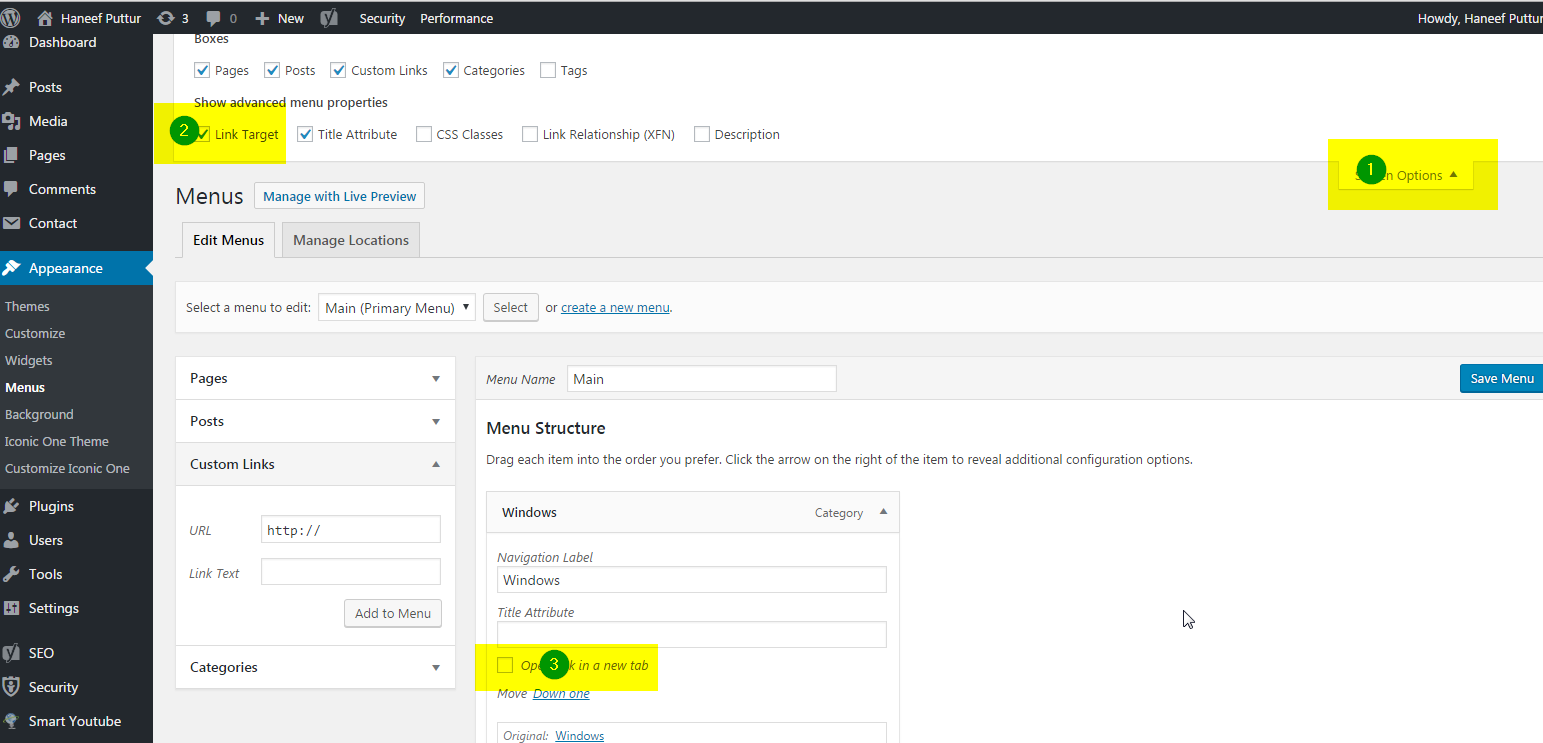
I’m trying to get the submenu on our navbar to “target=_blank” instead of “_self”. Is there any way to do this? Our website is http://adcratesolutions.com.
What we need to “target=_blank” are:
- Agency BRÜCKE
- Architecture DOMINEK
Kindly see attached file for your reference:
Cheers, TheDisjointedMuse
Hey TheDisjointedMuse
You can enable the “link target” option in the screen options tab when editing your menu
Cheers
Hi, why is not it compatible with Thrive comments? 
Hey tecnologyuy, what issues are you experiencing with the plugin – can you elaborate/share a URL?
Hello, Does the theme support png logo upload? For some reason, mine appears to show a broken image. Hmmmm, not sure what I am doing wrong. Appears to be a simple logo upload. http://zestagency.ca/
It’s fixed! I had to enter a logo height and voila!
Hey soarwithit, glad to hear you’ve figured it out
Is there are way to change the text “Previous Post” and “Next Post” when using the “Post Navigation Links On Single Post Page” option. I would want to change the text to something like “Previous Article” and “Next Article”. Many thanks.
Hey wints77,
You can make this change using the included .po file for translating theme strings
Can a button on the page, not the hamburger control the side widget area?
Hey tencatefabrics, as of now this would require a js modification since the only trigger in the script currently is the one via the header nav
When using tabs, is it possible to create a button in another row that can control the tabbed content? For instance, I’d like to use icons to control the tabbed area, but I’d like to display them differently. Thanks
Hey tencatefabrics,
It’s not possible without custom development to control a tabbed section from an external element on the page, however it is indeed possible to use icons within the tabbed controls. e.g. http://themenectar.com/demo/salient-promo/tabbed-section/ When editing your tab, there’s a dropdown to select the icon library and icon
Cheers
That’s perfect. Thanks
You’re welcome tencatefabrics
Hello! I was wondering if there is a way to change the functionality of the “client” tabs to where when clicked, it doesn’t open the link in a new tab? I am having a little trouble editing it. Thanks so much
-Paul
Hey Paul! For this, you’d need to edit the file nectar/nectar-vc-addons/vc_templates/client.php and remove this
target="_blank"
Cheers





)