7929 comments found.

Hi Ibrahim,
I saw your new update it was very great.
I wanted to install the same setup as you did on HOME V4 (https://demo2.madrasthemes.com/electro/home-v4).
How can i easily do that, noting that i have already the existing (previous) files from your initial version. I also uninstalled the plug-in that imports the file (i forget the name of the plugin already)—I was so obedient enough when i watched the demo video, as you told there “to uninstall as it finished its purpose” so i did.
Please help and thanks in advance.
PS i wanted it as it looks the same as the HOME V4
Hello there,
You can simply create a new page and assign it “Home v4” as page template or you can use Visual Composer. Ref :- https://docs.madrasthemes.com/electro/topics/set-up-pages/home-v4/
Hope this helps. Let us know if you have any other questions or need further help.
Thanks, Ibrahim
Hi thanks. can you please visit my site (https://www.bilihan247.com/home-v5/) why the payment icon at the lower right bottom appears very small?
Hello there,
Please add this custom CSS to Appearance > Customize > Additional CSS :
.footer-payment-logo .card-item>img { width: 100%; max-width: none; }You can also add the code to your child theme’s style.css. Once you’ve added the style to your child theme please make sure you load it by enabling it in Electro > General > Load child theme’s style.css.
Hi
That was perfect. Thanks!
Hi thanks for your good enough theme, my client wants to buy your theme, but one thing would you confirm us that your good theme compatible with alidropship plugin. please check below link and confirm us.
https://alidropship.com/woocommerce-dropshipping-plugin/thanks
Hello there,
Thank you for your interest in our theme. Dropshipping plugins usually works independent of the theme. Yes, the theme is compatible with dropship plugin.
Hope this answers your question. Let us know if you have any other questions.
Thanks, Ibrahim
Hi, can one set the minimum time you have to hover over the “Navbar Primary Navigation” dropdown before it shows? The problem is, even if you move your mouse quickly over the “Navbar Primary Navigation” it opens the dropdown menu. This is not what you want. Would be good if you could set it to 0.1 Seconds for example. Have a look at my site at http://99tech.com.au. You will see if you move the mouse from the address bar, down to the site contents, the navbar opens.
Hello there,
Thank you for purchasing our theme and for reaching us. Here is the custom CSS for animation delay : https://gist.github.com/anastransvelo/590bd1b7bd94a17317627917e22d9e77
We’ve made 5s delay. You can change it to any seconds or milliseconds.
Please add this custom CSS to Appearance > Customize > Additional CSS.
Hope this helps. Let us know if you have any other questions or need further help.
Thanks, Ibrahim
I fixed it. You are using the “Bootstrap Hover Dropdown” library. You can set the time before the menu opens. Can you add this option to your theme. Or, just set it to 200ms. It greatly improves the user experience, and prevents the dropdown menus from opening every time your mouse moves over them.
You have to edit your “electro_add_data_hover_attribute” function, and add the following line: $atts[‘data-hover-delay’] = ‘200’; after the following line: $atts[‘data-hover’] = ‘dropdown’;
This adds the “data-hover-delay” attribute to the HTML element, which is used by the “Bootstrap Hover Dropdown” library. Will be great if you can add this to your theme in next release.
Love the theme so far. Is it possible to twinkle with the backend to see how the page builder works? I want to import all the demo data and structure and then edit those. is it possible?
Hello,
Thank you for interest in our theme  Sure! Write to us via Support tab and we will setup admin demo for you.
Thanks, Michal.
thanks. How do I do that? any link?
You can email our support from here : https://themeforest.net/item/electro-electronics-store-woocommerce-theme/15720624/support
i am having a whole lot of issues here now, my site shows mobile version even for desktop users and the off canvas menu is not working and when i use the handheld menu it show in a way i dont like.
please check, the homepage should be at goodsellings.com while the mobile is at goodsellings.com/home-mobile
please solve asap, i am loosing a whole lot of traffic
if you need know it was better on the old verson, right now setting the mobile menu is complicated. set details fpr canvas and its shoeing something different
Hello there,
Thank you for purchasing our theme and for reaching us. I checked your website. There are problems in your optimizing plugins. Please de-activate all optimizing plugins and try again.
Thanks, Ibrahim
ok
you did not answer regarding the mobile home page menu. i have tried all your suggestion i dont get the canvas right
Hello there,
Like I’ve already explained your website is throwing JS errors due to incorrect optimisation of JS files. This is causing me to not open the off-canvas menu. Without looking at it I cannot say what the issue is.
Thanks, Ibrahim
i have deactivated the optimisation plugins, please check now
solved
Glad your issue is resolved. Let us know if you have any other questions.
Hi. When i filter the price. The URL = “https://mywebsite.com/product-category/electronics/?min_price=15&max_price=526” (and the 404 page comes up).
The URL needs to be “https://mywebsite.com/index.php/product-category/electronics/?min_price=15&max_price=526” (This way works)
So how do i get the URL to include “index.php” automatically.
Thanks!
Hello there,
Thank you for purchasing our theme and for reaching us. The 404 error comes up when your permalinks are wrong configured. Please navigate to Settings > Permalinks and make sure the settings are correct and click on “Save Changes” to regenerate the .htaccess file.
Hope this helps. Let us know if you have any other questions or need further help.
Thanks, Ibrahim
Hi!I would like to add an element on the home page with WPBakery Page Builder but I can not. Any idea?Thanks
Hello there,
Thank you for reaching us. Here is a tutorial on how to add custom elements for Visual Composer : https://webdesign.tutsplus.com/tutorials/how-to-extend-visual-composer-with-custom-elements--cms-27834
Hope this helps. Let us know if you have any other questions or need further help.
Thanks, Ibrahim
Hi team,
How to edit this area (Categories) https://prnt.sc/jnff9b , I have enabled it https://prnt.sc/jnffsx as per your theme doc but still unable to configure it.
Hello there,
Thank you for reaching us. The categories is part of navigation in mobile layout. You can configure the categories from Appearance > Menus > Mobile Handheld Department. Ref : https://docs.madrasthemes.com/electro/topics/navigation/menus-locations/#mobile-handheld-department
Hope this helps. Let us know if you have any other questions or need further help.
Thanks, Ibrahim
Do you get the premium versions of the plugins, from the purchase?
Don’t worry about it. Thanks.
Hello there,
Thank you for purchasing our theme and for reaching us. We include Slider Revolution and WPBPage Builder ( formerly Visual Composer ) as premium plugins along with the theme.
Hope this answers your question. Let us know if you have any other questions.
Thanks, Ibrahim
Hi,
On all departements menu (mobile version) when I press arrow down it goes to root category, it doesn’t open static block with list… (like on demo)
Hello there,
Thank you for reaching us. Please make sure you’ve assigned a menu to Off-Canvas Menu in Appearance > Menus > Manage Location for the menu to work in mobile.
Hope this helps. Let us know if you have any other questions or need further help.
Thanks, Ibrahim
i am having the errors on GTmetrix saying i should serve files from consistent url, i dont know what to do to the result here cos it matters to your url
The following resources have identical contents, but are served from different URLs. Serve these resources from a consistent URL to save 1 request(s) and 52.6KiB.
https://demo.chethemes.com/electro-real/wp-content/uploads/sites/7/revslider/home-v3-slider/HomeV3ProductBackground.jpg?id=3257 https://www.goodsellings.com/wp-content/uploads/revslider/home-v3-slider/HomeV3ProductBackground.jpgthats what it tells me for onw of my pages and on another it lost a lot which i belive comes from My CDN
Hello there,
Thank you for purchasing our theme and for reaching us. The resources you’ve posted are background images of slider used. Here is how you change your background image : https://drive.google.com/file/d/1qnRXgvLQokn95yZ0eZ4S66cYVMnYA7Oh/view?usp=sharing
Hope this helps. Let us know if you have any other questions or need further help.
Thanks, Ibrahim
Hi!
After updating WP and Woocommerce latest version i got this notification in my dashboard.
[Your theme (Electro) contains outdated copies of some WooCommerce template files. These files may need updating to ensure they are compatible with the current version of WooCommerce. You can see which files are affected from the system status page. If in doubt, check with the author of the theme.]
In the status page the following are in red color: - PHP version:We recommend using PHP version 7.2 or above for greater performance and security. -Many of the Plugins: Not tested with the active version of WooCommerce
Kindly make update to this necessary update and please let me know when available.
regards
Mon
Hello there,
Thank you for purchasing our theme and for reaching us. We’ve already released a compatibility update on the same day as WooCommerce 3.4 release. Please update the theme to resolve this issues.
Thanks, Ibrahim
HI Thanks for quick response.
How then can i access the update. There is no notification in my WP dashboard neither here on envato that there is update.
Please let me know.
Regards,
Mon
Hello Mon,
Thank you for reaching us. You need to have installed and configured Envato Market plugin to receive notification.
Hope this answers your question. Let us know if you have any other questions.
Thanks, Ibrahim
Hi Ibrahim,
Thanks for the help. I get my theme updated now.
Hello sir everything working great but some of the all departments jumbotron showing like this !! Please Help ! http://prntscr.com/jmrq26 i tried in all ways only some of them were showing like this!
Hello there,
May I request you to post your support question from the same account that you used to purchase the theme. Support is restricted to customers only and unfortunately I cannot verify your purchase against this account.
If you believe you’ve used this account for purchase I request you to contact Envato.
Thanks, Ibrahim
Hi, on the store page, the name of the products can go under the images? If possible, I would like to have a demo of the admin panel, thank you.
Hello there,
I am not sure if I understand your question correctly. Can you please help me understand your question with a screenshot ? Please email our support from here : https://themeforest.net/item/electro-electronics-store-woocommerce-theme/15720624/support and we’ll setup a trial for you.
Thanks, Ibrahim
Is it suitable for fruit shops, and does weight appear next to the price
Hello there,
Thank you for your interest in our theme. Yes, you can use it for any type of products including fruits and you can specify the weight in variations or in attributes.
Hope this helps. Let us know if you have any other questions or need further help.
Thanks, Ibrahim
Hi, pls. note after updating to latest version, Woocommerce product images are not shown on product details pages for not logged in users! Caches are cleared multiple times. Tested in both Chrome and FF.
Hello there,
Thank you for updating the theme and for reaching us. Can you please email our support from here : https://themeforest.net/item/electro-electronics-store-woocommerce-theme/15720624/support with your website details. I will take a look and get back to you.
Thanks, Ibrahim
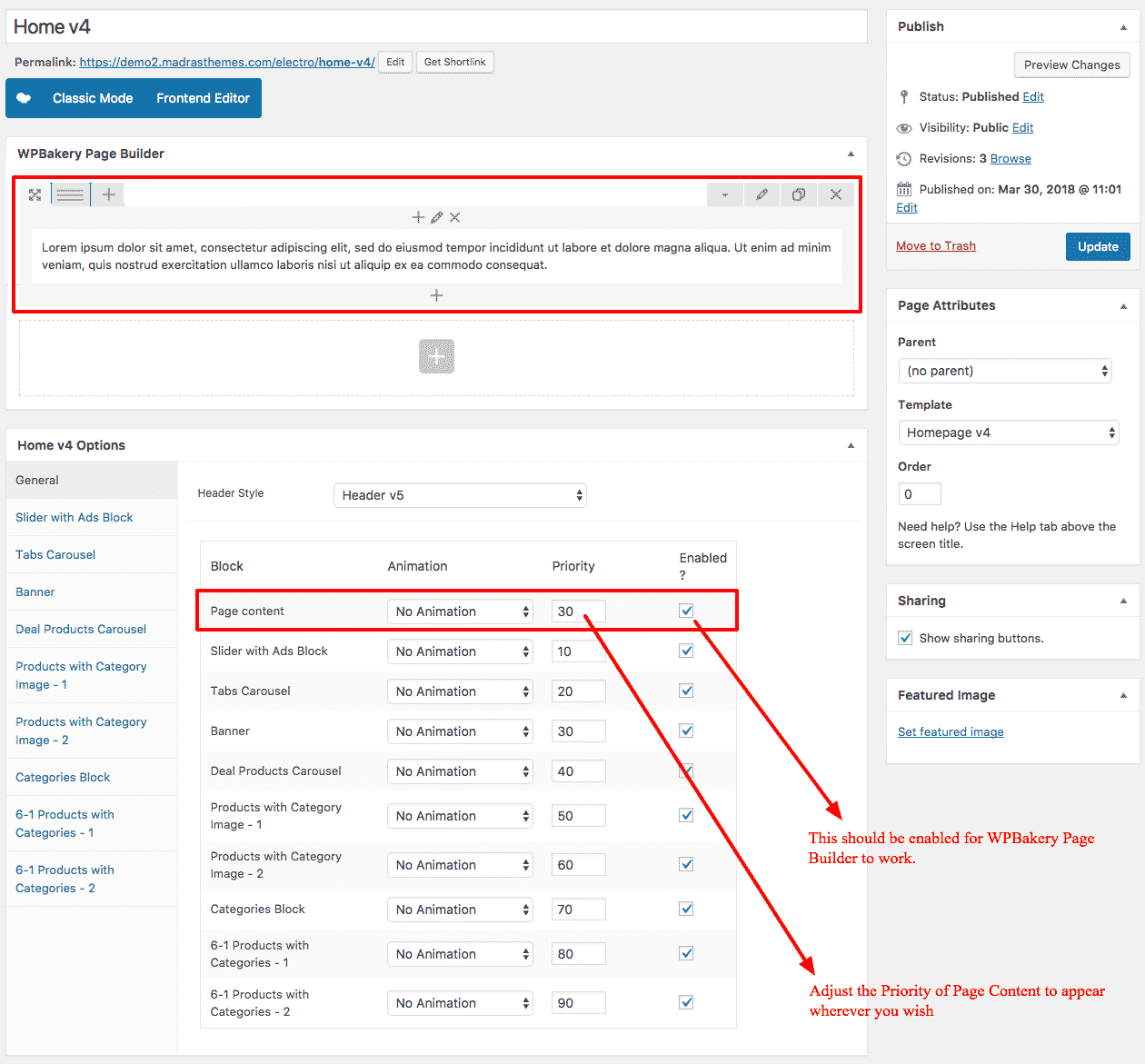
Hi, Im trying to place another ‘Product with category image’
https://docs.madrasthemes.com/electro/topics/visual-composer-elements/products-with-categories-and-image/ But it always shows above the slider: http://prntscr.com/jmdw14 Tell me how to correct it.Hello there,
Thank you for purchasing our theme and for reaching us. Hello there,
Thank you for purchasing our theme and for reaching us. “Product with category image” you’ve added is from Visual Composer and is part of “Page Content”. The slider and the rest of the content is loaded from page options. You need to adjust the priorities of the blocks in options like explained here : https://docs.madrasthemes.com/electro/wp-content/uploads/sites/6/2018/04/home4-page-content.png
Hope this helps. Let us know if you have any other questions or need further help.
Thanks, Ibrahim
For the new “header V5” on mobile. the search field is behind the secondary nav, so it nearly impossible to type your search in. Love the header tho. good addition
Hello there,
Thank you for updating the theme and for reaching us. Can you please help me understand your issue with a screenshot ?
Thanks, Ibrahim
Sure no probs. I’ll email it through
Hello there,
Thank you for your interest in our theme. You can find the Electro HTML here : https://themeforest.net/item/electro-electronics-ecommerce-html-template/16070524 but it does not have all the home pages in Electro WordPress.
Hope this helps. Let us know if you have any other questions or need further help.
Thanks, Ibrahim
Hi, Brand slider is added to the bottom of the page, but the brand thumbnail links to the homepage. Is there anyway to click the brand thumbnails to link to the product page of the specific brand?
Thank you.
Hello there,
Thank you for purchasing our theme and for reaching us. You need to enable archives for the “Brand” attribute so that the brand logos are linked to its own archive page which lists all products from the given brand. Ref : https://drive.google.com/file/d/0BxmC16gQK81fdHYxeXZ2b1ViYnM/view?usp=sharing
Hope this helps. Let us know if you have any other questions or need further help.
Thanks, Ibrahim
Got the brand attribute working. Thank you very much. Another question, I would like to make the same vertical menu (department menu) like your demo to have the parent menu link to a page. (Ex. When I click on the Laptops & Computers menu, it links to laptop computer’s main category page). Is the parent menu (Laptop & Computer) a Custom Link menu or Product Category? Please advise.
Hello there,
You can use any type of links in Appearance > Menus. It can be a custom link or a product category. We’ve used product category.
Hope this answers your question. Let us know if you have any other questions.
Thanks, Ibrahim
Hi, I use product category for parent menu, but it doesn’t behave as your demo. It doesn’t link to the main category page (refer to screenshots below). Please advise.
https://prnt.sc/jo5bzs https://prnt.sc/jo5calSorry that I forgot to mention in my comments previously. Parent menu clickable custom JS code is also added but still not work. Please refer to my website and screenshot below. Thank you.
http://site.sunpentown.com/nw2018/ https://prnt.sc/jodup3Hello there,
Thank you for your clarification. I see you are using older version of the theme. Please update the theme to have clickable parent menu without any additional code.
Hope this helps. Let us know if you have any other questions or need further help.
Thanks, Ibrahim