317 comments found.

Hi, there have no any response when I customise “Pages” and click “update”. Thx
Hi, I have solved the problem, some “Plugins” generate conflicts with the theme
Ok great! 
Hello! tell me, please, how to make such a screen so that the background image of the post was 100% of the screen, but it was the right site bar as in demo 2 http://themes.themegoods.com/grandnews/demo2/the-23-best-beauty-moments-from-the-fall-2016-runways/
Hi,
Thank you for purchasing.
When you create a post. There is post option which you can select layout for this post. Select “Right Sidebar” option there.
Please login with your purchased account so we can continue providing support for you.
Hello, I want to know how to change post title to all uppercase? (also posts titles displayed under posts or sidebar/widgets)
Hi,
Thank you for purchasing.
Could you please provide URL of post page you mentioned so I can check it for you please.
Kdpolitik.com i added this on “additional CSS” h1, h2, h3, h4, h5, h6 { text-transform: uppercase !important; }
The titles are now uppercase, but i also want on sidebar/widget to show uppercase.
Thanks.
Could you please provide URL of post page you mentioned so I can check it for you please.
Hi, How can I display/not display post’s author information at the bottom of the post. I turn off it carelessly, but I don’t know how to turn on it now. Thx.
Hi,
Thank you for purchasing.
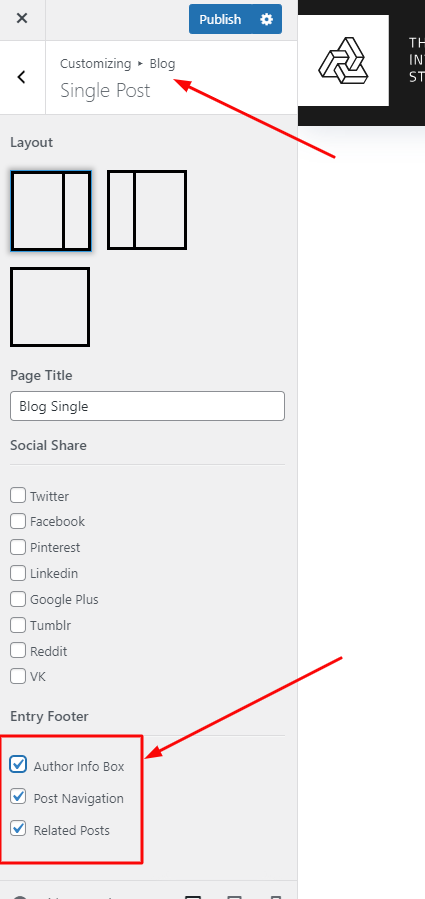
You can enable it from Appearance > Customize > Blog > Single Post > Display About Author.
Hi, the “Mailchimp Sign-up Form” can not display in “Home Sidebar” by Widgets, but it’s ok in the foot area after I fill API KEY in Plunins’ “General Setting” and the Form ID in Theme setting. How can I make it display in Home Sidebar by Widgets. Thx.
If you are building homepage content using content builder. It depends on element you added support side bar or not.
Home Sidebar only being used when you are using default latest posts blog page as homepage.
Hi, I got two new questions, according to” Online Documentation” 1. I can not find ” Sticky Menu Color Scheme” in” Appearance > Customize > Navigation > General”, only have “Enable Main Menu” and “Enable Stick Menu” . 2. I can not set up “mega menu” in “Appearance > Menus” , because no “CSS Classes(optional)” blank in “Appearance > Menus”, thx.
1. Really sorry for the mistake. I think there is no “Sticky Menu Color Scheme” option in Grand News theme. I will update theme documentation soon.
2. Please click on “screen options” at the top right cornet and check “CSS classes” option.
Hi,
Great theme. I am very satisfied with the purchase. There is one thing though I would like to find out and I did not receive any kin of reply to my ticket.
I wish to add custom non google font. What would be the best way of doing it. I could not see anything regarding that topic in the documentation that is why I am asking before messing up theme.
Regards
Hi,
Thank you for your purchasing.
You would required knowledge about CSS font family. Then you have to use plugin for example https://wordpress.org/plugins/use-any-font/
To upload font file to WordPress. Next you will have to add font-family CSS to elements you want using custom CSS code.
All, right but then I would have to edit css files manually. Right?
You can add your custom CSS via Appearance > Customize > Additional CSS.
Got it! Great  So I have another I believe the last question. Is it possible to display post categories on homepage slider? For example above title?
Sorry, I am not sure I understand you correctly, could you send me some screenshots with description please?
Hi, I don’t know how to send screen shots via this panel. Please find attached url for media file.
https://staging-hearinglikemegc.kinsta.com/content/uploads/2018/07/feature-meta-data.png See what I mean. I would like to have post category displayed. I know that this example is not taken from your theme but I am wondering if it is possible to have displayed both: Category and post count on the thumbnail as within attached file.Regrads
Thank you for your info. Currently It doesn’t support that. We will consider to add it into the future if there are many requests from customers.
Hi, How can I close the comments of any article? I operate in “Discussion Settings”, but the function is still there.
Hi,
Thank you for purchasing.
Could you please try to use this plugin https://wordpress.org/plugins/disable-comments/
Hi team, great theme! Love it.
However, I’m struggling with the Mega Menu. The installation documents refer to adding the ‘mega menu’ in the CSS Classes from a parent menu. But I can’t find the field for it;
https://ibb.co/hzg62TWhat should I do?
Hi,
Thank you for purchasing.
On Appearance > Menus. Click on “Screen options” at the top right and check CSS Classes option. Then it should be there.
Thanks guys!
You are welcome 
Btw, Could you help us rate for the theme please?
hello can u send me psd templates please
Hi,
Thank you for purchasing.
Could you please contact us here https://themeforest.net/user/ThemeGoods I will send PSD files to you.
done
Hi there, it’s a problem with YOAST with this theme, if yoast is activate, we canot insert a video on the feathured content type “vimeo” or “youtube”, Yoast is also not working, and on the text editor, the “only text ” doesnt work. I fixed that by doing this :
in “functions.php” theme file line 283
wp_enqueue_script(‘colorpicker’, get_template_directory_uri().’/functions/colorpicker/js/colorpicker.js’, false, THEMEVERSION);
just comment:
/* wp_enqueue_script(‘colorpicker’, get_template_directory_uri().’/functions/colorpicker/js/colorpicker.js’, false, THEMEVERSION); */
I found the solution here : https://github.com/Yoast/wordpress-seo/issues/9473
hope it can help
Hi,
Thank you for purchasing and sharing. We will included the fix to the next theme update.
Hello! I need PSD Tempate to coordinate it with the customer site. You can provide it if I buy this wordpress theme?
Hi,
Thank you for interesting.
Yes of course we can send them to you once purchased
Hi, I’ve just update to the latest release with WP 4.9.6 but the problem “Fix post view counter issue when have more than 1,000 views”is still live! I had posts with 2500 views that now have 25 views… Can you tell my where’s the problem? Thanks
Hi,
Thank you for purchasing.
Please provide WordPress and FTP accounts here https://themeforest.net/user/ThemeGoods I will check the issue for you.
Hi ThemeGoods, I really love this theme but am having a problem with my Product Registration, I paid for the theme but all my Envato Tokens bring the same error “We can’t find your purchase of GrandNews theme. Please make sure you enter correct Envato Token. If you are sure you enter correct one. Please open a ticket to us so our support staff can help you. Thank you very much.”
Please help!
Hi,
Thank you for purchasing.
Please submit your question on https://themegoods.ticksy.com/ Please also add a link to your site as well as the login credentials when opening the ticket, so we can take a look at your site.
Then please let me know ticket ID. I will check it for you quickly.
i submitted a Private Ticket #1602561
i submitted a Private Ticket #1602561
Our support staff replied your ticket. Could you please continue there.
Hello sir, I purchased your theme yesterday, but Enable Content Builder did not respond…
Hi,
Thank you for purchasing.
Please submit your question on https://themegoods.ticksy.com/ Please also add a link to your site as well as the login credentials when opening the ticket, so we can take a look at your site.
Hello, I just bought your template GRAND NEWS, I have it installed, so far the only problem I have is the complete template, for example, the width of the demonstration is 1435 px and when I install the template, the width that gives me another is 1300 px.
Please, could you tell me in which part I configured it to be able to put the whole width of the theme.
If in case you have to put the code, you could give me the code and tell me where I inserted it.
Thank you
Hi,
Thank you for purchasing.
Could you please provide URL of your site you mentioned please. I will check it for you.
Hi Sir. It’s my one of the favorite theme so I bought but ones I tried to upload in wordpress it shown the error . ....login has expired….tried many times but failed but help me….thank you @ Prashant ku. mail Id: advice4media@gmail.com
Hi,
Thank you for purchasing.
Could you please make these changes in PHP Options to correct. Basically some of your server PHP limitation is too low so theme couldn’t be uploaded.
max_execution_time 180 memory_limit 512M post_max_size 32M upload_max_filesize 64M
Hi , tried in Wordpress theme upload but shown the error ….may I go to php in home page and increase my space ….? Thank you
Could you please contact your webhost to change these settings limitation please.
Ok will ask him ones and if have issue, will contact you sir…thank you for your kind suggestions
Hi sir, I did setting as you said and tried for last 3days as needed some time to change in C pannel space.After that also it shows …Are you sure You want to do this …...please try again…Now what to do sir ….? plz suggest ..thanks
now have enough memory and all software is updated then still said THE LINK YOU FOLLOWED HAS EXPIRED…TRY AGAIN….what else i could do now ?
Please submit your question on https://themegoods.ticksy.com/ Please also add a link to your site as well as the login credentials when opening the ticket, so we can take a look at your site.
Hi Sir, I have been facing prolems to upload video from youtube and ad which is showing 728×90 in home page, will you please check url https://www.sdsikkim.com , will be highly obliged to see your kind coperations. Thanks
Sorry, I am not sure I understand you correctly, could you send me some screenshots with description please?
Hi, I have the version 2.0 of this theme. I am wondering if version 2.0 is compatible with wordpress 4.9.5. I did some changes in the 2.0 version of your theme and don’t want to lose them.
Hi,
Thank you for purchasing.
Version 2.0 is old version of theme and it doesn’t support WordPress 4.9.5
Please update to the latest version of theme.
Hello, do you have a demo admin panel with that templates?
Hi,
Thank you for interesting.
We can send screenshot of theme admin panel if you interested. Please let me know.
I’m wondering if I can construct individual home page for my requirements? For example, I would like to take this block https://prnt.sc/jihhy9 and add the grid 3 columns after that, can I do it?
Yes of course you can mixed each content blocks together.
Good evening. When there’ll be the theme update containing something to make the site GDPR compliance?
Thanks
Hi,
Thank you for purchasing.
Could you please provide more detail about “GDPR compliance” you mentioned please?
For example the possibility to check the privacy policy before sendind a form or joining a newsletter, and the possibility to have a scrolling div after the form in which to write the policy conditions.. thanks!
You can use this Contact Form 7 plugin here http://wordpress.org/plugins/contact-form-7/
To create customisable form.
Hi I am using the childtheme and occaitonally I get this error message:
Warning: json_decode() expects parameter 1 to be string, object given in /home2/tzhwhomy/public_html/wp-content/plugins/posts-social-shares-count/classes/share.count.php on line 46 Warning: json_decode() expects parameter 1 to be string, object given in /home2/tzhwhomy/public_html/wp-content/plugins/posts-social-shares-count/classes/share.count.php on line 66 0
Hi,
Thank you for purchasing.
Could you please provide WordPress account here https://themeforest.net/user/ThemeGoods
I will check the issue for you.
Thanks. Message was send