1458 comments found.

Can i override a file such as claue\core\libraries\janstudio\hooks\helper.php on my child theme so it won’t be overwritten by updates?
Hi,
Please copy function you want override to functions.php in child theme.
Kind regards
Hi!
I enabled breadcrumbs on shop page. Unfortunately, they are shown only on product pages. There are no any breadcrumbs on the pages such as shop page or product categories pages.
Tell me please, how can I display breadcrumbs on every catalog page?
Thanks.
Hi,
Sorry because inconvenience.
Please add below code to Claue > Theme Option > General Layout > Custom CSS to fix
.archive .woocommerce-breadcrumb { display: block; background: #f6f7f8; padding: 10px 15px; }
Kind regards
Thank you very much
Hello, is it possible to let be the submenu colapsed in header 5 after open submenu cat.? Thanks.
Hi,
Yes, it now submenu collapsed after open submenu categories
Please check at http://janstudio.net/claue/demo/home-6/?header=5
Kind regards
Hi,
I have one question. How could appear the category blog description?
Thanks
Hi,
1. Please follow this topic https://www.wpbeginner.com/wp-tutorials/how-to-display-category-descriptions-in-wordpress/
2. Please copy file index.php from claue to claue-child and copy the code this topic suggest below line 38.
Kind regards
Hi,
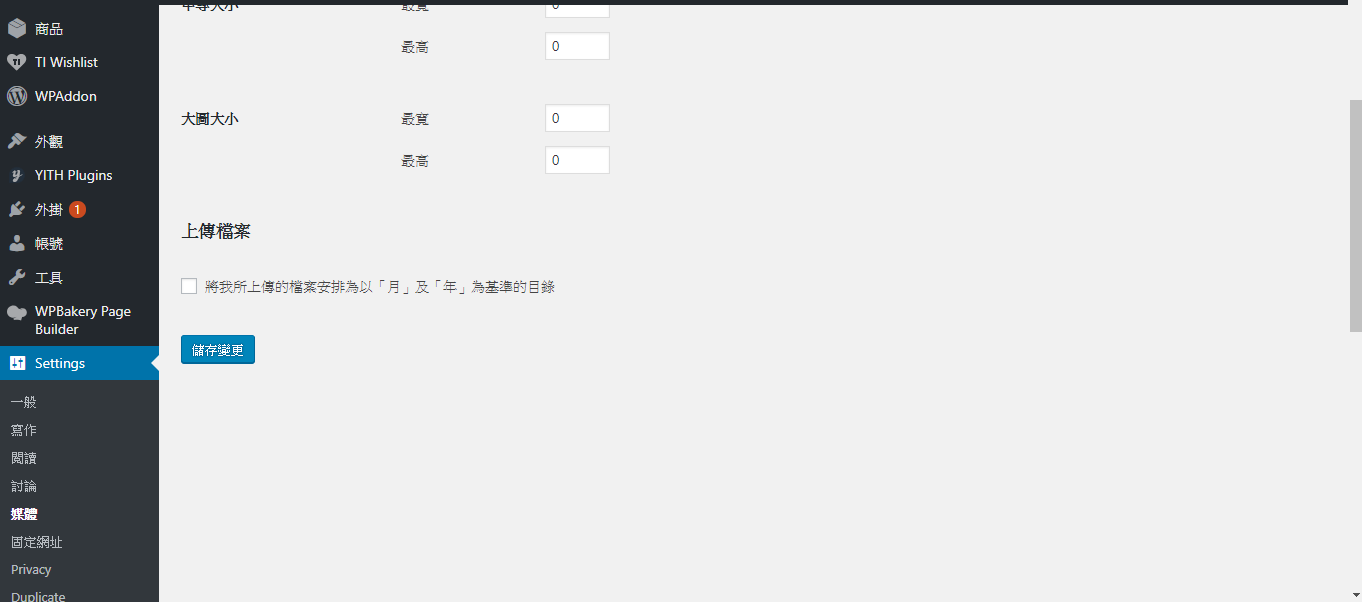
When I used install sample data, my “store uploads in this folder” and “full url to path to files” interface were all gone, and my wordpress system language became an en version.
How can I see again my “store uploads in this folder” and “full url to path to files” interface ?
Thank you.
Hi,
1.Could you take a screenshot about issue related to “store uploads in this folder” we still not clear about this issue.
2. Please go to Settings > General and change your site language.
Kind regards
Hi,
Did you install a plugin to manage media? Please go to Plugins and find plugin to manage media and activate this plugin.
Kind regards
I didn’t use the manage media plugin, only installed the plugins needed for this theme and theme, and executed the install sample data.
Then I found that the language changed, my “store uploads in this folder” and “full url to path to files” interface were all gone.
I restore WordPress and installed the plugins for themes and themes. My “store uploads in this folder” and “full url to path to files” interface can still be seen, but again install sample data, my “store uploads in this folder” and “full url to path to files” interface were all gone.
Hi,
WordPress remove this option from version 3.5 please follow this topic to show 2 options in new version of WordPress https://www.hongkiat.com/blog/wordpress-custom-upload-dir/
Kind regards
Thank you.
My wordpress version is 4.9.8, there is two fields.
The wordpress mu version will hide these two fields.
There are a lot of articles on teaching the site image put in the subdomain , which is used after the wordpress version 3.5.(These two fields should exist in 4.9.8.)
I have used the plug-in you recommended, but did not bring out the value I originally set, it is empty, I am abnormal after using it.
Hi,
Please try this plugin https://wordpress.org/plugins/wp-original-media-path/ in this topic http://www.matrudev.com/post/modify-wordpress-media-upload-folder/
Kind regards
The problem is solved. Thank you.
Hi,
One more thing, we have a cctv kit, and want people to have seperate dropdowns for choosing hard drive, cables, power supplies etc on one product page.
Is it possible to get the grouped or the bundled products into multiple dropdowns, like the way the variation dropdowns work? I want the website to auto calculate the prices, rather then adding each price over and over again via variation.
Hi,
1. Please create attribute (hard drive, cables, power supplies) in Dashboard > Product > Attributes
2. Please create product bundle with each product in bundle is variable product.
Kind regards
Hi, If i use the bundle. It will display like item + item + item and then a very long list underneath. I want a dropdown instead to minimize it.
Hi,
I’m sorry the dropdown select not visible with customer. Customer want to see more product in bundle.
Regards
Hi,
I have been working on this template for a while and my website is nearly finished. However one problem popped up. The filter sidebar has a price filter. This one seems to be stuck on 19-19 and it does not matter, what category or what prices the items are. It stays there. https://mcrcctvsuppliers.nl/product-category/brands/prolux/
Another issue we have is that when you want to make a bundle, and you search for an item. It shows the loading button for a very long time, but no item will appear?
Hi,
Thank you for choosing our theme.
1. I check the filter function it still work well, the lowest price on this page is 18,70 so minimum in filter is 18
2. Could you tell me is it in dashboard or on front-end. Please create new topic at our support forum at http://support.janstudio.net/forums/forum/themes-support/claue/ with details of your issue, your site url and temporary admin account. Our team will check and help you solve the issue.
Thanks
Hi, I tried to create an account and when I provide my purchase code, it comes as invalid? It will not proceed further, what should i do?
Hi,
Could you try http://support.janstudio.net/wp-login.php?action=register i check it still work well, or please send your purchase code to janstudio.net@gmail.com. We will help you create new account.
Regards
Hi, On your demo website, ADD BUNDLE TO CART, the product failed to join the shopping cart. Thank you.
Hi,
Thank you for report the bug, we fixed it by remove debug code.
Thanks
My cart is not showing on my site.
How do I fix it?
Hi,
Could you try go to Claue > Theme Option > WooCommerce > General Settings > Catalog Mode > Off
If issue still there, please create new topic at our support forum http://support.janstudio.net/forums/forum/themes-support/claue/ with details of your issue, your site url and temporary admin account. Our team will check and help you solve your problem.
Thanks
How can I click to fold the pruduct category menu?
Hi,
Thank you for choosing our theme. Please try follow this video https://youtu.be/cdkCSls-9s4
Kind regards
Thank you. I am referring to the product category menu on the left side of the shop. Click can open and close category menu.
Currently all category menu are opan, and I want to collapse all, only the item belongs product’s category will be opened.
Hi,
Please use this plugin https://wordpress.org/plugins/yith-woocommerce-category-accordion/
Kind regards
Hi,
Thank you for interested our theme and inform us about google speed score.
This issue because we keep images in high resolution use for demo with different layout (when you view this page http://janstudio.net/claue/demo/shop/ on 2 column layout it need big image) so google reduce score because the image bigger than browser need. If you site don’t need change layout you can keep image with small size.
We check our site on https://tools.pingdom.com/#!/cQZQ2T/http://janstudio.net/claue/demo/
You can check a topic and don’t worry about Google Speed Insight https://wp-rocket.me/blog/the-truth-about-google-pagespeed-insights/ and one more https://echo5digital.com/blog/why-google-pagespeed-scores-don-t-matter/
Kind regards
Thanks for an answer. The point is that your theme works really very slow both on PC and mobile. Do you have any demo, where I can see how fast it can work on both devices? 
Hi,
Please try click on product detail. I check out demo on desktop and mobile it still work well. How many seconds you need to loaded our demo?

Thank, we will improve on our demo. But we check our demo it need 3-5s to load not till to 8s.
Or are you able to show me some clients’ sites, which are faster?
Hi,
Please check our client site at https://www.southpacificunderwear.com/ https://vangobeauty.com/ https://leatoni.com/ https://www.fungadgets.se/ https://babalikit.com/Kind regards
How can I change the color letters of my metaslider?
Hi,
Please add below code to Claue > Theme Option > General Layout > Custom CSS
.metaslider .flexslider .caption-wrap h3, .metaslider .flexslider .caption-wrap h4, .metaslider .flexslider .slides p, .metaslider .flexslider .slides a {color: #fff !important;}
And change #fff with your color.
Kind regards
Hi there i cant seem to install the theme forest in word press. It says the theme is missing The theme is missing the style.css stylesheet”
Hi,
Thank you for choosing our theme.
Please extract the package you download from ThemeForest and install claue.zip.
Kind regards
TTFB seems to be quite poor in 1.4.2 so we have reverted back to 1.4.1 which performs much better. Please look into this so we can upgrade.
Hi,
Please try clear cache on your site after update and check again. We didn’t receive issue related to TTFB after user update theme.
Kind regards
Hi, on home page and shop page , or any other page its little bit align left of the product price.. please see https://prntscr.com/kp4ewi . please help me. Thanks
Hi,
Please add code at https://pastebin.com/25MknvW5 to Claue > Theme Option > General Layout > Custom CSS and don’t spam us with more message.
Thanks
I am sorry. I did not understand. it will never happen..your code is worked. Thanks. I need one more help please.. when you go to this website https://petitbox.org/shop/ , on the right side sort by /wocommerce ordering not working properly.. Can you help me for this please?? Thanks
I think this issue related to filter plugin. Could you try deactivate filter plugin you’re using on your site.
Kind regards
Sorry, I just tried deactivate other plugin but not working.. I don’t know why its not working.. Is there any code to work it?? or I will send you login info for this?? Thanks
Hi, Can you please reply, its urgent . I need to live the website. Hope you understand . Thanks
Hi,
Could you please create new topic at our support forum http://support.janstudio.net/forums/forum/themes-support/claue/ with details of your issue, your site url and temporary admin account. Our team will check and help you solve your problem.
Thanks
Hi,
I downloaded the latest version of the theme, however, on the product page, the like button is displaying twice. Is there a fix for this? Thanks!
Hi,
Please update recommend plugins in Appearance > Install Plugins to fix. After done, please clear cache on your browser.
Kind regards
Thank you, this helped.
Hello my section looks bad with the footer, besides that I can not remove “uncategorized”, how can I correct this error?
http://eleonoraboutique.mx/product-category/ropa/faldas/Hi,
1. Please try update theme to latest version 1.4.2.
2. The “uncategorized” is default category of WooCommerce, you can’t delete this. You can change name of this category.
Kind regards
Hi, How to add product filter ?? this code does not work (.filter-trigger {display: none;}) and also in theme option that option for hide filter trigger not working.. Thanks
Hi,
Could you please create new topic at our support forum http://support.janstudio.net/forums/forum/themes-support/claue/ with details of your issue, your site url and temporary admin account. Our team will check and help you solve your issue.
Thanks
Hi, in shop page on the right side, product trigger option not working properly .. I need help please. Thanks
Hi
Can you please provide us your store URL to take a closer look at this issue?
Hello, are you there?? Thanks
Hi,
Please go to Claue > Theme Option > WooCommerce > Product Listing Settings > Enable Sidebar Filter > Off.
Kind regards
I did that. But not working.. Can you please send me code so that it will be hide or code for color this as white so that it will not visible please?? Thanks
I checked your site it now filter trigger icon disappear. Could you please try clear cache of your browser.
Kind regards
No, It shows on the left side. when shop page full size, on the left side little bit cut the product description. please check it https://petitbox.org/shop/ ,. Thanks
Hi,
If you want to remove sidebar please go to Claue > Theme Option > WooCommerce > Product Listing setting > choose layout with out sidebar.
Kind regards
I want to remove this https://prntscr.com/kp19hh .. please send me code or way please.. its urgent.. Thanks
I want to remove this https://prntscr.com/kp19hh .. please send me code or way please.. its urgent.. Thanks
Hi,
You can hide this by add below code to Claue > Theme Option > General Layout > Custom CSS
.woocommerce-ordering { display: none; }
Kind regards