23251 comments found.

Yesterday I saw a $29 price tag, today I see $59.
Hi,
First of all thanks for showing your interest in Porto WordPress.
Sorry to say that but you are bit late, the Sale on Porto WordPress ends Yesterday so now the Porto WordPress is on it’s original Price.
Thanks.
it says $29 but when I add to the cart it becomes $59 :/
Hi,
First of all thanks for showing your interest in Porto WordPress.
Sorry to say that but you are bit late, the Sale on Porto WordPress ends Yesterday so now the Porto WordPress is on it’s original Price.
Thanks.
Yesterday I saw a $29 price tag, today I see $59.
Hi,
First of all thanks for showing your interest in Porto WordPress.
Sorry to say that but you are bit late, the Sale on Porto WordPress ends Yesterday so now the Porto WordPress is on it’s original Price.
Thanks.
Hello, I wanted to know If I purchase the PORTO theme from Envato, then can I use the theme in single site or I can reuse it in multiple websites ?
Hi,
First of all thanks for showing your interest in Porto WordPress.
All Theme-Forest products allows One license for each domain on which you will install the theme (sub-domains or multi-site installation does not matter though).
So regardless of number of clients, license works with number of domains. So if you are building 10 websites, you need to purchase 10 regular licenses for that etc… These are license usage policy of Theme-Forest (and we have no control on this), you may wish to confirm from Theme-Forest here:
https://help.market.envato.com/hc/en-us/requests/newThere is no unlimited usage license.
Thanks.
Hello, the responsive menu is always open in the one page’s demos once you choose a section…
Hi,
Yes, It is always Open on Mobile you have to close it by tapping on any section on the Mobile screen except the menu, and this is because the One Page Demo menu works on the section IDs so it not refreshes the page it just take you to the particular section on the same page right, and the menu close when the page will refresh and in that case the page is not refreshing so that is why it is no closing by it self. Hope this is all clear now.
Thanks.
it’s the first time I hear that … no need to refresh to hide the menu … when you touch the section the menu hides and takes you to the chosen one .. there are other templates that fulfill that function in single pages
Hi,
Sorry to say that but in One Page demo this is the default functionality, If you check any other Demo it will work like you want but if you want that functionality in the one page demo then you have to make it possible with the help of Customization.
Thanks for your understanding.
Hello,
i found on my website few english texts, but my website is in Slovak Language. I tried Loco Translate – doesnt work, i tried your theme .po, where i set some translates but still doesnt work. Only think, what i can do and its work was change text manually in the code. What i did bad that i had to do it this way? How can i fix it, that when you release new upgrade, my changes wont be rewrite? Thanks
Hi,
First of all please deactivate the Loco translate and all the translation plugins from your site and then download the latest Slovak Language Theme translation files from the below-given links and upload it to wp-content/languages/themes and then go to WP-Dashboard >> Setting >> General and change your site language to “Slovak” from there and save changes and check your site after removing the browser cache hope you will not find an issue.
https://www.dropbox.com/s/x0qxsf2al3nv360/porto-sk_SK.po?dl=0https://www.dropbox.com/s/w6ktcmttw8c2oi9/porto-sk_SK.mo?dl=0
Thanks.
Hi. Can I change the size of product image from square to rectangle at home page? (demo Shop 4) Thanks
Hi,
First of all thanks for showing your interest in Porto WordPress.
Yes, you can change it by following the steps written in this Official WooCommerce doc: https://woocommerce.com/posts/whats-new-woocommerce-3-3/
Thanks.
Hello. I bought today this theme. When I install plugin WPBakery Visual Composer and Revolution Slider this installation has failed. I work on localhost on my computer. When I activate this theme with “Item Purchase Code” i can’t do this, because “Purchase Code is not valid or could not connect to the API server!”. So how I can use this theme with demo content ?. Sorry, but my english is imperfect. Please help.
Hi,
Before Installing any Demo you must have to Install all the theme required/recommended plugins from Porto >> Setup Wizard >> Plugins and also before Installing the theme required/recommended plugins you must have to activate the theme from Porto >> Setup Wizard >> Activate.
Your issue: “Purchase Code is not valid or could not connect to the API server!”.
Solution:
Please enable curl extension form server this will fix your issue. This extension is required for the registration process.
Or
The issue mostly occurs when the server has any kind of restriction and do not allow to communicate your server with our internal server for activation, so please ask your hosting provider to remove all sorts/kinds of restrictions from your account and deactivate the firewalls for some time until you activate the theme otherwise please try/test the theme on any other Live server hope you will not find this issue
Thanks.
Top Header background color won’t change even after setting the color from Skin > Header > Header top > Background. I also tried clearing the cache. This might be a bug.
Hi,
Please go to WP-Dashboard >> Plugins and deactivate the plugin name “Fast Velocity Minify” and then go to Appearance >> Theme Options and click on save changes button and finally check your site after removing the browser cache you will find your issue resolved.
Fast Velocity Minify is the plugin that will minify the site CSS and will help in speeding up the site, so you have to activate that plugin once when you completed the site and completed with the development environment.
Hope your issue will solve and if not then please contact us through our support system with your site WP Admin and CPanel Login details so we will check and solve the issue for you.
Thanks.
Fast Velocity Minify is not installed
Hi,
Ok, Then please contact us through our support system with your site WP Admin and CPanel Login details so we will check and solve the issue for you.
Thanks.
Hi, i need some help. is there any way to remove the autocomplete function of Yith Ajax Search, i am not referring to search suggestions but the “auto jump into product” when text matches product name example there is one item name – “Tomb Raider” then there’s “Tomb Raider 2” and when customer types tomb raider, it immediately jumps into the first one and no chance seeing the 2nd one or others that started with the same name.
I found the one in fault is: porto/woocommerce/yith-woocommerce-ajax-search.php
since.. if i remove the php file, the plugin itself “Yith Ajax Search” doesn’t do that, is there a line where i can delete to remove the “auto jump into product” function ?
Hi,
Please go to Appearance >> Theme Options >> Header >> Search Form >> Select the Search Content type as Product. http://prntscr.com/l76psq
I am sure your issue will be solved.
And also Could you please purchase support extension to get further support? Your 6 months of support period is now expired. According to Envato support policy, renewing support is required for further support.
Thanks for your understand.
Hello, content type “Product” has always been my settings. Thank you for providing the screenshot, i can see the effort you made.
i think you misunderstood my issue, what i am saying is on the search bar right now, when you type the product name fully correct, it automatically jumps into the link without user pressing enter or clicking on it.
I am asking if it’s possible to remove the auto-jump function and let users click on it or enter if they want and not automatically since if I.e i have a product name Porto, Porto Express, Porto Extended
When customer wanted to search for Porto Extended, it just never work since when he has typed “Porto”, it already auto-jump into “Porto” and no chance seeing Porto Express or Porto Extended. I hope you get me.
like said previously it lies at porto/woocommerce/yith-woocommerce-ajax-search.php since if i remove the file, Yith AJAX Search don’t do that.
will surely support you if you can provide me a solution to this, my site already running for some time and this is the only issue.
Hi,
Sorry to say that but there is no option in the theme for that nor in the plugin so you have to make it possible only with the help of Customization.
Thanks.
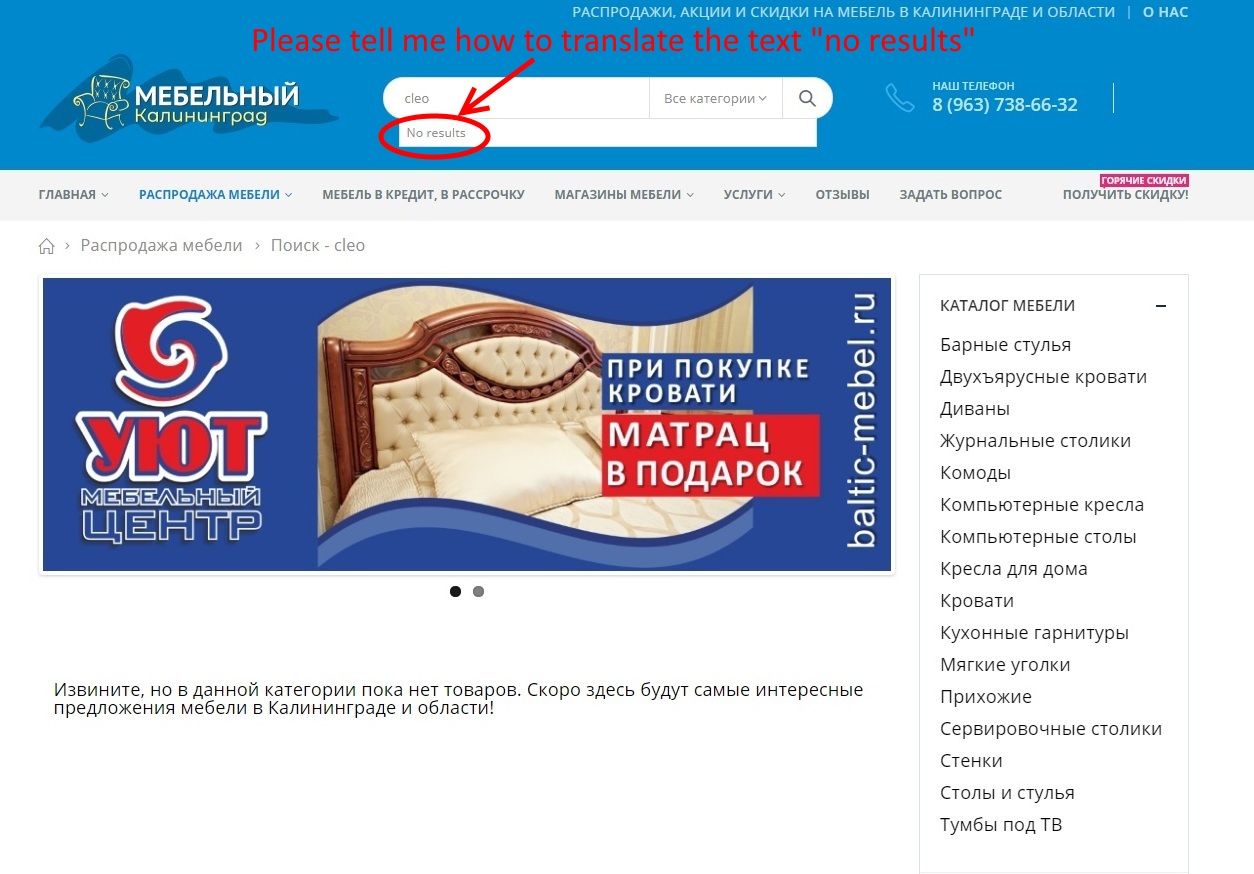
Please tell me how to translate the text “no results” Loco translate plugin can not translate this text
http://images.vfl.ru/ii/1539784646/89f169eb/23844275.jpgHi,
Please contact us through our support system with your site WP Admin and CPanel Login details so we will check and try to solve it for you.
Thanks.
Please give me porto theme admin access I want to buy this theme.
Hi,
First of all thanks for showing your interest in Porto WordPress.
Sorry to say that but you can not check the Admin Panel before purchasing the theme, but you can check all the Theme Pre-Built Demos here: https://www.portotheme.com/wordpress/porto_landing/
Thanks.
Hi there,
Thanks for renewing the purchase code! I love the theme very much.
Quesion: Can I use the demo images too and change text on it? Like: Bags or something else?
Thank you
Hi,
No, sorry to say that the images are only for demo purposes, once you import demo content it will come into your site but you will need to change these images before launching your site. Envato license does not allow usage of these same images in final public site.
Thanks.
Hello, I am desperately trying to translate the “Please wait…” string from the woocommerce-theme.js file copied from the theme to my child theme. This string appeared when loading into the login popup.
1) I have therefore copied in the child theme the folder “js” in which are located the files “woocommerce-theme.js” and “woocommerce-theme.min.js” with the expression “Please wait…” to translate.
2) In my function.php file of the child theme, I tried several ways to script to allow translation but nothing works.
Could you help me, please.
Here is my last script but it doesn’t work:
[code] add_action(‘wp_enqueue_scripts’,’translate_string_script’, 100); function translate_string_script() { wp_dequeue_script(‘woocommerce-theme’); wp_deregister_script(‘woocommerce-theme’); // For removed the parent script wp_enqueue_script(‘woocommerce-theme’, get_stylesheet_directory_uri() . ”/js/woocommerce-theme.js’); // Enqueue the woocommerce-theme.js located in the “js” folder of the child theme } [/code]
Thank you 
Hi,
Please edit “woocommerce-theme.js” and “woocommerce-theme.min.js” files and make changes in it as per your requirements and then save changes, finally Upload those both files into Child Theme in the same directory as Parent theme it will work for you otherwise please contact us through our support system with your site WP Admin and Cpanel Login details so we will check and solve the issue for you.
Thanks.
Hi, Thank you for your attention and answer.
a) However, unless I am mistaken, the child theme only replaces.php files and not scripts that are not considered unmodified in the “function.php” file.
b) Subsequently, translating the string into the original and then copying it does not mean that it works. In fact, the file in the parent folder is the only one that works with translation.
c) Unfortunately, at the next update it will be overwritten without the copy in the child theme folder being able to do anything about it.
d) It seems to me that the only way to solve this is to use the command wp_enqueue_script” to bring the translated copy and the command “wp_dequeue_script” to replace the one in the parent folder?
Have you tested this on your own? I will put my fingers back in my “function.php” file and try to find the solution. Greetings
Hi,
Can you please send me the WP admin login details of your site so I will check and solve the issue.
Thanks.
Hi, I want to make a site with your purchased theme first on the same domain, and then transfer the finished and full site with the database to another site – which will be the main one. Question: how can I use the key to get the demo version, I just bought a theme and don’t want to be mistaken
Hi,
Please follow the steps given below you will not find an issue.
Please Install the theme on Test site and activate it by going into Porto >> Setup Wizard >> Activate, and Install the Demo and Configure it as per your requirements.
Now before migrating or using the theme on Live site you have to deactivate the License from the test site by going into Porto >> Setup Wizard >> Activate and you will find the Deactivate button just click on it, it will deactivate the license from the test site.
Then finally go to the Live site and Install the theme on Live site and Activate the theme on Live site with the same purchase code by following the same steps.
You will not find a single issue and if yes then contact us we will reset the purchase code for you.
Thanks.
Hi, that’s a pre sales question. The https://www.portotheme.com/wordpress/porto/shop2/ demo features a 6 rows Home Top Categories menu. I’d like to know if this is a fixed numbers of rows, or if it can be customized? Thx!!
Hi,
First of all thanks for showing your interest in Porto WordPress.
Yes, The Home Top Categories menu has 6 menu items and it is Customizable you can easily Customize it by editing the Home Page, You will find WP Bakery element using this sidebar menu is built you can easily Customize it by editing that WP Bakery element.
Thanks.
Hi, I have a the paid woocommerce search form plugin. How can i bypass the porto search field to allow the default search field?
Hi,
Actually we have used “Yith WooCommerce AJAX Search” plugin in our theme for Search Functionality, so first you have to deactivate it and then go to wp-content/themes/porto/inc/functions/layout.php and Customize the code for Search as per your requirements.
Thanks.
Hi. For .section-testimonials, I can’t seem to be able to remove the “min-height: 615px” with custom CSS of “0 !important ;” I see this in Inspector: .section-testimonials { background-position: 50% 100%; min-height: 615px; But I can’t find it and I can’t modify it. Please help.
I did it eventually. Looks like it was a cache problem.
Hi,
Absolutely, It was the cache issue, but Sound’s really Great!
That you have managed to solve it by yourself.
Thanks.
Found some problems installing Shop Demos: seems that category pages are not downloaded with the demo package (all menu links to the same page or to the porto themes demo site)... can you fix that?
Hi,
Yes the menu links redirect you to the Demo site because the dummy URL is set behind the menu items but all the Demo pages including category pages will be there at the back-end of your site, you just have to go to Appearance >> Menu and change the URL of the menu items as per your site URL then it will work for you, if you are unable to do it then please contact us through our support system with your site WP Admin Login details so we will check and solve it for you.
Thanks.
Thank You for the reply… but it seems that category page are missing in the demo installation… I already checked, before mi previous comment, and all I can see is 19 pages… I Tried on two different demo packages, and no category pages were found in that list…
Hi,
Can you please contact us through our support system with your site WP Admin Login details so we will check and solve the issue for you.
Thanks.
Hi P-themes support ,
We met again , This time i’ve a question about SIDEBAR in Admin menu > Appearance > Sidebars
I built this as the demo and find the way to using this section. The question is
HOW TO USE IT ? and WHAT ARE THE ADVANTAGES OF USING THIS FUNCTION ??? .
THX 
Found and Fixed
For other people try using this function.You can find this section in POST PAGE > EDIT POST > VIEW OPTIONS > LAYOUT & SIDEBAR > SIDEBAR
https://prnt.sc/l6vvoyHi,
Sound’s really Great
That you have managed to solve your issue by yourself.
And thanks for sharing the solution with others it will surely help other users as well .