7928 comments found.

- 32662 waiting for an answer to the notification.
32662 waiting for an answer to the notification.
Hello again,
We’ve already responded to your question.
Thanks, Ibrahim
i am out of support option, visual composer does not work on my site at backend again since the upgrade. it does not give me options to edit my page content unless i do it front end
Please how can i fix this
Hello there,
Thank you for reaching us. I am not sure if I understand your question correctly. Can you please help me understand your question with a screenshot ?
Thanks, Ibrahim
visual composer does not work at the backend, i have to use the frontend editor in most case and this is frustrating is there anythng i can do to fix this
visual composer does not work at the backend, i have to use the frontend editor in most case and this is frustrating is there anythng i can do to fix this
Please email our support from here : https://themeforest.net/item/electro-electronics-store-woocommerce-theme/15720624/support and let us know your WP admin details and FTP ( or cPanel ) details. I will take a look into the issue.
Do i need to buy, - Visual Composer - Slider Revolution - YITH WooCommerce Wishlist - YITH WooCompare when i buy this theme ???
Hello there,
Thank you for your interest in our theme. Visual Composer and Slider Revolution are included with the theme. The other plugins are available for free.
Hope this answers your question. Let us know if you have any other questions.
Thanks, Ibrahim
Hi there, can you please advise how I can move the Scroll To Top button at the bottom of the page to the left. it is placed underneath my Facebook messenger plugin which Facebook recommends not to preposition.
https://imgur.com/fmpWDOOHello there,
Thank you for purchasing our theme and for reaching us. Please add this custom CSS to Appearance > Customize > Additional CSS :
#scrollUp { right: auto; left: 1.25rem; }Hope this helps. Let us know if you have any other questions or need further help.
Thanks, Ibrahim
why don’t you answer why?
Hello again,
I am sorry for the inconvenience. However we’ve responded to your questions on time except for the ones raised during last weekend as we were closed till Wednesday this week because of holiday season here.
Hope this clarifies. Let us know if you have any other questions or need further help with the theme.
Thanks, Ibrahim
how many hours can not get my question.
Hello there,
Please note our response time is 1 business day and we are closed on Saturday and Sunday which are weekends. This week we were closed till Wednesday as it was a long weekend in our country.
Hope this answers your question. Let us know if you have any other questions.
Thanks, Ibrahim
Hello brother Ibrahim ,,,, I have a little question , which is that I haven’t made any changes to the theme codes , So, is it safe to update it just by deleting the old version and installing the new one ,then activate it ?
Hello brother,
Thank you for reaching us. If you’ve not made any changes to .css or .php files, you can easily update the theme.
The theme can be updated in 3 ways :
1. Automatically : You can use Envato Market plugin to update the theme automatically. Instructions here : https://ibndawood.com/how-to-update-a-themeforest-wordpress-theme-or-a-codecanyon-wordpress-plugin/
2. Semi-Automatically : Sometimes (1) does not work. You should install this plugin : https://wordpress.org/plugins/easy-theme-and-plugin-upgrades/ , download the latest installable WP theme zip file from your Themeforest downloads page and then upload it via Appearance > Themes > Add New > Upload Theme and upload the zip file. The “easy upgrades” plugin will backup the old theme and install the new one.
3. Manually : You should download the latest installable WP theme from your themeforest downloads page, rename your current theme folder in wp-content/themes folder, unzip the downloaded WP theme from your Themeforest downloads page and upload it to wp-content/themes folder.
Please note that updating a theme will override any custom changes that you make to the parent theme. Hence we recommend using a child theme. A child theme is not meant to be updated and should contain only your custom changes.
Hope this helps. Let us know if you have any other questions or need further help.
Thanks, Ibrahim
Thank you so much brother for your quick response and I wish you the best of luck with this theme and any other projects in the future
Thank you brother. Good luck to you too.
salam bro can you check my ticket its urgent issue #32550
Wa alaikum salam bro. I’ve responded.
Kindest Regards, Ibrahim
How do I activate the Register system?
Hello there,
Thank you for reaching us. “My Account” page is available when you activate WooCommerce plugin or if you had imported dummy data. If you do not have a My Account page you can create one by following the instructions given here : https://docs.woocommerce.com/document/woocommerce-pages/
You can enable registration in WooCommerce > Settings > Accounts & Privacy > Account Creation and check the “Allow customers to create an account on the My account page” option.
Hope this helps. Let us know if you have any other questions or need further help.
Thanks, Ibrahim
Hi, How can I place this menu in the center of the page? https://imgur.com/a/ZLXxBaj
Hello there,
Thank you for purchasing our theme and for reaching us. The image you’ve attached does not load. Can you please upload it to a different server and let us know ?
Thanks, Ibrahim
electro theme home v7 header’s search bar dropdown,Top right and Top left menus are not wroking properly..Look at here Image : https://screenshot.net/kgrjlfx
Hello there,
Thank you for purchasing our theme and for reaching us. Can you please give us link to your website ? I’ll take a look and make suggestions.
Thanks, Ibrahim
Hi, I found a bug. The mini cart does not scroll down when there are too many items in the cart so users cannot access the cart or checkout button on the mini cart. Please advise. Thank you.
Hello there,
Thank you for purchasing our theme and for reaching us. This is not a bug but an edge case. Please navigate to Electro > Header > Header Cart and choose “Disable cart dropdown”. This will replace dropdown with link to the cart.
Hope this helps. Let us know if you have any other questions or need further help.
Thanks, Ibrahim
Ah I see. Thank you!
Hello Is it possible to update, without losing what I have built?
Hello there,
Thank you for your interest in our theme. You’ll have to use a child theme to make your custom changes.
Hope this helps. Let us know if you have any other questions or need further help.
Thanks, Ibrahim
Hi,
The product image gallery is not working when the website is in rtl (Arabic). See this image https://imgur.com/a/ds0PgSC When i switch the website to ltr (English) the image gallery works fine.
Could you help me with this issue.
Regards
Hello there,
Thank you for purchasing our theme and for reaching us. The issue with the WPBPage Builder ( formerly Visual Composer ) not supplying the latest version of flexslider. You simply need to replace the slider in WPBPage Builder ( formerly Visual Composer ) folder with the latest flexslider file from woocommerce. Please follow this step :
1. Copy contents of the file here : /wp-content/plugins/woocommerce/assets/js/flexslider/jquery.flexslider.min.js
2. and replace the copied content with the content of this file : /wp-content/plugins/js_composer/assets/lib/bower/flexslider/jquery.flexslider-min.js
Hope this helps. Let us know if you have any other questions or need further help.
Thanks, Ibrahim
Hello again,
Can you please give me the URL of your product page in RTL ? There can be 2 problems ;
1. Incorrectly renamed file ( not flexslider.min.js , flexslider-min.js 2. Cache.
If I look into your URL I can say what is the issue.
Thanks, Ibrahim
i renamed it correctly and now it is working fine. thx
Hello again,
Thank you for the details. You’ve wrong file :
Rename
https://inkdrop.sa/wp/wp-content/plugins/js_composer/assets/lib/bower/flexslider/jquery.flexslider.min.jsto
https://inkdrop.sa/wp/wp-content/plugins/js_composer/assets/lib/bower/flexslider/jquery.flexslider-min.jsPlease notice flexslider-min
Hope this helps. Let us know if you have any other questions or need further help.
Thanks, Ibrahim
Thank you for the fast response i updated it and it is working fine
Hi, I clicked one click import demo, however, below are appeared: [ERROR] Failed to import “fav-icon-lg” (Media) [ERROR] Failed to import “cropped-fav-icon-lg.png” (Media) [ERROR] Failed to import “patment-icon” (Media) [ERROR] Failed to import “electro-placeholder” (Media) .............
Please advise
Hello Erwan,
Thank you for purchasing our theme and for reaching us. Please add :
define( 'IMPORT_DEBUG', true);to your wp-config.php and import again. Let me know what error it throws.
Kindest Regards, Ibrahim
Good Morning
I have a problem on the page of the store when access through the cell phone, when I’m on the homepage the logo of the store is in the correct size, if I navigate to some category the logo becomes very large and unproposable, I have already adjusted the soon going on electro / mobile and putting the logos in the correct size but did not solve
Hello there,
Good morning. Thank you for purchasing our theme and for reaching us. Can you please give me link to your URL ? I will take a look and make suggestions.
Thanks, Ibrahim
Good morning,
My URL is www.hidro-shop.com
Hello again,
Thank you for the details. Please add this custom CSS to Appearance > Customize > Additional CSS :
.img-header-logo { width: 150px; }Thanks, Ibrahim
Hello! Search in the header is only for products? Can I do a search all over the site and by categories? News, Blog, Useful articles, question and answer, products? If Yes how? Is this indicated in the theme settings or will I need to hire a programmer?
Hello there,
Thank you for your interest in our theme. The search in header is only for products. If you wish to include all site search, you’ll have to modify it with custom coding. We can help you do that.
Please note custom changes are outside of support scope but we regularly help our customers with simple custom changes that does not consume much time.
Hope this clarifies. Let us know if you have any other questions or need further help with the theme.
Thanks, Ibrahim
Hi, i need some help.
How i can setting timezone on [electro_vc_deal_products_carousel header_timer]?
Hello there,
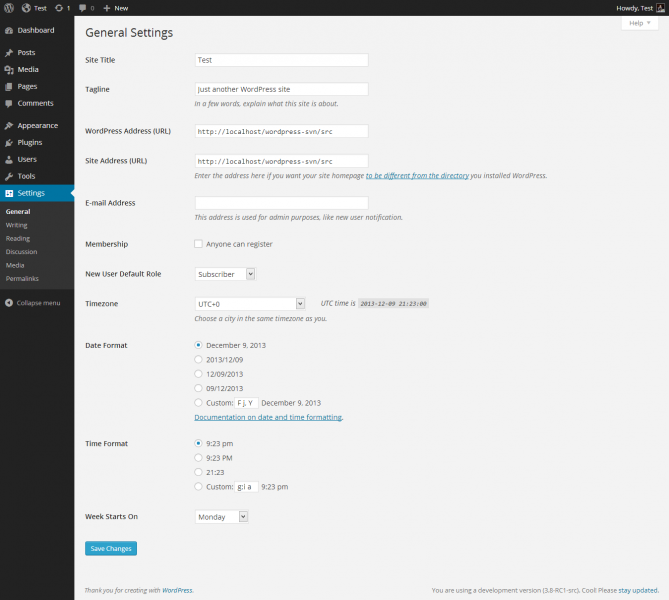
Thank you for reaching us. The timezone is that of your server. You can set your timezone in Settings > General > Timezone. Ref : https://codex.wordpress.org/images/thumb/6/61/options-general.png/669px-options-general.png
Hope this helps. Let us know if you have any other questions or need further help.
Thanks, Ibrahim
Already set the timezone : http://prntscr.com/lg4w2v
But still using UTC+0 on sale products: http://prntscr.com/lg4wg2
Please email our support from here : https://themeforest.net/item/electro-electronics-store-woocommerce-theme/15720624/support , I will look into this issue.
Hello Ibrahim I do not receive emails when registering a new user.
Thank Frank
Hello Frank,
Thank you for purchasing our theme and for reaching us. The theme does not send any emails. Notification emails are sent by WooCommerce which uses WordPress’s core function wp_mail. In most cases, if email is not being sent/received, then the issue is not with WooCommerce or the theme itself, but with the core email function on your web host. Please go through this link for solutions to common issues : https://docs.woocommerce.com/document/email-faq/
Hope this helps. Let us know if you have any other questions or need further help.
Thanks, Ibrahim
Hello Ibrahim thank you for your support. I receive e-mail if a registered user makes an order, I do not receive if a new user registers on my site. I checked on the internet and recommend installing puglin ..
Thank you
Hello Ibrahim, I solved by entering this code in function.php
add_action(‘woocommerce_created_customer’, ‘admin_email_on_registration’, 10 , 1); function admin_email_on_registration( $customer_id) { wp_new_user_notification( $customer_id ); }
Thank you Frank
Hello Frank,
Glad your issue is resolved. Please do not hesitate to reach us if you have any questions related to our theme.
Kindest Regards, Ibrahim
I tried to widen this section manually with some CSS because it was cutting of some woocommerce text, but it was messing up the whole styling of the page. Can you please provide me some simple code to widen the highlighter section and I don’t need the middle section to be that wide. And hopefully I can adjust the number in your code to my desired style.
https://i.imgsafe.org/33/33e575ad85.pngThanks
Hello there,
Thank you for reaching us. Here is the custom CSS : https://gist.github.com/ibndawood/b964b66e44878f9e0a66d878d8cc938bPlease adjust the width to your requirement.
Hope this helps. Let us know if you have any other questions or need further help.
Thanks, Ibrahim